How to Create a Social Media App in 2026: Features, Stack, Cost and Launch
Advertisement
What It Takes to Create a Social Media App
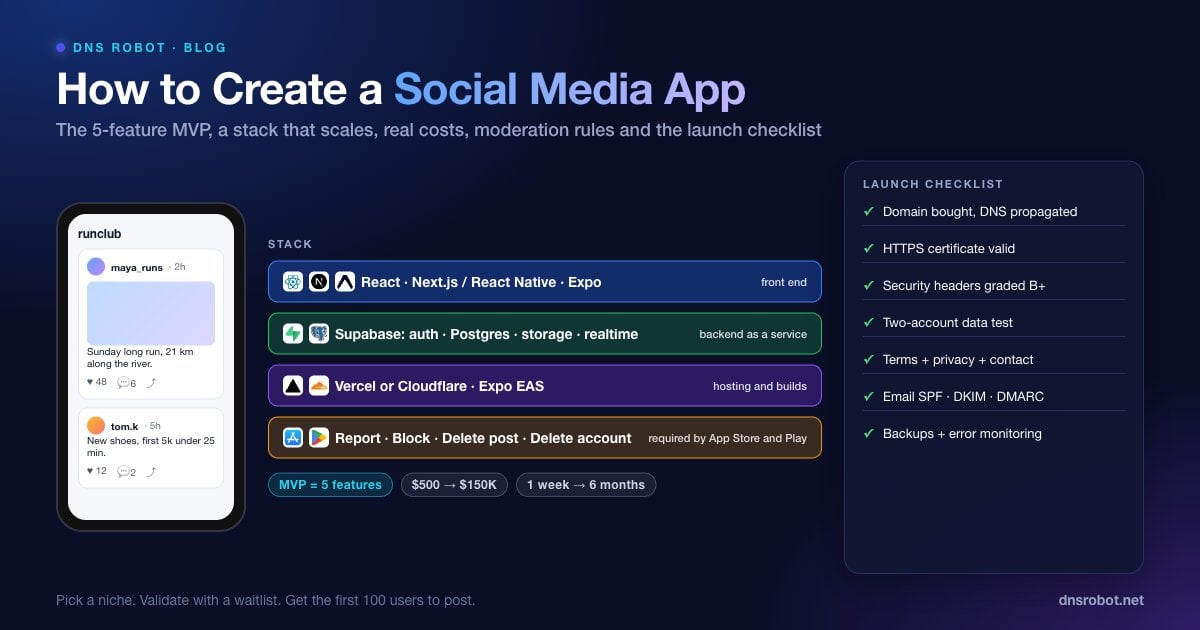
How to create a social media app comes down to eight steps: choose a niche and a single core interaction, validate demand with a waitlist, define a five-feature MVP, pick a stack that handles accounts and storage for you, design the data model, build it by one of three paths, add moderation and legal safeguards, and launch to a small group you can talk to. The code is the easy part in 2026. The hard parts are focus, safety and the first hundred users.
The opportunity is in niches, not in the next Instagram. Meta reported 3.6 billion daily active people across its family of apps in June 2026, according to its Q2 2026 results, and no new general-purpose network will out-build that. Communities organised around a hobby, a profession, a city, a condition or a game can, because the incumbents serve them badly. Strava, Letterboxd, Untappd and Discord all started as narrow social products.
This guide gives you the feature list, a stack that scales past the prototype, honest cost ranges, the moderation rules app stores enforce, and a launch checklist you can run in a week.
Step 1: Pick a Niche and One Core Interaction
To create a social media app that people come back to, make two decisions before anything else. The niche is who it is for and what they already do together: runners logging routes, collectors trading cards, nurses on night shift, parents at one school. The core interaction is the single thing users do that creates content for others: post a photo, log an activity, ask a question, rate something, check in somewhere.
Write both as one sentence: "[Group] use it to [core interaction] and see what others [did]." If the sentence needs an "and", cut it. Every feature in the MVP exists to make that one sentence happen faster.
Advertisement
Step 2: Validate With a Waitlist Before You Build
Before writing any app code, put up a one-page waitlist with the one-sentence pitch, three benefits and an email form, and send it to the community. As a rule of thumb, if fewer than five percent of the people who see it sign up, the pitch or the niche is wrong, and you have saved months. The what is a landing page guide covers the structure, and the vibe coding apps guide includes a ready prompt for a waitlist page with an admin dashboard that takes an hour to build.
Buy the domain now, not later. Check the name across 100+ extensions with the Domain Availability Checker, and run it through the Username Checker at the same time to confirm the handle is free on about 30 platforms where you will promote it, including Instagram, X, YouTube, Discord and GitHub.
Step 3: Define the MVP Feature Set
The minimum viable social app has five features and no more. Everything in the second column is tempting and every one of them delays launch by weeks.
| MVP (build first) | Version 2 (build after 100 active users) |
|---|---|
| Accounts: email or social sign-in, password reset | Direct messaging |
| Profiles: name, photo, bio, list of the user's own posts | Notifications (push and email digests) |
| Posting: the core interaction, with image upload if it needs one | Search and discovery |
| Feed: reverse-chronological posts from people you follow, or everyone in a small community | Algorithmic ranking |
| One engagement action: like, comment or follow, whichever fits the core interaction | Groups, events, stories, live video, monetisation |
Plus the safety features that are not optional even in an MVP: report a post, block a user, delete your own content and delete your account. App stores reject social apps that lack reporting, blocking or account deletion, as covered in Step 7.
Advertisement
Step 4: Choose the Tech Stack
The right stack for a new social app is one where authentication, the database, file storage and real-time updates are services you configure rather than systems you build. That leaves your effort for the product.
| Layer | Recommended | Why |
|---|---|---|
| Front end (web) | React with Next.js, or Vue with Nuxt | Server rendering for shareable public profiles and posts; huge component ecosystem |
| Front end (mobile) | React Native with Expo, or Flutter | One codebase for iOS and Android; Expo handles builds and store submission |
| Backend as a service | Supabase (Postgres) or Firebase (Firestore) | Auth, database, storage, real-time subscriptions and row-level security out of the box |
| Media | Supabase Storage, Firebase Storage, or Cloudflare R2 plus an image CDN | Uploads, resizing and delivery without running servers |
| Real-time | Supabase Realtime or Firebase listeners | Live feed updates and comment counts |
| Hosting | Vercel, Netlify or Cloudflare for web; Expo EAS for mobile builds | Deploy from Git, automatic HTTPS, global edge |
| Email and push | Resend or Postmark; Expo push or Firebase Cloud Messaging | Transactional email and notifications without infrastructure |
Supabase is a popular choice for social apps because Postgres handles the relational shape of social data (users, follows, posts, comments) naturally and row-level security policies enforce who can read what at the database layer. Firebase is a fine choice if your team already knows it or you are mobile-first.
Step 5: Design the Data Model
Social apps have a small, well-known core schema. Getting it right at the start avoids painful migrations once users have data. Five tables cover the MVP.
-- Supabase / Postgres MVP schema for a social app
create table profiles (
  id uuid primary key references auth.users(id) on delete cascade,
  username text unique not null,
  display_name text,
  avatar_url text,
  bio text,
  created_at timestamptz default now()
);

create table posts (
  id bigint generated always as identity primary key,
  author_id uuid not null references profiles(id) on delete cascade,
  body text,
  media_url text,
  created_at timestamptz default now()
);

create table follows (
  follower_id uuid references profiles(id) on delete cascade,
  followee_id uuid references profiles(id) on delete cascade,
  created_at timestamptz default now(),
  primary key (follower_id, followee_id)
);

create table likes (
  user_id uuid references profiles(id) on delete cascade,
  post_id bigint references posts(id) on delete cascade,
  primary key (user_id, post_id)
);

create table reports (
  id bigint generated always as identity primary key,
  reporter_id uuid references profiles(id),
  post_id bigint references posts(id) on delete cascade,
  reason text not null,
  created_at timestamptz default now()
);

-- Row-level security: anyone can read posts, only the author can change them
alter table posts enable row level security;
create policy "posts are public" on posts for select using (true);
create policy "authors manage own posts" on posts
for all using (auth.uid() = author_id) with check (auth.uid() = author_id);Add a blocks table (blocker, blocked) in the same shape as follows and filter it in every feed query. The feed for the MVP is a single query: posts from followed users, newest first, excluding blocked authors, limited to 20 with cursor pagination on created_at. Algorithmic ranking is a Version 2 problem.
Advertisement
Step 6: Build the App (Three Paths)
There are three realistic ways to make a social media app MVP in 2026, and the right one depends on whether you can code and how much money you have.
Path A: AI App Builder (No Code, Under $500)
Lovable, Bolt.new and Replit can produce the five-feature MVP on Supabase from prompts in a weekend. The results are a real web app you can put on your domain, and the code syncs to GitHub so a developer can take over later. The limits are native mobile apps, which not every builder produces (Bolt.new can generate an Expo project), and the care you must take with security policies. The best vibe coding tools guide compares the builders.
Build a social app for [niche]. Users sign up with email, set a username, display name, avatar and bio. They can create a post with text and one image, follow other users, and like posts. The home feed shows posts from followed users newest first with infinite scroll. Every post has Report and, on the author's own posts, Delete. Every profile has Block. Users can delete their account from settings. Use Supabase with row-level security so users can only edit their own data. Mobile-first layout.Path B: Freelancer or Small Team ($5,000 to $30,000)
A single experienced full-stack developer can build the MVP on the stack above in four to eight weeks. This is the best value path if you want native mobile from day one or if the core interaction has real complexity, such as location, video or payments. Hand them the one-sentence pitch, the feature table and the schema, and ask for a working web version in the first two weeks.
Path C: Development Agency ($30,000 to $150,000+)
Agencies deliver design, iOS, Android, backend and a launch plan as a package, usually over three to six months. It is the right path when you have funding and a clear product spec, and the wrong one for validating an idea, because the cost of learning you were wrong is the whole budget.
Step 7: Moderation, Safety and Legal Requirements
Any app with user-generated content has obligations from day one, and the app stores enforce them at review. Apple's App Review Guidelines section 1.2 requires apps with user-generated content to filter objectionable material, provide a way to report it with timely responses, block abusive users, and publish contact information, and guideline 5.1.1(v) requires in-app account deletion for any app that lets people create an account. Google Play's user-generated content policy likewise requires in-app reporting and blocking, and its user data policy requires account deletion. Apps without these features are rejected or removed.
Report, block, delete. Report any post or user, block any user, delete your own content and your account. Build these into the MVP.
Terms of service and privacy policy. Both stores require a privacy policy, and laws such as GDPR, CCPA and the UK's Online Safety Act can apply to any service reachable from those regions. Generate a first version from a template and have it reviewed before you scale.
Age gating. The US COPPA rule restricts collecting personal information from children under 13 without verifiable parental consent. Ask for a date of birth at sign-up and block under-13s unless you are building specifically for children under COPPA rules.
Moderation queue. A simple admin page listing reports, newest first, with hide and ban actions. One person checking it daily is enough at launch.
Automated filters. Basic keyword filtering and an image-moderation API for nudity and violence catch most of what a small community will see.
Data deletion. When a user deletes their account, delete their data. The
on delete cascadein the schema above does most of it.
Advertisement
Step 8: Launch Checklist
Run this list the week before you invite the community. Every item is a fifteen-minute check.
Domain bought and pointed at the web app; propagation confirmed with the DNS Propagation Checker rather than your own browser
HTTPS certificate valid on the bare domain and
www, checked with the SSL CheckerSecurity headers graded B or better on the HTTP Headers Checker: HSTS, Content Security Policy, frame protection
Two-account test: user B cannot see, edit or delete user A's private data by changing IDs
Report, block, delete post and delete account all work end to end
Terms, privacy policy and a contact email published and linked from sign-up
Transactional email (sign-up confirmation, password reset) delivers to Gmail and Outlook; SPF, DKIM and DMARC set on the sending domain
Image uploads limited in size and type; a 50 MB upload is rejected, not crashed on
Error monitoring and basic analytics installed so you can see what breaks and what people do
Backups enabled on the database and restore tested once
The email item is the one most first-time founders skip. A social app that cannot deliver its own sign-up confirmation loses users at the door. Since February 2024, Gmail's sender guidelines require every sender to authenticate with SPF or DKIM, and bulk senders to publish DMARC as well. Set SPF, DKIM and DMARC records on the sending domain and verify them with the SPF Checker and DMARC Checker before launch. The broader security items are covered in web security best practices.
How Much Does It Cost to Create a Social Media App?
Costs split into building and running. Building depends entirely on the path. Running costs for a small community are close to zero on the free tiers of Supabase, Vercel and Expo, and grow with media storage and active users.
| Path | Build cost | Time to MVP | Monthly running cost at 1,000 users |
|---|---|---|---|
| AI builder, owner builds | $0 to $500 | 1 to 2 weeks | $25 to $75 |
| Freelancer or small team | $5,000 to $30,000 | 4 to 8 weeks | $50 to $200 |
| Development agency | $30,000 to $150,000+ | 3 to 6 months | $200 to $1,000 |
Running costs at 10,000 active users typically land between $300 and $1,500 a month, driven by image and video storage, database size and email volume. Video is the line that grows fastest; if the core interaction needs it, budget for a dedicated video service from the start.
How to Get the First 100 Users to Post
The empty-feed problem kills more social apps than bugs do. A new user who opens the app and sees nothing leaves. Three tactics fix it: seed the app with 50 to 100 real posts from people you personally recruited before opening sign-ups; launch to one community at a time so the feed is dense for that group; and give every new user something to do in the first minute, such as follow five suggested people or post their first entry from a template.
Measure one number in the first month: the share of sign-ups who post at least once in their first week. As a rule of thumb, below 20 percent the core interaction is too hard or the feed too empty. Above 40 percent, invite the next community. Everything else, including the Version 2 features, waits on that number.
Check the app's name is free everywhere before you launch
DNS Robot's free Username Checker tests your app name across about 30 platforms, including Instagram, X, YouTube and GitHub, in one query, and the Domain Availability Checker does the same across 100+ domain extensions. Secure the handle and the domain on the same day, so the name on the App Store matches the name people search for.
Dene Username CheckerAdvertisement
How to Create a Social Media App FAQ
Typically under $500 if you build the MVP yourself with an AI app builder, $5,000 to $30,000 with a freelancer or small team, and $30,000 to $150,000 or more with a development agency. Running costs for a small community are roughly $25 to $200 a month on managed services.