DNS RobotDNS Propagation Checker
HomeDNS LookupWHOIS LookupIP LookupSSL Check
DNS RobotDNS Propagation Checker

Next-generation DNS propagation toolkit

Privacy PolicyTerms of ServiceAbout UsContact

DNS Tools

DNS LookupDomain to IPNS LookupMX LookupCNAME LookupView all

Email Tools

SPF Record CheckerDMARC CheckerDKIM CheckerSMTP Test ToolEmail Header AnalyzerView all

Website Tools

WHOIS LookupDomain AvailabilitySubdomain FinderCMS DetectorLink AnalyzerView all

Network Tools

Ping ToolTraceroutePort CheckerHTTP Headers CheckSSL Certificate CheckView all

IP Tools

IP LookupWhat Is My IPIP Blacklist CheckIP to HostnameASN LookupView all

Utility Tools

QR Code ScannerQR Code GeneratorMorse Code TranslatorText to Binary ConverterSmall Text GeneratorView all
© 2026 DNS Robot. Developed by ❤ Shaik Brothers
All systems operational
Made with
  1. Home
  2. /
  3. DNS Tools
  4. /
  5. Domain to IP

Domain to IP

Convert any domain to IP address instantly. Find all IPv4 and IPv6 addresses for any website with geolocation, CDN detection, and ASN information. Free online website IP checker for network professionals.

Free DNS ToolDomain to IP LookupIPv4 & IPv6Geolocation & CDN
Domain to IP Lookup

Convert any domain to IP address with RDAP network data, CDN detection, and ASN information

Selected Server:🇺🇸Google DNS(Google LLC)- 8.8.8.8Avg Speed: 9.96 ms

What Is Domain to IP Lookup?

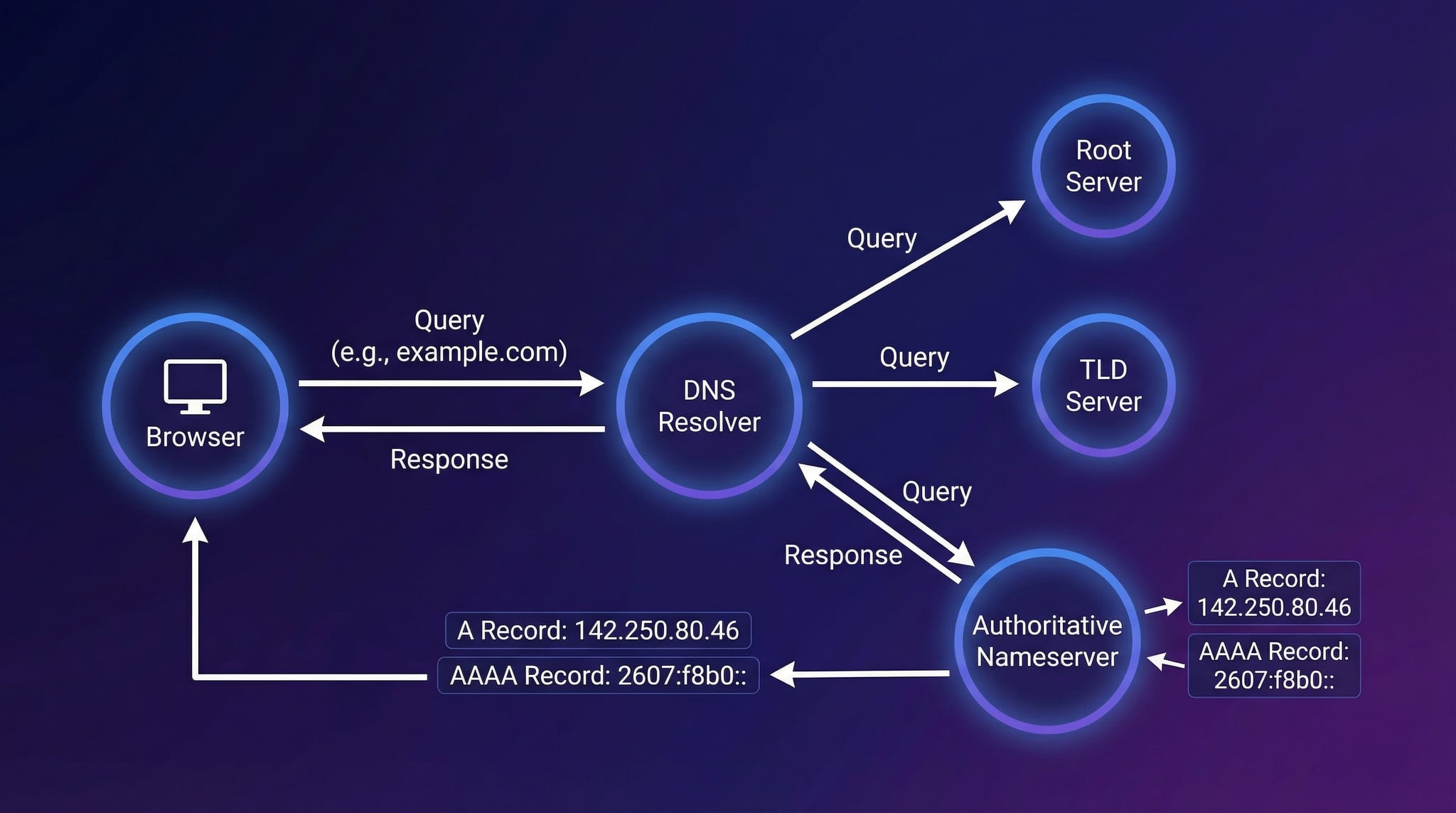
A domain to IP lookup converts a human-readable domain name (like google.com) into its numerical IP address (like 142.250.80.46). Every website on the internet is hosted on a server with a unique IP address. When you type a URL in your browser, the Domain Name System (DNS) performs this conversion automatically — our tool shows you exactly what IP addresses any domain resolves to.

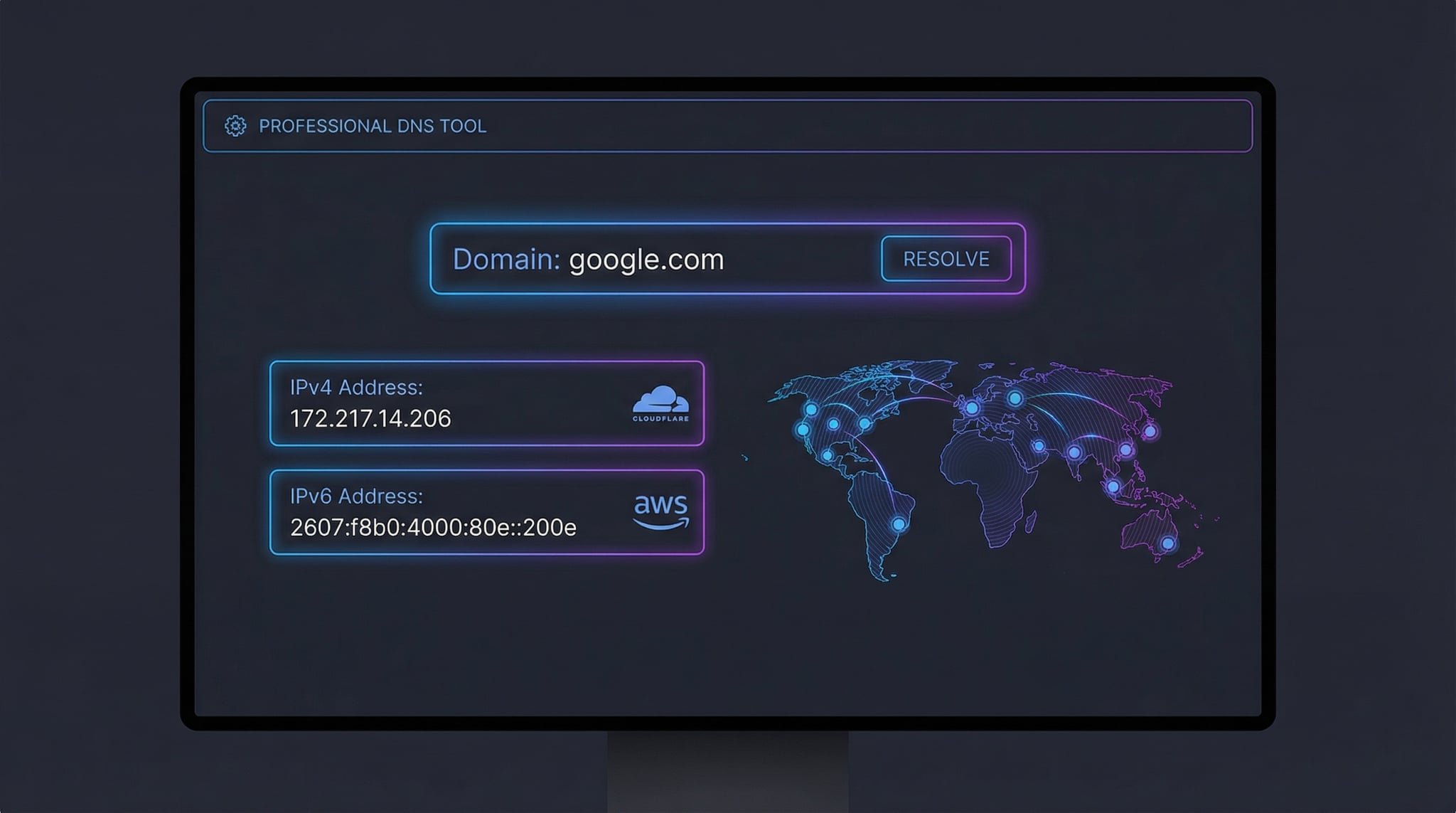
Our free domain IP lookup tool goes beyond basic resolution. It finds all IPv4 and IPv6 addresses, maps each IP to its physical location, detects CDN providers like Cloudflare and AWS, and identifies the hosting organization and ASN. Whether you need to check the IP of a website, verify server locations, or troubleshoot DNS issues, this tool provides complete IP intelligence in seconds.

Domain to IP lookup results showing IPv4 and IPv6 addresses with geolocation map and CDN detection
DNS Robot's domain to IP tool converts any domain name to its IP addresses with geolocation, CDN detection, and ASN details.

How to Find the IP Address of a Website (3 Methods)

There are several ways to find the IP address of a website. Our online tool is the fastest and most comprehensive method, but knowing command-line alternatives is useful for system administrators.

Domain to IP resolution flow from browser DNS query through resolver to authoritative nameserver
How domain to IP resolution works: Your browser queries DNS to convert a domain name into an IP address.
1
Online Domain to IP Tool (Recommended)
Enter any domain name in our tool above and click "Lookup IP". You'll instantly see all IPv4 and IPv6 addresses with geolocation, ISP, CDN provider, and ASN details for each IP — no installation required.
2
Using nslookup or ping (Windows/Mac/Linux)
Open a terminal and run nslookup example.com or ping example.com. Both commands convert the domain name to IP address. The ping command also tests connectivity to the resolved IP.
3
Using dig (Mac/Linux)
Run dig example.com +short for a quick IP lookup, or dig example.com AAAA +short for IPv6 addresses. The dig command provides detailed DNS response data. For full DNS record lookup, use our dedicated DNS Lookup tool.

What Domain to IP Lookup Reveals

✓
IPv4 & IPv6 Addresses
Resolves both A records (IPv4) and AAAA records (IPv6) to show every IP address of a website.
✓
IP Geolocation
Maps each IP to its physical location: country, region, city, coordinates, and timezone. Verify your server location instantly.
✓
CDN & Hosting Detection
Identifies CDN providers (Cloudflare, AWS, Akamai, Fastly) and hosting organizations from ASN and IP range data.

When to Use Domain to IP Lookup

Server Location Verification
Confirm where your website is physically hosted and whether it matches your target audience's location.
Security Analysis
Check if a suspicious domain resolves to known malicious IPs. Combine with IP Blacklist Check for reputation analysis.
Network Troubleshooting
Verify DNS resolution is working correctly. Use with Ping and Traceroute for full diagnostics.
CDN & Hosting Verification
Verify your CDN is properly configured and identify which hosting provider serves your website.

IPv4 vs IPv6: Understanding Domain IP Addresses

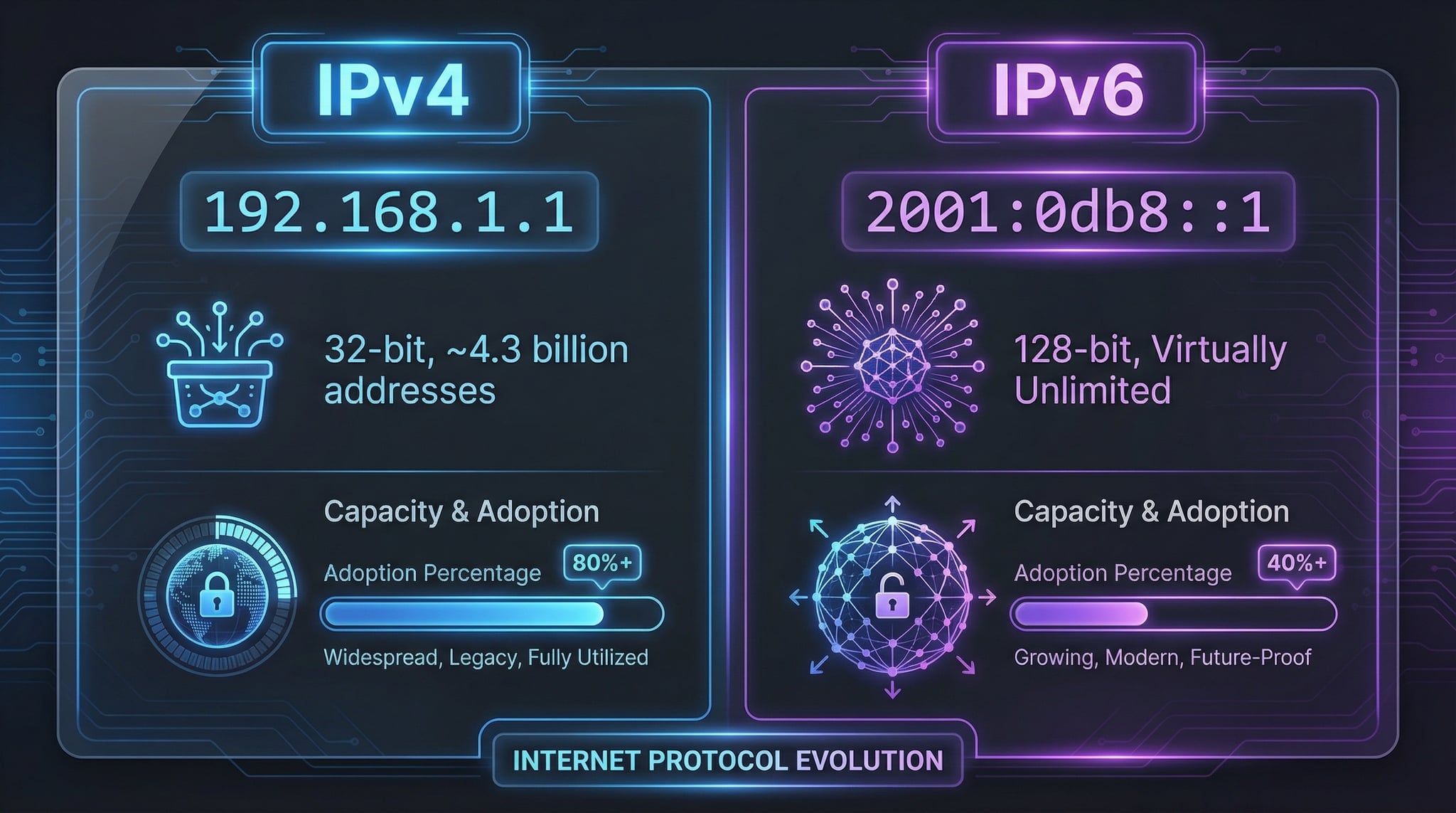
When you convert a domain to IP, the result can be an IPv4 address, an IPv6 address, or both. Modern websites increasingly support dual-stack networking for maximum compatibility. Here's how the two protocols compare:

IPv4 vs IPv6 address format comparison showing 32-bit and 128-bit structures for domain resolution
IPv4 vs IPv6: Key differences in address format, capacity, and adoption for domain to IP resolution.

IPv4 (A Record)

  • Format: 32-bit, four decimal numbers (e.g., 192.168.1.1)
  • Capacity: ~4.3 billion addresses (exhausted)
  • Support: Universal — every device supports IPv4
  • DNS Record: A record maps domain to IPv4

IPv6 (AAAA Record)

  • Format: 128-bit, eight hex groups (e.g., 2001:0db8::1)
  • Capacity: 340 undecillion addresses (virtually unlimited)
  • Support: ~45% of internet traffic uses IPv6
  • DNS Record: AAAA record maps domain to IPv6

Use our IPv4 to IPv6 converter to translate between formats, or the IPv6 Compression tool to work with IPv6 addresses.

CDN Detection & ASN Information

When you look up the IP address of a website, the result often belongs to a CDN (Content Delivery Network) rather than the origin server. CDN providers like Cloudflare, Amazon CloudFront, Akamai, and Fastly distribute content across hundreds of servers worldwide. Our domain to IP tool detects these CDN deployments by analyzing IP ranges and ASN data.

An ASN (Autonomous System Number) identifies the network operator that controls a block of IP addresses. For example, Cloudflare operates AS13335, Google uses AS15169, and Amazon AWS runs AS16509. The ASN reveals which organization hosts the server and how traffic is routed across the internet. For deeper ASN analysis, use our ASN Lookup tool.

Best Practices for Domain IP Management

  • Enable IPv6 (AAAA records) for future-proof connectivity
  • Use a CDN for global content delivery and DDoS protection
  • Monitor IP changes to detect unauthorized DNS modifications
  • Use multiple IPs for redundancy and load balancing
  • Verify server location matches your target audience
  • Check IP reputation to avoid blacklisted addresses
  • Set up proper reverse DNS (PTR) records for each IP
  • Review SSL certificates for each IP to ensure secure connections

Related DNS & IP Tools

DNS Lookup

Check all 12 DNS record types from 23+ global servers.

IP Lookup

Detailed geolocation and network info for any IP address.

Reverse DNS Lookup

Convert IP addresses back to hostnames via PTR records.

WHOIS Lookup

Find domain registration, registrar, and owner details.

NS Lookup

Discover authoritative nameservers for any domain.

SSL Checker

Verify SSL certificate validity and security details.

Frequently Asked Questions About Domain to IP

How to convert a domain to IP address?

Enter the domain name in our Domain to IP tool above and click "Lookup IP". The tool resolves both IPv4 and IPv6 addresses with geolocation. You can also use nslookup example.com or dig example.com +short from the command line.

What is the IP address of a website?

Every website has one or more IP addresses that identify the server hosting it. An IP address is a numerical label (e.g., 172.217.14.206 for IPv4 or 2607:f8b0:4004::200e for IPv6) that your browser connects to when you visit a website.

Why does a domain have multiple IP addresses?

Domains have multiple IPs for load balancing, redundancy, and CDN distribution. CDN providers assign multiple IPs to route traffic to the nearest server. Having both IPv4 and IPv6 (dual-stack) ensures compatibility with all connections.

What is the difference between IPv4 and IPv6?

IPv4 uses 32-bit addresses (about 4.3 billion unique addresses) while IPv6 uses 128-bit addresses (virtually unlimited). IPv6 was created to address IPv4 exhaustion. Use our IPv4 to IPv6 converter to translate between formats.

How to find IP address of a website using command line?

On Windows: nslookup example.com or ping example.com. On Mac/Linux: dig example.com +short or host example.com. For complete results, use our free online tool.

What is CDN detection?

CDN detection identifies if a domain uses a Content Delivery Network like Cloudflare, AWS CloudFront, or Akamai. When a domain uses a CDN, the IP addresses belong to the CDN provider, not the origin server.

How accurate is IP geolocation?

Country-level accuracy is ~99%. City-level accuracy ranges from 50-80% depending on the IP range. CDN and VPN IPs may show the proxy location rather than the origin server. For detailed IP analysis, use our IP Lookup tool.

Can I find who hosts a website?

Yes. Our domain to IP tool shows the ISP, organization, and ASN for each IP address, revealing the hosting provider. Combine with WHOIS Lookup for complete domain registration and hosting details.