Domain Validation
Free domain validation tool with 17 DNS health checks. Validates nameserver infrastructure, SOA configuration, address records, email authentication, and DNSSEC with graded results.
Free DNS ToolDomain Validation17 Health ChecksGraded Results
Domain Validation
Run 17 comprehensive DNS health checks on any domain. Validates nameserver infrastructure, SOA configuration, address records, email authentication, and security.
Advertisement
What Is Domain Validation?
Domain validation is the process of verifying that a domain's DNS records are correctly configured, complete, and following best practices. A DNS record validator checks essential records — nameservers, address records, mail exchange records, email authentication policies, and security extensions — to produce a comprehensive health report with a letter grade.
Unlike a simple DNS lookup that shows raw record values, domain validation analyzes whether those records meet recommended standards. It identifies missing records, misconfigured values, and security gaps that could affect your website availability, email delivery, and protection against spoofing attacks.
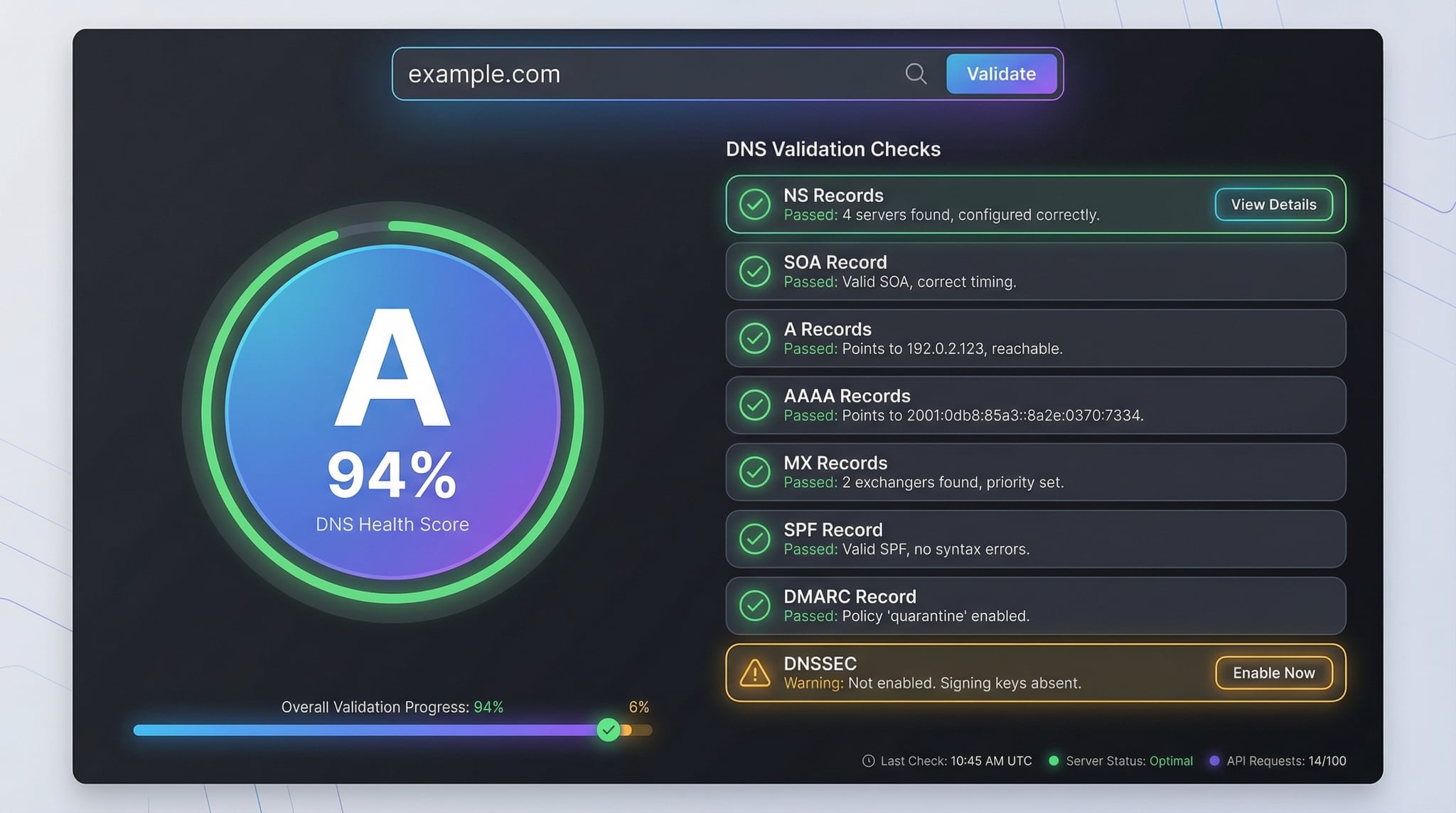
The 17 DNS Validation Checks
Our domain validity checker runs 17 targeted checks across 5 categories. Each check returns a pass, warning, or fail status with detailed explanations and recommendations. The checks cover nameserver infrastructure, SOA timing configuration, address records, email authentication, and DNS security.
DNS Infrastructure(5 checks)
1. NS Records
Verifies authoritative nameservers are configured. At least 2 NS records are recommended for redundancy — a single nameserver is a single point of failure.
2. All NS Responding
Queries each nameserver individually by resolving its hostname to an IP and sending a SOA query. Detects dead or unresponsive nameservers that could cause intermittent resolution failures.
3. Serial Numbers Match
Compares SOA serial numbers across all nameservers. Mismatched serials indicate zone transfer failures — some nameservers may serve stale DNS data.
4. NS Public IPs
Validates that all nameservers resolve to public IP addresses. Nameservers on private/RFC1918 ranges (10.x, 172.16-31.x, 192.168.x) are unreachable from the internet.
5. NS Dispersal
Checks that nameservers are on different /24 network subnets. If all nameservers share the same subnet, a single network outage can make the entire domain unreachable.
SOA Configuration(6 checks)
6. SOA Record
Checks the Start of Authority record containing zone admin info, serial number, and timing parameters. A valid SOA is required for proper DNS zone management.
7. SOA Expire Range
Validates the expire value is between 14-28 days. Too low means secondary nameservers drop zone data too quickly; too high means stale data persists after zone changes.
8. SOA Refresh Range
Checks the refresh interval is between 20 minutes and 12 hours. Controls how often secondary nameservers check the primary for updates.
9. SOA Retry Range
Validates the retry interval is between 3-15 minutes. Determines how long a secondary NS waits before retrying a failed zone transfer.
10. SOA Min TTL Range
Checks the minimum TTL is between 5 minutes and 1 day. This value controls how long negative responses (NXDOMAIN) are cached by resolvers.
11. SOA Serial Format
Verifies the SOA serial follows the recommended YYYYMMDDNN date-based format. This convention makes it easy to track when the zone was last updated.
Address Records(2 checks)
12. A Records (IPv4)
Confirms IPv4 address records exist so the domain resolves to a web server. Missing A records mean the domain is unreachable via IPv4.
13. AAAA Records (IPv6)
Checks for IPv6 address records. While not strictly required, IPv6 improves accessibility and future-readiness as IPv4 addresses become scarce.
Email Authentication(3 checks)
14. MX Records
Validates mail exchange records for email delivery. Missing MX records mean the domain cannot receive email. Use our MX Lookup for detailed mail server analysis.
15. SPF Record
Checks for Sender Policy Framework — the DNS TXT record that authorizes which servers can send email for your domain. Use the SPF Checker for deep analysis.
16. DMARC Record
Validates DMARC policy that protects against email spoofing. "Reject" provides the strongest protection. See our DMARC Checker for details.
Security(1 check)
17. DNSSEC
Verifies if DNS Security Extensions are enabled by querying DNSKEY records. DNSSEC adds cryptographic signatures to prevent DNS spoofing and cache poisoning attacks.
Advertisement
Understanding DNS Health Grades
After running all 17 domain validation checks, the tool calculates an overall DNS health score and assigns a letter grade. Here's how the scoring works:
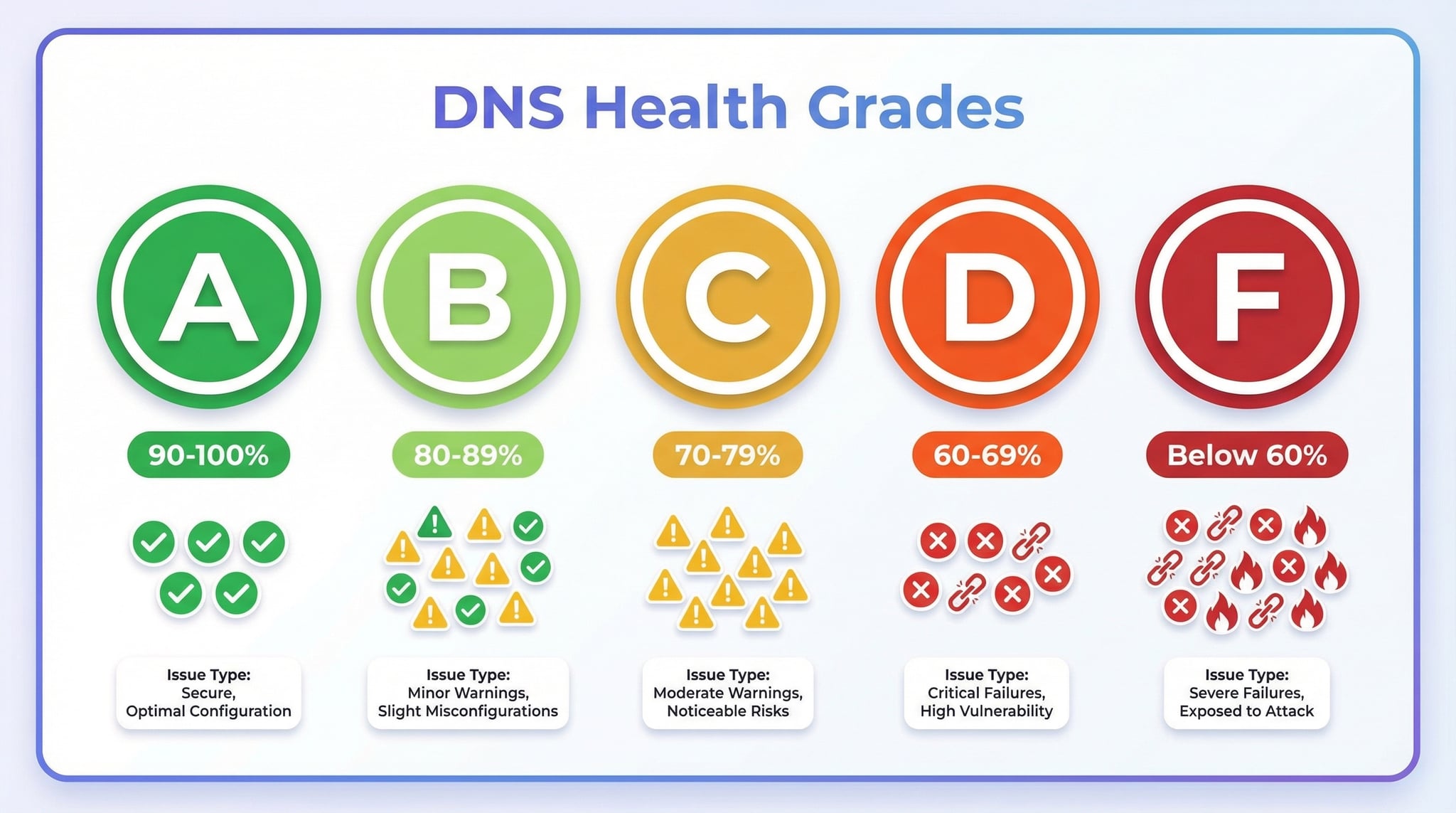
| Grade | Score | What It Means |
|---|---|---|
| A | 90–100% | Excellent — all critical and optional checks pass. DNS is fully configured. |
| B | 75–89% | Good — critical checks pass with minor warnings on optional records (e.g., missing IPv6 or DNSSEC). |
| C | 60–74% | Fair — some important records need attention. Email authentication may be incomplete. |
| D | 45–59% | Poor — multiple critical records missing or misconfigured. Immediate action needed. |
| F | Below 45% | Critical — major DNS failures. Domain is likely unreachable or highly vulnerable. |
Weighted scoring (150 max points): Critical (NS, All NS Responding, A, SPF, DMARC) = 15 pts each. Important (Serial Match, NS Public IPs, SOA, MX) = 10 pts each. SOA timing (Expire, Refresh, Retry, Min TTL, Serial Format) = 4 pts each. Optional (NS Dispersal, AAAA, DNSSEC) = 5 pts each. Pass = full points, Warning = half, Fail = 0.
Why Domain Validation Matters
DNS misconfiguration is one of the most common — and most overlooked — causes of website and email problems. A single missing or incorrect record can make your site unreachable, block email delivery, or leave your domain vulnerable to spoofing. Here's why regular domain validation checks are essential:
Website Availability
Missing A/AAAA records or broken nameservers make your website unreachable. Validation catches these issues before visitors notice.
Email Deliverability
SPF, DMARC, and MX records directly affect whether your emails reach recipients. Missing authentication records cause emails to land in spam.
Security Protection
DNSSEC, SPF, and DMARC protect your domain against spoofing, phishing, and DNS cache poisoning attacks. Validation ensures your defenses are active.
Advertisement
How to Validate DNS Records
There are several ways to perform a domain validation check. Here are three common methods, from the easiest to the most technical:
Method 1: Online Domain Validator (Recommended)
Use our DNS Record Validator above — enter any domain and get a complete health report in seconds. The tool runs all 17 checks automatically across 5 categories and provides a grade with actionable recommendations.
Method 2: Using nslookup Commands
Check individual records from your terminal (Windows, macOS, Linux):
nslookup -type=NS example.com          # Check nameservers
nslookup -type=SOA example.com         # Check SOA record
nslookup -type=MX example.com          # Check mail servers
nslookup -type=TXT example.com         # Check SPF record
Method 3: Using dig Commands (Linux/macOS)
The dig command provides more detailed output for DNS validation:
dig NS example.com +short              # Nameservers only
dig SOA example.com                    # Full SOA details
dig TXT _dmarc.example.com +short      # DMARC record
dig DNSKEY example.com +dnssec         # DNSSEC keys
Common DNS Issues and How to Fix Them
When the DNS record validator flags issues, here's what they mean and how to resolve them:
Missing SPF Record
Add a TXT record like v=spf1 include:_spf.google.com ~all (adjust for your mail provider). Without SPF, anyone can forge emails from your domain.
Missing DMARC Record
Add a TXT record at _dmarc.yourdomain.com with value v=DMARC1; p=quarantine; rua=mailto:dmarc@yourdomain.com. Start with "quarantine" and move to "reject" once confident.
Only 1 Nameserver
Contact your DNS provider to add at least one more NS record. Most providers assign 2-4 nameservers automatically. A single nameserver means if it goes down, your entire domain is unreachable.
No IPv6 (AAAA) Records
While not critical, adding IPv6 support improves accessibility. If you use Cloudflare, AWS, or Google Cloud, enable IPv6 in your hosting dashboard — it's usually a one-click setting.
DNSSEC Not Enabled
Enable DNSSEC through your domain registrar and DNS provider. Most modern DNS services (Cloudflare, Route 53, Google Cloud DNS) support DNSSEC with simple activation. Your registrar must also add DS records.
Advertisement
DNS Validation for Email Security
Three of the seventeen validation checks focus on email authentication — SPF, DMARC, and MX records. These are the most actionable results for most domain owners because email misconfiguration directly impacts deliverability and security.
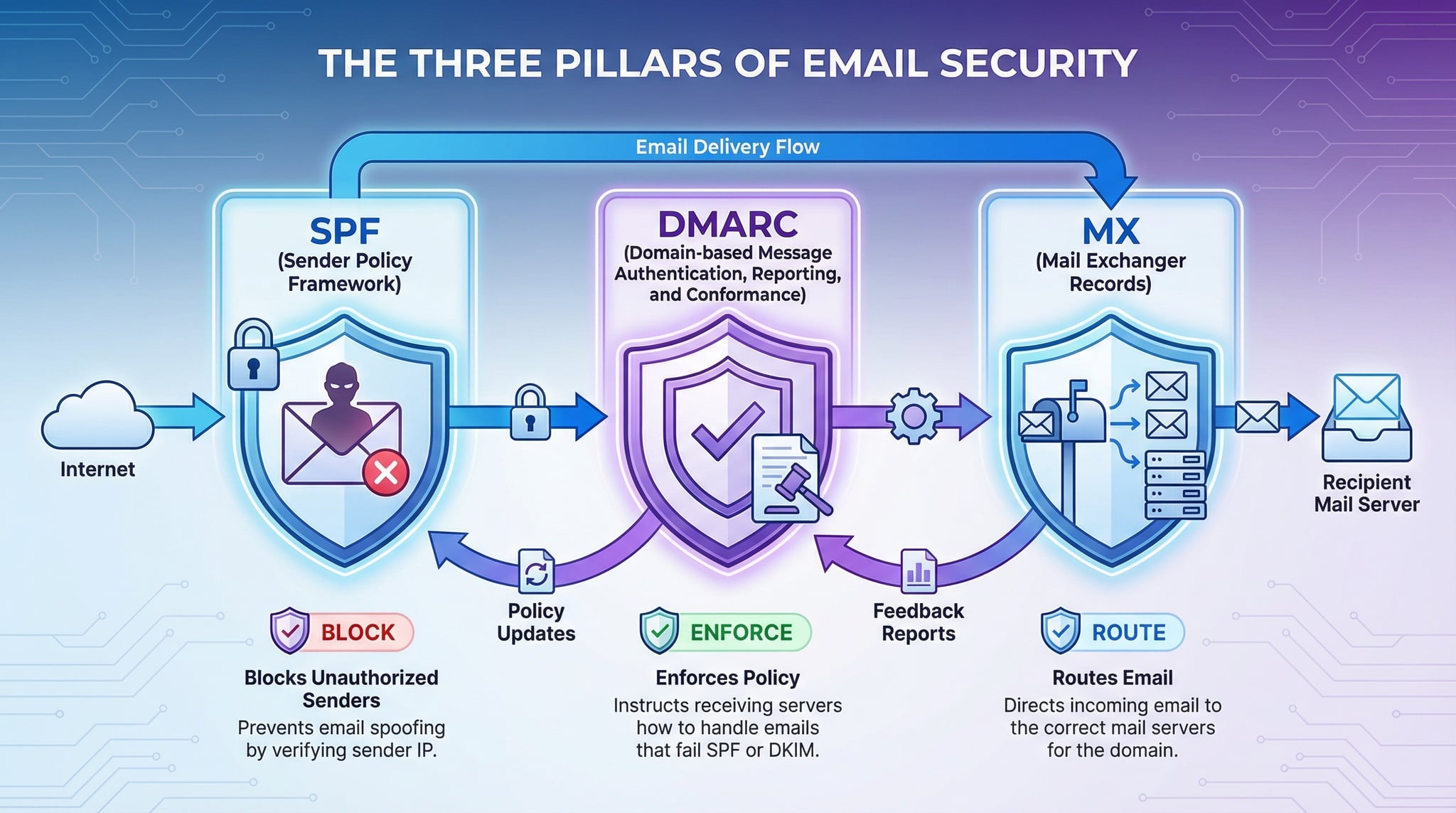
| Record | Purpose | Without It |
|---|---|---|
| SPF | Lists authorized mail servers | Anyone can send email as your domain |
| DMARC | Policy for handling spoofed mail | No enforcement against forged emails |
| MX | Routes incoming email to mail servers | Domain cannot receive any email |
For detailed analysis of each email authentication record, use our specialized tools: SPF Checker, DMARC Checker, and DKIM Checker. These provide in-depth record parsing, syntax validation, and specific recommendations.
When to Run a Domain Validation Check
After DNS Changes
Validate after updating nameservers, adding records, or migrating DNS providers to catch errors early.
Email Delivery Problems
If emails are bouncing or landing in spam, validate SPF, DMARC, and MX records first.
Regular Monitoring
Run monthly or quarterly checks to catch configuration drift, expired records, or accidental changes.
Domain Purchase Due Diligence
Check domain name quality before purchasing. Validate existing DNS health and look for blacklist issues.
Security Audits
Verify DNSSEC, SPF, and DMARC are active as part of your security compliance reviews.
Troubleshooting Outages
When a website is down, validate DNS first. Missing NS or A records are often the root cause.
Advertisement
Related DNS Tools
DNS Lookup
Look up all DNS record types for any domain
NS Lookup
Check nameservers and delegation details
MX Lookup
Check mail exchange records and email providers
SPF Checker
Deep SPF record analysis and validation
DMARC Checker
Validate DMARC policy and configuration
SSL Checker
Check SSL certificate validity and chain
Frequently Asked Questions
What is domain validation?
Domain validation is the process of checking whether a domain's DNS records are properly configured and healthy. It involves verifying essential records like NS (nameservers), SOA (Start of Authority), A/AAAA (IP addresses), MX (mail exchange), SPF, DMARC, and DNSSEC to ensure the domain is correctly set up for web hosting, email delivery, and security.
What DNS records does the validator check?
The DNS record validator runs 17 checks across 5 categories: DNS Infrastructure (NS records, all NS responding, serial consistency, public IPs, subnet dispersal), SOA Configuration (SOA record, expire/refresh/retry/min TTL ranges, serial format), Address Records (A and AAAA), Email Authentication (MX, SPF, DMARC), and Security (DNSSEC). Each check is graded as pass, warning, or fail.
How is the DNS health grade calculated?
The DNS health grade uses weighted scoring across 17 checks totaling 150 maximum points. Critical checks (NS, All NS Responding, A, SPF, DMARC) are worth 15 points each. Important checks (Serial Match, NS Public IPs, SOA, MX) are worth 10 points each. SOA timing checks (expire, refresh, retry, min TTL, serial format) are worth 4 points each. Optional checks (NS Dispersal, AAAA, DNSSEC) are worth 5 points each. Pass earns full points, warning earns half, fail earns 0. Grade thresholds: A (90-100%), B (75-89%), C (60-74%), D (45-59%), F (below 45%).
Why is my domain missing an AAAA record?
A missing AAAA record means your domain doesn't support IPv6. This is flagged as a warning (not a failure) because many domains still operate on IPv4 only. However, adding IPv6 support improves accessibility and future-readiness. Most hosting providers and CDNs like Cloudflare, AWS, and Google Cloud offer IPv6 support that you can enable in your DNS settings.
What happens when SPF or DMARC records are missing?
Missing SPF and DMARC records are flagged as failures because they are critical for email security. Without SPF, any server can send emails pretending to be from your domain. Without DMARC, there is no policy to handle spoofed emails. This can lead to phishing attacks, email deliverability problems, and damage to your domain's reputation.
What is DNSSEC and why does it matter?
DNSSEC (DNS Security Extensions) adds cryptographic signatures to DNS records to prevent tampering. It protects against DNS spoofing and cache poisoning attacks where attackers redirect traffic to malicious servers. While not required, DNSSEC is recommended by security best practices and is flagged as a warning if not enabled.
How many nameservers should my domain have?
Your domain should have at least 2 nameservers (NS records) for redundancy. If one nameserver goes down, the other can still respond to DNS queries. Most DNS providers assign 2-4 nameservers. Having only 1 nameserver is flagged as a warning because it creates a single point of failure that could make your entire domain unreachable.
Can I validate DNS records for any domain?
Yes, you can validate DNS records for any publicly registered domain. DNS records are public information, so you can check the health of any domain including your own, a competitor's, or a domain you're considering purchasing. Simply enter the domain name and the tool will run all 17 checks automatically.
What is the SOA record and why is it checked?
The SOA (Start of Authority) record contains essential zone information including the primary nameserver, admin contact, serial number, and timing parameters (refresh, retry, expire). It's checked because a valid SOA record is required for proper DNS zone management. Invalid serial numbers or out-of-range timing values indicate misconfiguration.
How often should I run domain validation checks?
Run domain validation after any DNS changes (nameserver updates, adding records, enabling DNSSEC). For ongoing monitoring, check monthly or quarterly. Also validate when you notice email delivery issues, website accessibility problems, or security alerts. Regular validation catches configuration drift and ensures your DNS stays healthy.