X-Frame-Options Explained: Fix “Refused to Connect” in an iframe
Advertisement
What “Refused to Connect” Inside an iframe Really Means
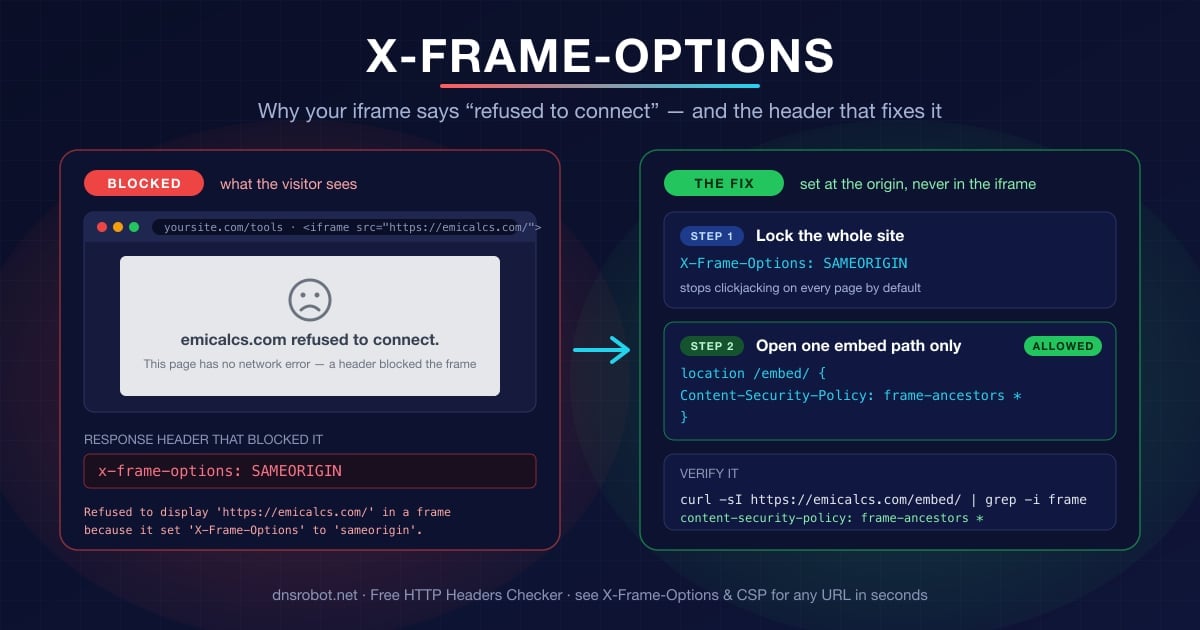
You add an <iframe> pointing at another site, reload, and instead of the page you get a grey box with a sad-face icon and the words example.com refused to connect. Your first instinct is a network problem, because that is exactly what Chrome shows for a dead server. But open DevTools and the console tells a different story:
Refused to display 'https://emicalcs.com/' in a frame because it set 'X-Frame-Options' to 'sameorigin'.Nothing failed on the network. DNS resolved, the TCP connection opened, TLS completed, and the server returned a perfectly good 200. The browser downloaded the page, read one response header, and then deliberately refused to paint it inside your page. That header is X-Frame-Options, and it exists to stop clickjacking — an attack where a hostile page loads a login or payment form inside an invisible iframe and tricks visitors into clicking buttons they cannot see.
This matters for how you troubleshoot it. A real connection failure — ERR_CONNECTION_REFUSED when you open the URL directly in a tab — is a server or firewall problem, covered in ERR_CONNECTION_REFUSED. The iframe version only appears when the page is framed, and the same URL works fine in its own tab. If the site loads directly but not in your frame, you are looking at a framing policy, not an outage.
How X-Frame-Options Works
X-Frame-Options is an HTTP response header, standardised in RFC 7034 and supported by every browser since Internet Explorer 8. The server attaches it to a page; the browser reads it before rendering and decides whether the page may appear inside a <frame>, <iframe>, <embed> or <object> on another page.
It takes one of two values that still matter, plus one that does not:
| Value | Who may frame the page | Typical use |
|---|---|---|
DENY | Nobody — not even the same site | Login pages, admin panels, anything with a session |
SAMEORIGIN | Only pages on the exact same origin (scheme + host + port) | Sensible default for most sites; lets you frame your own pages |
ALLOW-FROM https://a.com | Obsolete — ignored by every modern browser | Do not use; see below |
The header applies per response, not per site. That is the detail most guides skip, and the one that makes the fix in this article possible: a server can send SAMEORIGIN on 99% of its pages and a different policy on the one path that is meant to be embedded.
Advertisement
DENY vs SAMEORIGIN: Which One Should You Send?
Send SAMEORIGIN unless you have a reason not to. It blocks every third-party frame while keeping your own site free to frame its own pages — help widgets, previews, dashboards that load other internal pages.
Send DENY on pages where framing has no legitimate purpose and the downside is severe: sign-in forms, payment pages, one-click actions such as “delete account”. DENY also covers a subtle case where an attacker manages to inject a frame into one of your own pages — with SAMEORIGIN, that injected frame would still be allowed.
Whichever you pick, set it once at the web-server or CDN level so it covers every response, including error pages and static assets. Headers set inside application code tend to miss the 404 page and the maintenance page, and those are exactly the pages an attacker will frame.
ALLOW-FROM Is Dead — Do Not Use It
Older articles still recommend X-Frame-Options: ALLOW-FROM https://partner.com to allow a single embedding site. It never worked in Chrome or Safari, and Firefox dropped it in version 70 (October 2019). Worse, a modern browser that sees ALLOW-FROM treats the whole header as invalid and ignores it completely, which leaves the page frameable by anyone — the opposite of what you intended.
If you need to allow specific sites, the answer is CSP frame-ancestors, covered next. X-Frame-Options only knows how to say “nobody” or “only me”.
frame-ancestors: The CSP Directive That Replaces It
Content Security Policy Level 2 introduced frame-ancestors, a directive that does everything X-Frame-Options does and adds the one thing it cannot: a real allow-list. It rides inside the standard Content-Security-Policy header and accepts one or more sources:
It checks every ancestor, not just the parent. If page A frames page B and B frames your page, both A and B must be allowed. That is stricter and more predictable than
X-Frame-Options, whose handling of nested frames varies between browsers.It only works as an HTTP header.
frame-ancestorsis explicitly ignored when CSP is delivered through a<meta http-equiv>tag — the browser has to know the policy before it decides whether to render the document at all. The same is true ofX-Frame-Options. Neither can be set from HTML.Wildcards are per-host, not global.
https://*.example.commatches any subdomain of one site; a bare*matches every origin on the internet. Fine for a calculator widget, wrong for anything that carries a session.
# Nobody may frame this (same as X-Frame-Options: DENY)
Content-Security-Policy: frame-ancestors 'none'

# Only my own origin (same as SAMEORIGIN)
Content-Security-Policy: frame-ancestors 'self'

# My origin plus two named partners, one with a subdomain wildcard
Content-Security-Policy: frame-ancestors 'self' https://partner.example https://*.trusted.example

# Anyone may frame this — for a public embed endpoint only
Content-Security-Policy: frame-ancestors *
Three details are worth knowing before you switch:
What Happens When Both Headers Are Set
Most sites end up sending both during a migration, and the precedence is defined: if `frame-ancestors` is present, the browser enforces it and ignores `X-Frame-Options`. The CSP Level 2 specification says so outright, and Chrome, Firefox, Safari and Edge all follow it.
That makes the safe migration path simple. Keep X-Frame-Options: SAMEORIGIN for the handful of ancient clients that predate CSP 2, add Content-Security-Policy: frame-ancestors 'self' alongside it, and every modern browser will use the CSP rule. The two only cause trouble if you make them say different things — X-Frame-Options: DENY next to frame-ancestors *, say — in which case modern browsers allow framing and only very old ones block it. Keep them consistent and there is nothing to debug.
Step 1: Find the Header That Is Blocking You
Before changing anything, confirm which policy is in play. The browser console already told you the header name; curl shows you the exact value the server sends. This example uses the site from the worked example further down — its main pages are deliberately locked:
`x-frame-options: SAMEORIGIN` or `DENY` — the classic framing policy. Only a change on that server can lift it.
`content-security-policy: … frame-ancestors …` — a CSP policy. Read the source list; if your origin is not in it, you are blocked. The directive is often buried in a long CSP header alongside
script-srcand friends, so read the whole value.Neither header — the page is frameable, and “refused to connect” has another cause: a redirect to a login page that *is* locked, or the page’s own JavaScript running a frame-buster that navigates the top window.
curl -sI https://emicalcs.com/ | grep -i -E 'x-frame-options|content-security-policy'

# Output:
# x-frame-options: SAMEORIGINOne of three things comes back:
Advertisement
Step 2: Decide Who Should Be Allowed to Frame the Page
Everything from here on depends on one question: do you control the site being framed?
If you do not, stop here. There is no client-side workaround — not a sandbox attribute, not a different src, not a browser flag your visitors will have. The site owner decided their page should not be embedded, and the browser is enforcing that decision on their behalf. Your options are to link to the page instead, to ask the owner whether they provide an embed endpoint, or to use an official widget if one exists. Many services that lock their main site do offer one; the example in the next section shows what that looks like.
If you do control it, resist the temptation to remove the header site-wide. That reopens clickjacking on every page — including the ones with sessions and forms — to fix an embed on one. Instead, decide which specific paths are meant to be framed, and by whom:
| Situation | Header to send on that path |
|---|---|
| Internal tool framed by your own dashboard | frame-ancestors 'self' (plus X-Frame-Options: SAMEORIGIN) |
| Widget embedded by a few known partners | frame-ancestors 'self' https://partner-a.com https://partner-b.com |
| Public embeddable widget (calculator, map, player) | frame-ancestors * on the embed path only |
| Everything else | frame-ancestors 'self' plus X-Frame-Options: SAMEORIGIN |
The Right Pattern: Lock the Site, Open One Embed Path
The cleanest real-world example of this pattern I have come across is EMICalcs, a free collection of 44 Indian finance calculators — loan EMI, SIP, income tax, GST and so on — that other sites are invited to embed. The main site is locked; a dedicated /embed/ path is open. Compare the headers on the two:
# The calculator page a visitor normally uses — locked
curl -sI https://emicalcs.com/income-tax-calculator/ | grep -i -E 'x-frame|frame-ancestors'
# x-frame-options: SAMEORIGIN

# The same calculator on its embed path — open to any site
curl -sI https://emicalcs.com/embed/income-tax-calculator/ | grep -i -E 'x-frame|frame-ancestors'
# content-security-policy: frame-ancestors *Notice what the embed response does not contain: there is no X-Frame-Options header at all on /embed/. That is deliberate. Because the CSP directive takes precedence, leaving SAMEORIGIN in place would be harmless in modern browsers — but it would confuse the next engineer who reads the headers, and it would still block the few old clients that only understand X-Frame-Options. The embed path sends one policy, and it says exactly one thing.
Everything else on the site keeps SAMEORIGIN, so the homepage, the article pages and the full calculator pages stay protected from clickjacking. The embed versions are stripped-down documents with no navigation and nothing worth hijacking, which is why opening them to * is a reasonable trade.
Their embed guide is worth reading as a template if you are publishing a widget of your own: one stable URL per calculator, a fixed height that fits most of them, loading="lazy" in the snippet, and a promise that retired embed URLs will redirect rather than 404 — because every site that embeds you is trusting your URL to keep working.
Advertisement
Nginx (and the add_header Trap)
Here is the same pattern in the three places most sites set headers. In each case a site-wide rule locks everything and a narrower rule overrides it for the embed path. Nginx first, because it has a trap:
# Site-wide default (server block)
add_header X-Frame-Options "SAMEORIGIN" always;
add_header Content-Security-Policy "frame-ancestors 'self'" always;
add_header X-Content-Type-Options "nosniff" always;

location /embed/ {
    # WARNING: any add_header here stops ALL add_header inheritance from the
    # server block — re-declare every header you still want on this path.
    add_header Content-Security-Policy "frame-ancestors *" always;
    add_header X-Content-Type-Options "nosniff" always;
}The comment is not optional reading. add_header is not merged across levels: the moment a location block declares any add_header, it stops inheriting every add_header from the server block. Teams routinely lose their HSTS or nosniff headers on the embed path this way and only find out in a security scan months later. Re-declare what you need, and leave X-Frame-Options out of the embed block so the path sends one clear policy.
Apache
Apache’s Header directive merges across scopes, so you can set the default once and only touch the two headers that change on the embed path:
# Site-wide default (needs mod_headers)
Header always set X-Frame-Options "SAMEORIGIN"
Header always set Content-Security-Policy "frame-ancestors 'self'"

<LocationMatch "^/embed/">
    Header always unset X-Frame-Options
    Header always set Content-Security-Policy "frame-ancestors *"
</LocationMatch>
Next.js and Express
In Next.js, headers are declared in next.config.js. When two rules match the same path and set the same header, the later rule wins — but a header set only by the earlier rule still applies. To keep X-Frame-Options off the embed path entirely, exclude it from the site-wide rule with a negative lookahead:
// next.config.js
module.exports = {
  async headers() {
    return [
      {
        // Every path EXCEPT /embed/... gets the locked defaults
        source: '/((?!embed/).*)',
        headers: [
          { key: 'X-Frame-Options', value: 'SAMEORIGIN' },
          { key: 'Content-Security-Policy', value: "frame-ancestors 'self'" },
        ],
      },
      {
        source: '/embed/:path*',
        headers: [
          { key: 'Content-Security-Policy', value: 'frame-ancestors *' },
        ],
      },
    ]
  },
}
On Express, the popular helmet middleware already sends X-Frame-Options: SAMEORIGIN and a CSP that includes frame-ancestors 'self' by default. Mount it globally, then on the embed router call res.removeHeader('X-Frame-Options') and set Content-Security-Policy to frame-ancestors * before rendering. The order matters: your override has to run after helmet, or helmet will overwrite it.
Embedding a Third-Party Widget the Safe Way
Now the other side of the fence: you are the site doing the embedding, the provider has an open embed path, and you want the frame to behave. A widget snippet done well looks like this — it is the one EMICalcs publishes on each calculator page, and every attribute is doing a job:
`title` — names the frame for screen readers. Without it, assistive technology announces “frame” and nothing else, and accessibility audits fail the page.
`width="100%"` with a `max-width` in `style` — fills narrow columns on mobile without overflowing wide ones on desktop.
A fixed `height` — the embedding page cannot read a cross-origin frame’s content height, so a hard-coded value is the only way to avoid layout shift while it loads. Set it once per widget.
`loading="lazy"` — defers the request until the frame scrolls near the viewport, so a widget at the bottom of a long article costs nothing on initial load.
`border:0; border-radius; overflow:hidden` — removes the default inset border and clips the corners so the widget looks native to your page.
<iframe src="https://emicalcs.com/embed/income-tax-calculator/"
        title="Income Tax Calculator FY 2026-27 — EMICalcs"
        width="100%" height="760"
        style="max-width:680px;border:0;border-radius:16px;overflow:hidden"
        loading="lazy"></iframe>
<p>Free <a href="https://emicalcs.com/income-tax-calculator/" target="_blank" rel="noopener">Income Tax Calculator FY 2026-27</a> by EMICalcs</p>
The credit line sits deliberately *outside* the iframe. Anything inside the frame belongs to the framed document — its links are the provider’s links, on the provider’s URL — so a link inside the frame is not part of your page as far as your readers or a search engine crawler are concerned. If you want to credit the source, or the provider asks you to, put a plain paragraph next to the frame in your own HTML, as above.
sandbox: What to Allow for a Calculator Widget
The sandbox attribute is the embedder’s own protection. Add it with no value and the framed page gets nothing: no scripts, no forms, no pop-ups, no navigating your window, and an opaque origin that disables its own cookies and storage. Then add back only what the widget needs:
<iframe src="https://emicalcs.com/embed/loan-emi-calculator/"
        sandbox="allow-scripts allow-forms allow-same-origin allow-popups"
        title="Loan EMI Calculator — EMICalcs"
width="100%" height="760" loading="lazy"></iframe>allow-scripts and allow-forms are the minimum for anything interactive. allow-same-origin lets the framed page keep its own origin so its storage and cookies work — on a cross-origin embed this is safe, because “its origin” is still the provider’s, not yours. allow-popups is only needed if the widget opens links in a new tab, as the credit link inside the EMICalcs embed does.
What you should not do is combine allow-scripts with allow-same-origin on a frame that points at your own origin. The framed script can then reach up and remove its own sandbox attribute, and you have sandboxed nothing.
Why There Is No Fix on the Embedding Side
A search for “refused to connect iframe” turns up three popular workarounds. All of them are bad, and it helps to know exactly why.
Browser extensions that strip `X-Frame-Options` — they only work in your own browser. Every visitor to your site still sees the grey box, and you have switched off clickjacking protection on every site you visit in the meantime.
Proxying the page through your own server — you fetch the third-party HTML server-side and serve it from your origin, so the header never reaches the browser. This breaks relative links, cookies, logins and anything script-driven; it puts you on the hook for their content; and it usually violates the provider’s terms. Sites that catch you doing it block your server’s IP.
Screenshot or “web-to-image” services — you get a static picture, not a working page. Fine for a preview thumbnail, useless for a calculator.
The header is a statement by the site owner, enforced by the browser, about what may happen to their page. The only legitimate ways through are the two already covered: the owner opens an embed path, or you link out. Providers that want to be embedded make it easy — the good ones publish a snippet, keep the URL stable and open only the path that is safe to open.
Advertisement
Verify the Headers After Every Change
Framing headers get set in a config file and then forgotten, and a CDN, a reverse proxy or a well-meaning security plugin can add, strip or duplicate them at any time. After deploying, check from outside your network:
# The locked pages should show SAMEORIGIN and/or frame-ancestors 'self'
curl -sI https://example.com/ | grep -i -E 'x-frame-options|content-security-policy'

# The embed path should show ONLY frame-ancestors, with the sources you intended
curl -sI https://example.com/embed/widget/ | grep -i -E 'x-frame-options|content-security-policy'

# Error pages count too — attackers frame those as well
curl -sI https://example.com/this-does-not-exist | grep -i -E 'x-frame-options|content-security-policy'Then test it the way a browser does: put the embed URL in an <iframe> on a page served from a *different* origin — a local file:// page will not do, since browsers treat it specially — and open the console. A clean load means no Refused to display or Refused to frame line.
If the site sits behind Cloudflare or another CDN, the headers you see with curl from your laptop can differ from what the CDN serves elsewhere, or from what a cached copy carries. The HTTP headers checker fetches from a neutral vantage point and lists X-Frame-Options and Content-Security-Policy explicitly, with a note on whether each is present — a quick way to catch a CDN rule that quietly re-added SAMEORIGIN to your embed path.
Symptom → Cause → Fix
Use this to jump straight to the fix instead of re-reading the whole guide:
| What you see | What it means | Fix |
|---|---|---|
| Grey box “refused to connect”, but the URL loads in a tab | X-Frame-Options or frame-ancestors blocked the frame | Only the site owner can change it — use their embed path or link out |
Console: Refused to display … 'X-Frame-Options' to 'sameorigin' | Classic header; only same-origin frames allowed | On the framed site, open the embed path with frame-ancestors * or a partner list |
Console: Refused to frame … violates … frame-ancestors | CSP allow-list does not include your origin | Add your origin to the framed site’s frame-ancestors sources |
| Worked yesterday, broken today, no code change | CDN or security plugin started injecting SAMEORIGIN | Check with curl; exclude the embed path in the CDN or plugin rule |
| Your own dashboard cannot frame your own page | Subdomain or scheme mismatch (www vs apex, http vs https) | Use frame-ancestors 'self' https://*.example.com |
Embed works, but HSTS or nosniff vanished on that path | Nginx add_header inheritance dropped them | Re-declare every header inside the location block |
ERR_CONNECTION_REFUSED when opening the URL directly | A real network failure, not a framing policy | See ERR_CONNECTION_REFUSED and the port checker |
If the URL fails in its own tab too, the frame is a red herring. Walk the network layers in order — DNS, port, TLS, headers — with the public endpoint testing guide before touching any framing headers.
See every security header a URL sends
Check X-Frame-Options, Content-Security-Policy, HSTS and the rest for any page — fetched server-side, so a CDN, a proxy or a browser extension cannot mask the real response. Free, no signup.
Dene HTTP Headers CheckerAdvertisement
Frequently Asked Questions
Functionally it has been superseded by the CSP frame-ancestors directive, which browsers prioritise whenever both headers are present. It is not useless, though: every current browser still honours X-Frame-Options when frame-ancestors is absent, and it protects the small number of old clients that predate CSP Level 2. The practical advice is to send both and keep them consistent — SAMEORIGIN alongside frame-ancestors 'self'.