Content Calendar Template: Free Layout, Columns and a 30-Day Example
Advertisement
What Is a Content Calendar Template?
A content calendar template is a reusable table for planning and tracking every piece of content you publish: blog posts, videos, social posts, newsletters, podcasts. For each item it records what it is, which channel it goes to, who owns it, when it publishes, and what stage it is at. Everything else is optional.
The value is not the spreadsheet. The value is that a written plan changes behaviour. In the Content Marketing Institute's latest B2B Content and Marketing Trends research, marketers whose content strategy became more effective most often credited refining the strategy itself (74%), well ahead of adopting new technology (51%). A calendar is where that refinement becomes visible: it exposes the empty weeks, bottlenecks and ownerless pieces that an undocumented plan hides.
This page gives you a free content calendar template with the exact columns, what each column is for, a filled 30-day example, and a 45-minute routine for planning a month. Copy the table into Google Sheets, Excel, Notion or Airtable. It works unchanged in all four.
The Free Content Calendar Template
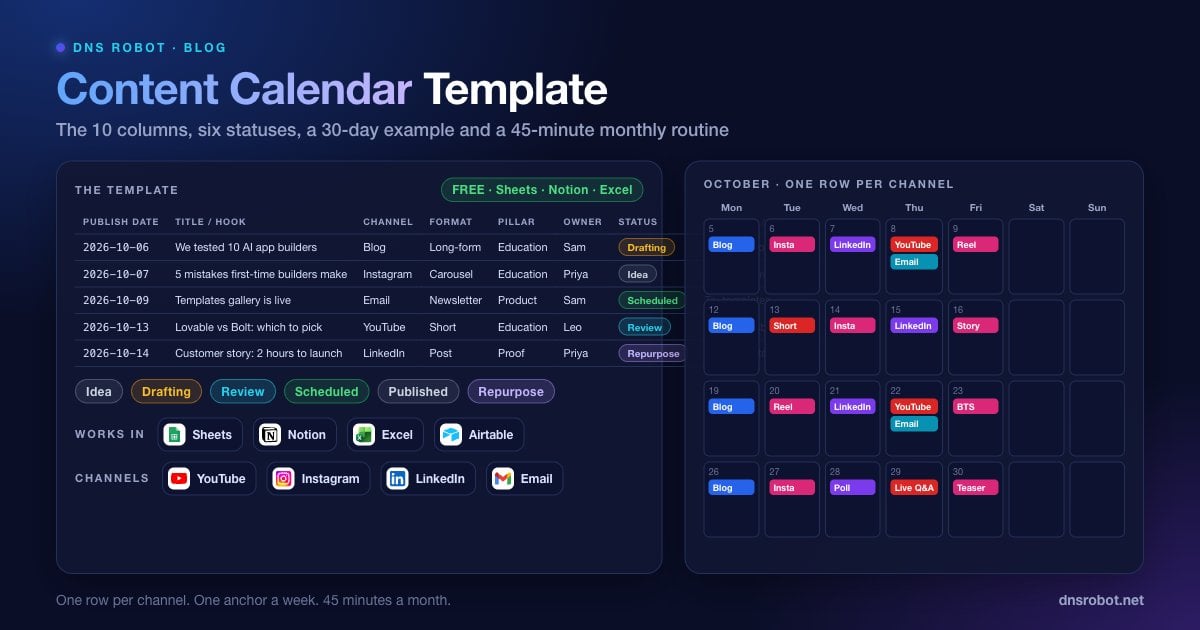
Ten columns is the sweet spot. Fewer and you lose the ability to filter by channel or status. More and people stop filling it in. Three example rows show how a single blog post turns into three calendar entries.
| Publish date | Title / hook | Channel | Format | Pillar | Owner | Status | Keyword or CTA | Asset link | Notes |
|---|---|---|---|---|---|---|---|---|---|
| 2026-10-05 | We tested 10 AI app builders so you do not have to | Blog | Long-form | Education | Sam | Drafting | best vibe coding tools | docs/ai-builders | Needs comparison table |
| 2026-10-06 | 5 mistakes first-time app builders make | Carousel | Education | Priya | Idea | Save + share | Cut from the blog post | ||
| 2026-10-08 | Which AI app builder should you pick? | Newsletter | Education | Sam | Scheduled | Read the comparison | Links to the blog post; send 9am local time |
Publish date,Title / hook,Channel,Format,Pillar,Owner,Status,Keyword or CTA,Asset link,NotesIf you prefer to start from a file rather than a table, paste the header row below into an empty sheet and turn on filters. That is the whole setup.
Advertisement
What Each Column Is For
Each column earns its place by answering a question someone will actually ask. If nobody on your team would ever filter or sort by a column, delete it.
Publish date. The day it goes live, not the day you write it. Sort by this column and the sheet becomes your schedule.
Title or hook. A working title for long content, the opening line for social. It should be good enough to publish; "blog post 3" is not a title.
Channel. One channel per row. If a blog post becomes a carousel and a newsletter, that is three rows. This is the most important rule on the page and the one most templates get wrong, because it is what lets you see at a glance that Instagram has nothing planned next week.
Format. Long-form, short-form video, carousel, story, thread, newsletter, webinar, podcast. It helps you balance the mix.
Pillar. The three to five themes your brand talks about. Every row gets exactly one. If a piece does not fit a pillar, either the pillars are wrong or the piece is.
Owner. One name. Not a team.
Status. One of the six stages in the next section, and nothing else.
Keyword or CTA. For search content, the target keyword. For social and email, the action you want: save, share, click, reply, buy.
Asset link. Where the draft, design file or video lives. One link.
Notes. Anything else: dependencies, approvals, "waiting on legal".
The Six Statuses
Status columns fail when they have too many options. Six is enough to run a team of any size, and the sixth is the one most calendars lack.
| Status | Meaning | Who moves it on |
|---|---|---|
| Idea | Approved topic, nothing written | Owner, when drafting starts |
| Drafting | Being written or produced | Owner, when a complete draft exists |
| Review | Waiting on a named reviewer | Reviewer, within two working days |
| Scheduled | Final, loaded in the publishing tool with a date | Publishing tool or owner on publish day |
| Published | Live, with the final URL in the asset link column | Nobody; it is done |
| Repurpose | Performed well, should be reshaped for another channel | Whoever plans next month |
Repurpose is a parked state, not a stage in the pipeline. Once a month, filter to it and turn each row into new Idea rows on other channels. Your best-performing post from March is worth three new pieces in June.
Advertisement
Content Calendar Example: A Filled 30-Day Month
This example is for a small software company posting to a blog, YouTube, Instagram, LinkedIn and an email list. Adjust the channels to yours; the rhythm is the point. One anchor piece a week, cut into three to five smaller pieces, with email every other week. That is about two dozen rows in the sheet and roughly four hours of original work per week.
| Week | Blog (Mon) | YouTube | |||
|---|---|---|---|---|---|
| 1 | Pillar guide | Tutorial cut from the guide (Thu) | Carousel: 5 takeaways (Tue); Reel: 1 tip (Fri) | Founder post on why we wrote it (Wed) | Newsletter linking the guide (Thu) |
| 2 | Comparison post | Short: the one-minute version (Tue) | Carousel: the comparison table (Wed); Story poll (Fri) | Reshare with a hot take (Thu) | None |
| 3 | Customer story | Interview clip (Thu) | Reel: customer quote (Tue); Behind the scenes (Fri) | Customer story with tag (Wed) | Newsletter: story + product update (Thu) |
| 4 | Roundup or FAQ post | Live Q&A (Thu) | Carousel: FAQ answers (Tue); Reel: next month teaser (Fri) | Poll on next month's topic (Wed) | None |
How to Make a Content Calendar in 45 Minutes
Block 45 minutes on the last Friday of each month. By the third month the routine usually takes closer to 25.
Advertisement
Minutes 1 to 10: List the Anchors
Write four anchor pieces, one per week, each tied to a pillar. If you are stuck, use the four types from the example: a guide, a comparison, a story and an FAQ. Enter them as four rows with the blog channel and Monday dates.
Minutes 11 to 20: Cut Each Anchor
For every anchor, add three derivative rows: one video, one social carousel or reel, one email or LinkedIn post. You now have 16 rows, and most channels already have something every week without a single original idea required.
Minutes 21 to 30: Fill the Gaps
Filter by each channel in turn. Any channel with a week of nothing gets one quick-format row: a poll, a single tip, a repost of an evergreen piece. Aim for 24 to 30 rows in total. More than that and the plan will not survive contact with reality.
Minutes 31 to 40: Assign and Date
Put an owner and a publish date on every row. Anchors publish Monday. Derivatives spread Tuesday to Friday. Email goes out Thursday morning in your audience's main time zone.
Minutes 41 to 45: Set Statuses and Sort
Everything starts as Idea except anchors already in progress. Sort by publish date. Done. The sheet is now the plan, and the plan is visible to everyone.
Where to Keep Your Content Calendar: Sheets, Notion, Excel or Airtable
The template is tool-agnostic. Where you keep it depends on where your drafts already live and how many people need to see it.
| Tool | Best when | Setup tip |
|---|---|---|
| Google Sheets | You want the fastest, free, shareable default | Add a second tab listing pillars, channels and statuses, then use data validation so the dropdowns stay consistent |
| Notion | Your drafts already live in Notion | Make the calendar a database with a calendar view and a board view grouped by status; the ten columns map directly to properties |
| Airtable | You run more than one brand or team | Use linked records for owners and campaigns; the calendar view is the best of the four |
| Excel | Your company mandates it | Convert the range to a proper Excel table so filters and sorting persist |
| A custom app | You have outgrown spreadsheets | A content calendar is one of the easiest apps to build with an AI builder; see below |
If you have outgrown spreadsheets, a content calendar with logins, a month view and channel filters is one of the easiest apps to build with an AI builder. The vibe coding apps guide includes a ready prompt for exactly this, and the best vibe coding tools comparison helps you pick the builder.
Connecting the Calendar to Your Website
A calendar plans the publishing. It does not guarantee anyone finds the result. Four quick technical checks belong in the routine for every row with the blog channel, and each takes under five minutes.
First, the published URL goes into the asset link column, and that URL must be in your XML sitemap so search engines can discover it quickly instead of waiting to stumble on a link. Google's sitemap documentation notes that sitemaps help most on new or large sites and for pages that are not yet well linked, which describes most fresh posts. The Sitemap Generator crawls your site and shows what a sitemap for it looks like; compare it with the one your CMS emits and fix any post that is missing. Second, every campaign that sends traffic somewhere has a destination page, and that page belongs in the calendar too; what is a landing page explains what it needs. Third, if a post moves or its slug changes, the old URL must redirect, or the traffic you planned for it goes to a 404. The Redirect Checker shows the full chain and status codes for any URL. Fourth, run the live post through the Link Analyzer, which lists every link on the page with its status code, so a broken link or a missing link to the related post shows up before readers find it.
# Confirm a newly published post is in the sitemap
curl -s https://yoursite.com/sitemap.xml | grep -c "your-new-post-slug"
# 1 or more = present, 0 = missing (if sitemap.xml is an index, check the child sitemap)

# Show every redirect hop: expect one 301, then a 200
curl -sIL https://yoursite.com/old-slug | grep -iE "^(HTTP|location)"Advertisement
Mistakes That Kill Content Calendars
Most calendars die in week three. The causes are predictable, and every one of them is a process fix rather than a tool fix.
One row for all channels. A single row per piece hides the gaps. Use one row per channel per piece.
Planning more than five weeks out. The calendar becomes fiction and people stop trusting it. One month firm, one month rough, everything else in an ideas list.
Nobody owns Review. Content sits there for weeks. Give Review a named person and a two-day limit.
No repurpose loop. Your best post from three months ago is worth three new pieces. Use the Repurpose status and the Results column.
Ignoring the destination. A campaign that sends traffic to an unplanned, untested page wastes the content that drove it.
Too many columns on day one. Add persona, funnel stage or results only when you feel their absence, not before.
Make sure every post you schedule actually gets found
DNS Robot's free Sitemap Generator crawls your site and builds an XML sitemap you can compare against the one your CMS publishes. Any post in your content calendar that is missing from the sitemap is a post search engines may never see. No sign-up.
Dene Sitemap GeneratorAdvertisement
Content Calendar Template FAQ
At minimum: publish date, title, channel, format, content pillar, owner, status, and the keyword or call to action. Add an asset link and notes. Everything beyond that is optional and should be added only when you feel the need.