What Is a CMS Detector?
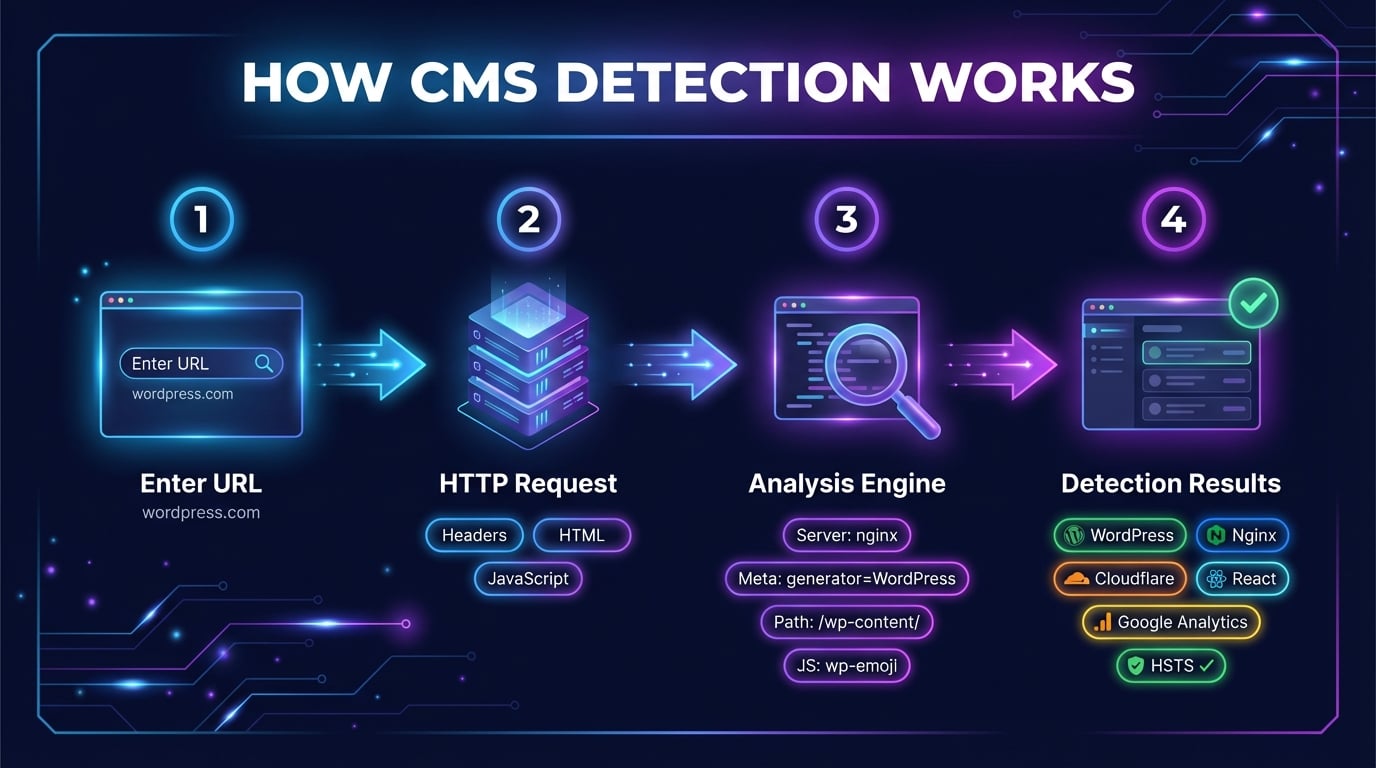
A CMS detector is a tool that analyzes a website to identify the content management system (CMS) and other technologies powering it. When you enter a URL, the tool sends an HTTP request and examines the response headers, HTML source code, JavaScript files, and meta tags to detect what CMS the website is built on.
Beyond CMS identification, our website technology checker reveals the complete technology stack: the web server software (Nginx, Apache, LiteSpeed), CDN provider (Cloudflare, Fastly, CloudFront), JavaScript frameworks (React, Next.js, Vue), analytics tools (Google Analytics, Meta Pixel), and security header configuration. This makes it a comprehensive alternative to paid tools like BuiltWith and browser extensions like Wappalyzer.
Whether you are researching competitors, planning a migration, or simply curious about what platform a website is built on, this free CMS detector gives you instant answers. No registration, no browser extension, no API key required — just enter a URL and get results in seconds.
How to Detect What CMS a Website Is Using
There are several ways to find out what CMS a website is using. Here are the three most common methods:
Method 1: Online CMS Detector Tool
The fastest approach. Enter the website URL in the CMS detector above and click "Detect." The tool sends an HTTP request, analyzes the response, and returns results in seconds. You will see the CMS platform, web server, CDN, frameworks, analytics tools, and security headers — all in one scan.
Method 2: HTML Source Code Inspection
Right-click on the website and select "View Page Source." Search for meta name="generator" tags — WordPress sites include content="WordPress 6.x", Joomla shows content="Joomla!", and Drupal includes content="Drupal". Also look for /wp-content/, /wp-includes/, or Shopify.theme in script and link tags.
Method 3: Browser Developer Tools
Open DevTools (F12) and go to the Network tab. Reload the page and click on the main document request. Check the Response Headers for Server, X-Powered-By, and X-Generator headers. You can also check all response headers using our HTTP Header Checker.
Advertisement
What Our CMS Detector Checks
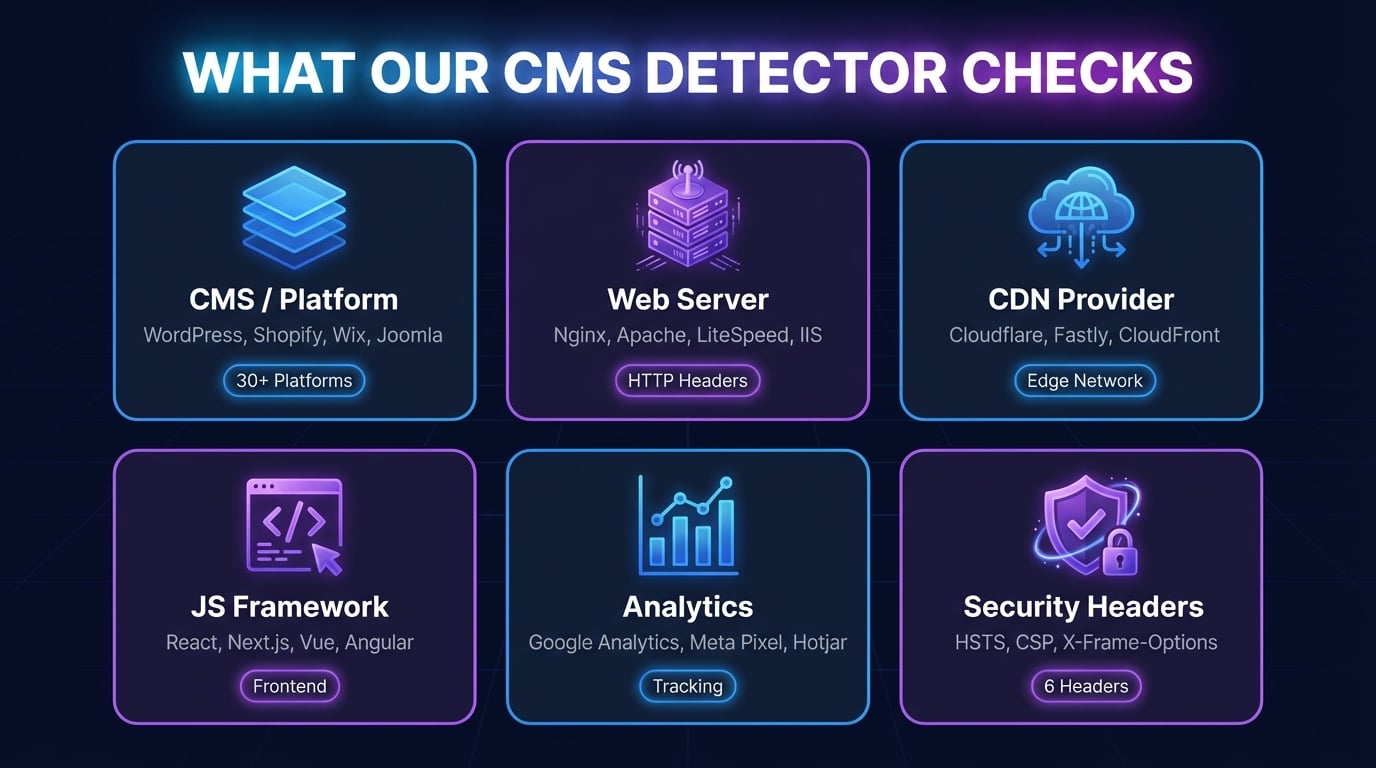
Our tool goes beyond basic CMS identification. It scans six categories of web technologies to give you a complete picture of any website's stack:
CMS / Platform
Identifies the content management system or website builder: WordPress, Shopify, Wix, Squarespace, Joomla, Drupal, Ghost, Webflow, Magento, and more. Detects via generator tags, script paths, and HTML patterns.
Web Server
Detects the web server software from the Server header: Nginx, Apache, LiteSpeed, Microsoft IIS, Cloudflare Server, Caddy, and others. Also identifies the HTTP protocol version (HTTP/1.1, HTTP/2, HTTP/3).
CDN Provider
Identifies content delivery networks from response headers and CNAME records: Cloudflare, Fastly, CloudFront (AWS), Akamai, Vercel Edge, Netlify, StackPath, and KeyCDN.
JavaScript Framework
Detects frontend frameworks and libraries from script tags and global variables: React, Next.js, Vue, Nuxt, Angular, Svelte, jQuery, Gatsby, Remix, and Astro.
Analytics & Tracking
Identifies analytics and marketing tools embedded in the page: Google Analytics (GA4, UA), Google Tag Manager, Meta Pixel, Hotjar, Mixpanel, Plausible, and Matomo.
Security Headers
Audits critical security headers: Strict-Transport-Security (HSTS), Content-Security-Policy (CSP), X-Frame-Options, X-Content-Type-Options, Referrer-Policy, and Permissions-Policy.
Popular CMS Platforms We Detect
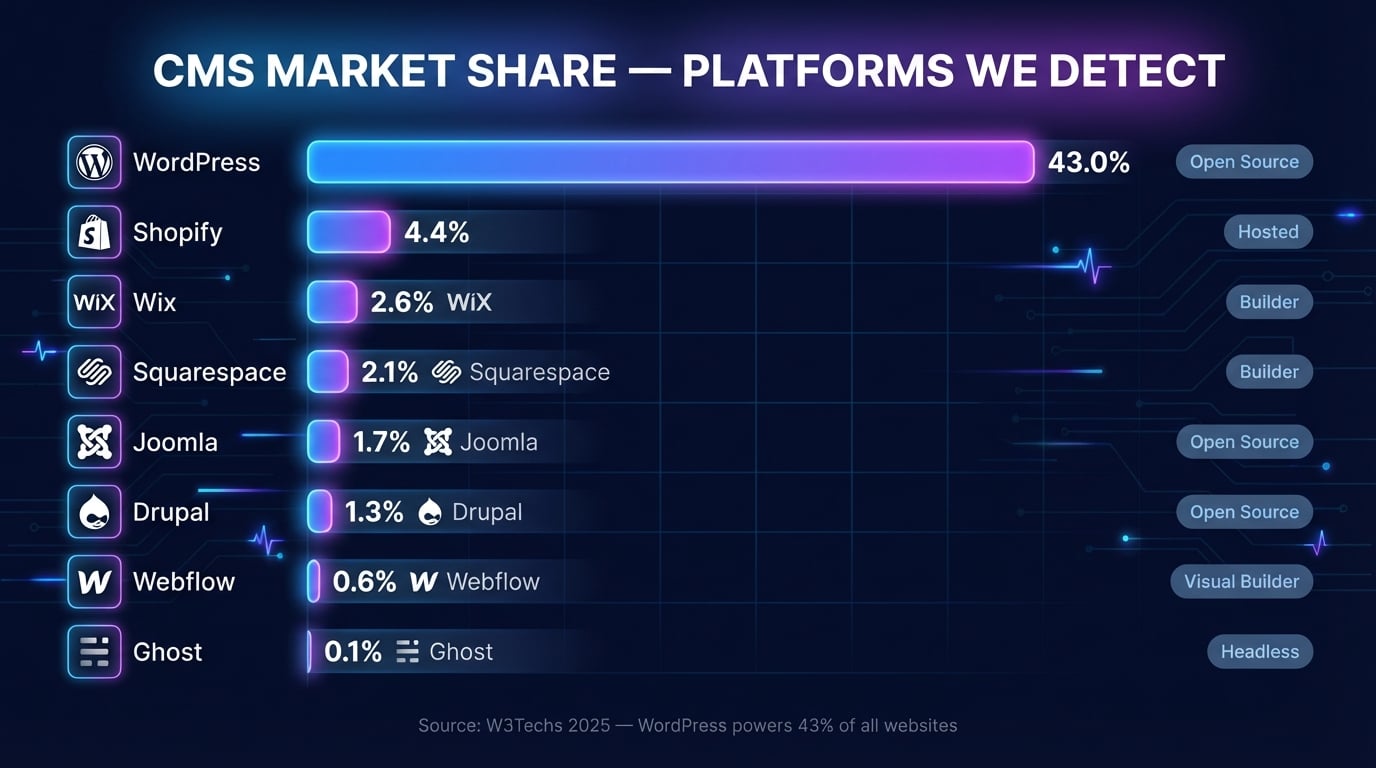
Our CMS detector identifies the most widely used content management systems and website builders. Here are the top platforms by global market share:
| CMS Platform | Market Share | Type | Detection Method |
|---|---|---|---|
| WordPress | 43% | Open-source CMS | Generator meta tag, /wp-content/ paths, wp-json API |
| Shopify | 4.4% | Hosted eCommerce | Shopify.theme global, cdn.shopify.com scripts |
| Wix | 2.6% | Website builder | X-Wix-* headers, wix.com script domains |
| Squarespace | 2.1% | Website builder | X-ServedBy header, squarespace.com assets |
| Joomla | 1.7% | Open-source CMS | Generator meta tag, /media/jui/ paths |
| Drupal | 1.3% | Open-source CMS | X-Generator/X-Drupal-* headers, Drupal.settings |
| Ghost | 0.1% | Headless CMS | X-Ghost-* headers, ghost/api paths |
| Webflow | 0.6% | Visual builder | X-Powered-By: Webflow, webflow.com assets |
Market share data based on W3Techs CMS usage statistics. Our tool detects these and many more platforms.
Advertisement
Why Check What CMS a Website Is Using?
There are many practical reasons to detect what CMS a website is built on. Here are six common use cases:
Competitive Analysis
Discover what technology stack your competitors use. If a competitor's site is fast and well-designed, knowing their CMS, CDN, and framework helps you understand their infrastructure choices and potentially adopt similar solutions.
Web Development Planning
When starting a new project, research sites similar to what you want to build. Identifying their CMS and technology stack helps you choose the right platform for your requirements, budget, and technical capabilities.
Security Research
Different CMS platforms have different vulnerability profiles. Identifying a site's CMS version helps security researchers check for known CVEs and assess the site's security posture alongside the security headers audit.
Migration Planning
Before migrating to a new platform, you need to know exactly what you are migrating from. A CMS detector reveals the current stack, plugins, and integrations that need to be replicated or replaced during migration.
Sales Prospecting
Digital agencies and SaaS companies use CMS detection to find potential customers. If you offer WordPress maintenance, knowing which businesses use WordPress lets you target your outreach more effectively.
SEO & Performance Analysis
Different CMS platforms handle technical SEO differently. Detecting the CMS helps you understand a site's SEO capabilities, page speed characteristics, and whether performance issues are platform-related.
CMS Detector vs BuiltWith vs Wappalyzer
Looking for a BuiltWith alternative or Wappalyzer alternative? Here is how our free CMS detector compares to the two most popular technology detection tools:
DNS Robot CMS DetectorFree
- 100% free, no limits
- No registration required
- No browser extension needed
- Instant results in browser
- CMS, server, CDN, framework detection
- Security headers audit included
BuiltWith
- Free basic, paid for details ($295+/mo)
- Registration required for full data
- Works in browser (website)
- Deep historical technology data
- Massive technology database (100K+)
- Market share analytics
Wappalyzer
- Free browser extension
- Extension installation required
- Works per-page as you browse
- Real-time detection while browsing
- Large technology database
- API access (paid plans)
For quick CMS identification and a full technology stack overview, our CMS detector provides everything you need at no cost. BuiltWith excels at historical data and market analytics for enterprise users. Wappalyzer is ideal for developers who want passive detection while browsing.
Advertisement
Understanding CMS Detection Results
When the CMS detector scans a website, it checks multiple signals to identify each technology. Understanding how detection works helps you interpret the results:
Detection Signals
- HTTP Headers: Server, X-Powered-By, X-Generator, Via, X-Cache
- Meta Tags: generator, viewport patterns, theme-color
- Script Paths: /wp-content/, cdn.shopify.com, /sites/default/
- Global Variables: __NEXT_DATA__, Shopify.theme, Drupal.settings
- CSS Patterns: class naming conventions specific to each CMS
- Cookie Names: wp-settings, _shopify_*, JSESSIONID
Detection Limitations
- Hidden CMS: Some sites remove generator tags and customize headers
- Reverse Proxies: Nginx or Cloudflare may mask the origin server
- Custom Builds: Bespoke applications have no CMS signatures
- Headless CMS: Decoupled architectures may only show the frontend framework
- WAF Protection: Web application firewalls can strip revealing headers
- Version Detection: Exact version numbers are not always exposed
Even when a CMS is not detected, the results still reveal valuable information about the web server, CDN, and security configuration. Use the HTTP Header Checker for a detailed view of all response headers, or the SSL Checkerto inspect the site's certificate and TLS configuration.
"What CMS Is This?" — Answer It in One Click
The most common way people arrive here is with a single question about a site they admire (or compete with): what CMS is this website using? Paste the URL above and the CMS checker answers in a few seconds — WordPress, Shopify, Wix, Squarespace, Webflow, Drupal, Joomla, Ghost, and dozens more, alongside the web server, CDN, analytics, and framework stack. No signup, no browser extension, and no per-lookup limits like some WhatCMS-style services impose.
Detection quality depends on signals, not guesses: generator meta tags, asset paths (wp-content, cdn.shopify.com), response headers, and framework fingerprints, each labeled with a confidence level. Heavily customized sites or those behind aggressive bot protection can hide their stack — if a check comes back empty, the headers still tell a story, and the HTTP Header Checker lets you read it raw.
Advertisement
Related Tools
Complement your CMS detection with these free tools for website analysis and network diagnostics:
Inspect all HTTP response headers including security headers and caching policies.
Verify SSL certificate validity, expiration, chain, and TLS configuration.
Check all DNS records (A, AAAA, CNAME, MX, NS, TXT) for any domain.
Look up domain registration details, registrar, and expiration dates.
Trace HTTP redirect chains and verify 301/302 redirects.
Discover all subdomains of a domain using certificate transparency logs.
Test if specific ports are open on any server or IP address.
Find the IP address, hosting provider, and ASN of any website.
Find out who hosts any website: web host, CDN, email provider and registrar.
Frequently Asked Questions About CMS Detection
What is a CMS detector?
A CMS detector analyzes a website's HTTP headers, HTML source, and JavaScript to identify the content management system powering it. Our tool also detects web server, CDN, frameworks, analytics, and security headers — providing a complete technology stack overview.
How does CMS detection work?
The tool sends an HTTP request and examines multiple signals: Server and X-Powered-By headers, generator meta tags, JavaScript file paths, global variables, and CSS patterns. Each CMS leaves unique fingerprints that are matched against a database of 30+ platforms.
What CMS platforms can this tool detect?
We detect WordPress, Shopify, Wix, Squarespace, Joomla, Drupal, Ghost, Webflow, Magento, PrestaShop, BigCommerce, Hugo, Jekyll, Gatsby, Next.js, Nuxt, and more — plus web servers, CDNs, frameworks, and analytics tools.
Is this CMS detector free to use?
Yes, 100% free with no registration, no API key, and no usage limits. Enter any URL and get instant results. No browser extension or software installation required.
What is the difference between a CMS and a web framework?
A CMS (WordPress, Shopify) provides a complete content management interface for non-technical users. A framework (React, Next.js) provides building blocks for developers to create custom applications. Some platforms like Webflow blur the line between both.
How accurate is CMS detection?
Detection is highly accurate for popular platforms with distinct signatures. Accuracy may be lower for sites that actively hide their CMS, use custom-built platforms, or are behind strict WAFs. We check multiple signals to maximize accuracy.
Can I detect the CMS of any website?
You can check any publicly accessible website. Sites with custom-built platforms, hidden technology headers, or strict firewall rules may return limited results. The tool works best with standard CMS installations.
What else does this tool detect besides CMS?
Web server software (Nginx, Apache), CDN providers (Cloudflare, Fastly), JavaScript frameworks (React, Vue), analytics tools (Google Analytics, Meta Pixel), HTTP protocol version, and security headers (HSTS, CSP, X-Frame-Options).
How is this different from BuiltWith or Wappalyzer?
Our tool is completely free with no installation needed. BuiltWith requires paid plans for detailed data ($295+/mo). Wappalyzer requires a browser extension. For quick CMS identification and technology overview, our tool provides everything you need at no cost.
Why would I need to know what CMS a website uses?
Common use cases: competitive analysis, choosing a platform for a new project, security research (checking for known CMS vulnerabilities), migration planning, sales prospecting (targeting businesses on specific platforms), and SEO analysis.