What Is an HTTP Header Checker?
An HTTP header checker (also known as a server header checker) is a tool that sends an HTTP request to any URL and displays the response headers returned by the web server. These headers contain critical metadata about the server's configuration — including content type, caching policies, server software, compression settings, and most importantly, security headers that protect against common web attacks.
Our free HTTP header checker goes beyond simply listing headers. It performs a comprehensive security headers check, analyzing six critical security headers (HSTS, CSP, X-Frame-Options, X-Content-Type-Options, Referrer-Policy, and Permissions-Policy) and grading your site from A to F. Whether you're a developer debugging response issues, a security engineer auditing web applications, or a site owner checking SSL configuration alongside headers, this tool gives you instant, actionable results. For everything to configure beyond headers, from DNSSEC and HSTS to password hashing and dependency audits, read our web security best practices guide.
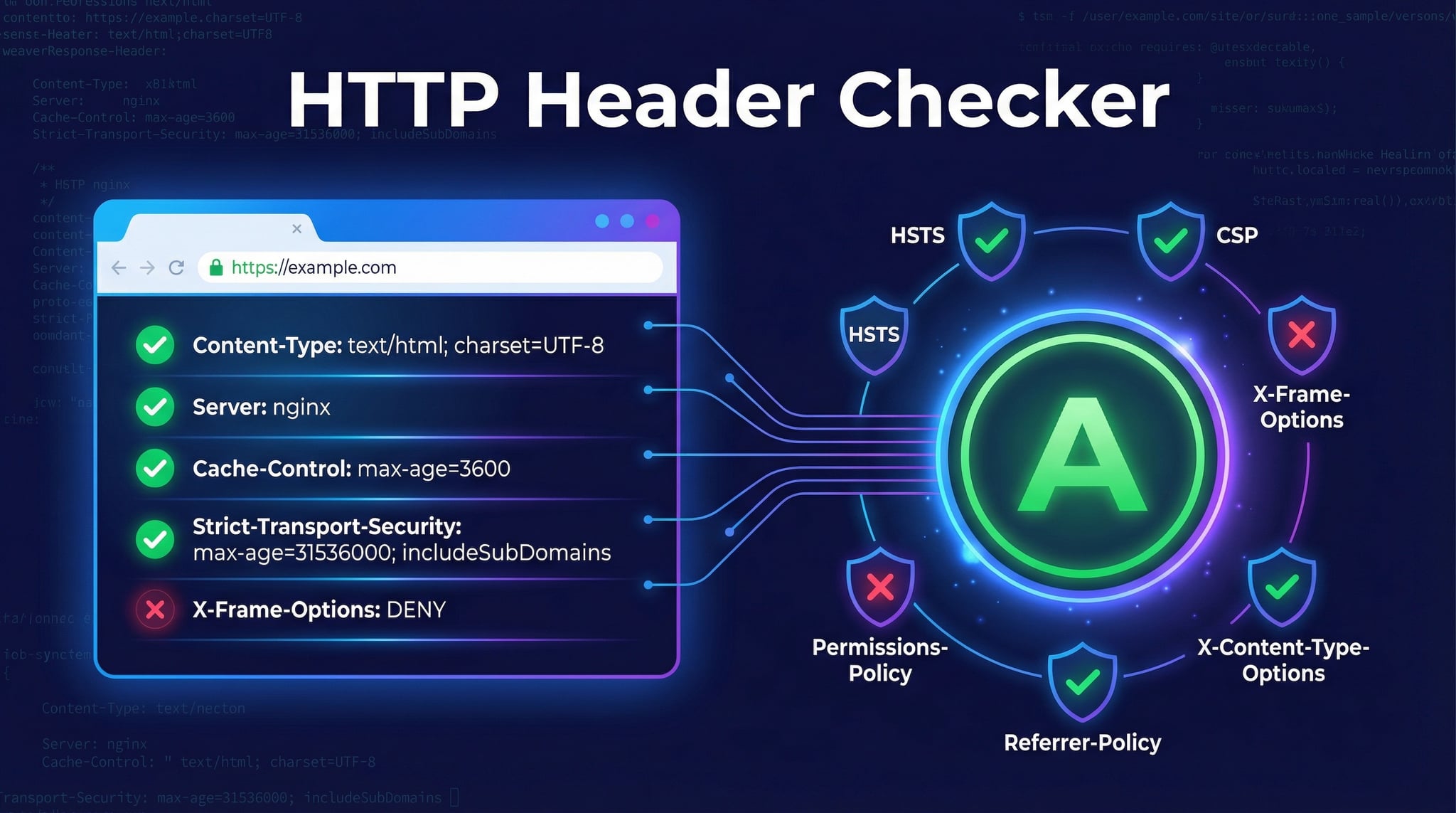
How the HTTP Header Checker Works
Our header checkerperforms a complete server header analysis in four steps, giving you a full picture of your site's HTTP configuration and security posture:
Enter any URL (e.g., https://example.com). The tool sends an HTTP GET request to the target server, following any redirects automatically.
All HTTP response headers are captured — including server type, content-type, cache-control, set-cookie, and every custom header the server returns.
Six critical security headers are evaluated with weighted scoring: HSTS (critical), CSP (critical), X-Frame-Options (high), X-Content-Type-Options (high), Referrer-Policy (medium), Permissions-Policy (medium).
A security grade (A-F) is calculated based on which headers are present and correctly configured. Each missing header gets a specific recommendation for implementation.
Advertisement
Critical Security Headers Explained
Security headers are the first line of defense for web applications. They instruct browsers on how to handle content securely, preventing common attacks without requiring changes to your application code. Our security headers check evaluates these six essential headers:
Forces all connections to use HTTPS, preventing SSL stripping and man-in-the-middle attacks. Include max-age=31536000; includeSubDomains; preload for maximum protection.
Controls which resources (scripts, styles, images) can load on your page. Prevents XSS and data injection attacks. Start with Content-Security-Policy-Report-Only to test before enforcing.
Prevents your site from being embedded in iframes, blocking clickjacking attacks. Set to DENY or SAMEORIGIN. Being superseded by CSP's frame-ancestors directive.
Prevents MIME-type sniffing by enforcing the declared content type. Always set to nosniff. Reduces risk of drive-by downloads and script execution from mistyped files.
Controls how much referrer information is sent when navigating away. Recommended value: strict-origin-when-cross-origin or no-referrer for maximum privacy.
Controls which browser features and APIs (camera, microphone, geolocation, payment) can be used on the page. Disable features you don't use to reduce attack surface.
Understanding the Security Header Grade
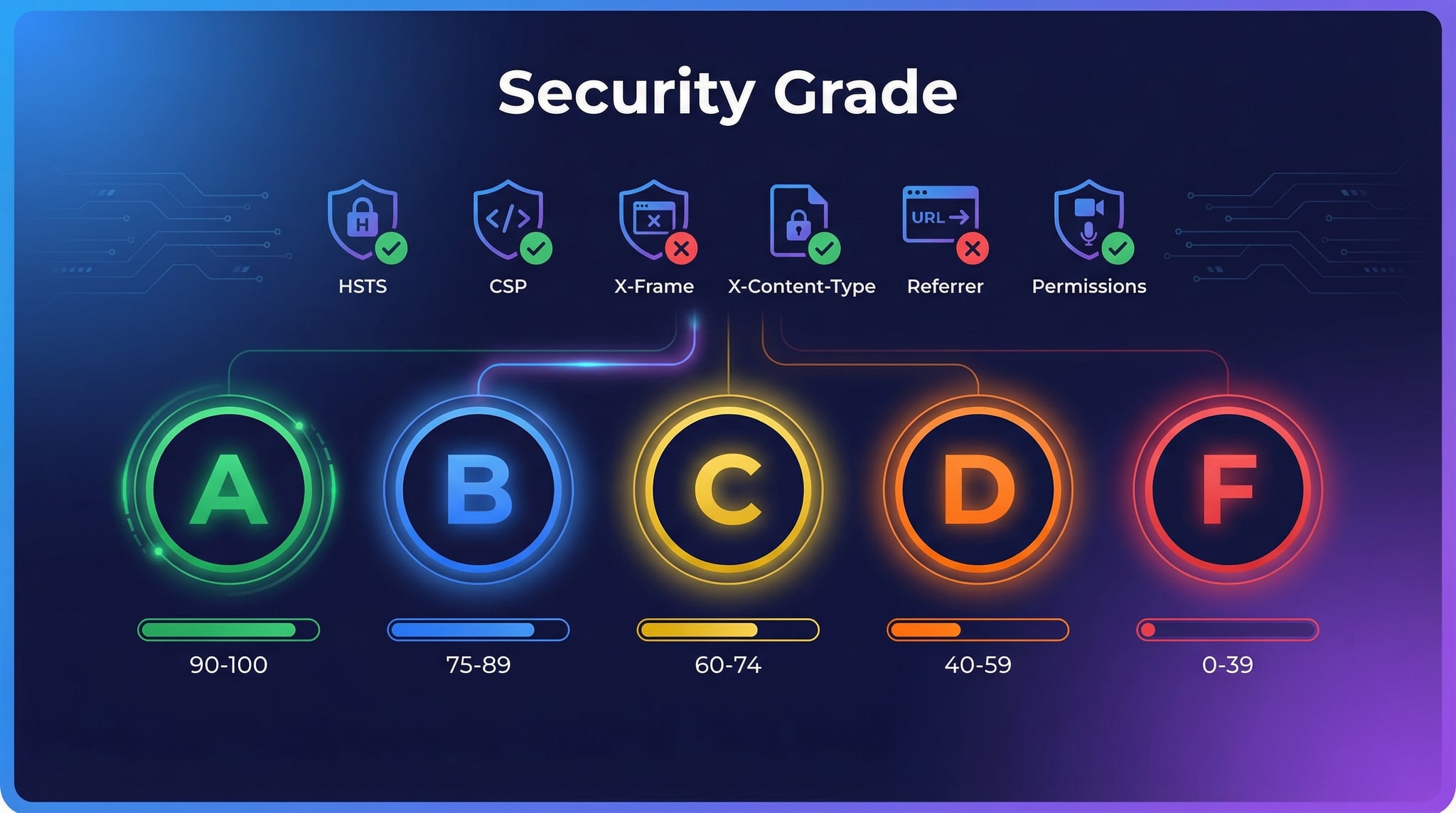
Our server header checker assigns a letter grade based on weighted scoring of six security headers. Critical headers (HSTS, CSP) carry the highest weight, followed by high-priority headers (X-Frame-Options, X-Content-Type-Options), and medium-priority headers (Referrer-Policy, Permissions-Policy).
Excellent — all major security headers configured
Good — minor gaps in coverage
Moderate — some headers missing
Weak — multiple headers missing
Poor — immediate action needed
Advertisement
Common HTTP Response Headers Reference
Beyond security headers, web servers return many other HTTP response headers that control caching, content delivery, authentication, and more. Understanding these headers is essential for debugging, performance optimization, and proper server configuration. Here are the most common headers you'll see when using our header checker:
Server & Content Headers
Content-TypeMIME type of the response body (e.g., text/html, application/json)Content-LengthSize of the response body in bytesContent-EncodingCompression algorithm used (gzip, br, deflate)ServerWeb server software (Apache, Nginx, Cloudflare)X-Powered-ByApplication framework (Express, PHP, ASP.NET)Caching & Performance Headers
Cache-ControlCaching directives (max-age, no-cache, no-store, public, private)ETagUnique identifier for a specific resource versionLast-ModifiedDate the resource was last changedExpiresDate after which the response is considered staleVaryHeaders used to determine cache variation (Accept-Encoding)Why Security Headers Matter
HTTP security headers form a defense-in-depth strategy that protects against a wide range of web attacks. Even if your application has a vulnerability, properly configured headers can prevent exploitation. Here's what they protect against:
Cross-Site Scripting (XSS)
CSP prevents unauthorized scripts from executing, even if an attacker injects malicious code into your page.
Clickjacking Attacks
X-Frame-Options and CSP frame-ancestors stop attackers from embedding your site in invisible iframes to trick users.
SSL Stripping / MITM
HSTS forces HTTPS connections, preventing downgrade attacks that intercept unencrypted HTTP traffic.
MIME-Type Sniffing
X-Content-Type-Options stops browsers from guessing content types, preventing drive-by download attacks.
Information Leakage
Referrer-Policy controls what URL information is shared when users navigate away from your site.
Feature Abuse
Permissions-Policy restricts access to sensitive browser APIs like camera, microphone, and geolocation.
Advertisement
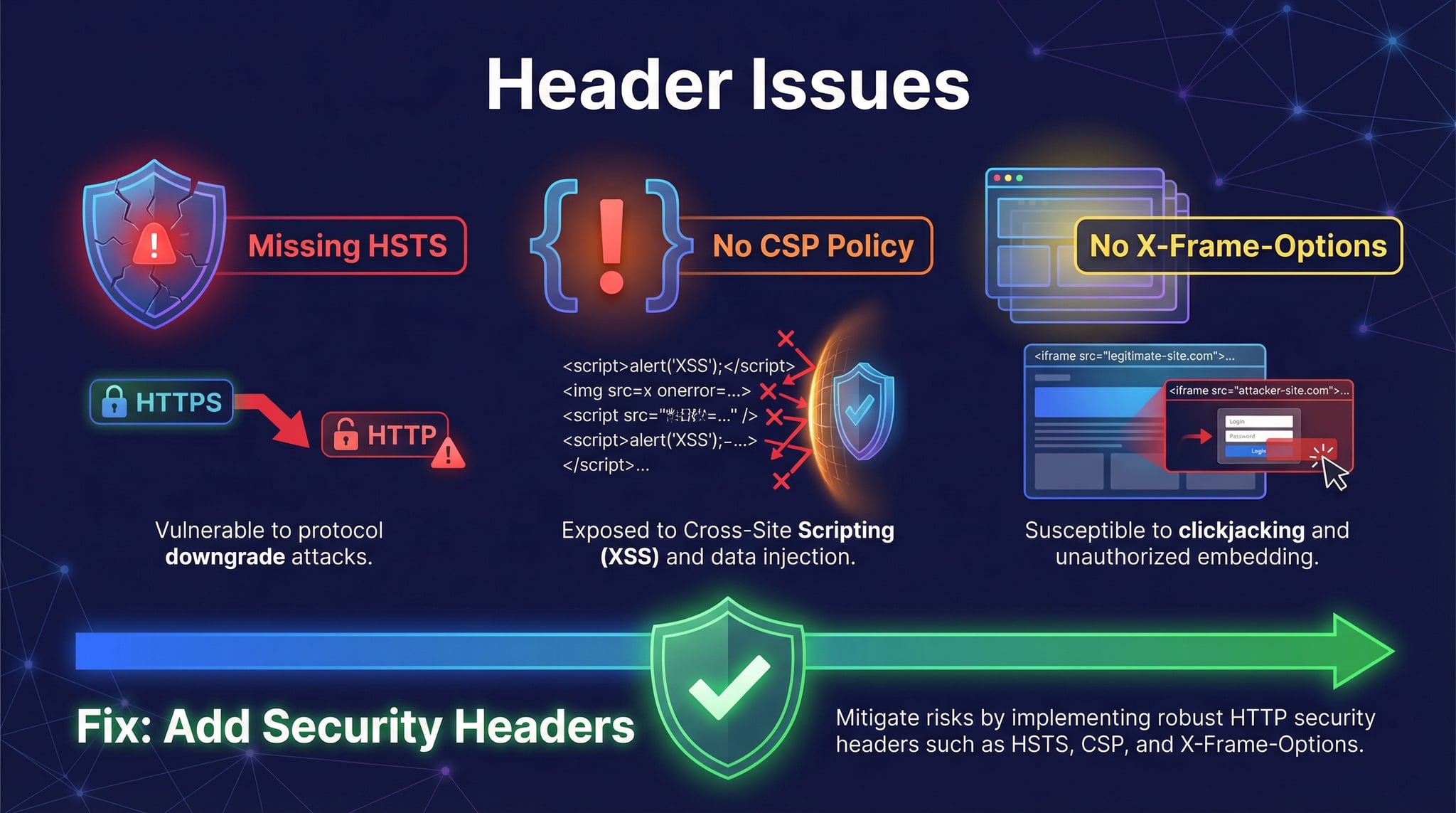
How to Add Security Headers to Your Website
After running our server header check and identifying missing headers, you can add them through your web server configuration, application framework, or CDN settings. Here are the most common methods:
Nginx Configuration
Apache (.htaccess)
Cloudflare (Transform Rules)
Cloudflare lets you add security headers via Transform Rules (HTTP Response Header Modification) or Page Rules without touching your origin server. This covers all cached and uncached responses globally.
Next.js / Vercel
Add headers in next.config.js using the headers() function, or deploy to Vercel with vercel.json headers configuration. Express.js apps can use the helmet middleware for one-line setup.
Related Network & Security Tools
Combine the HTTP header checker with these related tools for comprehensive web security and server analysis:
Advertisement
Frequently Asked Questions
Q.What is an HTTP header checker?
An HTTP header checker is a tool that sends a request to any URL and displays the HTTP response headers returned by the server. It shows metadata like content type, caching rules, server software, and security headers such as HSTS, CSP, and X-Frame-Options. Our tool also grades your security headers from A to F with specific recommendations.
Q.What are HTTP security headers?
HTTP security headers are directives sent by web servers that instruct browsers on how to handle content securely. Key security headers include Strict-Transport-Security (HSTS) which enforces HTTPS, Content-Security-Policy (CSP) which prevents XSS attacks, X-Frame-Options which blocks clickjacking, X-Content-Type-Options which prevents MIME sniffing, Referrer-Policy which controls referrer information, and Permissions-Policy which restricts browser APIs.
Q.What is the most important HTTP security header?
Content-Security-Policy (CSP) and Strict-Transport-Security (HSTS) are considered the two most critical security headers. CSP prevents cross-site scripting (XSS) attacks by controlling which resources can load on your page, while HSTS enforces HTTPS connections and prevents SSL stripping and man-in-the-middle attacks. Both carry the highest weight in our security grading system.
Q.How do I check server headers of a website?
You can check server headers using our free HTTP header checker by entering any URL. Alternatively, use command-line tools like 'curl -I https://example.com' to see response headers, or open browser developer tools (F12) and check the Network tab. Our online tool is the easiest method — it shows all headers, identifies the server software, and grades security headers automatically.
Q.What does the security header grade mean?
Our security header grading system evaluates six critical headers with weighted scoring. Grade A (90-100) means excellent security with all major headers configured. Grade B (75-89) indicates good security with minor gaps. Grade C (60-74) shows moderate protection needing improvement. Grade D (40-59) means weak security with multiple missing headers. Grade F (0-39) indicates poor security requiring immediate attention.
Q.What is Content-Security-Policy (CSP)?
Content-Security-Policy is an HTTP security header that controls which resources (scripts, styles, images, fonts, frames) can load on your web page. It prevents XSS attacks by blocking unauthorized script execution. A basic CSP might be: default-src 'self'; script-src 'self' https://cdn.example.com. Start with CSP in report-only mode to test before enforcing, as overly restrictive policies can break legitimate functionality.
Q.What is HSTS and why does it matter?
HSTS (HTTP Strict-Transport-Security) tells browsers to only connect to your site via HTTPS for a specified duration. It prevents SSL stripping attacks where an attacker downgrades HTTPS to HTTP to intercept traffic. A strong HSTS header looks like: max-age=31536000; includeSubDomains; preload. The preload directive allows submission to browser HSTS preload lists for maximum protection.
Q.How do I add security headers to my website?
Security headers can be added through: 1) Web server configuration — Apache (.htaccess or httpd.conf), Nginx (server block), IIS (web.config). 2) Application frameworks — Express.js (helmet middleware), Django (SecurityMiddleware), Next.js (next.config.js headers). 3) CDN/proxy settings — Cloudflare (Transform Rules), AWS CloudFront (response headers policy). 4) Hosting platforms — Vercel, Netlify, and similar platforms support custom headers in configuration files.
Q.Can security headers break my website?
Overly restrictive Content-Security-Policy can block legitimate scripts, styles, and resources, causing page functionality to break. To avoid this, start CSP in report-only mode (Content-Security-Policy-Report-Only) to identify violations before enforcing. Other security headers like HSTS, X-Frame-Options, X-Content-Type-Options, and Referrer-Policy are generally safe and rarely cause issues when configured correctly.
Q.Is this HTTP header checker free?
Yes, our HTTP header checker is completely free with no registration required. You can check unlimited URLs, view all response headers, get security header grading from A to F, and receive actionable recommendations — all without any cost or account creation.