Free Portfolio Website Templates: 15 Genuinely Free Options (2026)
Advertisement
What Genuinely Free Means for a Portfolio Template
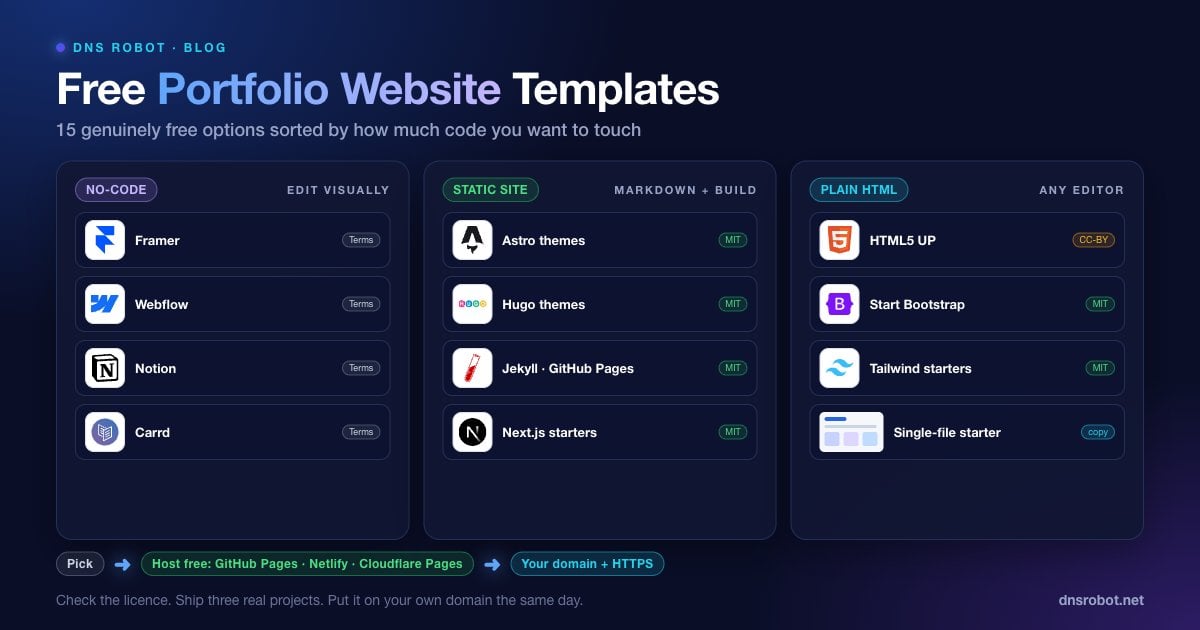
The best free portfolio website templates come from HTML5 UP and Start Bootstrap for plain HTML, the Astro, Hugo and Jekyll theme directories for static sites, and the free tiers of Framer, Webflow, Notion and Carrd for no-code. What separates them is the strings attached, and the strings matter more than the design. Some are free to download but need a paid plan to publish on your own domain. Some are free to use but demand a visible credit link. Some are free under an open licence and can be used, changed and hosted anywhere, with no condition beyond keeping a copyright or credit notice. Every template on this page is in the third group or clearly marked when it is not.
The licences to look for are MIT, Creative Commons Attribution 3.0 or 4.0, and Apache 2.0. All three allow commercial use and modification. CC-BY asks for attribution, which a line in the footer or the source satisfies. Templates labelled "free" on marketplaces without a stated licence are the ones to avoid; the terms usually appear at checkout.
This guide sorts fifteen options by how much code you want to touch, compares them in one table, and then covers what the template pages skip: hosting for free, connecting a domain, and making a template look like yours rather than like the demo.
How to Choose a Portfolio Template
Three questions narrow fifteen options to two.
Will you edit code? No: use the no-code group. A little, in Markdown files: the static-site group. Yes, HTML and CSS: the plain HTML group.
Is your work visual? Designers and photographers need image-led grids and a lightbox. Developers and writers need text-led layouts with clear project descriptions and links.
How often will it change? A site you update monthly wants a static-site generator with Markdown. A site you set once a year is fine as a single HTML file.
If you have not decided whether you want a portfolio at all or just your CV online, the resume website template is the simpler starting point. If you would rather describe the site and let a tool build it, can AI make my portfolio covers that route.
Advertisement
Free No-Code Portfolio Templates
Edit visually, publish from the tool. The free tiers host the site on a product subdomain; a custom domain usually needs the paid plan, which is the one cost to check.
1. Framer Free Portfolio Templates
Framer's template gallery has dozens of free portfolio designs with real animation and responsive layouts. Remix one, edit it in the visual editor and publish on the free plan to a framer.website subdomain, which carries a small "Made in Framer" badge. A custom domain needs the Basic plan or higher. Best for designers who want polish without code.
2. Webflow Free Portfolio Templates
Webflow's marketplace filters to free templates, including several clean portfolio layouts. The free Starter plan hosts on a webflow.io subdomain with a two-page limit and no custom domain, which is enough for a one-page portfolio you are testing. Best for people who want CMS-style project collections and may go professional with the tool later.
3. Notion Portfolio Templates
Notion's template gallery has free portfolio pages you duplicate into your workspace and publish with one toggle. The result is a fast, readable site that is easy to update from your phone. A custom domain needs Notion's paid custom-domain add-on or a third-party service such as Super. Best for writers, consultants and anyone whose work is documents rather than visuals.
4. Carrd Free One-Page Templates
Carrd is built for one-page sites and its free plan allows three of them on a carrd.co subdomain. The templates are minimal and load instantly. Custom domains and forms need the Pro Standard plan, which costs less for a whole year than most builders charge for a month. Best for a link-in-bio style portfolio with a headline, three projects and a contact button.
Free Static-Site Portfolio Templates
Fill Markdown files, run a build, get plain HTML you can host anywhere free. This is the sweet spot for developers, technical writers and anyone who updates the site regularly. The themes named below are MIT-licensed; check the licence file of anything else you pick.
Advertisement
5. Astro Portfolio Themes
Astro's official theme directory filters to free portfolio themes, including AstroWind, Astrofy and Astro Nano, all MIT-licensed. Astro ships zero JavaScript by default, which makes near-perfect Core Web Vitals scores easy to reach. Best for developers who want a modern toolchain and Markdown content.
6. Hugo Portfolio Themes
The Hugo themes site lists more than 300 free themes, with a portfolio tag that includes Hugo Profile, Toha and Hugo Creative Portfolio. Hugo builds thousands of pages in seconds and installs as a single binary. Best for people who want the fastest build and the least tooling.
7. Jekyll Themes on GitHub Pages
GitHub Pages builds Jekyll sites automatically, so a theme such as Minimal Mistakes (usable as a remote theme) or the built-in Minimal theme publishes from nothing but a repository. al-folio, popular with academics, ships a GitHub Actions workflow that builds and deploys it for you. Best for academics, researchers and anyone already on GitHub who wants almost no build setup.
8. Next.js Portfolio Starters
Vercel's template gallery includes free, MIT-licensed portfolio starters such as the Portfolio Starter Kit, built with Next.js, Tailwind CSS and MDX. It deploys in one click to Vercel's free Hobby plan, which is for personal, non-commercial use. Best for React developers who want the portfolio to double as a demonstration of their stack.
Free HTML Portfolio Templates
A folder of HTML, CSS and a few images. Edit in any text editor, upload anywhere, no build step. These are the most portable option and the easiest to hand to an AI tool for customisation.
9. HTML5 UP
HTML5 UP offers more than 40 responsive templates under the Creative Commons Attribution 3.0 licence, including portfolio-friendly layouts such as Miniport, Strata, Multiverse and Lens. Commercial use is allowed, and crediting HTML5 UP in the footer or source is the only condition. The designs are polished and widely used, which is the one drawback: visitors may have seen them before.
10. Start Bootstrap
Start Bootstrap publishes MIT-licensed Bootstrap 5 templates, including Resume, Freelancer and Grayscale, all portfolio-friendly. Clean code, easy to edit, and the Bootstrap grid means the layout survives your changes. Best for people who know a little HTML and want a safe, conventional layout.
11. Tailwind CSS Starters
The Tailwind community has many free portfolio starters on GitHub; search for "tailwind portfolio template" and sort by stars. Tailwind's Play CDN is handy for prototyping with no build step, but Tailwind recommends its CLI or a build plugin for the live site. Best for people who want modern styling and full control of the markup.
12. A Single-File Starter You Can Copy Now
If you want to start from nothing and understand every line, this skeleton is a complete one-page portfolio: header, about, project grid and contact. Replace the bracketed text and extend the inline CSS.
<!DOCTYPE html>
<html lang="en">
<head>
  <meta charset="utf-8">
  <meta name="viewport" content="width=device-width, initial-scale=1">
  <title>[Name] | [Role] portfolio</title>
  <meta name="description" content="[Name], [role] in [city]. Selected work and contact.">
  <style>
    body{margin:0;font:17px/1.6 system-ui,sans-serif;color:#111}
    main{max-width:960px;margin:0 auto;padding:48px 20px}
    .grid{display:grid;grid-template-columns:repeat(auto-fit,minmax(260px,1fr));gap:24px}
    .card{border:1px solid #e5e5e5;border-radius:12px;overflow:hidden}
    .card img{width:100%;height:180px;object-fit:cover;display:block}
    .card div{padding:16px}
  </style>
</head>
<body>
<main>
  <header>
    <h1>[Name]</h1>
    <p>[One-line pitch: what you do and for whom.]</p>
    <p><a href="#work">View work</a> · <a href="#contact">Contact</a></p>
  </header>
  <section id="about"><h2>About</h2><p>[Three sentences in your own voice.]</p></section>
  <section id="work"><h2>Selected work</h2>
    <div class="grid">
      <a class="card" href="[project-url]"><img src="[image.jpg]" alt="[What the image shows]"><div><h3>[Project]</h3><p>[One line with the result.]</p></div></a>
      <a class="card" href="[project-url]"><img src="[image.jpg]" alt="[What the image shows]"><div><h3>[Project]</h3><p>[One line with the result.]</p></div></a>
      <a class="card" href="[project-url]"><img src="[image.jpg]" alt="[What the image shows]"><div><h3>[Project]</h3><p>[One line with the result.]</p></div></a>
    </div>
  </section>
  <section id="contact"><h2>Contact</h2><p><a href="mailto:[you@yourname.com]">[you@yourname.com]</a> · <a href="https://linkedin.com/in/[handle]">LinkedIn</a></p></section>
</main>
</body>
</html>
13 to 15. Three More Free Sources Worth Knowing
These three sources widen the choice further, each with a condition worth knowing before you build on it.
Bootstrapmade offers free Bootstrap templates with a credit-link condition; the paid licence removes it. Good portfolio layouts, check the terms.
GitHub topic pages for
portfolio-templateandpersonal-websitesurface thousands of open-source portfolios by real developers, most under MIT. Sort by recently updated to avoid abandoned ones.Figma Community has free portfolio designs you can hand to an AI builder or a developer; they are designs, not code, but they solve the taste problem first.
Free Portfolio Website Templates Compared
The table sums up the licence, the cost of a custom domain and the best fit for each main source above.
| Source | Group | Licence | Free custom domain | Best for |
|---|---|---|---|---|
| Framer | No-code | Framer terms | No (paid plan) | Designers wanting polish |
| Webflow | No-code | Webflow terms | No (paid plan) | CMS-style project collections |
| Notion | No-code | Notion terms | Via third party or paid | Writers, consultants |
| Carrd | No-code | Carrd terms | No (Pro plan) | One-page link-in-bio portfolios |
| Astro themes | Static | Mostly MIT | Yes | Developers, fastest sites |
| Hugo themes | Static | Mostly MIT | Yes | Minimal tooling, fast builds |
| Jekyll on GitHub Pages | Static | MIT | Yes | Academics, GitHub users |
| Next.js starters | Static | MIT | Yes | React developers |
| HTML5 UP | HTML | CC-BY 3.0 | Yes | Polished designs, any host |
| Start Bootstrap | HTML | MIT | Yes | Safe conventional layouts |
| Tailwind starters | HTML | Varies, mostly MIT | Yes | Modern single-file sites |
"Free custom domain" means you can point your own domain at the free hosting tier. For every static and HTML option the answer is yes because you host the files yourself; for the no-code tools it depends on the plan.
Advertisement
Where to Host a Portfolio Website for Free
Every static-site and HTML template hosts free with HTTPS on GitHub Pages, Netlify, Vercel or Cloudflare Pages. All four deploy from a Git repository, rebuild on every push and support a custom domain at no cost. GitHub Pages is simplest if your code is already there, Cloudflare Pages is the easiest to connect if your domain's DNS is already on Cloudflare, and Netlify adds built-in form handling for a contact form. Vercel's free Hobby plan is for personal, non-commercial use, so check its terms if the portfolio sells your services.
# Deploy any static folder to Netlify from the terminal
npm install -g netlify-cli
netlify login
netlify deploy --dir=. --prod

# Or to Cloudflare Pages
npm install -g wrangler
wrangler login
wrangler pages deploy . --project-name=my-portfolioHow to Connect a Custom Domain to Your Portfolio
A portfolio on a hosting subdomain looks temporary. Check your name across 100+ extensions with the Domain Availability Checker; .com, .dev, .design and .me all suit a portfolio. Then add the domain in the host's settings and create the records it gives you at your registrar, usually an A or ALIAS record for the bare domain and a CNAME for www. Netlify's documented records, for example:
; Netlify custom domain (check your host's dashboard for its exact values)
yourname.design.        A      75.2.60.5
; or, if your DNS provider supports ALIAS/ANAME: apex-loadbalancer.netlify.com
www.yourname.design.    CNAME  your-site.netlify.app.

; Confirm they resolve
dig +short yourname.design A
dig +short www.yourname.design CNAMEPropagation takes from minutes to 48 hours worldwide; check with the DNS Propagation Checker rather than refreshing your browser. Once the domain resolves, the host issues an HTTPS certificate automatically. Confirm it with the SSL Checker, and if you see a privacy warning in the meantime, the connection is not private fix explains why.
Advertisement
How to Customise a Portfolio Template So It Looks Like Yours
Every popular free template has thousands of live copies. Five changes, in this order, make yours unrecognisable as the demo.
Replace every image. Demo photography is the first giveaway. Use your own project images, even if they are screenshots.
Change the accent colour and the font. One colour, one font pairing. Templates ship with a default of each, and swapping both changes the whole feel.
Rewrite the hero line. The demo says "Hi, I'm a creative designer". Yours says what you do, for whom, with one result.
Cut sections you do not need. A template with testimonials, services and a blog is a portfolio with three empty sections. Delete them.
Add one custom element. A hand-drawn logo, a photo of your workspace, a short intro video. One human touch breaks the template pattern.
Common Portfolio Template Mistakes
Most weak portfolios fail on the same six points, and none of them is the template's fault.
Publishing with demo content still in it. Search the source for "Lorem", "John Doe" and the template's name before you go live.
Ignoring the licence. A CC-BY template with the credit removed is a licence breach, and a marketplace "free" template may forbid commercial use.
Six placeholder projects. Three real ones beat six fake ones. Empty cards are worse than a shorter grid.
No contact path. A portfolio without an email link or form has no purpose.
Never updating it. Add a project every quarter and put an "Updated" date in the footer.
Leaving it on the hosting subdomain. Your name, your domain, same day.
Find the domain for your portfolio before you pick the template
DNS Robot's free Domain Availability Checker searches your name across 100+ extensions in one query, including .com, .dev, .design and .me, and suggests alternatives when the first choice is taken. Register it, point it at your free host with the records above, and the portfolio has a permanent address.
試す Domain Availability CheckerAdvertisement
Free Portfolio Website Templates FAQ
HTML5 UP and Start Bootstrap for plain HTML, the Astro, Hugo and Jekyll theme directories for static sites, Vercel's template gallery for Next.js, and the free sections of Framer, Webflow, Notion and Carrd for no-code. All are listed and compared on this page.