What Is Text to Binary Conversion?
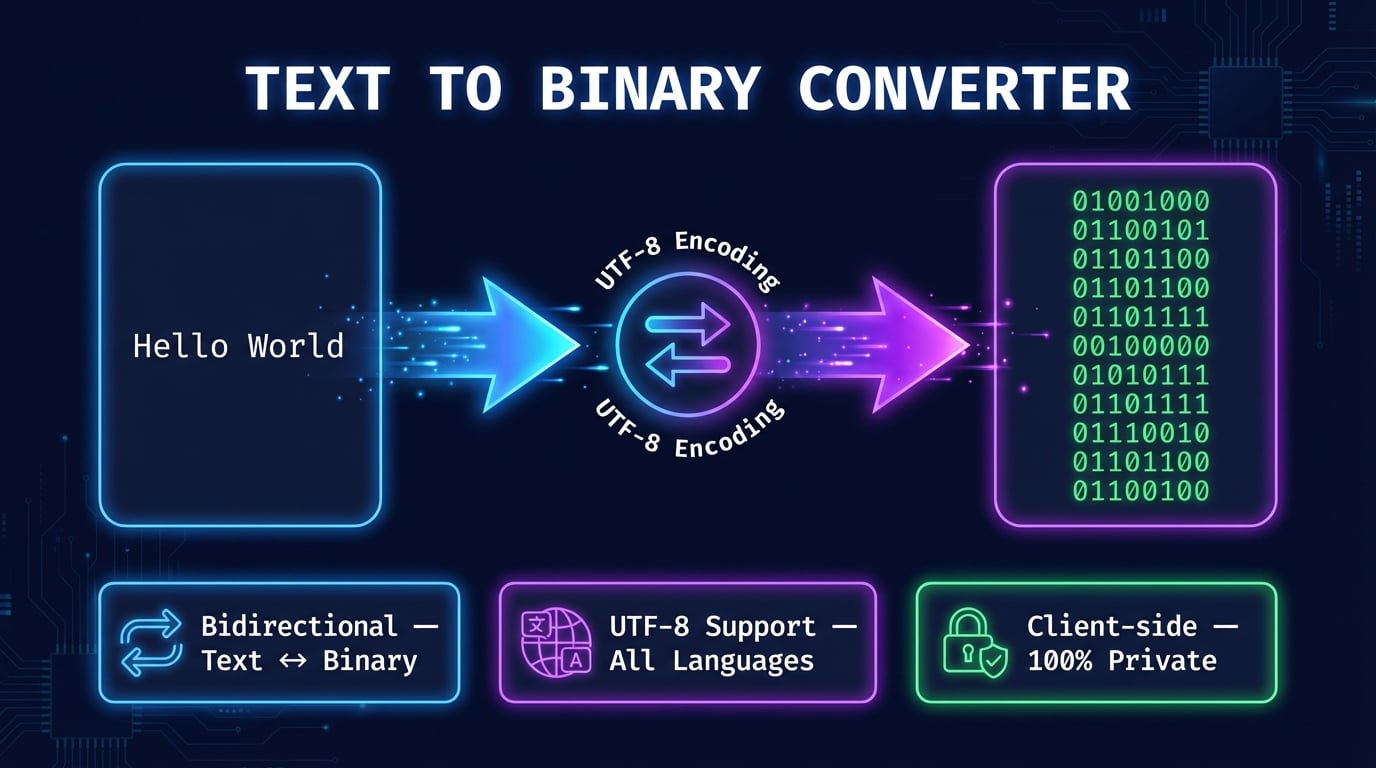
Text to binary conversion is the process of translating human-readable characters into sequences of ones and zeros — the fundamental language of computers. Every piece of digital data, from the text you are reading right now to complex software programs, is ultimately stored and processed as binary code. Our free binary code translator lets you convert any text into its binary representation and decode binary back to readable text instantly.
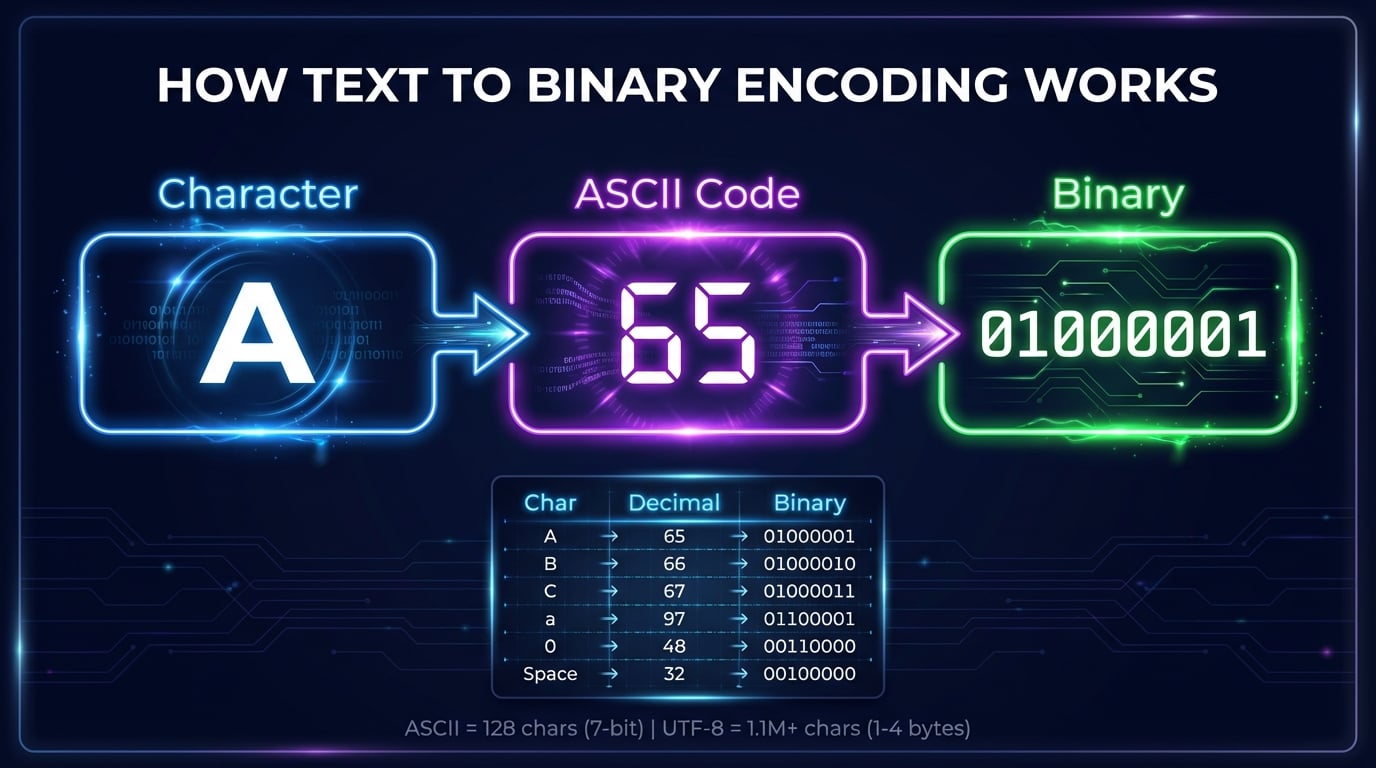
Binary code uses only two digits: 0 and 1. Each digit is called a bit (binary digit), and 8 bits form a byte. When you type a letter like "A" on your keyboard, the computer stores it as the byte 01000001. This binary translator reveals that hidden layer between human text and machine code.
Whether you are studying computer science, debugging encoding issues, or simply curious about how your name looks in binary, this tool provides instant, accurate results. It works entirely in your browser — no data is sent to any server, ensuring complete privacy. Try converting English to binary above, or explore the ASCII table reference to understand how every character maps to its binary value.
How to Convert Text to Binary
Our text to binary converter translates characters into binary through a four-step encoding process that happens instantly as you type:
Enter Your Text
Type or paste any text into the input field. The tool accepts all characters: English letters, numbers, punctuation, symbols, and even emoji or characters from other languages.
UTF-8 Encoding
Each character is mapped to its numeric code point using UTF-8 encoding. Standard ASCII characters (A-Z, 0-9) use a single byte, while international characters use 2-4 bytes.
Decimal to Binary
Each byte value (0-255) is converted from decimal to base-2 binary. The number is divided by 2 repeatedly, and the remainders form the binary digits, padded to 8 bits per byte.
Output Binary Code
The binary output is displayed with each byte separated by a space for readability. Copy the result with one click, or switch to binary-to-text mode to decode binary back to text.
Advertisement
Common Words in Binary: Hello, Hi, I Love You and More
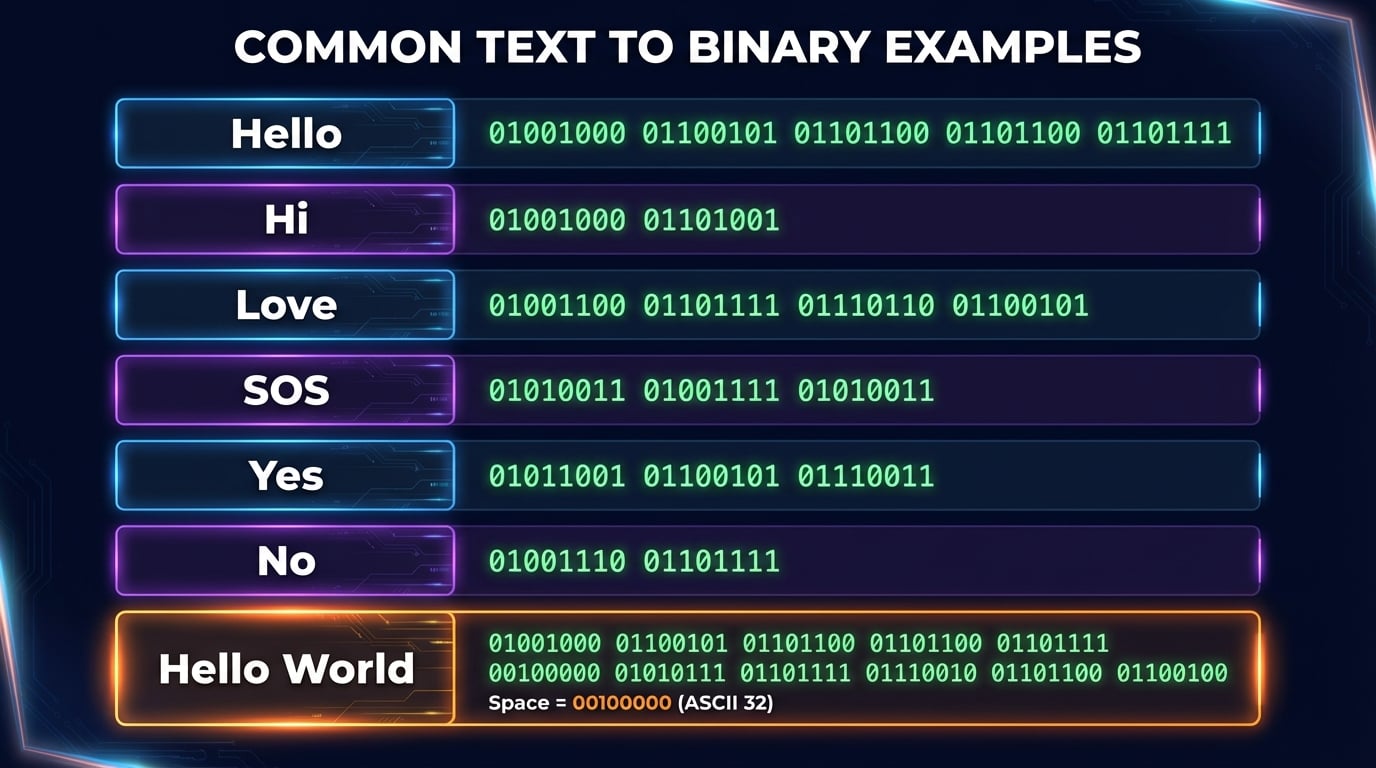
These are the words people look up most, in exact UTF-8 binary. Uppercase and lowercase letters have different codes, so "hello" and "Hello" differ in the first byte. Paste any line back into the translator to decode it:
01101000 01100101 01101100 01101100 0110111101001000 01100101 01101100 01101100 0110111101101000 0110100101001000 0110100101001001 00100000 01101100 01101111 01110110 01100101 00100000 01111001 01101111 0111010101110100 01101000 01100001 01101110 01101011 00100000 01111001 01101111 0111010101101000 01100101 01101100 01101100 01101111 00100000 01110111 01101111 01110010 01101100 0110010001111001 01100101 01110011 / 01101110 01101111Try typing any of these words in the converter above to verify the results. You can also convert longer phrases, sentences, or even entire paragraphs to binary. Use the Morse Code Translator for another way to encode text.
ASCII vs UTF-8 Encoding
Understanding the difference between ASCII and UTF-8 is essential for working with binary text encoding. This tool uses UTF-8, which is backward compatible with ASCII:
ASCII (American Standard Code)
- Bit width: 7-bit (stored in 8 bits / 1 byte)
- Character set: 128 characters total
- Coverage: English letters, digits, punctuation, control characters
- Range: 0-127 (00000000 to 01111111)
- Limitation: No support for accented characters, non-Latin scripts, or emoji
- Created: 1963, standardized in 1967
UTF-8 (Unicode Transformation Format)
- Bit width: Variable — 1 to 4 bytes per character
- Character set: Over 1.1 million characters
- Coverage: All languages, symbols, emoji, mathematical notation
- Compatibility: First 128 characters identical to ASCII
- Adoption: Used by 98%+ of all websites
- Created: 1992, standardized by Unicode Consortium
For English text, ASCII and UTF-8 produce identical binary output since UTF-8 is backward compatible. The difference appears with international characters: the Chinese character "你" requires 3 bytes in UTF-8 (11100100 10111101 10100000) but cannot be represented in ASCII at all.
Advertisement
Understanding the Binary Number System
The binary number system (base-2) is the mathematical foundation of all digital computing. Unlike the decimal system (base-10) that uses digits 0-9, binary uses only two digits: 0 and 1. Each position in a binary number represents a power of 2, just as each position in a decimal number represents a power of 10.
For example, the binary number 10101 converts to decimal as: 1×16 + 0×8 + 1×4 + 0×2 + 1×1 = 21. The 10101 binary code pattern is often associated with computers in popular culture, representing the stream of ones and zeros that make up machine language.
Computers use binary because their electronic circuits have two fundamental states: on (represented by 1) and off (represented by 0). These states are implemented as voltage levels in transistors — the billions of tiny switches inside every processor. A single transistor holds one bit, and modern CPUs contain billions of transistors processing binary data at speeds measured in gigahertz.
Binary Place Values
| Position | 7 | 6 | 5 | 4 | 3 | 2 | 1 | 0 |
|---|---|---|---|---|---|---|---|---|
| Power of 2 | 27 | 26 | 25 | 24 | 23 | 22 | 21 | 20 |
| Decimal value | 128 | 64 | 32 | 16 | 8 | 4 | 2 | 1 |
Example: "A" = 01000001 → 0+64+0+0+0+0+0+1 = 65 (ASCII code for "A")
Why Convert Text to Binary?
There are many practical and educational reasons to use a text to binary converter. Here are the most common use cases:
Computer Science Education
Understanding binary is foundational to computer science. Students learn how processors execute instructions, how memory stores data, and how encoding standards work — all rooted in binary.
Programming & Debugging
Developers use binary when working with bitwise operations, binary protocols, file format headers, low-level I/O, and debugging character encoding issues in databases or APIs.
Data Encoding & Protocols
Network protocols (TCP/IP, HTTP), file formats (JPEG, PDF), and storage systems all operate on binary data. Understanding binary helps you work with raw data at the protocol level.
Cybersecurity & Forensics
Security analysts examine binary data in malware analysis, network packet inspection, memory forensics, and reverse engineering. Binary literacy is essential in cybersecurity.
Fun & Secret Messages
Binary is a fun way to encode secret messages, create tech-themed decorations, or challenge friends to decode text. It's a popular element in hacker culture and science fiction.
Understanding Character Encoding
Working with binary teaches you how UTF-8, ASCII, and Unicode map human characters to bytes — critical knowledge for web development, internationalization, and data processing.
Advertisement
Binary Code Generator: Create Binary From Any Text
Used the other way around, this tool is a binary code generator: type any word, sentence, or block of text and it generates the exact binary representation — each character expanded to its 8-bit form, space-separated so it stays readable. People use it to generate binary for classroom exercises, puzzle and escape-room clues, ASCII-art captions, tattoo designs, and social bios that spell out a hidden word in 1s and 0s.
Because the generator works from real character encodings rather than a lookup table of common words, it handles anything you type — punctuation, numbers, and Unicode included. Flip the direction to decode binary back to text and verify a generated string round-trips perfectly before you put it on a t-shirt.
Related Encoding & Text Tools
Explore more free encoding, conversion, and text tools from DNS Robot:
Translate text to Morse code and Morse code back to text with audio playback.
Convert IP addresses to decimal, hexadecimal, and binary formats instantly.
Generate cryptographically secure passwords with custom length and character options.
Generate superscript, subscript, and small caps Unicode text styles.
Generate QR codes for URLs, WiFi, vCard, and more with custom styling.
Advertisement
Frequently Asked Questions About Binary Translation
What is binary code?
Binary code is a numbering system using only two digits: 0 and 1. It is the fundamental language of all computers and digital devices. Every piece of data — text, images, audio, software — is stored as binary. Each binary digit is a 'bit,' and 8 bits form a 'byte.'
How does text to binary conversion work?
Each character is mapped to a numeric value using UTF-8 encoding (e.g., 'A' = 65). That decimal number is then converted to base-2 binary (65 = 01000001). Multi-byte characters like emoji use 2-4 bytes.
What is 'Hello' in binary?
"Hello" in binary is: 01001000 01100101 01101100 01101100 01101111. Each letter maps to its ASCII value (H=72, e=101, l=108, l=108, o=111) and is converted to 8-bit binary.
What encoding does this tool use?
This tool uses UTF-8, the dominant encoding on the web (98%+ of sites). UTF-8 is backward compatible with ASCII for English characters and supports all Unicode characters including emoji and non-Latin scripts.
How many bits does one character need?
It depends on the encoding. ASCII characters use 8 bits (1 byte). In UTF-8: Latin characters = 1 byte, European/Middle Eastern = 2 bytes, East Asian (CJK) = 3 bytes, emoji = 4 bytes.
What is the difference between ASCII and UTF-8?
ASCII supports 128 characters (English only, 7-bit). UTF-8 supports 1.1 million+ characters (all languages, variable 1-4 bytes). The first 128 UTF-8 characters are identical to ASCII, ensuring backward compatibility.
What does 10101 mean in binary?
Binary 10101 equals 21 in decimal (1×16 + 0×8 + 1×4 + 0×2 + 1×1 = 21). As an 8-bit byte (00010101), it's the ASCII control character NAK. The '10101' pattern is iconic in popular culture as representing computer code.
How to convert binary to text?
Split the binary string into groups of 8 digits, convert each byte to decimal, then look up the character in ASCII/UTF-8. For example, 01001000 01101001 = 72 105 = 'Hi'. Our binary to text converter does this instantly — paste binary code and get readable text.
Can this tool convert binary back to text?
Yes. It detects the direction automatically: paste binary such as 01001000 01101001 and you get the text (Hi); type text and you get the binary. The Text → Binary and Binary → Text buttons force a direction.
How do you say hello in binary?
Lowercase "hello" is 01101000 01100101 01101100 01101100 01101111. "Hello" with a capital H is 01001000 01100101 01101100 01101100 01101111: only the first byte changes (H = 72, h = 104).
What does 01001000 01101001 mean?
It's "Hi". 01001000 is 72 in decimal, the letter H, and 01101001 is 105, the letter i.
Can I paste binary without spaces?
Yes. Unspaced binary is split into groups of 8 bits, so 0100100001101001 becomes "Hi". The number of digits must be a multiple of 8; with spaces, each group can be 1 to 8 bits.
Is my data sent to a server?
No. All conversion happens entirely in your browser using JavaScript's built-in TextEncoder and TextDecoder APIs. No text or binary data is ever sent to any server, ensuring complete privacy.
How do computers use binary code?
Computers use binary because their circuits have two states: on (1) and off (0). CPUs execute binary machine code, RAM stores binary data, and storage writes binary bits. All software, text, images, and videos are ultimately binary.