HTTP Error 429 Too Many Requests: Causes & How to Fix
Advertisement
What Is HTTP Error 429?
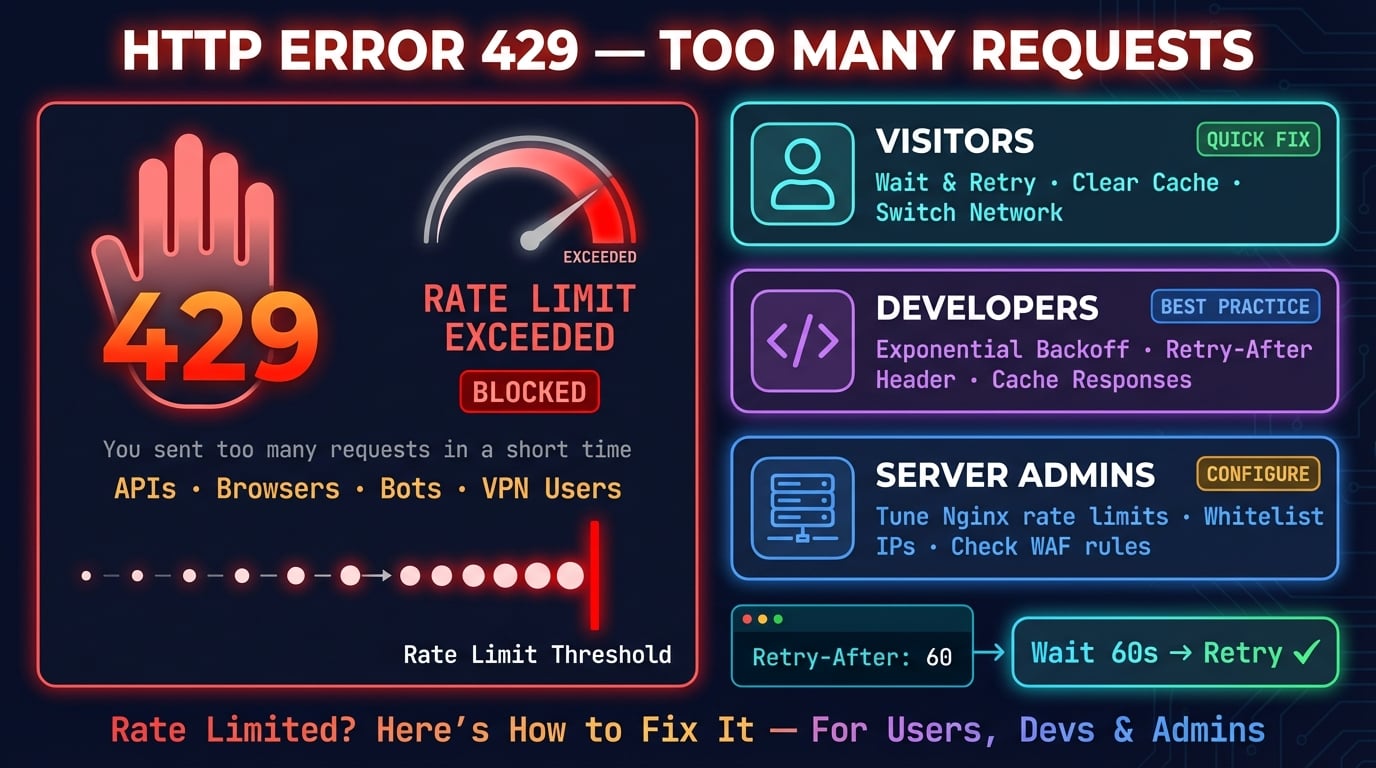
HTTP error 429 is a client error status code that means Too Many Requests. The server is telling you that you have sent too many requests in a given timeframe, and it is temporarily refusing to process more until you slow down.
This error is defined in RFC 6585 and is part of the HTTP rate-limiting mechanism. It is one of the most common errors encountered by developers working with APIs, but regular users can see it too when browsing websites.
The 429 status code is different from other 4xx errors. A 403 error means you are not authorized. A 401 error means you are not authenticated. A 429 error means your credentials are fine — you are just sending requests too fast.
When a server returns a 429 response, it may include a Retry-After header that tells you exactly how long to wait before sending the next request.
What Does a 429 Error Look Like?
The 429 error appears differently depending on the browser, application, or API client you are using. Here are the most common variations:
| Context | Error Message |
|---|---|
| Chrome / Edge | 429 Too Many Requests |
| Firefox | 429 Too Many Requests |
| Nginx | 429 Too Many Requests (nginx) |
| Apache | 429 Too Many Requests |
| Cloudflare | Error 429 — Rate Limited |
| API Response | {"error": "rate_limit_exceeded", "retry_after": 60} |
| WordPress | 429 Too Many Requests — You have been rate limited |
| cURL | HTTP/1.1 429 Too Many Requests |
Unlike 500 errors that indicate a server-side problem, the 429 is a client-side error — the server is working fine, but it is protecting itself from too many requests.
Advertisement
How Rate Limiting Works
Rate limiting is a technique servers use to control how many requests a client can make within a specific time window. When the limit is exceeded, the server responds with HTTP 429.
There are several common rate-limiting algorithms:
Fixed Window — The server allows N requests per time window (e.g., 100 requests per minute). The counter resets at fixed intervals.
Sliding Window — Similar to fixed window, but the time window slides with each request. This prevents bursts at window boundaries.
Token Bucket — The server assigns tokens that refill at a steady rate. Each request consumes a token. When tokens run out, requests are rejected.
Leaky Bucket — Requests are processed at a constant rate regardless of burst size. Excess requests queue up or get dropped.
Most APIs communicate their rate limits through response headers. Common headers include X-RateLimit-Limit (max requests allowed), X-RateLimit-Remaining (requests left in the current window), and X-RateLimit-Reset (when the window resets).
Understanding which algorithm a service uses helps you design your client to stay within limits and avoid 429 errors.
Common Causes of HTTP Error 429
The 429 error can be triggered by many different scenarios. Here are the most common causes, grouped by who typically encounters them:
| Cause | Who It Affects | Description |
|---|---|---|
| API rate limit exceeded | Developers | You sent more API requests than the service allows per minute/hour |
| Too many page requests | Visitors | You refreshed a page too quickly or opened too many tabs at once |
| Web scraping / bots | Developers | Automated scripts hitting a website too fast trigger rate limits |
| Brute-force protection | Visitors | Too many failed login attempts triggered security rate limiting |
| DDoS protection | Everyone | Cloudflare, AWS WAF, or similar services blocking traffic spikes |
| Shared IP rate limiting | Visitors / VPN users | Multiple users behind the same IP (VPN, proxy, corporate network) collectively exceed the limit |
| Misconfigured rate limits | Website owners | Server-side rate limits set too aggressively, blocking legitimate traffic |
| Plugin or theme issues | Website owners | WordPress plugins making excessive API calls or cron jobs running too frequently |
| Webhook storms | Developers | A misconfigured webhook retrying failed deliveries in a tight loop |
Advertisement
How to Fix 429 Error (For Visitors)
If you are seeing a 429 error while browsing a website, here are the fixes you can try. Start with the simplest solution and work your way down.
1. Wait and Retry
The simplest fix is to wait. The 429 error is temporary — the server is asking you to slow down, not blocking you permanently.
Wait 30 seconds to a few minutes, then try again. Most rate limits reset within 1–5 minutes. If the page still shows 429, wait longer — some services enforce hourly or daily limits.
Do not repeatedly refresh the page. Every refresh sends another request and can extend the rate-limiting period.
2. Clear Browser Cache and Cookies
Sometimes cached data or cookies can trigger rate limiting. Clearing them can help:
Chrome: Press
Ctrl+Shift+Delete(Windows) orCmd+Shift+Delete(Mac) → select "Cookies" and "Cached images" → click "Clear data"Firefox: Press
Ctrl+Shift+Delete→ select "Cache" and "Cookies" → click "Clear Now"Edge: Press
Ctrl+Shift+Delete→ check "Cookies" and "Cached data" → click "Clear now"Safari: Go to Safari → Settings → Privacy → Manage Website Data → Remove All
After clearing, close and reopen the browser before visiting the site again.
3. Disconnect VPN or Proxy
If you are using a VPN or proxy, you might be sharing an IP address with hundreds of other users. When their combined requests exceed the server's limit, everyone on that IP gets rate-limited.
Try disconnecting your VPN and accessing the site on your regular internet connection. If the 429 error goes away, the VPN IP was the problem.
If you need the VPN, try switching to a different server location to get a new IP address.
4. Disable Browser Extensions
Some browser extensions send background requests without your knowledge. Ad blockers, price comparison tools, SEO extensions, and auto-refresh plugins can all generate extra requests that trigger rate limiting.
To test, open the site in an incognito/private window (which disables most extensions by default). If the 429 error disappears, one of your extensions is the culprit.
Disable extensions one by one to find the problematic one. In Chrome, go to chrome://extensions/ and toggle them off individually.
5. Try a Different Network
If nothing else works, the server may be rate-limiting your IP address specifically. Try:
Switch from Wi-Fi to mobile data (this gives you a different IP). Try the site from a different network entirely. If you are on a corporate or school network, try from home — large networks share a single public IP.
You can check your current IP address using our What Is My IP tool to verify it has changed.
How to Fix 429 Error (For Developers)
If you are building an application that calls APIs, the 429 error means your code is sending requests too fast. Here is how to handle it properly.
Advertisement
1. Implement Exponential Backoff
Exponential backoff is the industry-standard retry strategy. Instead of retrying immediately after a 429, you progressively increase the wait time between retries:
First retry: wait 1 second. Second retry: wait 2 seconds. Third retry: wait 4 seconds. Fourth retry: wait 8 seconds. And so on.
Here is a basic implementation in JavaScript:
async function fetchWithBackoff(url, options = {}, maxRetries = 5) {
  for (let attempt = 0; attempt < maxRetries; attempt++) {
    const response = await fetch(url, options);

    if (response.status !== 429) return response;

    // Check Retry-After header first
    const retryAfter = response.headers.get('Retry-After');
    const delay = retryAfter
      ? parseInt(retryAfter) * 1000
      : Math.pow(2, attempt) * 1000; // Exponential backoff

    console.log(`Rate limited. Retrying in ${delay / 1000}s...`);
    await new Promise(resolve => setTimeout(resolve, delay));
  }
  throw new Error('Max retries exceeded');
}Add jitter (random variation) to the delay to prevent multiple clients from retrying at exactly the same time. Replace the delay calculation with Math.pow(2, attempt) * 1000 + Math.random() * 1000.
2. Respect the Retry-After Header
When a server returns a 429 response, it often includes a Retry-After header that tells you exactly how long to wait. This header can contain either a number of seconds or an HTTP date:
Retry-After: 60 means wait 60 seconds. Retry-After: Thu, 06 Mar 2026 12:00:00 GMT means wait until that specific time.
Always check this header before applying your own backoff logic. The server knows better than your code how long you should wait.
import requests
import time

def make_request(url):
    response = requests.get(url)

    if response.status_code == 429:
        retry_after = response.headers.get('Retry-After', '5')
        wait_time = int(retry_after)
        print(f"Rate limited. Waiting {wait_time} seconds...")
        time.sleep(wait_time)
        return make_request(url)  # Retry after waiting

    return response
3. Cache API Responses
If your application makes the same API call multiple times, cache the response instead of hitting the API every time. This drastically reduces your request count.
Use an in-memory cache (like Redis or a simple Map) for frequently accessed data. Set a reasonable TTL (time-to-live) based on how often the data changes.
For example, if you are checking DNS records for a domain, the results likely will not change in the next 5 minutes — cache them.
const cache = new Map();
const CACHE_TTL = 5 * 60 * 1000; // 5 minutes

async function cachedFetch(url) {
  const cached = cache.get(url);
  if (cached && Date.now() - cached.time < CACHE_TTL) {
    return cached.data;
  }

  const response = await fetch(url);
  const data = await response.json();
  cache.set(url, { data, time: Date.now() });
  return data;
}
4. Use Webhooks Instead of Polling
If you are polling an API repeatedly to check for changes (e.g., checking order status every 10 seconds), switch to webhooks if the service supports them.
With webhooks, the server pushes updates to your application when something changes — no need for constant polling. This can reduce your API calls from thousands per hour to just a handful.
Most modern APIs (Stripe, GitHub, Twilio, Shopify) support webhooks. Check the API documentation for webhook configuration.
5. Request Higher Rate Limits
If you legitimately need more API calls, contact the service provider. Many APIs offer higher rate limits for paid plans or verified applications.
When requesting higher limits, explain your use case and provide estimates of your expected request volume. Services like Google APIs, Twitter API, and GitHub API all have processes for requesting elevated limits.
Some APIs also offer bulk endpoints that let you fetch multiple resources in a single request, reducing total call count.
How to Fix 429 Error (For Website Owners)
If your visitors or API consumers are getting 429 errors, the problem is in your server configuration. Here is how to diagnose and fix it.
1. Tune Your Rate Limits
If legitimate users are hitting 429 errors, your rate limits may be too strict. Review and adjust them.
In Nginx, the rate limiting module (ngx_http_limit_req_module) controls request rates:
# Define rate limit zone: 10 requests per second per IP
limit_req_zone $binary_remote_addr zone=api:10m rate=10r/s;

server {
    location /api/ {
        # Allow bursts of 20, no delay for first 10
        limit_req zone=api burst=20 nodelay;
        limit_req_status 429;
    }
}The burst parameter is critical — it allows short traffic spikes without triggering 429. Without it, even normal browsing patterns can hit the limit.
In Apache, use mod_ratelimit or mod_evasive. In Node.js, use packages like express-rate-limit.
2. Whitelist Trusted IPs
If certain clients (monitoring services, payment processors, your own microservices) are getting rate-limited, whitelist their IP addresses.
In Nginx, you can use a map to bypass rate limiting for trusted IPs:
geo $rate_limit {
    default        1;
    192.168.0.0/16 0;  # Internal network
    10.0.0.0/8     0;  # Internal network
    203.0.113.50   0;  # Payment processor
}

map $rate_limit $limit_key {
    0 "";
    1 $binary_remote_addr;
}

limit_req_zone $limit_key zone=api:10m rate=10r/s;
Also whitelist search engine bots (Googlebot, Bingbot) if they are being rate-limited — blocking them hurts your SEO. You can verify bot identities using reverse DNS lookups.
3. Check WAF and CDN Settings
If you use Cloudflare, AWS WAF, Sucuri, or another security service, their rate-limiting rules may be the source of the 429 errors — not your origin server.
In Cloudflare, check Security → WAF → Rate Limiting Rules. You can see which rules are triggering and adjust thresholds. Cloudflare's default "I'm Under Attack" mode is particularly aggressive.
In AWS WAF, check your web ACL rules for rate-based rules. The minimum threshold is 100 requests per 5 minutes — make sure this is appropriate for your traffic levels.
Review your CDN analytics to distinguish between legitimate traffic and bot traffic before adjusting limits.
4. Optimize Server Performance
Sometimes 429 errors appear because the server cannot handle the load, and rate limiting kicks in as a safety mechanism. Improving server performance lets you raise rate limits safely.
Key optimizations include: enable response caching to reduce backend load, use a CDN for static assets, add database query caching with Redis or Memcached, implement connection pooling for database connections, and scale horizontally with load balancing if traffic warrants it.
Use our HTTP Headers tool to verify your caching headers are set correctly.
429 vs Other HTTP Errors
It is easy to confuse the 429 error with other HTTP status codes. Here is how they differ:
| Status Code | Name | Meaning | Key Difference |
|---|---|---|---|
| 401 | Unauthorized | Authentication required | Missing or invalid credentials |
| 403 | Forbidden | Access denied permanently | You do not have permission |
| 429 | Too Many Requests | Rate limited temporarily | You are sending requests too fast |
| 500 | Internal Server Error | Server crashed | Server-side bug or failure |
| 502 | Bad Gateway | Upstream server failed | Proxy could not reach backend |
| 503 | Service Unavailable | Server overloaded or in maintenance | Server is too busy to respond |
| 504 | Gateway Timeout | Upstream server took too long | Backend did not respond in time |
The key distinction: 429 is temporary and intentional. The server is healthy — it is actively choosing to reject your request to protect itself. Other 5xx errors indicate something is actually broken.
Advertisement
How to Prevent 429 Errors
Prevention is better than cure. Here are best practices to avoid 429 errors in the first place:
Read API documentation — Know the rate limits before writing code. Most services publish their limits clearly.
Monitor your usage — Track
X-RateLimit-Remainingheaders to know how close you are to the limit.Batch requests — Use bulk endpoints when available instead of making individual calls.
Distribute requests — Spread API calls evenly over time instead of sending bursts.
Use API keys — Authenticated requests usually get higher rate limits than anonymous ones.
Implement circuit breakers — If you get repeated 429s, stop sending requests entirely for a cooldown period.
Test with rate limit simulators — Simulate 429 responses in development to ensure your error handling works.
Log 429 responses — Track when and where rate limiting occurs to optimize your request patterns.
Check your server rate-limit headers
Use DNS Robot's free HTTP Headers tool to check any server's response headers — including rate-limit headers like Retry-After, X-RateLimit-Limit, and X-RateLimit-Remaining.
Try HTTP Headers CheckerAdvertisement
Frequently Asked Questions
HTTP error 429 means "Too Many Requests." The server is rate-limiting you because you sent too many requests in a short period. It is a temporary block — wait a few minutes and try again.