










CNAME Lookup
Follow any name's DNS CNAME chain hop by hop, asked at each zone's own nameservers: every alias with its TTL and who answered it, the platform behind the target and the final addresses. Dangling targets, loops and long chains are named, with the fix.
Looked up exactly as typed: www. and subdomains stay as they are, and an IDN is sent as punycode.
What is a CNAME record?
A CNAME (canonical name) record makes one name an alias of another. Ask for the alias and DNS answers: look up this other name instead. The value is always a name, never an IP address (RFC 1034 §3.6.2).
Resolvers follow the alias for you and return the target's addresses in the same answer, so a browser never notices. That's why platforms ask for one: you point www at their name once, and they can move their servers without you touching your DNS.
Strictly, the canonical name is the target; calling the alias "a CNAME" is the common shorthand. A name with a CNAME can hold nothing else and only one CNAME (RFC 2181 §10.1), so the top of a zone, which must hold its SOA and NS records, can't hold one (RFC 1034 §4.2.1).

- You look upwww.github.com
- CNAME · 1 hr
- The canonical namegithub.com
- A · 1 min
- The address · AS8075 Microsoft20.207.73.82

- www.github.comCNAMEgithub.comthe same domain
- www.rust-lang.orgCNAMErust-lang.github.ioGitHub Pages
- www.cursor.comCNAMEcname.vercel-dns.comVercel
- docs.github.comA185.199.108.154+3 moreno alias: its own addresses






How to check CNAME records with dig, nslookup and PowerShell
Type the name above and press Look up CNAME: the tool asks each zone's own nameserver hop by hop and draws the chain. On a computer, dig does it in one line: ask for type A and the answer lists every alias first, then the addresses.
Ask for type CNAME to see only the first alias. Windows has nslookup -type=cname, PowerShell Resolve-DnsName -Type CNAME, and host -t cname prints one sentence.
Two catches: a resolver shows how much of the TTL is left in its cache, not the TTL the zone sets, and dig +short drops the TTLs and the owner names, so a chain prints as a bare list.
dig www.example.com A +noall +answerEvery alias with its TTL, then the addresses. +short prints only the targets, without the TTLs.
$ dig www.nytimes.com A +noall +answer
www.nytimes.com.                  12902IN  CNAME www.prd.map.nytimes.com.3
www.prd.map.nytimes.com.             482   IN  CNAME www.prd.map.nytimes.xovr.nyt.net.
www.prd.map.nytimes.xovr.nyt.net.    260   IN  CNAME nytimes.map.fastly.net.
nytimes.map.fastly.net.               28   IN  A     151.101.1.1644
nytimes.map.fastly.net.               28   IN  A     151.101.129.164
nytimes.map.fastly.net.               28   IN  A     151.101.193.164
nytimes.map.fastly.net.               28   IN  A     151.101.65.164

$ dig www.nytimes.com +short5
www.prd.map.nytimes.com.          # no TTL, no owner names
www.prd.map.nytimes.xovr.nyt.net.
nytimes.map.fastly.net.
151.101.1.164
151.101.129.164
151.101.193.164
151.101.65.164
- The name you asked. Each line's first column is the record's owner.
- Seconds left in Google's cache: 290 sec of the zone's 600 sec. The zone's own server shows the full TTL.
- CNAME → the next name. 3 aliases here, so 3 lines like this.
- The addresses belong to the last name in the chain: Fastly's, TTL 1 min at the zone.
+shorthides the TTL and the owner names: only the targets and addresses remain.


The same question in other tools


$ nslookup -type=cname www.nytimes.com
Non-authoritative answer:
www.nytimes.com	canonical name = www.prd.map.nytimes.com.
PS> Resolve-DnsName www.nytimes.com -Type CNAME
# one row per record: the name, its type, its TTL and the target

$ host -t cname www.nytimes.com
www.nytimes.com is an alias for www.prd.map.nytimes.com.
nslookup as macOS prints it; Windows lays the same answer out a little differently.

Reading the result
The head says in one sentence where the name ends up and through how many aliases, with the platform's mark; the notes under it are the findings that matter. The count is of CNAME records: www.github.com → github.com is 1, not 2.
The Chain view lists each record as its own zone's server answered it, with the zone, the server, the AA flag and the TTL, then the readings: loop, length, missing targets, other data beside a CNAME. Copies shows Google's and Cloudflare's cached copy of each record beside the zone's. On the right, the navy column draws the chain: a loop as a ring, a missing target broken off.
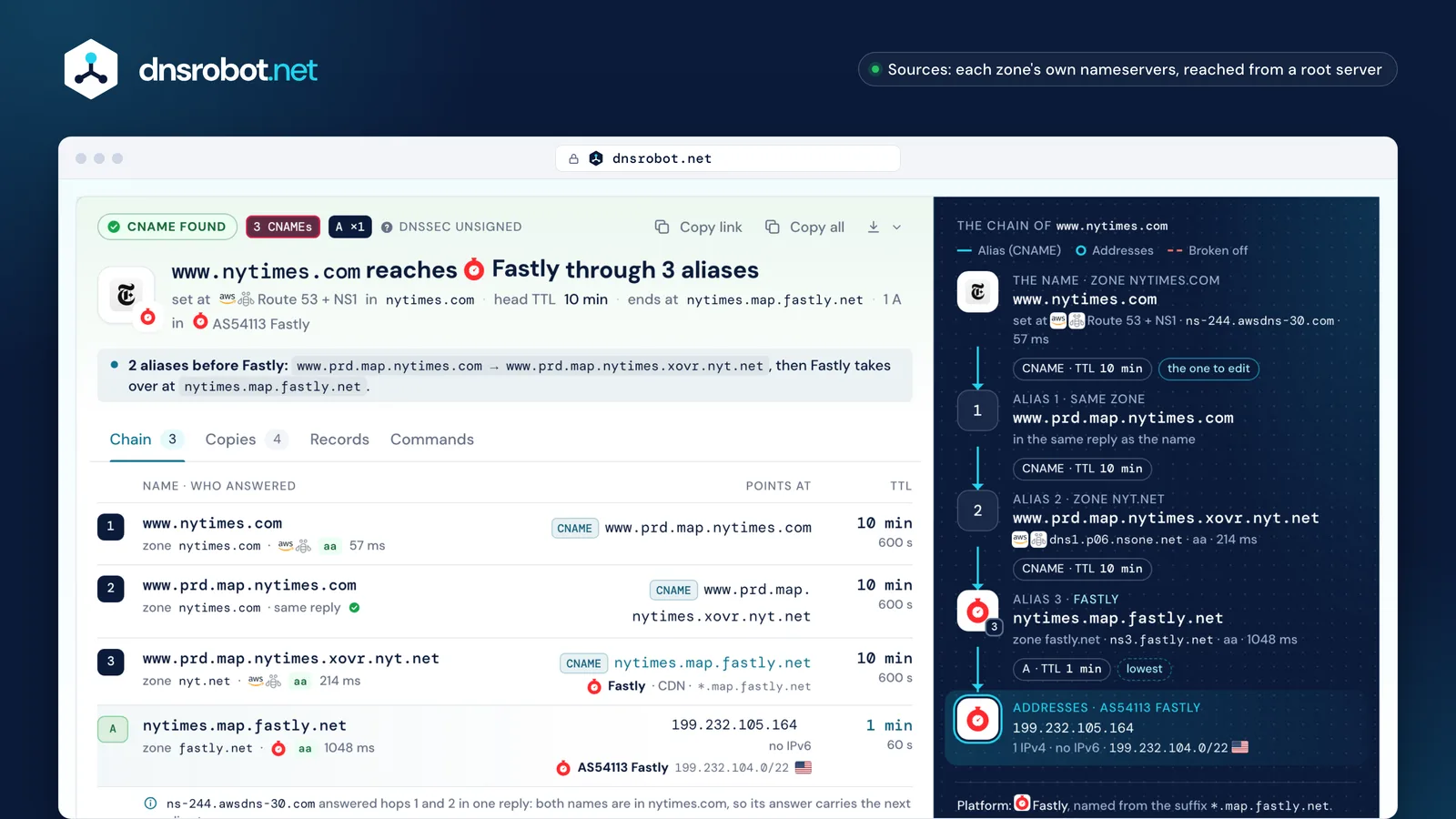
 The verdictWhere the name ends up, through how many aliases, the platform and the network of the addresses.The cached copiesGoogle's and Cloudflare's copy of each record, the time each has left and when an edit to the first one shows.Each record, hop by hopThe target and TTL as the zone holds them, the server that answered, the AA flag and the time.The chainName, each alias with its zone and TTL, then the final addresses and their network.
CNAME vs A record
An A record holds an address: docs.github.com → 185.199.108.154. A CNAME holds a name: www.github.com → github.com, and the address comes from that name's own A record.
Use an A record for your own server and for the root domain. Use a CNAME when a platform gives you a name to point at (Vercel, GitHub Pages, a CDN, a mail service's DKIM key): when they move, your record follows by itself.
The price is one more lookup per alias and the strict rules: nothing else at that name, and never at the zone's top.
github.coman IPv4 address: 185.199.108.154CNAME at the root domain: CNAME vs ALIAS, ANAME and CNAME flattening
The root of a domain (github.com) is the top of its zone, and the top must hold the zone's SOA and NS records. A CNAME allows nothing beside it, so it can't go there: the two rules collide (RFC 1034 §4.2.1, RFC 2181 §10.1).
DNS hosts work around it in their own servers: they follow the target themselves and answer with its addresses. Cloudflare calls it CNAME flattening, Route 53 an alias record, DNSimple and NS1 ALIAS, DNS Made Easy ANAME. Resolvers only ever see A and AAAA, so no lookup can show the alias behind them.
There is no standard ANAME: the IETF draft expired in 2019. The standard route is the HTTPS record in AliasMode (RFC 9460), which only clients that ask for it use, so the root still needs its A records.
github.com.zone top
- SOAdns1.p08.nsone.net. hostmaster.nsone.net. …
- NS8 servers: NS1 + Route 53
- MX github-com.mail.protection.outlook.com.
- A20.207.73.82
- CNAME
anything.example.net.




A CNAME must stand alone, and these records must be here: so no CNAME at the root.
What DNS hosts offer insteadResolvers see
- Cloudflare · CNAME flatteningon by default at the root, on every planA · AAAA
- Amazon Route 53 · alias recordto AWS resources or a record in the same zoneA · AAAA
- DNSimple · ALIASlooks the target up when askedA · AAAA
- NS1 (IBM) · ALIASA · AAAA
- DNS Made Easy · ANAMEA · AAAA
- Azure DNS · alias record setA · AAAA
- HTTPS record in AliasMode · RFC 9460the only standard: per service, for clients that ask for itHTTPS



CNAME chains, TTLs and how long a change takes
An alias may point at another alias: www.microsoft.com goes through two, www.nytimes.com through three. Each record in the chain has its own TTL and is cached on its own, so the copies run out at different times (RFC 1034 §5.3.3).
That's why the lowest TTL isn't the wait. Microsoft's final address lives 20 seconds, but an edit to the first record, the one in microsoft.com's own zone, waits for that record's copies: Google's had 37 minutes left when we checked, Cloudflare's almost the full hour, and any resolver may keep it up to that hour.
Keep chains short. RFC 9460 recommends no more than 8 aliases in a row; BIND and Unbound give up after 11, PowerDNS after 10, Knot after 13. Google and Cloudflare publish no limit.
- www.microsoft.comCNAME → www.microsoft.com-c-3.edgekey.netthe record its owner edits1 hrTTL at the zone
- Google36:37 left · until 07:59:03
- Cloudflare59:48 left · until 08:22:14
An edit to this record shows at Google by 07:59:03 and at Cloudflare by 08:22:14 UTC, at any resolver within 1 hr.
- www.microsoft.com-c-3.edgekey.netCNAME → e13678.dscb.akamaiedge.net15 minTTL at the zone
- Google6:58 left · until 07:29:24
- Cloudflare14:48 left · until 07:37:14
- e13678.dscb.akamaiedge.netA 23.2.78.94lowest TTL20 secTTL at the zone
- Google0:20 left · until 07:22:46
- Cloudflare0:08 left · until 07:22:34
Published limits, and real chains
- 8 RFC 9460: more than 8 not recommended
- 10 PowerDNS
- 11 BIND, Unbound
- 13 Knot
- Google, Cloudflare: none published
Dangling CNAMEs and subdomain takeover
A CNAME dangles when its target is gone: a cloud app deleted, a bucket emptied, a domain expired. If someone else can create a resource with that name, they serve your subdomain and can even get a valid certificate for it.
DNS shows it as an NXDOMAIN answer that still carries your CNAME: the target is missing, not your name (RFC 6604 §3). That only works on platforms that give each resource its own DNS name. Others answer for any name, so a deleted site there still resolves: there, check the site itself.
The fix is order: delete the DNS record before the resource, and verify your domain on platforms that offer it. A fixed target can still look missing for a while: resolvers keep the negative answer for the smaller of the target zone's SOA TTL and its minimum field (RFC 2308 §5).
A missing target answers NXDOMAIN
A deleted resource's name stops resolving: our verdict is dangling.
- *.azurewebsites.netApp Service
- *.trafficmanager.netTraffic Manager
- *.blob.core.windows.netBlob Storage
- *.cloudapp.netCloud Services
- *.elasticbeanstalk.comElastic Beanstalk
- *.elb.amazonaws.comElastic Load Balancing
- *.pages.devCloudflare Pages
- *.edgekey.netedge hostname
- *.map.fastly.netmap name



The platform answers any name
A deleted site still resolves: our verdict is points at the platform: check the site is still yours.
- *.github.ioGitHub Pages
- *.netlify.appNetlify
- *.herokuapp.comHeroku
- *.vercel.appVercel
- *.myshopify.comShopify
- *.pantheonsite.ioPantheon
- *.go-vip.netWordPress VIP
- *.webflow.ioWebflow
- *.zendesk.comZendesk
- *.s3.amazonaws.comAmazon S3
- *.azurefd.netAzure Front Door
- *.global.ssl.fastly.netTLS hostname








$ dig shop.example.com A
;; ->>HEADER<<- opcode: QUERY, status: NXDOMAIN
;; ANSWER SECTION:     # your record is there
shop.example.com.   3600  IN  CNAME  example-shop.example.net.
;; AUTHORITY SECTION:  # no such target; resolvers may keep the miss 5 min
example.net.         300  IN  SOA    ns1.example.net. …
Ownership checks that stop a takeover
- GitHub Pages
TXT _github-pages-challenge-<user>.<domain> - Azure App Service
TXT asuid.<subdomain> - Webflow
TXT _webflow one-time-verification=… - Cloudflare for SaaS
hostname validation, by TXT or HTTP - Netlify
domain lock, through Support
How to add a CNAME record (GoDaddy, Cloudflare, Namecheap, Squarespace)
Every DNS panel asks for the same three things: the type (CNAME), the host and the target your platform gave you. In the host field type only the label, www or shop: the panel adds your domain itself.
Typing the full name gives www.example.com.example.com, the most common reason a new CNAME "doesn't work". The same happens in a zone file, where a name without its final dot is relative. On Cloudflare, a Proxied record hides the CNAME from lookups: set it to DNS only when a platform must verify it.
Then check it here. Hosts quote anything from a minute to 72 hours; the real wait for a changed record is the old record's TTL, and a brand-new name usually shows at once.
GoDaddyTarget from Shopify

Name: “without the domain name, such as blog or shop”; never @.
CloudflareTarget from Webflow
Name: “use your subdomain”. DNS only keeps the CNAME visible to lookups; Proxied hides it.
NamecheapTarget from Google

Host: “mysubdomain and not like mysubdomain.domain.tld”.
SquarespaceTarget from Framer




Name: “It's not possible to add a CNAME with @ in the Name field.”
What hosts say vs the TTL
- Route 53within 1 min, to its own servers
- Namecheap30 min
- GoDaddy1 hr, up to 48 hrdefault TTL 1 hr
- Hostingerup to 24 hrdefault TTL 4 hr
- Squarespace24 hr to 48 hrdefault TTL 4 hr
- Gandiup to 72 hr


what the host saysits default TTL: how long resolvers may keep the old record
Cloudflare error 1014: CNAME cross-user banned
Error 1014 appears when a name on Cloudflare points, by CNAME, at a name in another Cloudflare account. Cloudflare blocks it so one customer can't route traffic through another's settings.
It's allowed inside one zone, between zones of the same account, and through Cloudflare for SaaS, where the target's owner adds your name as a custom hostname. That's the fix when you point a domain at a SaaS that runs on Cloudflare. Other causes: an R2 custom domain whose zone is on hold, or a banned zone.
A lookup can only hint at it: when both zones use Cloudflare's nameservers, 1014 is possible if they're in different accounts. DNS shows zones, never accounts, and a proxied record hides the CNAME itself, so only a DNS-only one shows up here.
Account A
shop.example.comCNAME → shops.example.net
1014cross-user banned
Account B
shops.example.netproxied · the SaaS provider's own zone
- Same zonewww → example.com
- Same accountone zone → its sister zone
- Cloudflare for SaaSthe target's owner adds your hostname
Other causes: an R2 custom domain whose zone is on hold, or a banned zone.
What this tool can say: when both zones answer from *.ns.cloudflare.com, a 1014 is possible if the accounts differ. DNS shows zones, never accounts. A *.cdn.cloudflare.net target is Cloudflare's partial CNAME setup, not SaaS.
CNAME vs redirect
A CNAME is not a redirect. It only tells DNS where to find the address; the browser keeps the name you typed in the address bar, sends it to the server and expects a certificate for it.
That's why platforms make you add your domain on their side too: their server must recognise www.example.com and serve a certificate for it. A CNAME to a server that doesn't know your name shows its default page or a certificate error.
To send visitors from one URL to another, use an HTTP redirect (301 or 308) on a web server, or your DNS host's forwarding feature, which runs such a server for you. The Redirect Checker shows each hop of one.
CNAMEthe name stays
- DNS:
www.example.com→ CNAMEsites.example.net→ its address - TLS: the certificate must name
www.example.com - HTTP:
Host: www.example.com; the server must know it
301the URL changes
- DNS:
example.com→ the A record of a web server - HTTP:
301 Location: https://www.example.net/ - Browser: loads the new URL, which gets its own DNS lookup
CNAME lookup: frequently asked questions
What is a CNAME record?
How do I check a CNAME record?
dig www.example.com CNAME on macOS or Linux, nslookup -type=cname www.example.com on Windows, or Resolve-DnsName www.example.com -Type CNAME in PowerShell.What's the difference between a CNAME and an A record?
Can I put a CNAME on my root domain?
Why can't I see my CNAME?
How long does a CNAME change take?
What is a dangling CNAME?
How many CNAMEs can be chained?
Can a CNAME point to an IP address?
Is a CNAME the same as a redirect?
What does Cloudflare error 1014 mean?
Why do DKIM selectors use CNAMEs?
Missing something?Suggest a feature or a new tool
Related DNS tools
DNS Lookup
Every DNS record from the domain's own nameservers, beside Google's and Cloudflare's cache
NS Lookup
Discover nameservers for any domain with provider detection
MX Lookup
Find mail exchange records and mail server details
Subdomain Finder
Discover all subdomains of any domain
Hosting Checker
Find out who hosts any website: web host, CDN, CMS, email provider, registrar and SSL issuer
Domain to IP
Convert any domain name to its IP address with geolocation and CDN detection
Redirect Checker
Follow every redirect hop by hop: 301/302 chains, timing and bulk checks
Reverse DNS Lookup
Find hostnames associated with any IP address via PTR records