








Email Header Analyzer
Paste an email's headers to see the path it took, how long each hop took and what your provider's SPF, DKIM and DMARC checks said.
What is an email header?
An email header is the block of lines above the message text: who sent it and to whom, when, and a record from every server that handled it. Mail apps hide most of it; “Show original” or “View source” shows all of it.
Each line is a name, a colon and a value; a long value continues on lines that start with a space (RFC 5322). The headers end at the first blank line. Everything after it is the body, which this tool never reads.
Three kinds of authors write them: the sender's app (From, To, Subject, Date), every server on the way (one Received line each) and your provider (Authentication-Results, spam verdicts). Only the last are checked by someone you trust.
Added by your provider (Google)11 fields

- 1Delivered-To: reader@example.com
- 2Received: by 2002:a05:6214:5a0b:… with SMTP id kq11csp1342871qvb; Wed, 21 Oct 2026 07:02:48 -0700
- 3–7 X-Google-Smtp-Source, X-Received, ARC-Seal, ARC-Message-Signature, ARC-Authentication-Results
- 8Return-Path: <bounces+48213-9f1c-reader=example.com@sendgrid.net>
- 9Received: from o1.ptr1234.example.org ([167.89.118.37]) by mx.google.com with ESMTPS id …; Wed, 21 Oct 2026 07:02:47 -0700
- 10Received-SPF: pass (google.com: domain of …@sendgrid.net designates 167.89.118.37 as permitted sender) client-ip=167.89.118.37;
- 11Authentication-Results: mx.google.com; dkim=pass …; dkim=pass …; spf=pass …; dmarc=pass …
Added by servers on the way (SendGrid, example.org)5 fields

- 12DKIM-Signature: v=1; a=rsa-sha256; d=example.org; s=s1; h=content-type:from:…
- 13DKIM-Signature: v=1; a=rsa-sha256; d=sendgrid.info; s=smtpapi; h=content-type:from:…
- 14Received: by filterdrecv-7d9c8b5f6-2kqzr with SMTP id … 2026-10-21 14:02:13.517 +0000 UTC
- 15Received: from app-01.example.org ([198.51.100.24]) by geopod-ismtpd-3 (SG) with ESMTPSA id …; Wed, 21 Oct 2026 14:02:12.902 +0000
- 16Received: from localhost ([127.0.0.1]) by app-01.example.org (Postfix) with ESMTP id 4Xc9Fq2Lb1z9vKs; Wed, 21 Oct 2026 14:02:10 +0000
Written by the sender's app14 fields
- 17Content-Type: multipart/alternative; boundary=8a1f4c2e9b7d3a6c5e0f
- 18Date: Wed, 21 Oct 2026 14:02:04 +0000 (UTC)
- 19From: Example Weekly <news@example.org>
- 20Mime-Version: 1.0
- 21Message-ID: <3qX0b1wZTcO2pN9sKd4ZfA@geopod-ismtpd-3>
- 22Subject: This week at Example: five things worth reading
- 23List-Unsubscribe: <https://u48213.ct.sendgrid.net/lu/unsubscribe?…>, <mailto:unsubscribe@example.org?…>
- 24List-Unsubscribe-Post: List-Unsubscribe=One-Click
- 25–29 List-Id, Feedback-ID, X-SG-EID, X-SG-ID, X-Entity-ID
- 30To: reader@example.com
blank line: the body starts here, and this tool never reads it
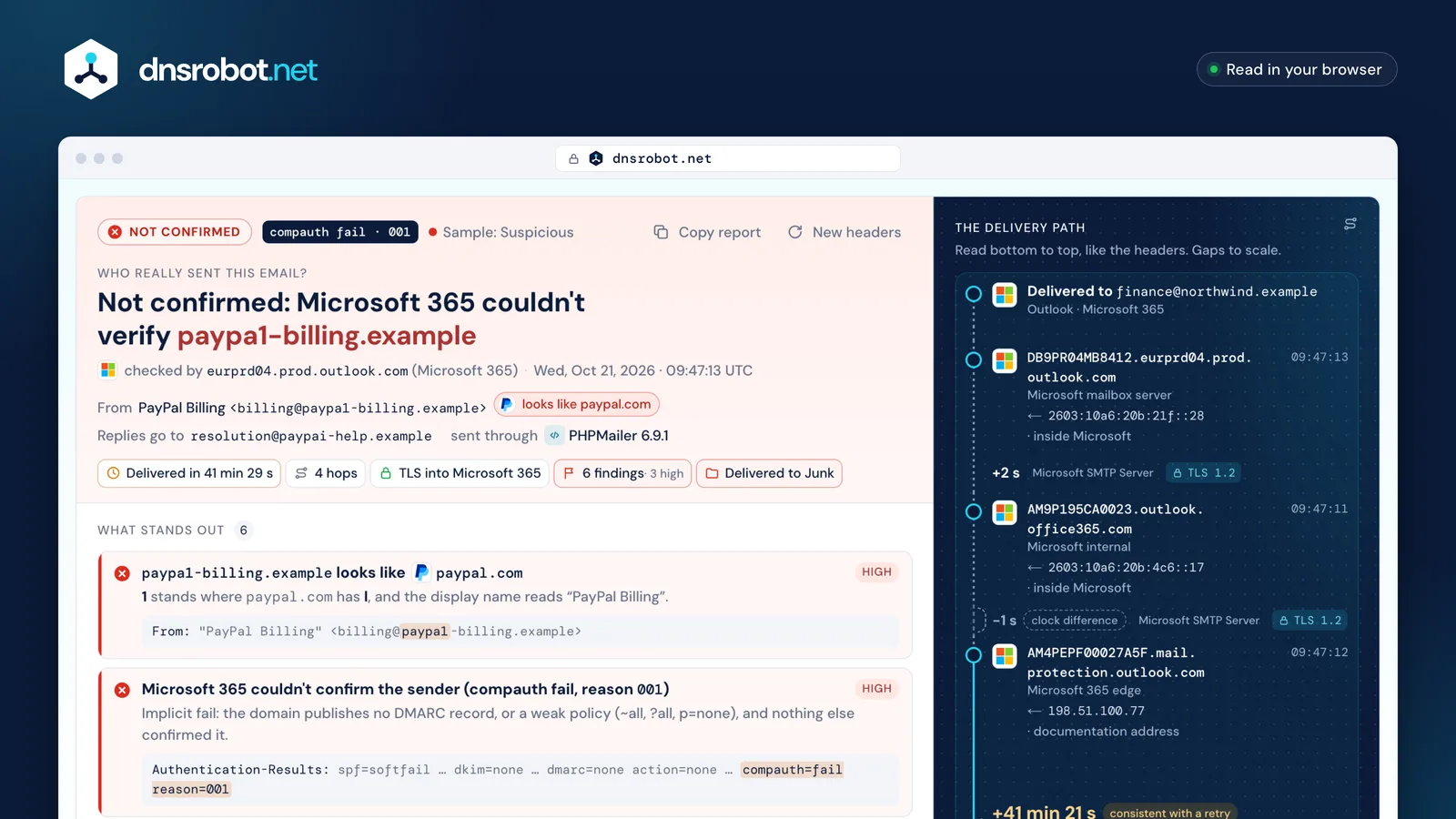
 The verdictWho sent it, judged only by the Authentication-Results your provider wrote, with the server that checked it.What stands outEach finding with its severity, the reason and the exact header line it comes from.The delivery pathEvery server from the Date header to the inbox, the gaps drawn to scale and the trust boundary across it.The factsHow long delivery took, how many hops, whether every external hop used TLS and which folder Microsoft chose.
How to read email headers, bottom to top
To analyze email headers, read the Received lines from the bottom up. Each server adds its line on top of the ones already there, so the lowest is the first hop and the top one is your provider handing the message to the mailbox (RFC 5321 §4.4).
A line says who received it (by), from which server and address (from, the address seen on the connection), how (with: ESMTPS means STARTTLS, ESMTPSA STARTTLS plus a login) and when. Servers stamp their own local time, so turn each into UTC before subtracting: 07:02:47 -0700 is 14:02:47 UTC.
Only the lines your provider wrote are certain. Everything below its first line comes from servers you can't check, and a sender can add lines of its own.
In the header · top is newest
The journey · hop 1 first
Trust boundary
Read upward: each server adds its line on top
SPF, DKIM and DMARC in email headers
SPF asks whether the sending server may send for the envelope domain (the Return-Path). DKIM asks whether a domain signed the message and the signature still matches. DMARC asks whether a passing SPF or DKIM domain matches the From address you see.
Your provider writes the answers into Authentication-Results. Trust the block your provider wrote beside its own Received line. Other copies, ARC copies and any that sit among the sender's lines may have been added by anyone (RFC 8601).
A pass proves the domain, not its intentions: examp1e.com can pass all three for itself.
Authentication-Results: mx.google.com;1Who checkedthe authserv-id: your provider's own server
dkim=pass header.i=@example.org header.s=s1 header.b=Xk3Pq9aZ;2DKIM: example.org signed itits key sits at s1._domainkey.example.org
dkim=pass header.i=@sendgrid.info header.s=smtpapi …;3A second signaturethe sending service's own; it can't align with example.org
spf=pass (google.com: … designates 167.89.118.37 as permitted sender) smtp.mailfrom=…@sendgrid.net;4SPF: allowed to send for sendgrid.netthe envelope (Return-Path) domain, not the From
dmarc=pass (p=QUARANTINE sp=QUARANTINE dis=NONE) header.from=example.org5DMARC: the From domain matches ②p=quarantine is what example.org asks receivers to do with failures
#3 Authentication-Results: spf=softfail (sender IP is 198.51.100.77) … dkim=none … dmarc=none action=none … compauth=fail reason=001CountedMicrosoft 365 wrote it, above the first Received line it added.
Trust boundary
#7 Authentication-Results: protection.outlook.com; spf=pass … dkim=pass … dmarc=pass action=none … compauth=pass reason=100IgnoredIt names Microsoft but sits below every Received line: it came inside the message. A receiver never writes there.Is this email real or spoofed?
Headers can't tell you whether an offer is honest, but they show whether the From domain really sent it and whether it imitates someone else's. Start with the verdict your provider wrote, then look for these signs.
None of them proves phishing on its own, and several common differences are normal. Microsoft notes that a lookalike domain can pass SPF, DKIM and DMARC if its owner set them up (Microsoft).
A lookalike From domainHigh
paypa1-billing.examplevspaypal.com
A digit or a similar letter swapped in. It can pass SPF, DKIM and DMARC for itself.
Letters from another alphabetHigh
xn--pypal-4ve.exampleshows aspаypal.example
The а is Cyrillic. Headers keep the xn-- form (punycode), which gives it away.
Your provider says failHigh
compauth=fail reason=001 · spf=softfail
The receiver couldn't tie the From domain to the server that sent it.
A name that carries another addressMedium
"accounts@example.com" <notice@mailer.example>
Apps show the name, not the address. The real sender is inside the brackets.
The filter's own verdictMedium
CAT:PHSH · dest:J · SFTY:9.25
Microsoft classed it as phishing and filed it in Junk; 9.25 is the first-contact tip.
Pass results below the lineMedium
#7 Authentication-Results: protection.outlook.com; spf=pass dmarc=pass
Written below every Received line, so the sender wrote it. Only your provider's count.

Normal, not red flags on their own
Return-Path differs from From
sendgrid.netvsexample.org
Email services send for you; DKIM carries the match.
Reply-To differs from From
Reply-To: support@example.org
Replies go to a help desk. Worth a look only if that domain imitates another.
A time that runs backwards
09:47:12 → 09:47:11 (−1 s)
Each server stamps its own clock, and clocks can differ by a second or more.
A server in another country
CTRY:US · 209.85.208.54
That's where the server is, not the person. Big providers send from everywhere.
Why was my email delayed?
Subtract each Received time from the one above it, in UTC. The largest gap shows where the message waited. A gap of 30 minutes or more is consistent with a retry (RFC 5321 suggests waiting at least 30 minutes).
The Date header comes from the sender's device, so the time from Date to the first server includes a slow clock or a draft written long before it was sent. Times can also step back a second when two servers' clocks differ.
No standard says how long is too long.
Microsoft 365
- 09:47:12edge, first line
- 09:47:11internal · −1 s
- 09:47:13mailbox server
- 09:05:44Date headerthe sender's clock
- +7 s
- 09:05:51mail.paypa1-billing.examplefirst server
- 41 min 21 s≥ 30 min: consistent with a retry
- 09:47:12Microsoft 365 edgefirst line Microsoft wrote
- −1 sclocks differ
- 09:47:11Microsoft internal
- +2 s
- 09:47:13Microsoft mailbox server
- from the Date header
- 41 min 29 s
- from the first server
- 41 min 22 s
- Date → first server 6 s
- into SendGrid 2.9 s
- SendGrid filter 0.6 s
- SendGrid → Google, the largest gap 33 s
- inside Google 1 s
Microsoft 365 and Gmail spam headers, decoded
Microsoft 365 writes its filter's verdict into X-Forefront-Antispam-Report: CAT is the verdict, SFV how spam filtering ruled, and X-Microsoft-Antispam-Mailbox-Delivery says which folder it went to.
SCL is still written, but Microsoft says it no longer decides anything in Microsoft 365: read CAT instead (Microsoft). BCL rates bulk mail by complaints from 0 to 9, and your policy's threshold (7 by default) decides.
Gmail writes no documented spam verdict. Servers running SpamAssassin add X-Spam-Status with the score, the threshold and the rules that fired.
- 1CAT:PHSH the verdict: phishing (SPM spam, SPOOF, BULK, HPHSH…)
- 2SFV:SPM spam filtering marked it spam (NSPM: not spam)
- 3SCL:5 an input to filtering, not the decision in Microsoft 365
- 4SFTY:9.25 the first-contact safety tip was shown
- 5IPV:NLI the IP isn't on any reputation list
- 6DIR:INB inbound; SFS and ARA are Microsoft's internal diagnostics
Bulk complaint levelBCL:0
Thresholds 5 strict, 6 standard, 7 default: at or above, it's bulk.
Where it wentdest:J
dest:I is the inbox. ucf, jmr and ENG are internal.
Gmail and SpamAssassin


Gmail writes no documented spam verdict: X-Received, X-Google-Smtp-Source and X-Gm-* are internal.
X-Spam-Status: No, score=2.307 required=6.31
SpamAssassin: spam only at or above the required score.
How to find email headers in Gmail, Outlook, Apple Mail and others
Copy the full headers, or the whole original message, from a computer or a web browser. Then paste them above, or save the message as an .eml file and upload it.
Each app hides them in a different menu. Pick yours: the steps follow each provider's own help page.
- 1Open the message
- 2More ⋮
- 3Show original
- 4Copy to clipboard
Source: support.google.com/mail/answer/29436
- 1Open the message
- 2More actions ···
- 3View
- 4View message details

Source: support.microsoft.com · View internet message headers
- 1Double-click the message
- 2File
- 3Properties
- 4Internet headers
Source: support.microsoft.com · View internet message headers
- 1Select the message
- 2View
- 3Message
- 4All Headers


Source: support.apple.com · Mail User Guide (macOS Sequoia)
- 1Open the message
- 2More
- 3Show All Headers

Source: support.apple.com · iCloud User Guide
- 1Open the message
- 2More options ···
- 3View Raw Message

Source: help.yahoo.com · SLN36735
- 1Select the message
- 2View Message Source
- 3Ctrl+U · ⌘U

Source: support.mozilla.org · keyboard shortcuts
- 1Open the message
- 2More ⋯
- 3View headers

Source: proton.me/support/check-email-headers
- 1Open the message
- 2More Actions
- 3Show Original

Source: zoho.com/mail/help
- 1メールを開く
- 2その他
- 3メールのソースを表示

Source: support.yahoo-net.jp · H000007254
- 1Откройте письмо
- 2⋯
- 3Свойства письма

Source: yandex.ru/support · Yandex 360
On a phone? The Gmail, Outlook and Apple Mail apps don't show full headers. Open the message in a browser (Gmail, Outlook on the web) or a desktop app, or forward it as an attachment and upload the .eml here.
How to trace an email, and what an IP can and can't tell you
To trace an email, take the from address in the first Received line your provider wrote: the server that handed the message over. Look up who owns it and you know whose server that was, which can be a forwarder rather than the original sender.
The headers show mail servers, and only sometimes the sender's own network, in X-Originating-IP.
Even that address points to a network and roughly a country, never to a person or a street.
What 209.85.208.54 tells you
- Owner
- Google LLC · 209.85.128.0/17 (ARIN)
- Country
 United States, where the server is
- Role
- a Gmail sending server, the one SPF checked
What it can't tell you
- Who
- Ana, or anyone else at example.net
- Where
- her city or street
- Device
- her computer or phone
Email headers: questions and answers
How do I analyze email headers?
Is it safe to paste email headers here?
Can email headers be spoofed?
How can I tell if an email is fake?
Can I find the sender's IP address from an email?
Why doesn't Gmail show the sender's IP address?
SPF passed, so why did DMARC fail?
What does a negative delay between hops mean?
What do SCL and BCL mean?
Do email headers show BCC recipients?
Is this the same as Microsoft's Message Header Analyzer?
Why are there several Authentication-Results headers?
Missing something?Suggest a feature or a new tool
More email tools
SPF Record Checker
Validate SPF records and check DNS lookup count per RFC 7208
DKIM Checker
Find a domain's DKIM keys across 140 common selectors, or verify an email's signature
DMARC Checker
Check any domain's DMARC policy the way receivers read it, with reports, SPF and DKIM
IP Lookup
Look up IP address geolocation, ISP, and network details instantly
IP Blacklist Check
Check if an IP address is listed on spam or malware blacklists
MX Lookup
Find mail exchange records and mail server details