







Link Analyzer
See every link on a page the way Google reads it: internal or external, followed or nofollow, sponsored or ugc, where each one really lands and which ones are broken.
A domain works too: example.org reads its homepage.
- FetchReads the HTML once
- RedirectsUp to 10, each checked
- Robotsmeta + X-Robots-Tag
- Links found<a> and <area>
What does a link analyzer check?
A link analyzer reads one page and lists every link on it: where each one goes, how it's marked for search engines, what its anchor text says, and where it really lands when you follow it.
It reads the page's HTML the way Googlebot first sees it. Google follows <a> elements that have an href (Google); relative links are resolved against the page's <base href>, else its address after redirects (HTML).
Then every unique URL is requested once, with a GET and its redirects followed one hop at a time. A HEAD request is quicker, but servers often answer it differently from a real visit, so a link that ends in a 404 behind a redirect still counts as broken here.
- 1Where it goesexternalwww.rfc-editor.org
- 2How it's markednofollowmw:extlinkkept, no SEO meaning
- 3What it says“1035”
- 4Where it lands↳ 301 /info/rfc1035/OK 200185 ms
- 5Where it sitslink 187 of 1,117, under “Contents”
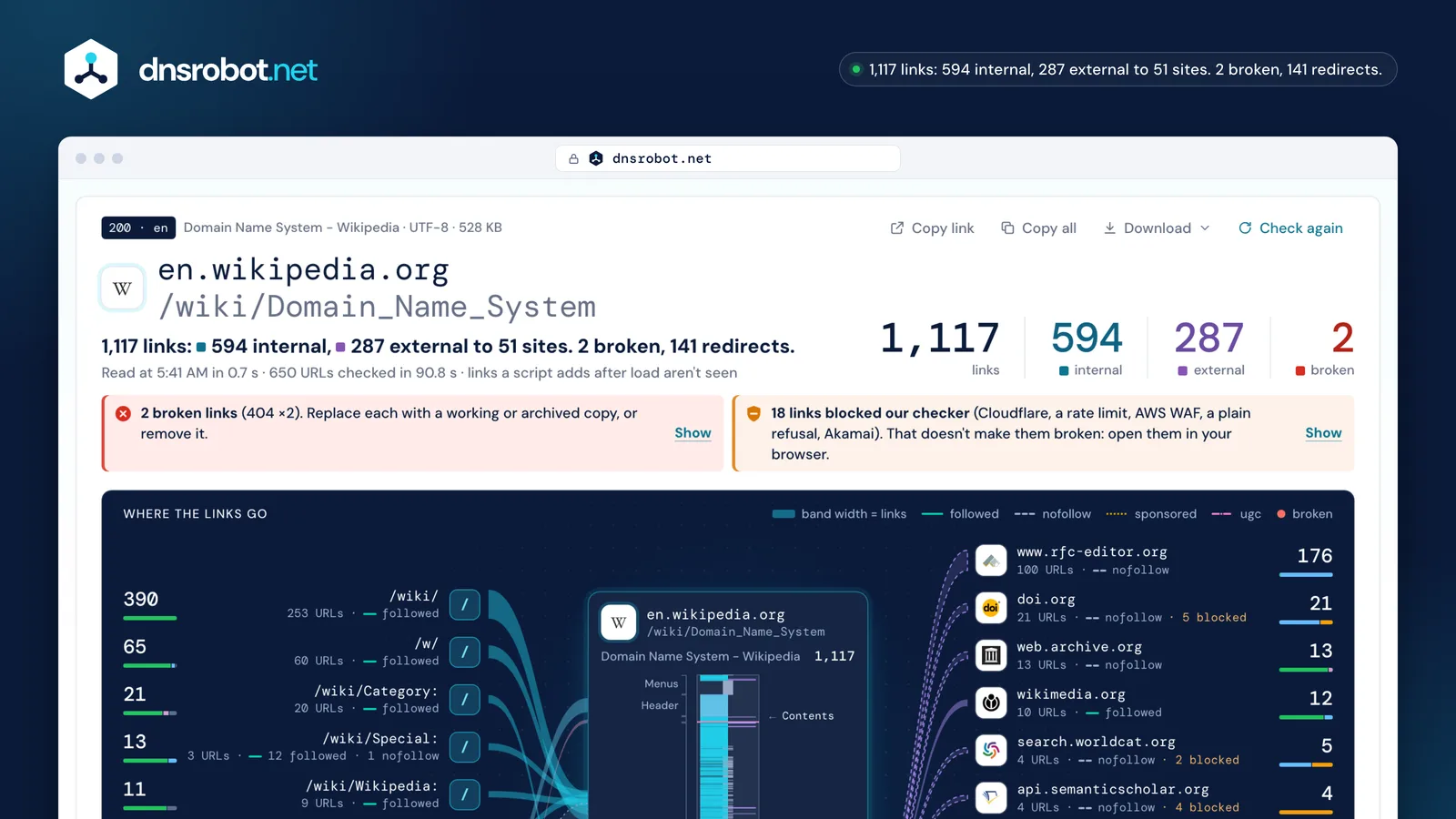
 The answer firstHow many links the page has, how many stay on the site and how many leave it, and how many are broken.Notes with a fixBroken links, links that only bot protection stopped, redirects worth updating, empty anchors: each with its count and what to do.The page, top to bottomOne tick per link where it sits on the page: menus, the article, the references, the footer.Where the links goOne band per section and per site, as wide as its number of links, dashed when the links are nofollow.
Internal link checker: what counts as internal or external?
An internal link points to the same host as the page; an external link points to another website. Links to another host of the same site, such as de.wikipedia.org from en.wikipedia.org, are counted apart.
Internal links help readers and crawlers find a site's other pages; every page that matters should be linked from at least one other (Google). External links aren't a risk in themselves: citing good sources helps readers trust a page.
Google suggests nofollow only for links you don't vouch for, not for every external link. A link to #section stays on the same page, and Google doesn't treat fragments as separate pages (Google).
- same host 514
- same site, other host 80
- other site 287
- same page 235
- javascript: 1
- en.wikipedia.org/wiki/Domain_nameinternalSame host as the page: internal.
- de.wikipedia.org/wiki/Domain_Name_Systemsame siteSame site (wikipedia.org), another host: counted apart.
- www.wikidata.org/wiki/Q8767externalAnother domain, even though Wikimedia runs it: external.
- www.rfc-editor.org/rfc/rfc1035externalAnother domain: external.
Dofollow checker: nofollow, sponsored and ugc (and why “dofollow” isn't an attribute)
rel="nofollow" asks search engines not to count a link as your endorsement, rel="sponsored" marks a paid link or an ad, and rel="ugc" marks a link your users wrote. A link with none of them is followed: there is no dofollow value.
Since September 10, 2019 all three are hints, not commands, and since March 1, 2020 also for crawling and indexing (Google). Values can be combined, such as ugc nofollow, separated by spaces or commas.
The one that matters most: a paid link without sponsored or nofollow breaks Google's spam policies (Google). On the Wikipedia article we read, 267 of the 287 external links carry nofollow, which MediaWiki adds to every citation.
<a href>Followed by default: nothing to addrel="nofollow"Don't vouch for it: when no other value fitsrel="sponsored"Paid or an ad: needed on paid links (or nofollow)rel="ugc"Written by users: comments, forum postsrel="ugc nofollow"Both: allowed, for older crawlersrel="dofollow"Not a value: browsers and Google ignore it
- 2005Google introduces nofollow
- 2019-09-10sponsored and ugc arrive; all three become hints
- 2020-03-01hints for crawling and indexing too
What if the page itself says nofollow?
Then Google follows none of its links, whatever each link's own rel says. A robots meta tag or an X-Robots-Tag header with nofollow applies to the whole page; this tool marks each link “nofollow (page)”.
Google reads the robots and googlebot names in any case, even in the body, and none means noindex plus nofollow (Google). The same rules can come as a header, such as X-Robots-Tag: nofollow.
Wikipedia's revision history pages carry noindex,nofollow on purpose. The previous version of this tool never read the tag and counted 194 of a history page's first 200 links as followed.
of the first 200 links: the meta tag was never read
links, all nofollow (page): Google follows none of them
543 nofollow (page)6 nofollowX-Robots-Tag: none
Website link checker: find and fix broken links
A link is broken when its URL answers with an error such as 404 Not Found or 410 Gone, or redirects to one, or when its name doesn't exist. Analyze the page, then open the Broken tab.
Fix each one by linking the page's new address, an archived copy, or nothing. Google drops 4xx pages from its index (Google), and a reader who follows the link lands nowhere.
Not every error means broken: 401 asks for a login, so the page exists (RFC 9110), and 5xx or a timeout often passes, so check those again later. On the article we read, 2 of 656 URLs were broken, both in its references; a third answered a plain 403, which we list as blocked.
- umbrella.cisco.com404
The page is gone
Cisco retired the blog post; the server says so plainly.
umbrella.cisco.com/blog/dnscrypt-critical-fundamental-and-about-timeLink the archived copy on web.archive.org, or remove the link.- http://www.apwg.org301
- https://…/1H2010.pdf404
A redirect that ends in a 404
http:// moves to https://, and the PDF isn't there. Counted as broken, not as a redirect.
www.apwg.org/reports/APWG_GlobalPhishingSurvey_1H2010.pdfFind where the report lives now, or cite an archive.- www.akamai.com403
A plain 403: blocked, not broken
The server refused our checker with no sign of bot protection. The file may be gone, or the server may turn bots away.
www.akamai.com/dl/technical_publications/network_overview_osr.pdfOpen it in your browser; if it opens, keep it.

Redirects in links: worth fixing?
A link that redirects still works, but every hop costs a request and time. Point links at the final address, above all links inside your own site, where you control both ends.
A 301 or 308 says the move is permanent; a 302, 303 or 307 is temporary, and Google keeps showing the old address (Google). Googlebot follows up to 10 hops, browsers up to 20 (Google).
rfc-editor.org now sends its /rfc/ pages on to /info/, so 175 links in the article we read take an extra hop. A redirect that ends in a 404 is counted as broken here, not as a redirect.
- doi.org/10.17487/RFC1035302302: temporary, the old URL stays the one to use
- www.rfc-editor.org/info/rfc1035301301: moved for good, link the new URL
- www.rfc-editor.org/info/rfc1035/200
links point at rfc-editor.org/rfc/…, which now moves to /info/…
of the page's 656 URLs redirect
hops Googlebot follows at most; browsers give up after 20
“Blocked here, but it works in my browser”
Many sites put bot protection in front of their pages. It stops visitors that don't run JavaScript or look scripted, so our checker gets a 403 or a 429 while your browser passes. These links are listed as Blocked, not broken.
Cloudflare marks its challenges with a cf-mitigated: challenge header (Cloudflare) and challenges clients with unusual user agents by default; 429 means too many requests (RFC 6585).
We send an honest user agent and never try to get round a wall. On the article we read, 18 URLs were blocked: 17 by Cloudflare, AWS WAF, Akamai and rate limits, one by a plain 403. Open them yourself before you change anything.
- Cloudflare challenge7dl.acm.org · onlinelibrary.wiley.com · queue.acm.org · 403
- AWS WAF6api.semanticscholar.org · ui.adsabs.harvard.edu · sgp.fas.org · 202 · 405
- Rate limit (429)3search.worldcat.org · api.semanticscholar.org · 429
- Akamai bot protection1dyn.com → www.oracle.com · 403
Link counter: how many links can a page have?
There is no limit. Google's guidance sets no number and says there is no ideal count; the old advice to keep under 100 links dates from when Google read only part of a page.
What matters is that each link helps the reader, that the important ones are real <a href> links in the HTML, and that they sit within the first 2 MB of HTML, which is all Googlebot reads for Search (Google).
The Wikipedia article we read carries 1,117 links in 528 KB of HTML. example.com carries none in its HTML at all: its one link is added by a script after the page loads.
- wikipedia.org/wiki/Domain_Name_System1,117
- www.wikipedia.org383
- developer.mozilla.org/en-US/158
- github.com142
- dnsrobot.net/blog/hosting-com-coupon100
- example.com0its one link is added by a script
Anchor text and image links
Anchor text is the clickable text of a link; it tells readers and Google what the target is about. For an image link Google reads the image's alt text as the anchor, so an image link with an empty alt says nothing.
Good anchors are short, specific and describe the target; “click here” and “read more” tell nobody anything (Google). Google falls back to the title attribute when a link has no text.
This tool shows the alt text of every image link, marks empty ones and lists repeated anchors. On the article we read, “edit” is the anchor of 49 links: section edit links, fine on Wikipedia, weak anywhere else.
<a href="/wiki/DNS_over_HTTPS">DNS over HTTPS</a>anchorDNS over HTTPS<a href="/wiki/File:Wikiversity_logo_2017.svg"><img alt="Wikiversity logo"></a>anchorImageWikiversity logo<a href="/wiki/File:DNS_Architecture.svg"><img alt=""></a>anchorEmptynothing: an empty link
- “edit”×49
- “Archived”×11
- “more...”×4
target=_blank and noopener: still needed?
Not in current browsers. A link with target="_blank" opens a new tab, and every major browser now treats it as rel="noopener": the new page can't reach back and change yours. Missing noopener is listed as a note, not a risk.
The HTML standard made _blank imply noopener in 2019 (HTML); Safari 12.1, Firefox 79 and Chrome 88 shipped it. noreferrer also hides where the visitor came from: a privacy and analytics choice, not a security fix.
<a target="_blank">no rel at allwindow.opener→ null- 2019-02HTML: _blank implies noopenerwhatwg/html #4330
- 2019Safari 12.1implicit noopener
- 2020Firefox 79implicit noopener
- 2021Chrome 88implicit noopener
- dnsrobot.net/blog/hosting-com-coupon23 of 23 have noopener or noreferrer
- github.com10 of 10 have noopener or noreferrer
- developer.mozilla.org/en-US/10 of 10 have noopener or noreferrer
Link myths, checked against Google's own pages
Most link advice repeats a few old rules. Here is what Google's documentation says about each one today.
| The myth | What Google says | Source |
|---|---|---|
| False“dofollow” is an attribute you add | Links are followed by default; only nofollow, sponsored and ugc mean anything. | developers.google.com |
| FalseNofollow on external links gets a site penalized | Google asks for nofollow or sponsored only on paid links and links you don't vouch for. | developers.google.com |
| OutdatedKeep a page under 100 links | There is no limit and no ideal number of links per page. | developers.google.com |
| FalseNofollow keeps a page out of the index | To keep a page out of Google, allow crawling and use noindex. | developers.google.com |
| OutdatedNofollow links pass nothing at all | Since 2019 they're hints: Google may use them, though it generally still doesn't count them for ranking. | developers.google.com |
| Outdatedtarget=_blank without noopener is a security hole | Current browsers imply noopener for _blank links, unless rel=opener asks for the opener. | html.spec.whatwg.org |
Sources
- Google Search Central: crawlable links, qualifying outbound links, robots meta tag, HTTP status codes
- HTML Living Standard (links, rel values, base URL) and RFC 9110 (status codes)
- Cloudflare: detecting a challenge
- The numbers: our own run on en.wikipedia.org/wiki/Domain_Name_System, October 23, 2026
Link Analyzer FAQ
Is this link safe to click?
How do I find all the links on a webpage?
What is the difference between internal and external links?
What does nofollow mean, and is dofollow a real attribute?
When should I use rel="sponsored" or rel="ugc"?
Why is a link marked “Blocked” and not broken?
Why does a link redirect, and should I fix it?
Does it find links added by JavaScript?
The page blocks automated readers. Can I still analyze it?
How many links does it check?
How many links should a page have?
Is the Link Analyzer free, and do you store the pages?
Missing something?Suggest a feature or a new tool
More website and SEO tools
Subdomain Finder
Discover all subdomains of any domain
Website Down Checker
Is it down for everyone or just you? Check any site from 11 places and your own connection, with a live screenshot
SSL Certificate Check
Verify SSL certificate validity and security details
Hosting Checker
Find out who hosts any website: web host, CDN, CMS, email provider, registrar and SSL issuer
WHOIS Lookup
Look up domain registration, registrar, and owner details via RDAP
IP Blacklist Check
Check if an IP address is listed on spam or malware blacklists