










IP to Hostname
Convert an IP address to its hostname and domain name. We read the address's PTR record from its holder's nameservers, check that the name leads back to the same IP, and show the website names the address answers with.
IPv4 or IPv6. A hostname works too: its first address is looked up in full, up to 7 more are listed.
How to find the hostname of an IP address
Type the address above and press Find hostname. The tool reads the address's PTR record from the nameservers of whoever holds the address, then looks the name up again to confirm it leads back to the same IP: 1.1.1.1 is one.one.one.one, 8.8.8.8 is dns.google.
The hostname is the name the address's holder chose. A company's server usually carries the company's own name; a cloud server, a home connection or a phone usually carries the provider's default pattern, with the address's digits written into it.
Trust a hostname only when it points back. If the name's A or AAAA record doesn't return the same IP, someone wrote a name they don't control; the tool marks it as pointing elsewhere.
- The address8.8.8.8IPv4 · Google, AS15169
- Its reverse name8.8.8.8.in-addr.arpathe four numbers reversed, under in-addr.arpa
- The holder's nameserverns1.google.comfound from the root down: IANA, ARIN, then Google
- The hostnamedns.googlepoints back to 8.8.8.8



What the result shows
The head gives the hostname in one sentence, with the network behind the address and whether the name points back. Under it, a dashed card lists the site names from the address's own certificate: hints, not a list of every site.
Hostname shows each PTR name with its TTL and forward check, Domains the certificate and port-80 answers, Network the block, AS number and registry, and Commands the same lookup for a terminal. The column on the right traces where the name came from.
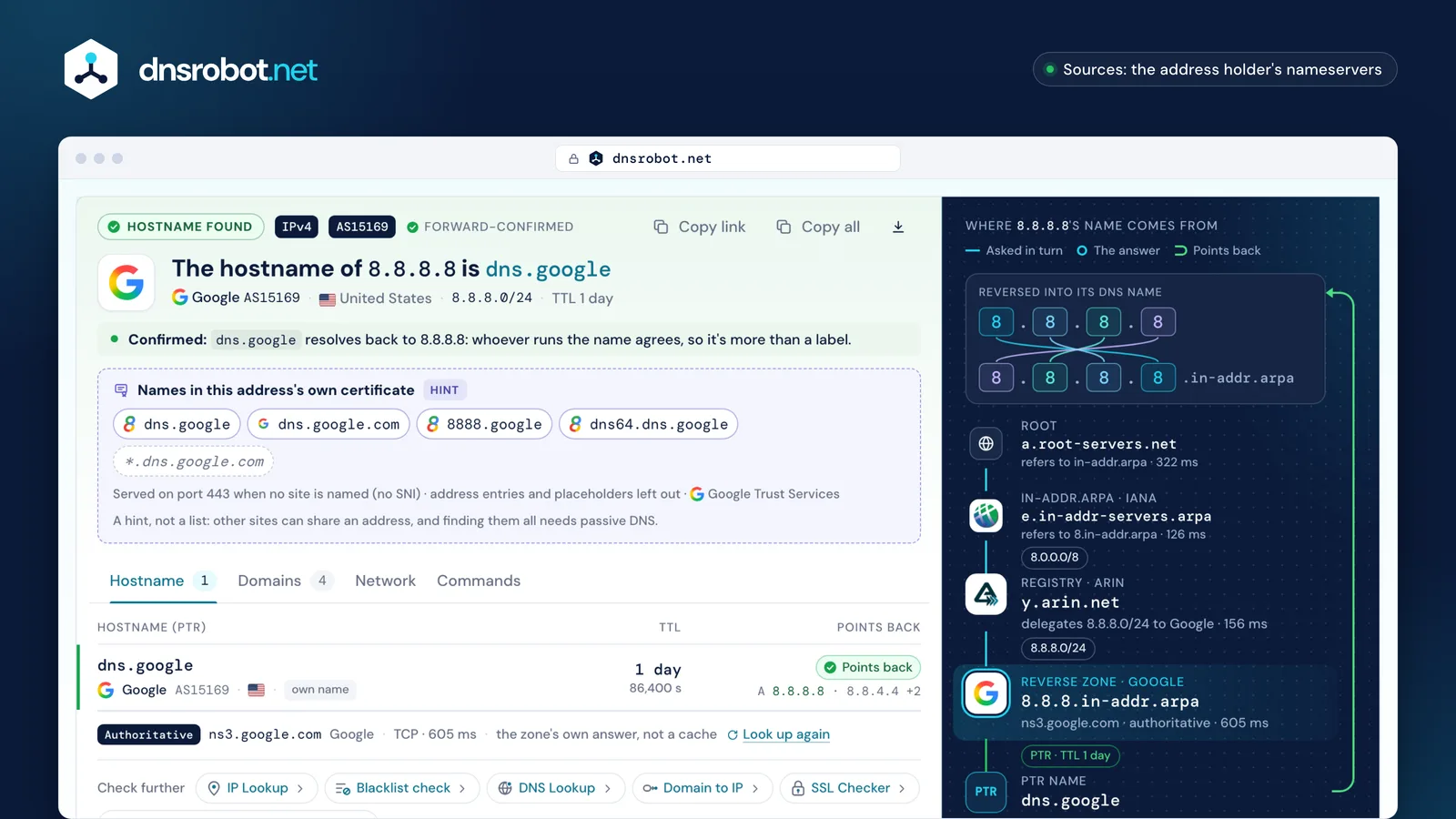
 The hostnameThe name in the address's PTR record, and whether it resolves back to the same IP.The certificate hintSite names from the certificate the address serves on port 443 when no site is named.The viewsEvery PTR name, the domains the address answers with, the network behind it, the commands.Where the name comes fromThe reverse zone's path from the root, and what the address itself answered on ports 443 and 80.
Can you find every domain on an IP address?
Not from DNS. An address has one place for names, its PTR record, and that holds whatever the address's holder chose, often the provider's default rather than any website.
Two more hints come from the address itself. The certificate it serves on port 443 when no site name is sent names its default site (RFC 6066 §3 forbids an IP address as the site name), and a redirect on port 80 may name a host. The tool shows both as hints, never as a full list.
Listing every domain that points at an address takes passive DNS: answers collected over months from many resolvers and crawls, sold by a few companies. We don't buy that data or pass your lookups to anyone, so the page says plainly what it can't see.


IP to domain on shared hosting and CDNs
One shared-hosting or CDN address serves many sites, so it has no single domain to find. Cloudflare's addresses are shared by all proxied hostnames, and a handshake that names no site is refused (TLS alert 40), so not even a default site shows.
A dedicated address answers with its own certificate: 9.9.9.9 serves dns.quad9.net and Quad9's other service names. Behind a CDN, the PTR names the CDN or nothing, and the site's name travels only inside each visitor's request. To go the other way, from a site to its addresses, use Domain to IP.

- PTR
- none · NXDOMAIN
- Certificate
- www.python.org · *.python.org · python.orgGlobalSign
- Port 80
- 500
- Also here
- other sites Fastly serves, never listed

- PTR
- none · NXDOMAIN
- Certificate
- refused: TLS alert 40, a site name is needed
- Port 80
- 403
- Also here
- every hostname Cloudflare proxies
A dedicated address answers for itself: 9.9.9.9 sends Quad9's own certificate, dns.quad9.net and 21 more Quad9 names.DigiCert


How to find a hostname from an IP on Windows, macOS and Linux
On Windows, nslookup 1.1.1.1 prints the hostname on its Name: line. On macOS and Linux, host 1.1.1.1 prints it after "domain name pointer", and dig -x 1.1.1.1 +short prints the name alone. In PowerShell, Microsoft documents the reversed name: Resolve-DnsName -Name 1.1.1.1.in-addr.arpa -Type PTR.
Each command asks your own resolver, so it shows that resolver's cached copy and leaves the forward check to you. The tool asks the zone's own nameserver and confirms the name in the same step.
nslookup 1.1.1.1The hostname is on the "Name:" line.
macOS
% host 1.1.1.1
1.1.1.1.in-addr.arpa domain name pointer one.one.one.one.the hostname
Linux
$ dig -x 1.1.1.1 +short
one.one.one.one.the hostname
Windows
C:\> nslookup 1.1.1.1
PS> Resolve-DnsName -Name 1.1.1.1.in-addr.arpa -Type PTR
Microsoft documents that nslookup returns the computer's name for an IP address, and documents Resolve-DnsName with the reversed name.
What the hostname tells you about an IP address
Who answers for the address, and often what it is: crawl-66-249-66-1.googlebot.com is Googlebot, ec2-3-80-0-1.compute-1.amazonaws.com is an AWS server in us-east-1, and mail-…google.com names are Gmail's outbound servers.
ISPs write the address and words such as dsl, dyn, pool or cable into home lines' names; RFC 8501's own example is 1.string.region.example.com. A city or airport code in a name is a hint the operator chose, never a location record.
A name proves nothing on its own: check that it points back before trusting it, as the tool does for every name it finds.
1.
- 1a host number
- stringa word the ISP picks
- regiona region
- example.comthe ISP's domain
ec2-
- ec2EC2
- 3-80-0-1the address
- compute-1us-east-1
- amazonaws.comAmazon's domain


lb-
- lblikely a load balancer
- 140-82-112-3the address
- iadWashington Dulles's airport code
- github.comGitHub's domain


crawl-
- crawlcrawler
- 66-249-66-1the address
- googlebot.comGoogle's crawler domain
mail-am6eur05on2052.
- mail-am6eur05on2052one sending server; Microsoft doesn't document the parts
- outbound.protection.outlook.comMicrosoft 365's outbound mail domain

<reversed-ip>.
- <reversed-ip>the address, reversed
- bc.googleusercontent.comGoogle Cloud's default domain

IP to hostname: frequently asked questions
How do I find the hostname of an IP address?
How do I convert an IP address to a domain name?
Why is the hostname different from the website I visited?
Why does an IP address have no hostname?
Can I find all websites hosted on one IP address?
What is the difference between a hostname and a domain name?
Can a hostname show where an IP address is?
Why do Cloudflare IP addresses show no website?
Is it legal to look up the hostname of an IP address?
Why do two tools show different hostnames for one IP?
Missing something?Suggest a feature or a new tool
More IP and DNS tools
Reverse DNS Lookup
Find hostnames associated with any IP address via PTR records
IP Lookup
Look up IP address geolocation, ISP, and network details instantly
Domain to IP
Convert any domain name to its IP address with geolocation and CDN detection
What Is My IP
Your public IPv4 and IPv6 at once, with the network, location and a VPN check
WHOIS Lookup
Look up domain registration, registrar, and owner details via RDAP
DNS Lookup
Every DNS record from the domain's own nameservers, beside Google's and Cloudflare's cache
SSL Certificate Check
Verify SSL certificate validity and security details
Hosting Checker
Find out who hosts any website: web host, CDN, CMS, email provider, registrar and SSL issuer