What Is a Morse Code Translator?
A Morse code translator is a tool that converts plain text into Morse code (dots and dashes) and decodes Morse code back into readable text. Morse code was developed in the 1830s by Samuel Morse and Alfred Vail as a way to send messages over the electric telegraph — the first practical long-distance communication technology. Each letter, number, and punctuation mark is assigned a unique pattern of short signals (dots, or "dits") and long signals (dashes, or "dahs").
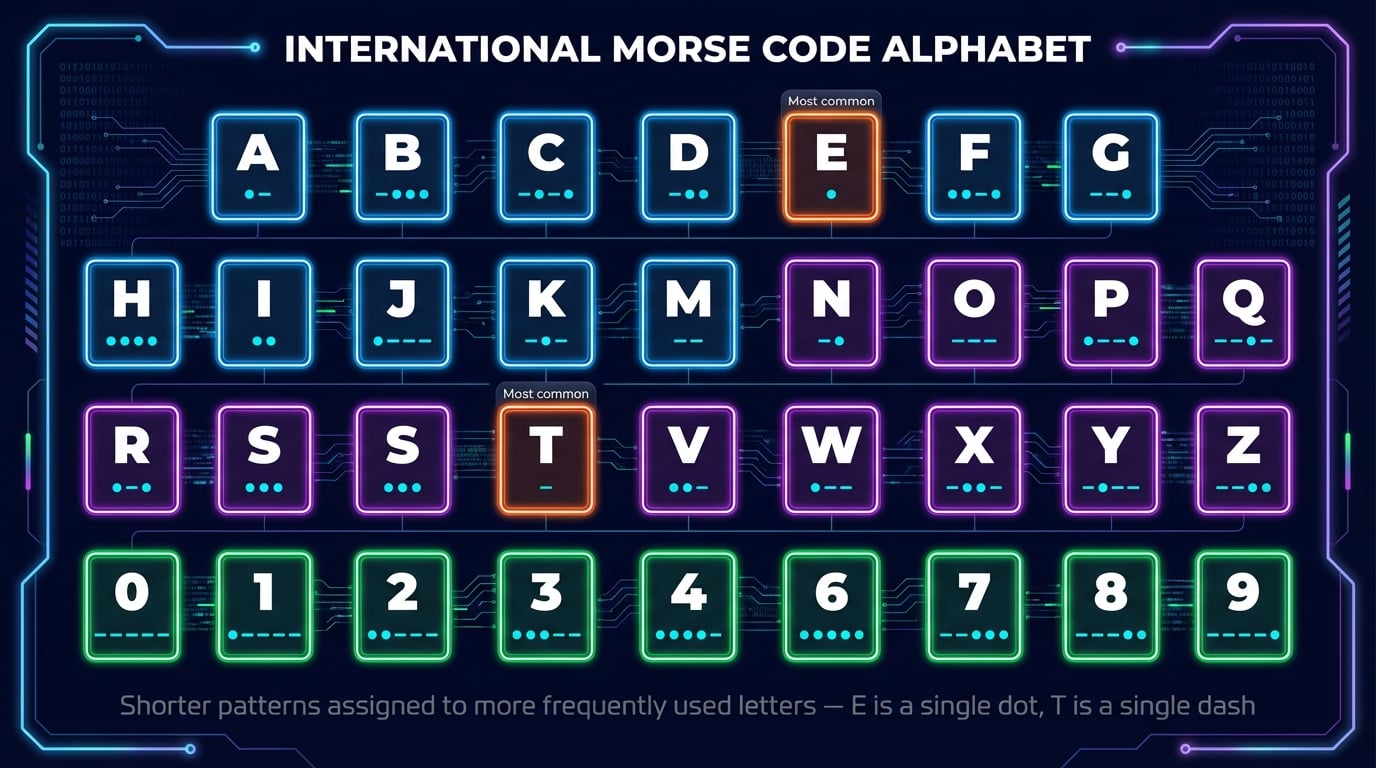
The International Morse Code standard, finalized in 1865 and still in use today, assigns shorter patterns to more frequently used letters. The letter E, the most common in English, is just a single dot. The letter T is a single dash. Less common letters like Q (--.-) and Z (--..) require longer sequences. This frequency-based design made telegraph operators faster, since the most-used characters took the least time to transmit.
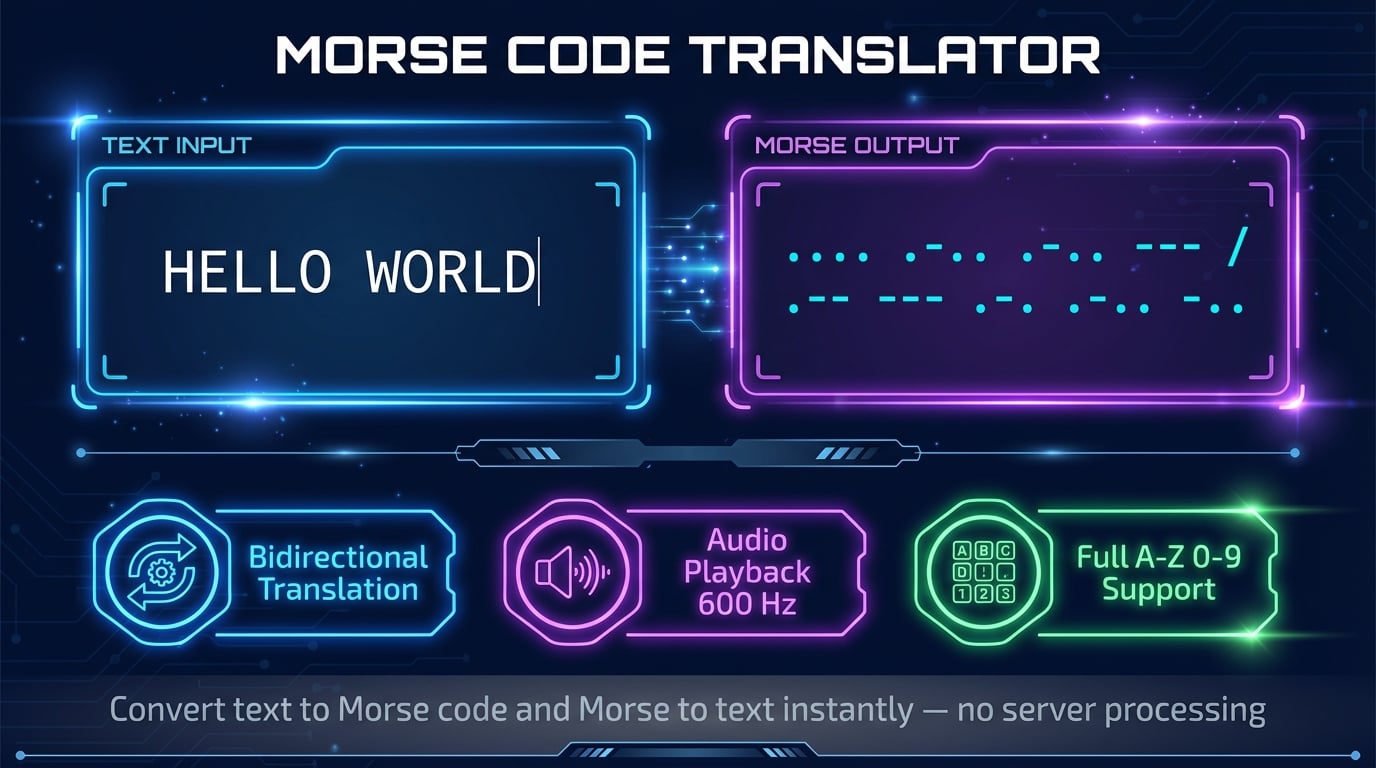
Our free online Morse code translator handles bidirectional conversion automatically — type text to get Morse code, or enter dots and dashes to decode a message. The built-in audio player lets you hear the Morse code at the standard 600 Hz CW frequency. Whether you are learning Morse code for encoding concepts like binary, practicing for amateur radio, or building an alternative text format, this tool provides instant results with no registration required.
How Our Morse Code Translator Works
Our text to Morse code converter follows a straightforward four-step process. Every conversion happens instantly in your browser with no server processing.
Enter Text or Morse Code
Type any text to encode it into Morse code. Or switch to Morse-to-Text mode and enter dots, dashes, spaces, and slashes to decode a Morse message.
Instant Bidirectional Conversion
The translator converts your input in real time as you type. Text to Morse and Morse to text both work instantly with no delays or loading screens.
Listen with Audio Playback
Click Play Audio to hear your message as authentic Morse code beeps at 600 Hz. The audio follows International Morse Code timing ratios for realistic output.
Copy Results or Browse Chart
Copy the Morse code output to your clipboard with one click. Use the built-in reference chart to look up individual character patterns for any letter or number.
Advertisement
International Morse Code Alphabet & Numbers
The Morse code alphabet assigns a unique dot-dash pattern to each of the 26 letters and 10 digits. In the International Morse Code standard, a dot ("dit") is a short signal and a dash ("dah") is a signal three times as long. Shorter patterns are given to more frequently used letters — E is a single dot, T is a single dash, while uncommon letters like Q and J use four symbols.
Letters A-Z
Numbers 0-9
All 10 digits use exactly five symbols: 1 starts with one dot and four dashes (.----), while each subsequent number shifts one dash to a dot, until 5 is all dots (.....). Then 6 starts with a dash and four dots, continuing the pattern to 0 which is all dashes (-----). This systematic design makes numbers easy to memorize once you learn the pattern.
Common Morse Code Signals & Phrases
Beyond individual characters, Morse code includes prosigns (procedural signals) — special character combinations used as shorthand in radio communications. These are transmitted without the normal inter-character spacing, making them distinct from the individual letters they contain.
| Signal | Morse Code | Meaning |
|---|---|---|
| SOS | ... --- ... | International distress signal (emergency) |
| CQ | -.-. --.- | General call to all stations ("calling any station") |
| 73 | --... ...-- | Best regards (standard ham radio sign-off) |
| 88 | ---.. ---.. | Love and kisses (informal ham radio closing) |
| AR | .-.-. | End of message (prosign) |
| SK | ...-.- | End of contact / signing off (prosign) |
| BK | -...-.- | Break / invite to transmit (prosign) |
SOS in Morse code (...---...) is the most recognized signal worldwide. It was chosen in 1906 not as an abbreviation, but because its dot-dash pattern is unmistakable and can be transmitted quickly even under extreme duress. You can test it right now — type "SOS" in our translator above and click Play Audio to hear the distinctive pattern.
Advertisement
Uses for Morse Code Today
Despite being nearly 200 years old, Morse code remains relevant and actively used across several domains. Its simplicity — requiring only an on/off signal — means it works with almost any medium: light, sound, radio waves, or even touch.
Amateur Radio (Ham Radio)
CW (continuous wave) Morse code remains one of the most popular modes among ham operators. It cuts through noise better than voice and requires minimal bandwidth — just 150 Hz compared to 2,400 Hz for SSB voice. Many operators prefer it for DX (long-distance) contacts.
Emergency Communication
SOS (...---...) is the universal distress signal. Morse code can be sent with a flashlight, mirror, whistle, or any device that makes a signal. In survival situations where voice communication fails, Morse code provides a reliable fallback.
Assistive Technology
People with limited mobility use Morse code input on smartphones and computers. Google's Gboard keyboard supports Morse code input on Android and iOS. Only two inputs (dot and dash) are needed, making it accessible for people who can control a single switch.
Aviation & Navigation
Airport navigational aids — VORs (VHF Omnidirectional Range) and NDBs (Non-Directional Beacons) — continuously transmit their identifier in Morse code. Pilots use this to verify they are tuned to the correct navigation station.
Military & Intelligence
Military forces have used Morse code for over 150 years. Its low bandwidth requirements and ability to work with simple equipment make it valuable when modern communication infrastructure is unavailable or compromised.
Education & Puzzles
Morse code appears in geocaching clues, escape rooms, puzzle games, and STEM education. It teaches encoding concepts, pattern recognition, and the history of telecommunications — the same principles behind modern digital communications.
Text to Morse Code vs Morse to Text
Our Morse code converter supports both directions: encoding (text to Morse) and decoding (Morse to text). Understanding the rules for each direction helps you use the translator effectively and interpret Morse code in the wild.
Text to Morse Code (Encoding)
- • Each letter/number maps to a unique dot-dash pattern
- • Letters within a word are separated by a space
- • Words are separated by a slash ( / )
- • Case-insensitive — "Hello" and "HELLO" produce the same output
- • Unsupported characters are silently skipped
Morse to Text (Decoding)
- • Enter dots (.) and dashes (-) for each character
- • Separate letters with a space
- • Separate words with a slash ( / )
- • Invalid patterns show a ? placeholder
- • Example:
.... . .-.. .-.. ---= HELLO
Morse Code Timing Ratios
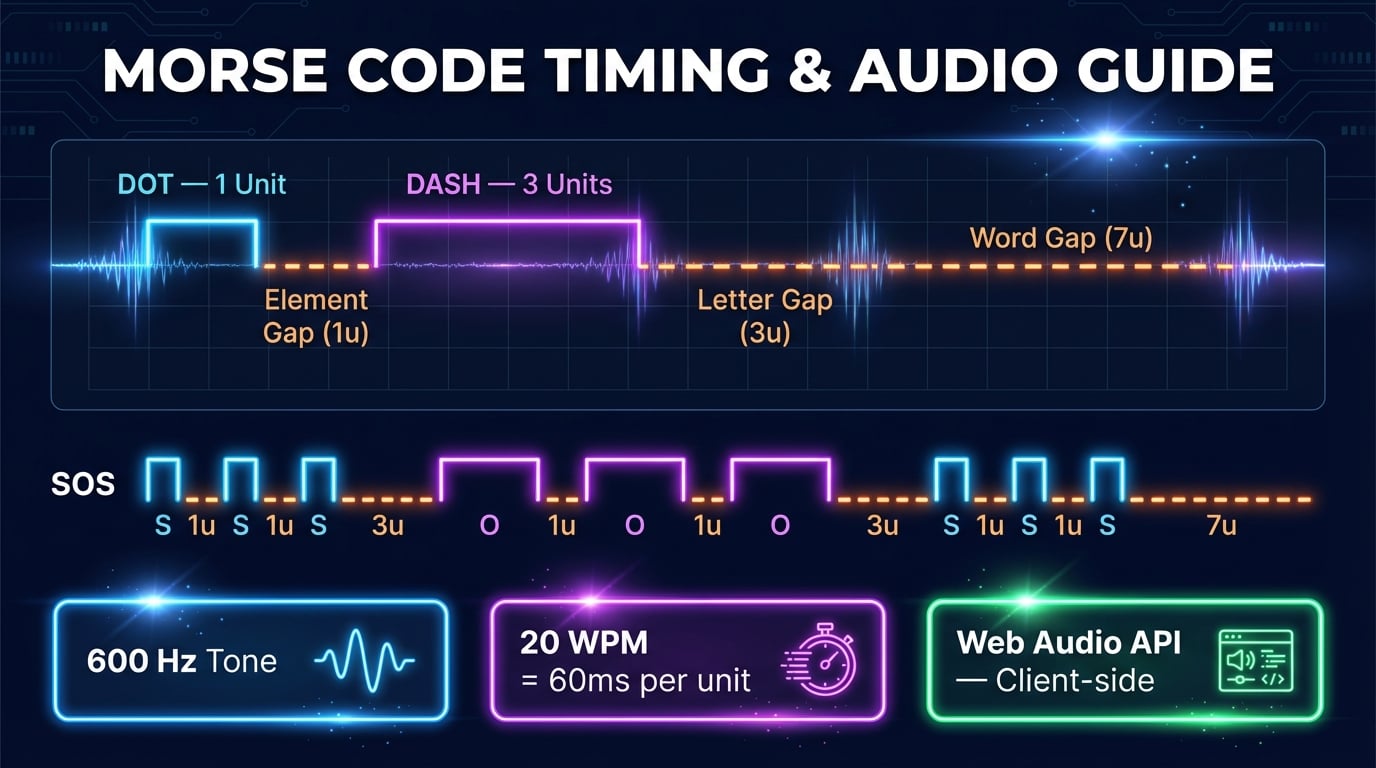
In audio and radio transmission, Morse code uses precise timing: a dot = 1 time unit, a dash = 3 units, the gap between elements within a character = 1 unit, the gap between letters = 3 units, and the gap between words = 7 units. At 20 WPM (words per minute), one time unit equals approximately 60 milliseconds. These ratios are what give Morse code its distinctive rhythmic sound.
Advertisement
Morse Code Audio Playback
Our Morse code audio feature uses the Web Audio API to generate precise tone patterns directly in your browser. The tone is set to 600 Hz — the standard CW frequency used by amateur radio operators. Dots produce a short beep and dashes produce a beep three times longer, with appropriate gaps between elements, characters, and words.
Since all audio is generated client-side using the Web Audio API, there is no server round-trip — playback starts instantly when you click Play. This also means complete privacy: your messages are never sent to any server. The audio feature is an excellent way to learn Morse code by ear, as hearing the rhythmic patterns helps build recognition faster than visual study alone. Professional radio operators learn to hear Morse code as words and phrases rather than individual characters, a skill called "head copy" that comes with practice.
Related Utility Tools
Explore more free encoding, text, and generator tools on DNS Robot. Each tool is free with no registration required.
Advertisement
Frequently Asked Questions About Morse Code
What is Morse code?
Morse code is a character encoding system that represents letters, numbers, and punctuation as sequences of short signals (dots) and long signals (dashes). Developed in the 1830s by Samuel Morse and Alfred Vail for the electric telegraph, it became the foundation of long-distance communication. Each character has a unique pattern — for example, E is a single dot and T is a single dash. Morse code is still used today in amateur radio, emergency signaling, aviation, and assistive technology.
How do I use this Morse code translator?
Type any text in the input field to instantly convert it to Morse code (dots and dashes). Switch to Morse-to-Text mode to decode Morse code back to readable text. In Morse input mode, use dots (.) for short signals, dashes (-) for long signals, spaces between letters, and slashes (/) between words. Click Play Audio to hear the Morse code. Click Copy to copy the result to your clipboard.
What is SOS in Morse code?
SOS in Morse code is ... --- ... (three dots, three dashes, three dots). It is the international distress signal, adopted in 1906 and officially in use since 1908. Contrary to popular belief, SOS does not stand for "Save Our Souls" or "Save Our Ship" — it was chosen purely because its pattern (di-di-di dah-dah-dah di-di-di) is unmistakable and easy to transmit under distress conditions.
Can I listen to Morse code audio with this tool?
Yes. Our Morse code translator includes a built-in audio player powered by the Web Audio API. Click Play Audio to hear your message as authentic Morse code beeps at 600 Hz — the standard CW frequency. Short tones represent dots and longer tones represent dashes, following International Morse Code timing ratios. All audio is generated locally in your browser.
Is Morse code still used today?
Yes. While no longer required for maritime or commercial use, Morse code remains widely used in amateur (ham) radio where CW mode excels in poor signal conditions, aviation navigation aids (VORs and NDBs identify via Morse), assistive technology for people with disabilities, military communications, emergency signaling, and educational settings including geocaching and escape rooms.
What characters does this translator support?
Our translator supports all 26 letters (A-Z), all 10 digits (0-9), and common punctuation including period, comma, question mark, exclamation mark, slash, parentheses, ampersand, colon, semicolon, equals sign, plus, hyphen, underscore, quotation marks, dollar sign, and at sign. The International Morse Code standard defines unique dot-dash patterns for each character.
What is the Morse code alphabet?
The Morse code alphabet assigns each letter a unique dot-dash pattern. Common letters have shorter patterns: A (.-), E (.), I (..), T (-). Less common letters have longer ones: Q (--.-), X (-..-), Z (--..). Shorter patterns for frequent letters made telegraph operators faster. Our reference chart above shows all 26 letters and 10 digits with their patterns.
How does Morse code timing work?
Morse code uses precise timing ratios: a dot is 1 time unit, a dash is 3 units, the gap within a character is 1 unit, the gap between letters is 3 units, and the gap between words is 7 units. At 20 WPM, one unit equals about 60 ms. Our audio player reproduces these ratios for authentic sound.
What is the difference between text to Morse and Morse to text?
Text to Morse code (encoding) converts readable letters and numbers into their dot-dash equivalents. Morse to text (decoding) does the reverse — it takes dot-dash patterns and converts them back to readable characters. Our translator supports both directions with a simple mode toggle.
Is this Morse code translator free?
Yes. Our Morse code translator is completely free with no registration, no sign-up, and no usage limits. All processing — text conversion, audio generation, and the reference chart — happens entirely in your browser. No data is sent to any server, ensuring complete privacy. Translate unlimited messages and use all features without any cost.