










What Is My IP Address?
Your public IP address is shown the moment this page opens: your IPv4 and your IPv6 side by side, the network each one belongs to, roughly where they place you, and whether a VPN or relay is in the way. Nothing to type, and you can copy either with one click.
Checking
What is an IP address, and what does this page show?
An IP address is the number your connection is reached at on the internet: every website you open sees it, because its answer has to come back to you. Your provider assigns it to your router or phone, and every device behind your router shares it.
Most IP checkers show one address. This one shows both your IPv4 and your IPv6 at once, the network and announced block behind each, roughly where they place you, and what the address itself says: whether a VPN covers both families, and whether your IPv6 carries your device's hardware address.
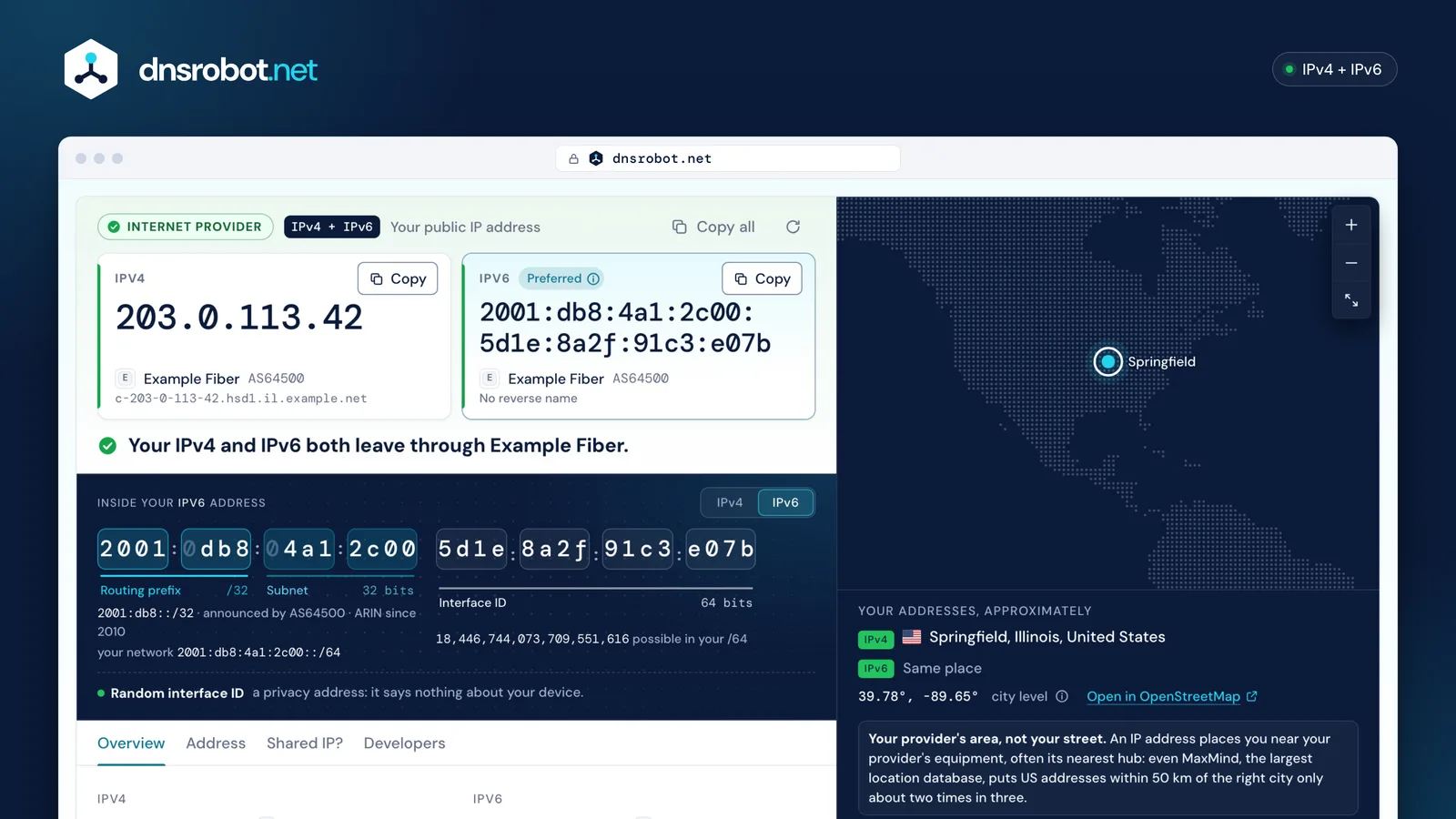
 Both your addressesYour IPv4 and IPv6, each with a copy button. Preferred marks the one your browser used: the one most sites see.What they sayOne sentence from the data: your provider on both, a VPN, iCloud Private Relay, a Tor exit, or a VPN that misses one family.Inside the addressThe address bit by bit: the block your provider announces, your network's /64 and the interface ID, read as random, set by hand or built from your MAC.Where it places youThe approximate place: your provider's area, often its nearest hub, never your street.
How do I find my IP address?
Your public IP address is at the top of this page: the one every website sees. Your device also has a local IP address inside your home network; each system shows it in its network settings or with one command.
Public IP: what every website sees (this page shows it)Local IP: your device inside your home network

Windows 11 and 10
Local IPSettingsNetwork & internetWi-Fiyour network
> ipconfig
IPv4 Address. . . . . . : 192.168.1.23
Or Ethernet instead of Wi-Fi; Settings lists it as “IPv4 address”, and ipconfig prints “IPv4 Address”.


Mac
Local IPSystem SettingsWi-FiDetails
% ipconfig getifaddr en0
192.168.1.23
en0 is Wi-Fi on a MacBook; on a Mac with an Ethernet port, Wi-Fi is often en1.

Linux
Local IPTerminal
$ ip -br addr
wlan0 UP 192.168.1.23/24 fe80::…/64
hostname -I prints all of the computer's addresses at once.


iPhone and iPad
Local IPSettingsWi-Fiⓘ next to your network

Android
Local IPSettingsNetwork & internetInternet⚙ next to your network
Menus vary by maker; on a Samsung Galaxy, start at Settings › Connections › Wi-Fi.
Your router
WAN IPAdmin pageStatusInternet (WAN)
This is your public IP only when no other device between your router and the internet translates addresses: a 100.64.x.x or private address here means carrier-grade NAT or a second router.
What is the difference between a public and a private IP address?
Your public IP address is your connection's address on the internet; private addresses (like 192.168.1.23) work only inside your home or office network. Your router translates between them with NAT, so all your devices share one public IPv4 address. Many providers add a second layer, carrier-grade NAT, and share one public address among many customers.
How one public address serves a whole home
Your own public address · most home lines
Behind carrier-grade NAT · common on mobile networks
- 10.0.0.0/8PrivateRFC 191816,777,216
- 172.16.0.0/12PrivateRFC 19181,048,576
- 192.168.0.0/16PrivateRFC 1918 · most home routers65,536
- 100.64.0.0/10Shared (carrier-grade NAT)RFC 65984,194,304
- 169.254.0.0/16Link-local: no router gave an addressIPv6: fe80::/1065,536
- fc00::/7Private IPv6 (unique local)RFC 4193 · in practice fd…
- 127.0.0.0/8This device (loopback)IPv6: ::116,777,216
- everything elsePublic: reachable on the internetIPv6: 2000::/3
What is the difference between IPv4 and IPv6?
An IPv4 address is 32 bits, written as four numbers from 0 to 255; an IPv6 address is 128 bits, written as eight groups of hex digits. IPv4 has about 4.3 billion addresses and ran out (the last free blocks went to the regional registries in 2011), so homes share one through NAT. IPv6 has enough for every device to get its own.
Network: the provider's announced blockSubnet: your network (IPv6)Host: one device (IPv6: the interface ID)
| Property | IPv4 | IPv6 |
|---|---|---|
| Length | 32 bits | 128 bits |
| Written as | 4 numbers with dots: 203.0.113.42 | 8 hex groups with colons; :: stands for zeros: 2001:db8::1 |
| Addresses | about 4.3 billion, all handed out | about 3.4 × 10³⁸ |
| Your home gets | one, shared by every device (NAT) | a block: every device gets its own address |
| Changes | when the provider reassigns it | the second half, about daily, for privacy |
| Google shows it | when your IPv6 doesn't work | when your IPv6 works |
Why does my IPv6 address change every day?
Your device makes up the second half of its IPv6 address, the interface ID. Most pick a random one and replace it regularly: a temporary address is used for new connections for one day by default (RFC 8981). Older setups build it from the network card's MAC address (EUI-64, with ff:fe in the middle), which lets sites recognise the device on any network; the address breakdown above flags it.
What can someone do with my IP address?
Not much on its own: it shows your provider and a rough area, not your name or street. Every site you visit sees and logs it. Only your provider's records link an address to a customer, and providers normally release them only when the law requires it.
What a website's server log keeps about your visit
203.0.113.42 - - [22/Oct/2026:14:02:11 +0000] "GET /pricing HTTP/2" 200 5120 "-" "Mozilla/5.0 (Macintosh; Intel Mac OS X 10_15_7) …"
From the IP alone, anyone can find
- Your providerExample Fiber · AS64500
- A rough areaSpringfield, Illinois
- Country and time zoneUS · America/Chicago
- VPN, relay or Tor?No
- Where to report abuseabuse@example.net
Not in your IP address
- Your name
- Your street address
- Your phone number or email
- Which device in your home
- What you do on other sites
A stranger with your address can see your provider and area, report it, block it or, rarely, send unwanted traffic to it: keep your router updated and don't forward ports you don't use.
Why does my IP address change, and how do I change it?
Most home connections get a dynamic address: the provider hands it out (by DHCP or PPPoE) and may change it when the router reconnects, though many keep the same one for months. IPv6 changes more often on purpose: devices start a new temporary address every day. A static IP that never changes is a fixed assignment, often a paid extra.
One week of one home's addresses
Home IPv4lent by your provider
router restarted ↓
IPv6 prefixstays with your line
IPv6 interface IDa new one every day
Phone on mobile datafrom a shared pool
DHCP or PPPoE: the provider lends the IPv4 address and often gives the same one back.Temporary IPv6 (RFC 8981): used for new connections for 1 day by default, then replaced.Mobile data: an address from the carrier's pool for each session.
| To change or hide it | Sites then see | Location shows | Works for |
|---|---|---|---|
| Restart your router | maybe a new IPv4; a new temporary IPv6 | the same area | the whole home |
| Switch to mobile data | your carrier's address | the carrier's area | that phone |
| A VPN | the VPN server's address | the server's city | what it tunnels: check both families above |
| iCloud Private Relay | a relay address | your region | Safari |
| Tor Browser | a Tor exit relay | the exit's country | Tor Browser |
| Ask your provider | a new or a static IP | the same area | your line |

Why does Google show a different IP address?
Google shows one address: when your IPv6 works, that is usually your IPv6, while sites without IPv6 see your IPv4. Both are yours. Devices prefer IPv6 when both work, and browsers race the two (Happy Eyeballs), so this page asks for each family separately to show the pair.
One device, two addresses, three kinds of site

250 msBrowsers start IPv6 first and try IPv4 if IPv6 hasn't connected within about 250 ms (Happy Eyeballs, RFC 8305), so on a working dual-stack line Google sees IPv6.
IP address questions
What is my IP address?
How do I find my IP address?
ipconfig on Windows, ipconfig getifaddr en0 on a Mac, ip -br addr on Linux, or open the Wi-Fi network's details on an iPhone or Android phone. The guide above shows each path step by step.What is the difference between a public and a private IP address?
Why do I have two IP addresses, IPv4 and IPv6?
Why does Google show a different IP address than this page?
Can someone find my location from my IP address?
Why does my IP address change?
How can I change or hide my IP address?
How do I check that my VPN hides my IP?
What is CGNAT, and is my IP shared?
Is it safe to show my IP address?
Does this page store my IP address?
Missing something?Suggest a feature or a new tool
Related IP and network tools
What Is My ISP
Discover your ISP, ASN, and connection details
IP Lookup
Look up IP address geolocation, ISP, and network details instantly
MAC Address Lookup
Identify device vendor from MAC address using IEEE database
Port Checker
Test port connectivity and service availability
DNS Lookup
Every DNS record from the domain's own nameservers, beside Google's and Cloudflare's cache
WHOIS Lookup
Look up domain registration, registrar, and owner details via RDAP