











Free UPI QR Code Generator
Turn your UPI ID into a QR code that PhonePe, Google Pay, Paytm, BHIM and every other UPI app can scan to pay you, with or without a fixed amount.
Made in this browser and never uploaded · static codes that never expire
UPI payment


Merchant details (MCC, transaction reference)
Your UPI PIN is only for paying. Nobody needs it to send you money.
upi://pay?pa=shop.example@ybl&pn=Example%20Store&cu=INR55 bytesYour code
Print it or show it on your screen: paying from a shared QR image is capped at ₹2,000.
PDF · A6 table stand, four to an A4 sheet
Scan check
Reading…Checking…
Reading the code back the way a strict phone reader would.
- Logo
- 7.2 % of the codesafe 10 % · cap 15 % · lab limit at v6: 19.3 %
- Contrast
- 85 % · A#c2410c on #ffffff
- Quiet zone
- 4 modules
- Code on this print
- 7.0 cm wide · scans from about 36 cm1.43 mm a module: 1 module per 250th of the distance (an estimate)
Design
Every template reads back in the scan check, on screen and on a small faded print.
How do I turn my UPI ID into a QR code?
Type your UPI ID (the name@handle your app shows), the name customers should see and, if you like, an amount: the code appears as you type. Download it as SVG, PNG or PDF, or print it as a table stand or poster with your name and UPI ID written under the code.
The code is made in your browser: your UPI ID isn't uploaded or written into the page's address. There's nothing to register either, as the code only carries the UPI ID your bank already knows.
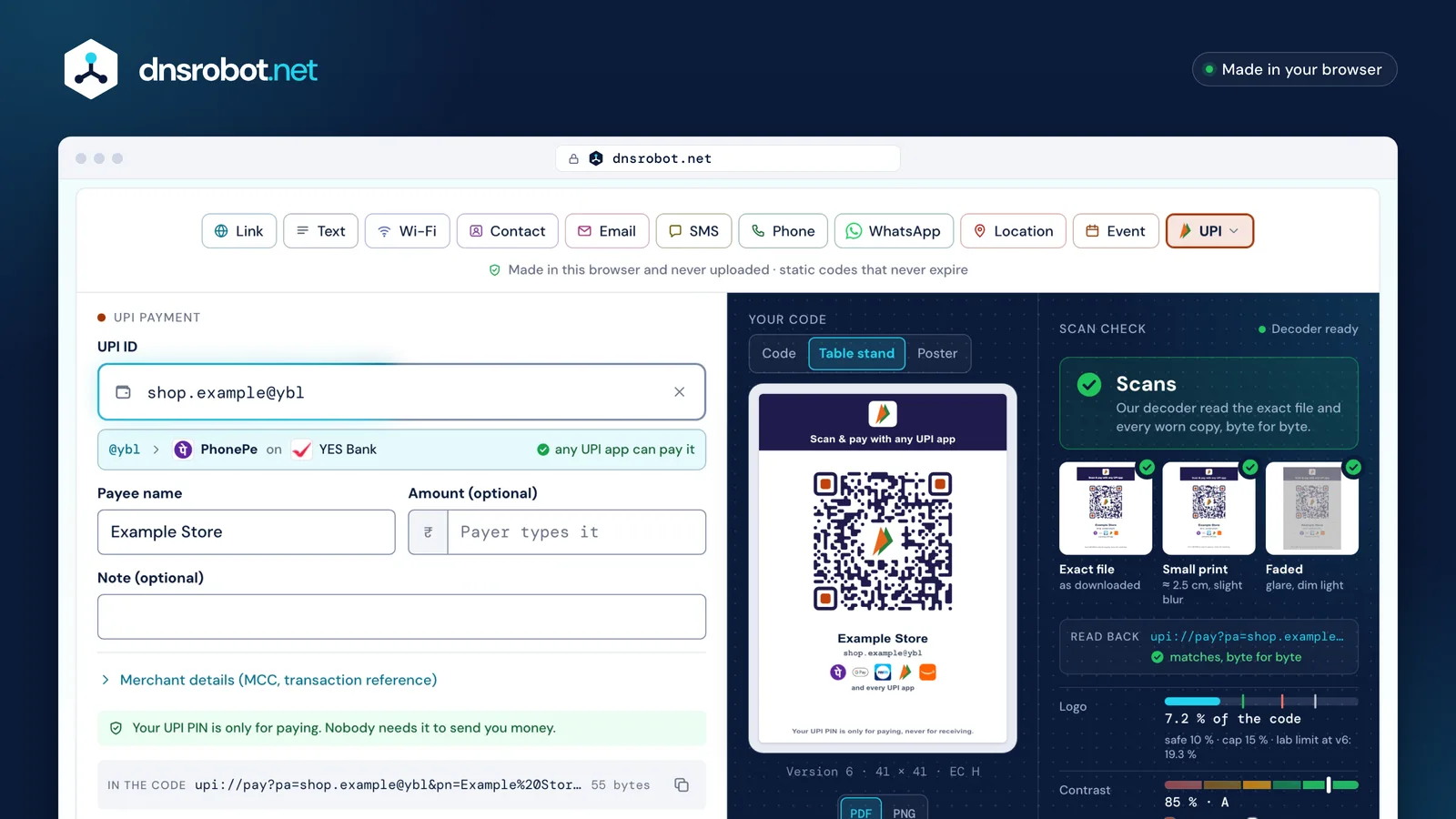
 UPI IDType a UPI ID, a name and, if you like, an amount: the handle after the @ names the app and bank as you type.DesignThe Scan & pay look with the UPI mark; colours, frame and logo as on any code.Scan checkZXing reads the code back before it goes on the counter.PrintThe table stand or poster as a PDF, or the code alone as SVG or PNG.
How does a UPI QR code work?
A UPI QR code holds a upi://pay link with your UPI ID (pa) and name (pn), in the format set by NPCI's UPI Linking Specification v1.6 (copy hosted by labnol.org). Every app must open these links, so one code works in PhonePe, Google Pay, Paytm, BHIM and the rest, whichever app made your UPI ID.
It's a static code, the normal kind for a small shop: the customer scans it and types the amount. Codes made here are unsigned, because only payment apps and merchants holding NPCI's keys can sign one, so some apps note that the source couldn't be verified before asking for the PIN. This page is our QR Code Generator opened on UPI: the same tool makes link, Wi-Fi and contact codes too.
upi://pay?pa=shop.example@ybl&pn=Example%20Store&am=250.00&cu=INR&tn=Order%2042
- upi://pay?
- Every UPI app opens it
- pa=shop.example@ybl
- The UPI ID that gets paid@yblIssued byPhonePeYES Bank
- pn=Example%20Store
- The name the app shows
- am=250.00
- A fixed amount, two decimals; leave it out and the payer types it
- cu=INR
- Rupees, the only currency UPI takes
- tn=Order%2042
- A note
One code, every UPI app
- PhonePe
- Google Pay
- Paytm
- BHIM
- Amazon Pay
- CRED
- MobiKwik



Which app is my UPI ID from? @ybl, @okaxis, @paytm
The part after the @ is the handle NPCI gives each app and its partner bank: @ybl, @ibl and @axl are PhonePe; @okaxis, @okhdfcbank, @okicici and @oksbi are Google Pay; @paytm and the @pt handles are Paytm; @upi is BHIM. So any UPI QR generator is a ybl QR code generator: type the whole ID, such as shop.example@ybl, and the tool names PhonePe and its bank as you type.
Any UPI app can pay any handle. Your own UPI ID is on your app's profile or "My QR" screen, under your name.
| App | Handles and their banks |
|---|---|
| PhonePe |
|
| Google Pay |
|
| Paytm |
|
| BHIM |
|
| Amazon Pay |
|
| |
| CRED |
|
| MobiKwik |
|


How do I set a fixed amount in a PhonePe or UPI QR code?
Type the amount in the generator's Amount field: it's written into the code as am=250.00, and PhonePe, Google Pay and the other apps open with it already filled in. Leave the field empty for a shop counter, where every bill is different, and the payer types the amount.
NPCI's spec asks only for the amount in decimal form; the generator writes rupees and paise, with two decimals. Show a code with an amount above ₹2,000 on a screen or on paper rather than sending it as a picture: paying a person from a shared QR image is capped at ₹2,000 (NPCI).

No amount in the codeupi://pay?pa=shop.example@ybl&pn=Example%20Store&cu=INR
am=250.00 in the codeupi://pay?pa=shop.example@ybl&pn=Example%20Store&am=250.00&cu=INR
How do I print a UPI QR code for my shop?
Choose Table stand or Poster above the code and download the PDF: it prints the code with your name, your UPI ID and the app marks, so customers know any UPI app works. Keep the white margin round the code, and print on matt paper, which throws back less glare than gloss.
Then scan the print with two different UPI apps before you put it out. The reach below is the tool's own estimate (a module at least 1/250 of the scanning distance, worked out from QR vendors' 10:1 rule of thumb), for a code with a UPI ID and a name.
Is there a limit on UPI QR code payments?
Yes: a normal UPI payment, person to person included, is capped at ₹1 lakh (NPCI's FAQ). Since 15 September 2025, verified merchants in some categories, such as insurance, travel and credit-card bills, can take up to ₹5 lakh in one payment (NPCI circular OC 185B), and banks may set lower limits of their own.
Since 1 October 2025, UPI no longer carries person-to-person "collect" requests (NPCI circular OC 220), so showing your code is now the way to ask a person for money. Two older NPCI rules still stand: paying a person from a tapped upi:// link isn't allowed, and paying a person from a shared QR image is capped at ₹2,000 (NPCI circular OC 76C). Scan to pay, never to receive: nobody needs your PIN to send you money.
- 1 Feb 2025Transaction IDs with special characters declined
- 15 Sep 2025₹5 lakh for verified merchants in listed categories
- 1 Oct 2025Person-to-person collect requests end
QR Code is a registered trademark of DENSO WAVE INCORPORATED.
UPI QR code FAQ
Does one UPI QR code work with PhonePe, Google Pay and Paytm?
How do I make a QR code for my @ybl UPI ID?
How do I set a fixed amount in a PhonePe QR code?
How do I find my UPI ID?
Is there a limit on payments to a UPI QR code?
Why does the app say the source couldn't be verified?
Can someone take money by making me scan a code?
Is this a static or dynamic UPI QR code?
Can I share my UPI QR code on WhatsApp?
Can I add my logo to a UPI QR code?
Missing something?Suggest a feature or a new tool
More QR tools
QR Code Generator
Make QR codes for links, Wi-Fi, contacts, WhatsApp and UPI or Pix payments, with your logo and colours, read back before you download SVG, PNG or PDF
QR Code Scanner
Scan QR codes from webcam or uploaded images instantly
WiFi QR Code Generator
A WiFi QR code guests join in one scan with the iPhone Camera or Android's Wi-Fi settings: WPA2 and WPA3, and a printable guest card
Password Generator
Strong random passwords, passphrases and PINs made in your browser, each with its exact bits and crack time
What Is My IP
Your public IPv4 and IPv6 at once, with the network, location and a VPN check
SSL Certificate Check
Verify SSL certificate validity and security details