What Is a Domain Age Checker?
A domain age checker is a tool that tells you how old a domain name is by looking up its registration date in the WHOIS/RDAP database. When you enter a domain like example.com, the tool queries public registration records and calculates the exact time elapsed since the domain was first registered — displaying the result in years, months, and days.
Domain age matters for SEO analysis, competitor research, trust assessment, and domain acquisition. Search engines like Google consider domain age as one of many ranking signals, and users tend to trust older, established domains more than recently registered ones. Our free domain age checker also shows the expiration date, lifecycle progress, and registrar information.
DNS Robot's domain age checker uses the RDAP protocol (the modern successor to WHOIS) as its primary data source, with traditional WHOIS as a fallback. This ensures accurate results for virtually any registered domain across all TLDs including .com, .org, .net, country-code TLDs, and new gTLDs.
How to Check Domain Age
Checking the age of any domain takes just three steps with our free tool:
Enter Domain
Type any domain name (e.g., google.com, amazon.co.uk) in the search box above. The tool automatically strips prefixes like http://, https://, and www.
Query RDAP/WHOIS
Click 'Check Age' and the tool queries RDAP servers (with WHOIS fallback) to retrieve the domain's registration record including creation, expiration, and registrar data.
View Results
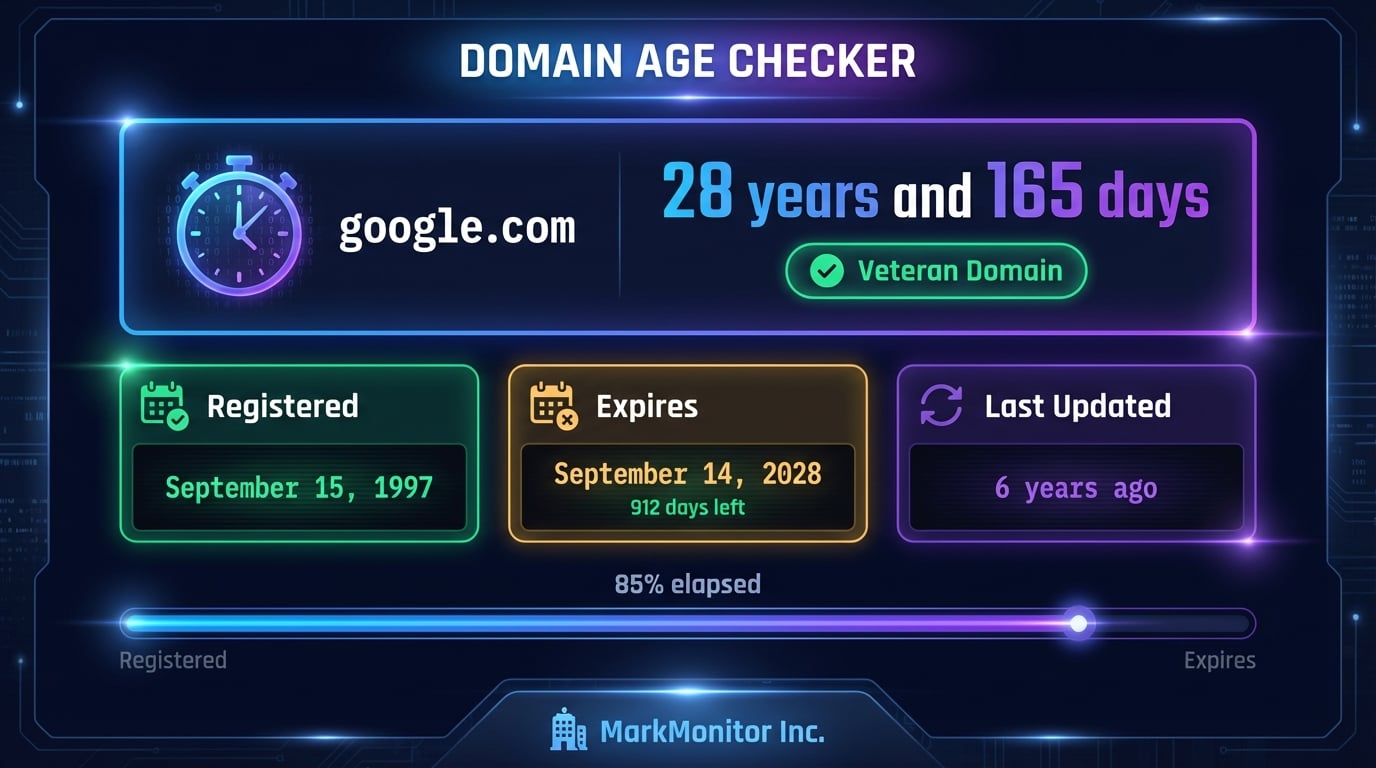
See the domain age in years and days, registration and expiration dates, lifecycle progress bar, age classification label, and registrar details — all displayed instantly.
Registration Date
The exact date the domain was first registered — the starting point for age calculation.
Expiration Date
When the registration expires with a countdown showing days remaining and renewal urgency.
Domain Age
Calculated age in years and days with classification labels: New, Young, Growing, Mature, Established, Veteran.
Lifecycle Progress
Visual progress bar showing how far through its registration period the domain is.
Advertisement
When Was a Domain First Registered? How to Read the Creation Date
The date the tool shows as Registered is the registry's creation date: the day the current registration of the name began. For most domains that is also the day the name was first registered, because a .com that has been renewed every year since 1998 keeps its 1998 creation date through every renewal and every transfer between registrars. The date only resets when a domain is deleted and registered again from scratch.
That reset is the trap behind "domain age". A name that was first registered in 2004, dropped in 2019, and re-registered in 2020 shows a 2020 creation date and an age of a few years, even though the name has existed for two decades. To find when a domain was first registered, check three sources in order:
- The creation date from this tool. It comes straight from the registry over RDAP, so it is authoritative for the current registration.
- The Wayback Machine. If web.archive.org has snapshots older than the creation date, the name was registered and in use before the current owner; the oldest snapshot is a floor for the original registration.
- Historical WHOIS. Commercial WHOIS-history services keep records back to the early 2000s and show every previous registration, owner change and drop. The redacted-owner section of our WHOIS lookup guide explains how to use them.
A few registries never publish a creation date at all. Nominet lists .uk names registered before 1996 as "before Aug-1996", DENIC publishes no dates for .de on its public service, and some ccTLDs return only the last change. When that happens the tool says so, and the WHOIS lookup shows whatever the registry does return.
Website Age vs Domain Age: Checking When a Website Was Created
People searching for a website age checker usually want one of two different dates. Domain age is how long the name has been registered; that is what this tool measures. Website age is how long a site has actually been publishing at that name, and no registry records it. A domain bought in 2010 and parked until 2023 is 15 years old as a domain and two years old as a website.
Domain age (this tool)
Registry creation date to today. Objective, instant, and the number most SEO tools and marketplaces quote.
Website age (three checks)
Oldest Wayback Machine snapshot, oldest dated article or sitemap entry, and the earliest copyright year in the footer. Take the earliest that shows real content.
For due diligence on a shop or a partner, check both. A large gap between the two, an old domain with a young website, often means the name changed hands or was bought as an expired domain for its history. The SSL certificate issue date and the CMS detector add two more clues about when the current site went live.
Bulk Domain Age Check: Up to 20 Domains at Once
Switch the tool above to Bulk, paste up to 20 domains one per line, and every name is checked in parallel. The results table shows the registration date, age, expiry date with a countdown, and registrar for each domain, and the Copy CSV button gives you a spreadsheet-ready export. The address bar updates with a ?domains= link, so a list can be re-run or shared later.
Because each lookup goes from your browser straight to the registry's RDAP server, the bulk domain age checker is not throttled by a shared server the way most free tools are. It is built for the jobs where one domain at a time is too slow:
- Vetting a list of expired or auction domains before bidding: age, registrar and whether the current registration is about to lapse.
- Link prospecting: sorting a list of candidate sites by domain age to spot brand-new domains that may be link farms.
- Portfolio audits: checking expiry dates across every domain your company owns in one pass.
- Competitor research: seeing how long each competitor in a niche has held its name.
Why Domain Age Matters for SEO
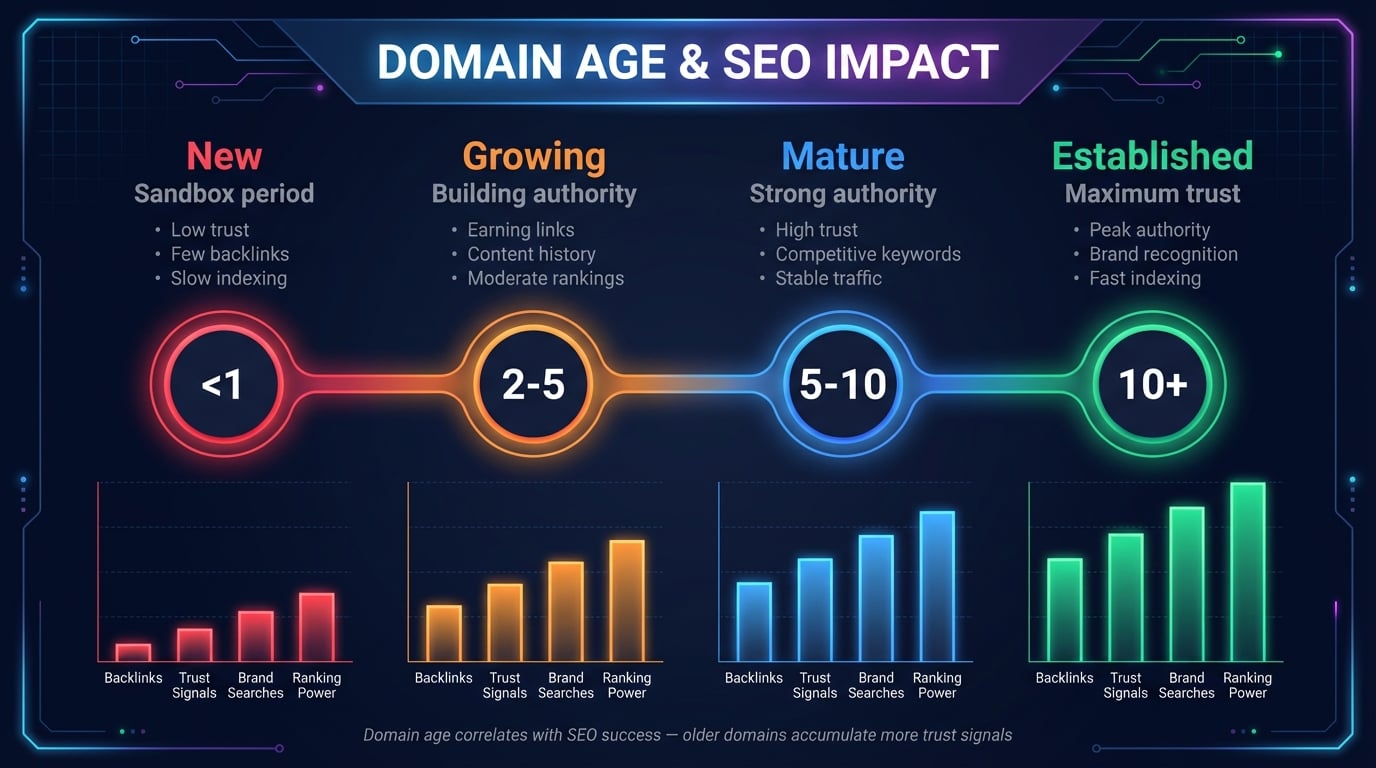
Domain age is frequently discussed in the SEO community as a potential ranking factor. While Google's John Mueller has stated that domain age is "not a factor" in isolation, the reality is more nuanced. Older domains correlate with higher rankings because they've had more time to accumulate backlinks, content, and trust signals — all of which are confirmed ranking factors.
That said, a brand-new domain with excellent content and a solid link-building strategy can absolutely outrank an older, neglected domain. Domain age is one signal among hundreds — it provides context but doesn't determine rankings on its own. Use our domain age checker alongside tools like DNS Lookup and Domain Health Check for a complete picture.
Understanding Domain Age Classifications
Our domain age checker categorizes domains into six age tiers to help you quickly assess a domain's maturity level. These classifications are based on common industry benchmarks used in SEO analysis and domain evaluation:
New
Under 1 YearRecently registered, still in sandbox period. Common for startups and new projects.
Young
1-2 YearsPast the initial sandbox but still building authority and accumulating backlinks.
Growing
2-5 YearsEstablished enough to rank for moderate keywords. Has meaningful content history.
Mature
5-10 YearsStrong domain authority. Can compete for competitive keywords in its niche.
Established
10-20 YearsHigh authority with a long history. Valued in domain acquisition markets.
Veteran
20+ YearsAmong the oldest active domains. Maximum trust. Examples: google.com (1997), amazon.com (1994).
Advertisement
Domain Expiration and Renewal: What You Need to Know
Our domain age checker shows not just how old a domain is, but also when it expires. The expiration date is critical because domains that aren't renewed can be picked up by anyone — including competitors, domain squatters, or trademark trolls.
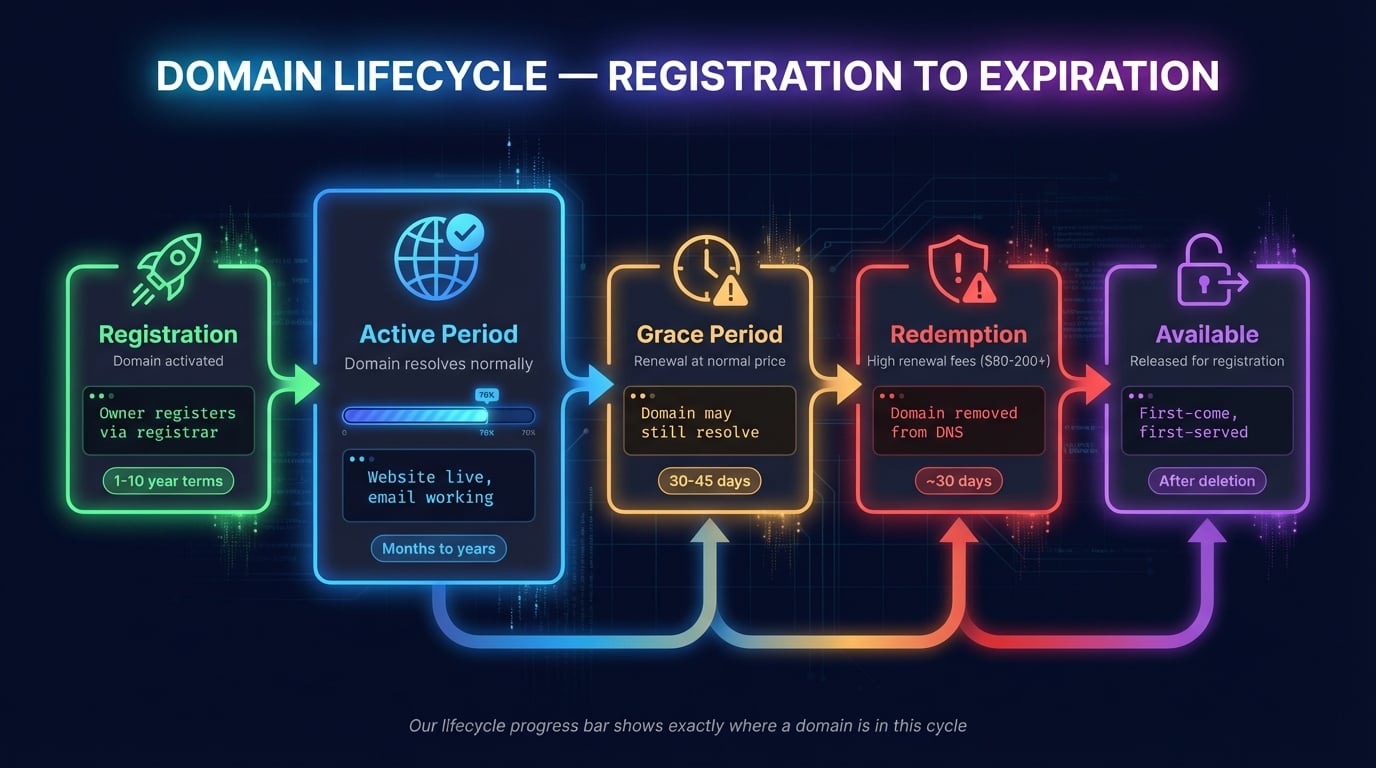
When a domain expires, it goes through several stages before becoming available again:
Grace Period
30-45 daysThe original owner can still renew at the normal price. The domain may still resolve during this period.
Redemption Period
~30 daysRenewal is possible but with high fees ($80-200+). The domain stops resolving and is removed from DNS.
Pending Delete
~5 daysThe domain is queued for deletion. No one can renew it during this phase.
Available
After deletionThe domain is released for public registration. Anyone can register it on a first-come, first-served basis.
The lifecycle progress bar in our tool shows how far through its registration period a domain is. A domain showing 90%+ lifecycle progress is nearing expiration and should be renewed soon. You can check domain availability for expired domains using our Domain Availability Checker.
Domain Age Checker Use Cases
Knowing the age of a domain is valuable for several practical scenarios:
SEO & Competitor Research
Check how old competitor domains are to understand their authority advantage. Older competitors may require different strategies to outrank.
Domain Acquisition
Evaluate expired or for-sale domains before purchasing. Older domains with clean history are more valuable than newer ones.
Fraud & Scam Detection
Check if a website is trustworthy by verifying its domain age. Phishing sites and scam domains are almost always very new (under 30 days old).
Brand Monitoring
Track when competitor or similar domains were registered. Detect potential trademark infringement or copycat sites early.
Advertisement
Related Domain & SEO Tools
Combine domain age data with these free DNS Robot tools for comprehensive domain analysis:
Full WHOIS/RDAP lookup — registration details, nameservers, registrar, domain status.
Check if a domain name is available for registration with TLD suggestions.
Comprehensive DNS health analysis — SOA, NS, MX, DNSSEC validation.
Discover all subdomains of any domain via certificate transparency logs.
Verify SSL validity, expiration, and security configuration for any domain.
Check DNS records (A, AAAA, CNAME, MX, NS, TXT) with global propagation.
Analyze all links on a webpage — dofollow/nofollow detection, status codes.
Detect what CMS, web server, CDN, and technologies any website uses.
Frequently Asked Questions About Domain Age
What is a domain age checker?
A domain age checker is a free tool that looks up a domain's registration date and calculates how old it is. It queries WHOIS/RDAP databases to retrieve the creation date, expiration date, and registrar details. Our tool also shows a lifecycle progress bar and age classification.
Does domain age affect SEO rankings?
Domain age itself is not a direct Google ranking factor, but it correlates with ranking success. Older domains have had more time to accumulate backlinks, content, and trust signals — all confirmed ranking factors. A new domain with great content can still outrank an older, neglected one.
How is domain age calculated?
Domain age is calculated from the original registration date in the WHOIS/RDAP record to today's date. If a domain expired and was re-registered, the age resets to the new registration date — it doesn't carry over from the previous owner.
What is a good domain age for SEO?
There's no magic number. Domains over 2 years have typically passed the 'sandbox' period. Over 5 years is considered mature. But domain age alone doesn't determine SEO success — content quality, backlinks, and user engagement matter far more.
Can I check the age of any domain?
Yes, you can check any publicly registered domain. WHOIS/RDAP records are public. Some registrars offer privacy protection that hides owner info, but registration and expiration dates are still available.
What happens when a domain expires?
It enters a grace period (30-45 days), then redemption period (30 days, high fees), then pending delete (5 days), and finally becomes available for anyone to register. Our tool shows days until expiration.
How do I find when a domain was first registered?
Enter the domain in our checker. The 'Registered' field shows the creation date. Note: if a domain was re-registered by a new owner, the date reflects the most recent registration, not the original.
What is the difference between RDAP and WHOIS?
RDAP is the modern replacement for WHOIS. It returns structured JSON instead of plain text, uses HTTPS, and provides standardized responses. Our tool uses RDAP first with WHOIS as a fallback.
Can newly registered domains rank on Google?
Yes. Google indexes new domains within days. While they may not have authority yet, new domains with quality content and proper SEO can rank for low-competition keywords quickly. Domain age is just one of many factors.
Is this domain age checker free?
Yes, 100% free with no registration required. Check unlimited domains and view registration date, expiration date, domain age, lifecycle progress, and registrar details. Combine with our WHOIS Lookup and Domain Health tools for deeper analysis.
How do I check when a website was created?
Domain age tells you when the name was registered; website age is when content first went live. Check the domain here, then look up the oldest Wayback Machine snapshot and the earliest dated page or copyright year. The earliest of those with real content is the website's age.
Can I check the age of multiple domains at once?
Yes. Switch to Bulk mode, paste up to 20 domains one per line, and the tool checks them in parallel from your browser. You get registration date, age, expiry and registrar per domain, plus a CSV export and a shareable link.
Why does a domain look younger than it should?
The registry creation date resets when a domain is deleted and registered again. A name first registered in 2004, dropped, and re-registered in 2020 shows a 2020 date. Use the Wayback Machine or a WHOIS history service to see the original registration.