DNS RobotDNS Propagation Checker
HomeDNS LookupWHOIS LookupIP LookupSSL Check
DNS RobotDNS Propagation Checker

Next-generation DNS propagation toolkit

Privacy PolicyTerms of ServiceAbout UsContact

DNS Tools

DNS LookupDomain to IPNS LookupMX LookupCNAME LookupView all

Email Tools

SPF Record CheckerDMARC CheckerDKIM CheckerSMTP Test ToolEmail Header AnalyzerView all

Website Tools

WHOIS LookupDomain AvailabilitySubdomain FinderCMS DetectorLink AnalyzerView all

Network Tools

Ping ToolTraceroutePort CheckerHTTP Headers CheckSSL Certificate CheckView all

IP Tools

IP LookupWhat Is My IPIP Blacklist CheckIP to HostnameASN LookupView all

Utility Tools

QR Code ScannerQR Code GeneratorMorse Code TranslatorText to Binary ConverterSmall Text GeneratorView all
© 2026 DNS Robot. Developed by ❤ Shaik Brothers
All systems operational
Made with
  1. Home
  2. /
  3. DNS Tools
  4. /
  5. NS Lookup

NS Lookup

Check nameservers for any domain instantly. Our free NS lookup tool shows authoritative nameservers with DNS provider detection, response time analysis, and IP resolution. Verify NS records and DNS delegation in seconds.

Free DNS ToolNS Record LookupProvider DetectionResponse Times
NS Lookup

Check nameservers with provider detection, response times, and IP resolution

Selected Server:🇺🇸Google DNS(Google LLC)- 8.8.8.8Avg Speed: 9.96 ms

What Is NS Lookup?

An NS lookup (nameserver lookup) queries the Domain Name System to find the authoritative nameservers for a domain. Nameservers are the DNS servers responsible for storing and serving all DNS records — A, AAAA, MX, CNAME, TXT, and more — for a given domain. When you perform an NS record lookup, you discover which servers control a domain's DNS configuration.

Our free nameserver lookup tool goes beyond basic NS record queries. It automatically detects DNS providers like Cloudflare, AWS Route53, and Google Cloud DNS, measures each nameserver's response time, resolves their IP addresses, and verifies DNS delegation. Whether you need to check nameservers during a DNS migration, troubleshoot resolution failures, or audit a domain's DNS infrastructure, this tool provides complete nameserver intelligence.

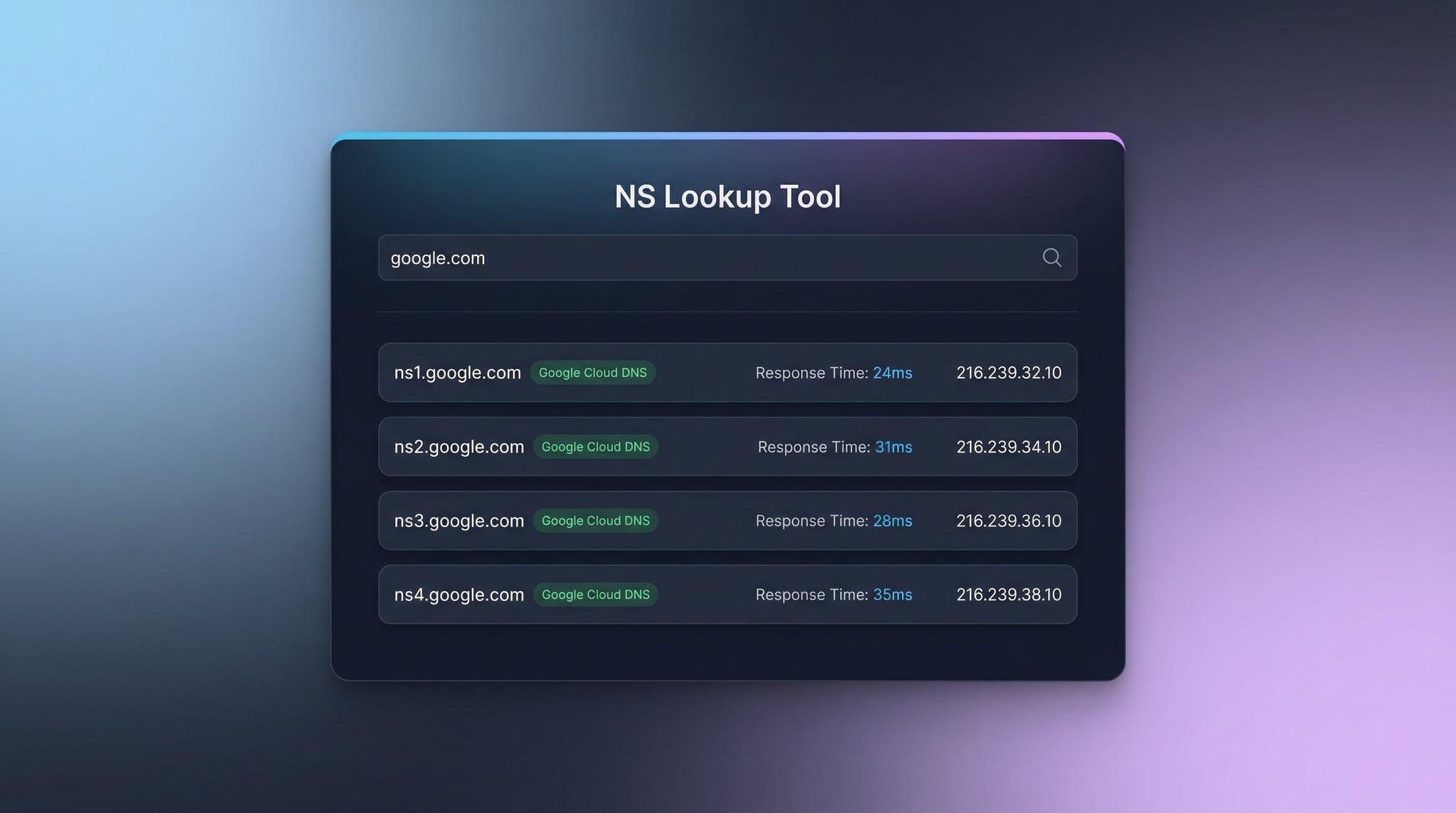
NS lookup results showing authoritative nameservers with DNS provider detection, response times, and IP addresses
DNS Robot's NS lookup tool checks nameservers for any domain with provider detection, response times, and IP resolution.

How to Check Nameservers of a Domain (3 Methods)

There are several ways to check nameservers and find NS records for any domain. Our online tool is the fastest and most comprehensive method, but command-line alternatives are useful for system administrators.

DNS delegation flow from TLD registry to authoritative nameservers showing how NS records direct queries
How DNS delegation works: NS records at the TLD registry point to authoritative nameservers for your domain.
1
Online NS Lookup Tool (Recommended)
Enter any domain name in our tool above and click "NS Lookup". You'll instantly see all authoritative nameservers with DNS provider names, response times, and IP addresses — no installation required.
2
Using nslookup (Windows/Mac/Linux)
Open a terminal and run nslookup -type=ns example.com. This queries NS records directly and shows all authoritative nameservers for the domain. Available on all major operating systems.
3
Using dig (Mac/Linux)
Run dig example.com NS +short for a quick NS record lookup, or dig example.com NS for full details including TTL values. For complete DNS record lookup, use our dedicated DNS Lookup tool.

What NS Lookup Reveals

✓
Authoritative Nameservers
Shows all NS records pointing to the DNS servers that host the domain's zone file and serve its DNS records.
✓
DNS Provider Detection
Automatically identifies 30+ DNS providers like Cloudflare, AWS Route53, Google Cloud DNS, GoDaddy, and more from nameserver patterns.
✓
Response Time & IP Resolution
Measures each nameserver's response time in milliseconds and resolves their IP addresses for complete infrastructure visibility.

When to Use NS Lookup

DNS Migration
Verify nameserver changes during DNS provider migrations. Confirm the new nameservers are live before updating other records.
Delegation Verification
Confirm correct DNS delegation from registrar to hosting. Detect lame delegations where nameservers don't respond.
Troubleshooting
Diagnose DNS resolution failures. Check if nameservers are responding and serving consistent records. Use with DNS Propagation Checker.
Competitor Analysis
Discover which DNS provider competitors use. Compare infrastructure quality and evaluate DNS hosting options.

What Is an NS Record? Understanding Nameservers

An NS record (Name Server record) is one of the most important DNS record types. It specifies which DNS servers are authoritative for a domain — meaning they hold the master copy of all DNS records for that domain and respond to queries from DNS resolvers worldwide.

NS records in DNS hierarchy showing TLD delegation to authoritative nameservers serving domain records
NS records in the DNS hierarchy: TLD registries delegate authority to authoritative nameservers for each domain.

How NS Records Work

  • NS records are stored at the parent zone (e.g., the .com registry)
  • They delegate authority: "for example.com, ask ns1.provider.com"
  • DNS resolvers follow NS records to find authoritative answers
  • Changed at your domain registrar, not your DNS hosting panel

NS Record Example

; NS records for example.com
example.com. 86400 IN NS ns1.cloudflare.com.
example.com. 86400 IN NS ns2.cloudflare.com.

This shows example.com is delegated to Cloudflare's nameservers with a 86400-second (24-hour) TTL.

Choosing the Right DNS Provider

Different DNS providers offer varying levels of performance, security, and features. Our nameserver checker helps you discover which provider any domain uses and evaluate their infrastructure quality. Here are the most common DNS providers our tool detects:

Cloudflare DNS

Free tier with global anycast, DDoS protection, and sub-20ms response times. Pattern: *.ns.cloudflare.com

AWS Route 53

Enterprise DNS with 100% SLA, health checks, and routing policies. Pattern: ns-*.awsdns-*.com

Google Cloud DNS

Google's infrastructure with global anycast and automatic scaling. Pattern: ns-cloud-*.googledomains.com

Use our NS lookup tool to check nameservers of any domain and see which DNS provider powers it. Regular monitoring helps detect unauthorized nameserver changes that could indicate a DNS hijacking attempt. For complete domain details, combine with our WHOIS Lookup tool.

Nameserver Configuration Best Practices

  • Use at least two nameservers for redundancy and high availability
  • Choose geographically distributed nameservers for global performance
  • Enable DNSSEC for cryptographic authentication of DNS responses (check via DNS Lookup)
  • Monitor nameserver response times regularly with our NS lookup tool
  • Verify NS records after any registrar or DNS changes
  • Use premium DNS for business-critical domains (DDoS protection, SLA)
  • Keep registrar credentials secure to prevent unauthorized NS changes
  • Ensure all nameservers serve identical, consistent DNS records

Related DNS & Network Tools

DNS Lookup

Check all DNS record types (A, AAAA, MX, CNAME, TXT, and more).

Domain to IP

Convert domain to IP address with geolocation and CDN detection.

WHOIS Lookup

Find domain registration, registrar, and owner details.

MX Lookup

Check mail server records and email routing configuration.

SSL Checker

Verify SSL certificate validity and security details.

DNS Propagation

Check DNS propagation worldwide after nameserver changes.

Frequently Asked Questions About NS Lookup

What is an NS record?

An NS (Name Server) record specifies which DNS servers are authoritative for a domain. NS records delegate a domain to nameservers that store and serve all other DNS records (A, AAAA, MX, CNAME, etc.). Every domain must have at least two NS records for redundancy.

How to check nameservers of a domain?

Enter the domain in our NS Lookup tool and click "NS Lookup". You'll see all nameservers with provider detection and response times. Command-line: nslookup -type=ns example.com or dig example.com NS +short.

Why does a domain have multiple nameservers?

Multiple nameservers provide redundancy. If one goes down, others keep serving DNS queries so your website stays online. Most domains have 2-4 nameservers. Enterprise providers like Cloudflare may assign more for global distribution.

How long do nameserver changes take to propagate?

Nameserver changes typically propagate within 24-48 hours, though they can take up to 72 hours. The time depends on TTL values at the TLD registry. Use our DNS Propagation Checker to monitor progress.

What is DNS delegation?

DNS delegation assigns authoritative nameservers for a domain at the parent zone (e.g., .com registry). When you change nameservers at your registrar, you're updating the delegation so DNS queries reach the correct servers.

How do I identify my DNS provider?

DNS providers use distinctive nameserver naming patterns. Our NS lookup tool automatically detects 30+ providers by analyzing these patterns. For example, Cloudflare uses *.ns.cloudflare.com.

What is a good nameserver response time?

Good nameserver response times are under 100ms. Premium providers like Cloudflare achieve sub-20ms. Response times above 200ms can slow down website loading since every page visit starts with a DNS lookup.

Can mismatched nameservers cause problems?

Yes, misconfigured nameservers can cause intermittent DNS failures, email delivery issues, and website downtime. All nameservers should serve identical records. Use our tool to verify consistency across all nameservers.