











MX Lookup
Check the MX records of any domain: its mail servers in delivery order, who runs them, their IPv4 and IPv6 addresses, and whether they answer with STARTTLS. Straight from the domain's own nameservers, beside Google's and Cloudflare's cached copies.
Exactly the name you type: a www. or a subdomain is looked up as it is, never rewritten.
What is an MX record?
An MX (mail exchange) record names the servers that receive email for a domain, each with a priority number: senders try the lowest number first.
When someone writes to name@airbnb.com, their mail server asks DNS for airbnb.com's MX records, picks the server with the lowest number and delivers over SMTP on port 25. The record holds a host name, never an IP address, and that name needs its own A or AAAA record: it may not be an alias (a CNAME, RFC 2181 §10.3).
An MX lookup reads those records and follows each server to its addresses, its network and the provider behind it. MX only steers incoming mail: who may send as the domain is SPF, DKIM and DMARC.
How to check MX records
Type the domain above and press Look up MX, or ask DNS from a terminal: dig example.com MX on macOS and Linux, nslookup -type=mx example.com on any system, or Resolve-DnsName example.com -Type MX in Windows PowerShell.
Each answer line is one server: the priority, then the host name. The number before IN is the TTL, the seconds a resolver may keep serving this copy. Add @ and a nameserver (dig @dns1.p08.nsone.net airbnb.com MX) to read the zone's own answer instead of a cache.
dig example.com MX +shortEach line: the priority, then the mail server. Add @ and a nameserver to skip caches.
$ dig airbnb.com MX
;; ->>HEADER<<- opcode: QUERY, status: NOERROR1
;; flags: qr rd ra; QUERY: 1, ANSWER: 5

;; ANSWER SECTION:
airbnb.com.    3002  IN  MX   13 aspmx.l.google.com.4
airbnb.com.    300   IN  MX   5 alt1.aspmx.l.google.com.
airbnb.com.    300   IN  MX   5 alt2.aspmx.l.google.com.
airbnb.com.    300   IN  MX  10 alt3.aspmx.l.google.com.
airbnb.com.    300   IN  MX  10 alt4.aspmx.l.google.com.

;; SERVER: 8.8.8.8#53(8.8.8.8)5
- Status. NOERROR with answers. NXDOMAIN means the name doesn't exist; NOERROR with no answer means no MX.
- TTL. Seconds this copy may still be served: 300 at the source, counting down in caches.
- Priority. The order senders try, lowest first.
- Mail server. The host to connect to on port 25; the trailing dot ends the name.
- Who answered. 8.8.8.8 is a cache.
@dns1.p08.nsone.netasks the zone itself.
How to read the result
The head says in one sentence who receives the domain's mail and how many servers stand behind it, with the provider's mark; the tinted rows below it are the findings that matter.
The Servers view lists every MX host by priority with its addresses, network and reverse DNS; the first server is tested on port 25 automatically and the others on request. On the right, the delivery path draws what a sender does with these answers.
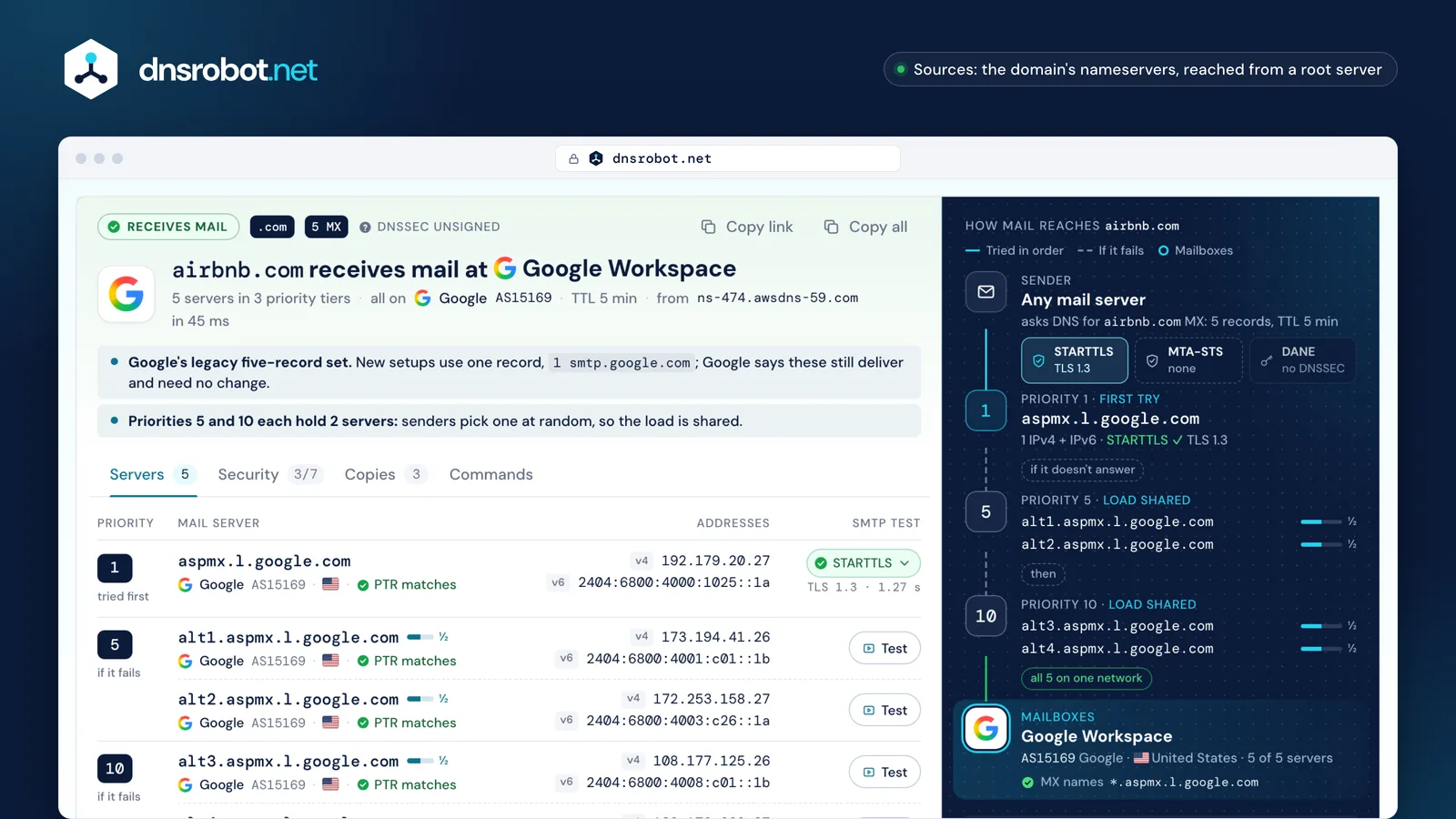
 The verdictWho receives the mail, the servers and tiers, the network, the TTL and which nameserver answered.The serversEach MX host by priority with its IPv4 and IPv6 addresses, AS number and forward-confirmed PTR.The SMTP testSTARTTLS and the TLS version from our server on port 25; open a row for the whole conversation.The delivery pathSender, the shields on the first hop, each priority tier, then the mailboxes and their evidence.
What does MX priority mean?
The priority (RFC 5321 calls it preference) sets the order: a sender tries the lowest number first and moves on only when that server doesn't answer or defers the message with a temporary 4xx reply.
Servers with the same number share the load: the sender picks one at random. Only the order counts, not the gaps, and 0 is a valid number. One MX record is enough when the name behind it spreads over many servers, as Microsoft 365's and Mimecast's do.
Our advice on backup MX: a backup at another company that filters less than your primary is a known spam path, and hosted providers already run redundant servers behind one MX name. If you keep one, it must apply the same SPF and spam checks as the primary (RFC 7208, Appendix F).
only if it doesn't answer or replies 4xx
then
Google Workspace MX records
New Google Workspace domains need a single MX record: smtp.google.com with priority 1. Domains set up before 2023 often still publish the five-record set that starts with aspmx.l.google.com; Google says both work and that a working setup needs no change.
The tool names Google Workspace for either set and marks the older one as legacy, never as an error. Pair the MX with SPF include:_spf.google.com and DKIM from the Admin console; Google allows up to 72 hours for new MX records to be seen everywhere.

Microsoft 365 MX records
Microsoft 365 gives each domain one MX record under mail.protection.outlook.com, such as microsoft-com.mail.protection.outlook.com, usually at priority 0. The first part is a token you copy from the Microsoft 365 admin center: it often looks like the domain with dashes, but not always.
Domains that turn on inbound SMTP DANE get a host under mx.microsoft instead, such as siemens-com.h-v1.mx.microsoft: that zone is signed with DNSSEC, so senders can check the server's certificate with DANE. While moving, both records are live, the new one first behind the old, then in front of it, until the old one is removed. Microsoft has no plans to sign mail.protection.outlook.com, so the legacy host isn't outdated.

No MX record or null MX: what happens?
A domain without MX records can still receive mail: senders fall back to the domain's own A or AAAA address (RFC 5321 §5.1). Only a null MX, the single record 0 ., tells every sender that the domain accepts no mail (RFC 7505).
That makes the null MX the right record for a domain that never receives email: senders bounce at once, with 556 5.1.10, instead of retrying for days. Add v=spf1 -all and DMARC p=reject so no one can send as it either, as example.com does. MX records belong to one name: www.example.com doesn't inherit example.com's.
.cmo, so nothing under it exists.bounced5.1.2A domain that sends and receives no mail:MX 0 .v=spf1 -all_dmarc p=reject
Mail not arriving? Where MX fits in troubleshooting
Read the bounce first: its status code says which step failed. MX problems show up as "host not found" or long delays; a missing mailbox is 5.1.1; authentication failures are 5.7.x rejections.
Work down the list: the domain must exist, its MX must name the provider you use, each MX host must resolve and answer on port 25, and only then do SPF, DKIM, DMARC and blacklists decide where a message lands.
MTA-STS, DANE and TLS for mail servers
Mail servers encrypt with STARTTLS only when both sides offer it, so someone on the path can strip the offer and read the message. MTA-STS and DANE let a domain demand TLS from senders.
MTA-STS publishes a policy over HTTPS (https://mta-sts.<domain>/.well-known/mta-sts.txt) listing the allowed MX hosts and a mode; with enforce, senders deliver only over valid TLS to those hosts (RFC 8461). DANE puts the server's key in a TLSA record at _25._tcp.<mx host>, which counts only where DNSSEC signs that zone (RFC 7672). TLS-RPT asks senders to report failures (RFC 8460). The tool checks that every live MX matches a policy mx: line.
250-STARTTLS just disappears from the reply.
v=TLSRPTv1; rua=https://reports.proton.me/reports/smtptls. The tool tests STARTTLS from our server; MTA-STS and DANE come from DNS and the policy file.Popular providers' MX hosts
Most domains point their MX at one of a few dozen providers, and each publishes recognisable host names. That is how the tool names a domain's mail provider, and how you can check a setup against the provider's own values.
Gateways such as Mimecast, Proofpoint and Barracuda sit in front of the mailbox host; the tool then reads SPF and Autodiscover to name the likely mailboxes behind them.
| Provider | MX (priority host) | SPF |
|---|---|---|
| Google Workspace | 1smtp.google.comor 1 aspmx.l.google.com + 4 alt | include: |
| Microsoft 365 | 0<token>.mail.protection.outlook.comor <token>.<x>-v1.mx.microsoft | include: |
| Zoho Mailregion in the TLD | 10mx.zoho.com20mx2.zoho.com · 50 mx3.zoho.com | include: |
| Proton Mail | 10mail.protonmail.ch20mailsec.protonmail.ch | include: |
| iCloud Mail | 10mx01.mail.icloud.com10mx02.mail.icloud.com | include: |
| Fastmail | 10in1-smtp.messagingengine.com20in2-smtp.messagingengine.com | include: |
| Yandex 360 | 10mx.yandex.net | redirect=_spf. |
| Titan Email | 10mx1.titan.email20mx2.titan.email | include: |
| GoDaddy Professional Email | 0smtp.secureserver.net10mailstore1.secureserver.net | include: |
| Namecheap Private Email | 10mx1.privateemail.com10mx2.privateemail.com | include: |
| Cloudflare Email Routingforwarding | route1/2/3.mx.cloudflare.netpriorities set per domain | include: |
| Amazon SESshared with WorkMail | 10inbound-smtp.<region>.amazonaws.com | include: |
| Mimecastgateway | 10<region>-smtp-inbound-1.mimecast.com10<region>-smtp-inbound-2.mimecast.com | include: |
| Proofpointgateway | mx0a-<id>.pphosted.com · mx0b-<id>or mx1-us1.ppe-hosted.com (Essentials) | a: |
| Barracudagateway | 1<id>.ess.barracudanetworks.com10<id>.ess.barracudanetworks.com | include: |
| NAVER WORKSKorea | 10kr1-aspmx1.worksmobile.com20kr1-aspmx2.worksmobile.com | include: |







MX lookup: frequently asked questions
What is an MX lookup used for?
How do I check MX records with nslookup?
Can a domain have more than one MX record?
Can an MX record point to an IP address or a CNAME?
How long do MX record changes take?
What is a null MX record?
What happens if a domain has no MX record?
Is a single MX record a problem?
Why does the MX show a different provider than I expected?
Are MX records public?
Do MX records affect sending email?
Why can't I connect to port 25 from my computer?
Missing something?Suggest a feature or a new tool
More DNS and email tools
DNS Lookup
Every DNS record from the domain's own nameservers, beside Google's and Cloudflare's cache
SPF Record Checker
Validate SPF records and check DNS lookup count per RFC 7208
DMARC Checker
Check any domain's DMARC policy the way receivers read it, with reports, SPF and DKIM
IP Blacklist Check
Check if an IP address is listed on spam or malware blacklists
SMTP Test Tool
Test any mail server: STARTTLS, certificate, AUTH and open relay
Email Checker
Verify an email address with its mail server, nothing sent, or send us a test email for a spam and deliverability report
Hosting Checker
Find out who hosts any website: web host, CDN, CMS, email provider, registrar and SSL issuer
Reverse DNS Lookup
Find hostnames associated with any IP address via PTR records