What Is SMTP?
SMTP (Simple Mail Transfer Protocol) is the standard protocol for sending email across the internet. Defined in RFC 5321, SMTP handles the transmission of email messages from a sender's mail client to the recipient's mail server. Every email you send — whether from Gmail, Outlook, or a custom mail server — relies on SMTP to deliver the message. An SMTP test verifies that a mail server is reachable, accepts connections, and supports the expected features like encryption and authentication.
Our free SMTP test tool goes beyond a simple ping. It performs a full SMTP handshake: connecting on your chosen port, reading the banner, sending an EHLO command to discover server capabilities, checking STARTTLS support, upgrading to TLS encryption, and recording the entire conversation. Whether you're debugging email delivery, verifying a new mail server setup, or auditing encryption compliance, this SMTP tester gives you complete diagnostic data in seconds.
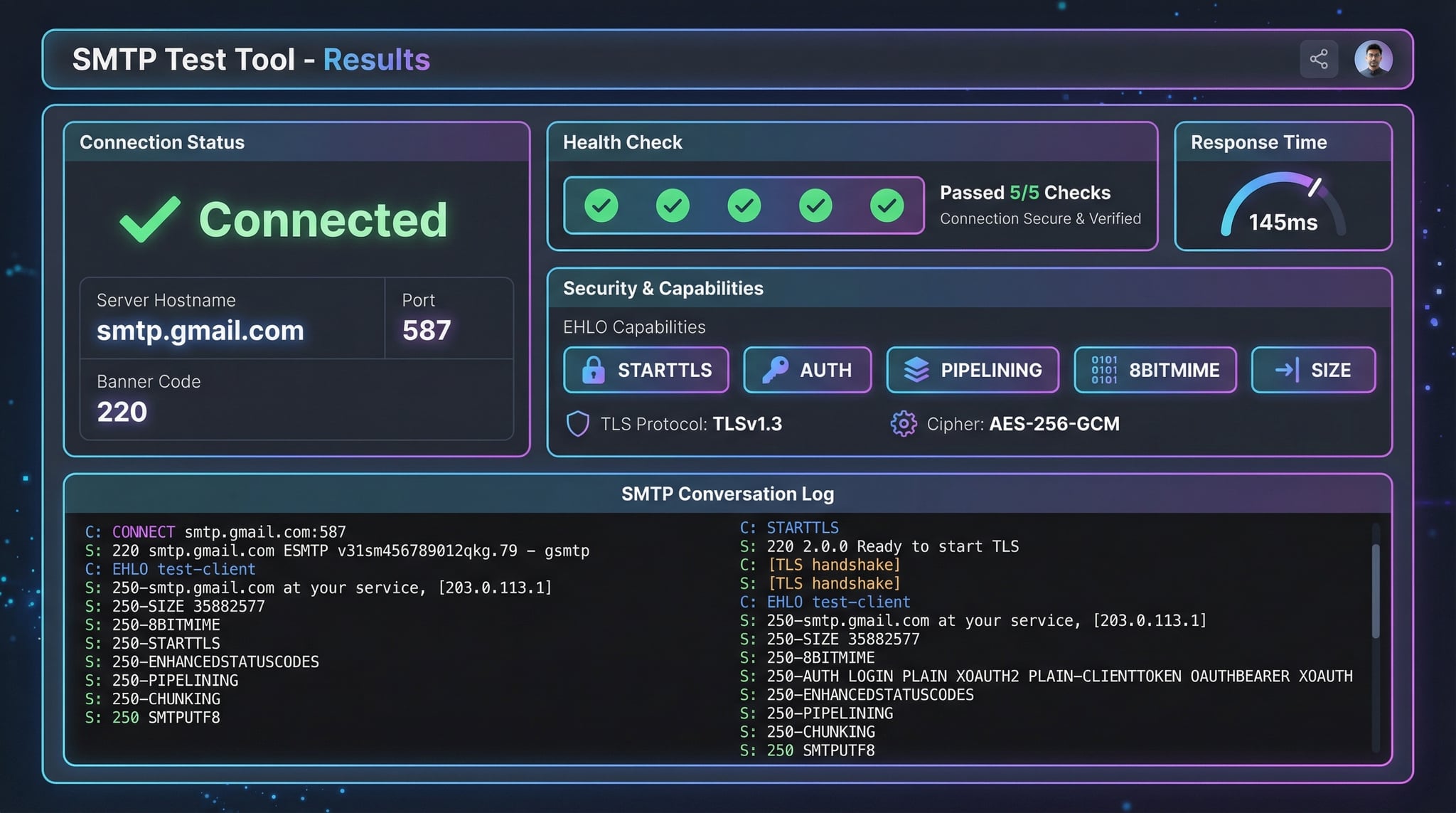
How to Test SMTP Server (3 Methods)
There are several ways to test SMTP server connectivity and diagnose email delivery issues. Our online SMTP checker is the fastest method, but command-line tools also work for manual testing.
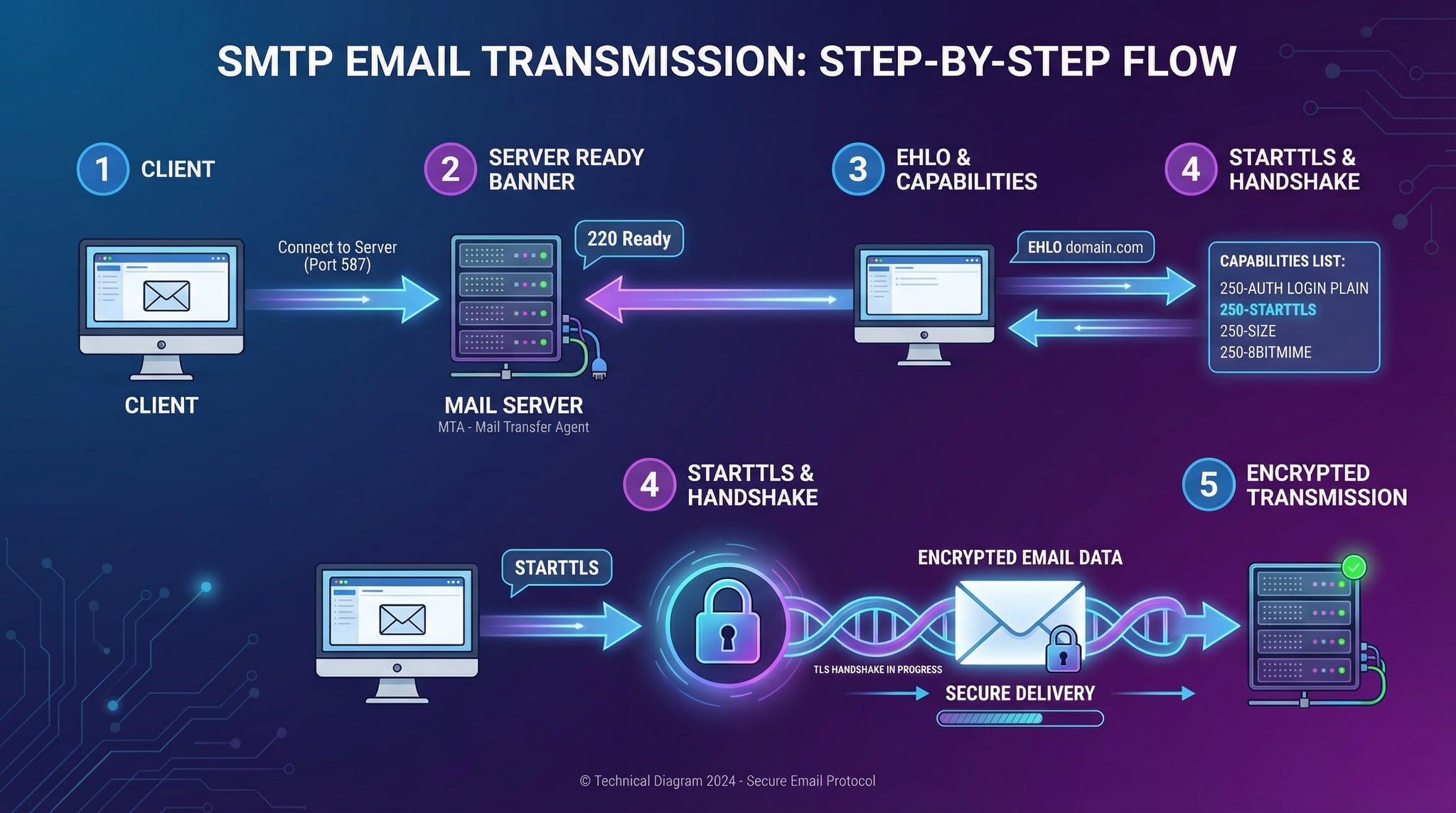
telnet smtp.example.com 25 in your terminal. You'll see the banner, then type EHLO yourdomain.com to discover capabilities. Type STARTTLS to upgrade encryption. Useful for manual debugging but limited — no TLS cipher details. For DNS-level checks, try our DNS Lookup tool.openssl s_client -connect smtp.gmail.com:465. For STARTTLS: openssl s_client -starttls smtp -connect smtp.gmail.com:587. On Windows PowerShell: Test-NetConnection smtp.gmail.com -Port 587 tests basic connectivity.Advertisement
SMTP Ports Explained
SMTP uses different ports for different purposes. Understanding which port to use is essential when you test SMTP servers. Here are the four main ports:
The standard SMTP port for server-to-server email transfer. Used by MX servers to receive mail. Often blocked by ISPs and cloud providers for residential connections to prevent spam. Supports optional STARTTLS encryption.
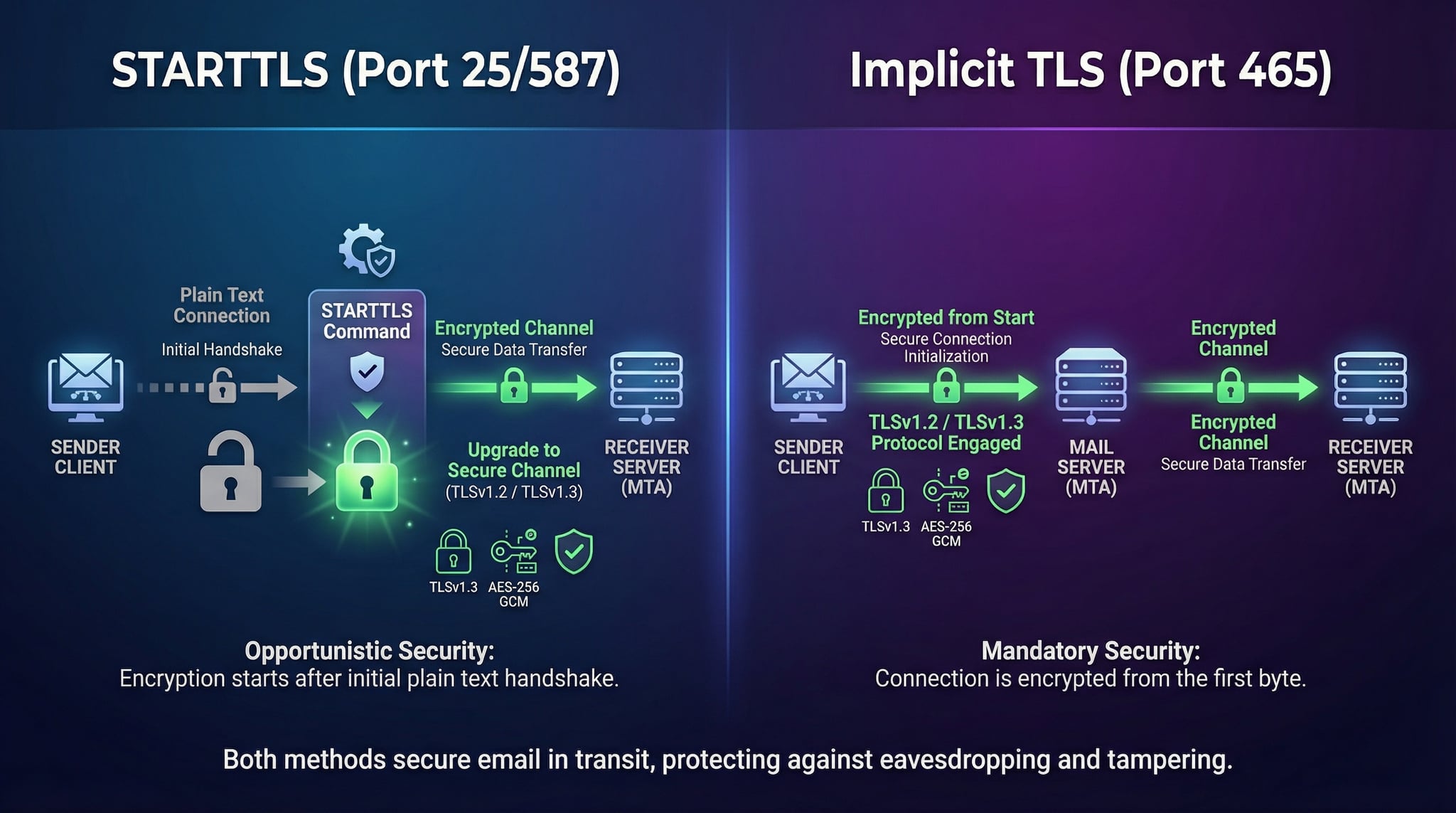
Uses implicit TLS — the connection is encrypted immediately without a STARTTLS step. Originally deprecated, it was re-standardized in RFC 8314 (2018) for email submission. Gmail, Outlook, and most providers support it. Ideal when STARTTLS might be stripped by a middlebox.
The recommended port for email clients to submit messages. Requires authentication (AUTH) and uses STARTTLS to upgrade to encryption. Defined in RFC 6409. Most email providers (Gmail, Microsoft 365, Amazon SES) use this port for outbound email.
An unofficial alternate SMTP port used when port 25, 465, or 587 is blocked by a firewall or hosting provider. Not an IANA-registered port, but widely supported by services like SendGrid, Mailgun, and Amazon SES as a fallback. Supports STARTTLS.
SMTP Response Codes Reference
When you test SMTP, the server responds with numeric codes. Understanding these codes helps diagnose email issues. Here are the most important ones:
Server is ready and accepting connections. This is the expected banner response when an SMTP connection succeeds.
The requested action was completed successfully. Used in EHLO responses and after MAIL FROM / RCPT TO commands.
Server is ready to accept the email body. Sent after DATA command. End the message with a line containing only a period (.).
Server is temporarily unavailable. Usually means the server is overloaded, undergoing maintenance, or rate-limiting connections.
The requested mailbox is temporarily unavailable. Usually a temporary condition — the sending server should retry later (greylisting, quota).
The server did not recognize the command. Usually indicates a protocol error, unrecognized command, or line too long.
The recipient mailbox does not exist or the action was rejected. Permanent error — check the email address or use our MX Lookup to verify mail routing.
Connection refused permanently. Often due to IP blacklisting, policy violations, or sender reputation. Check our IP Blacklist Checker.
Advertisement
SMTP Encryption Checks
Our SMTP test checks these security aspects automatically:
SMTP Security Best Practices
Related Email & DNS Tools
Check SPF records, count DNS lookups, and resolve include chains.
Check DMARC policy, reporting settings, and alignment mode.
Validate DKIM records, auto-detect selectors, and check key strength.
Check MX records and detect email providers for any domain.
Test if any TCP port is open or closed on a server.
Check if your mail server IP is blacklisted on major RBLs.