Qu'est-ce qu'un enregistrement DKIM ?
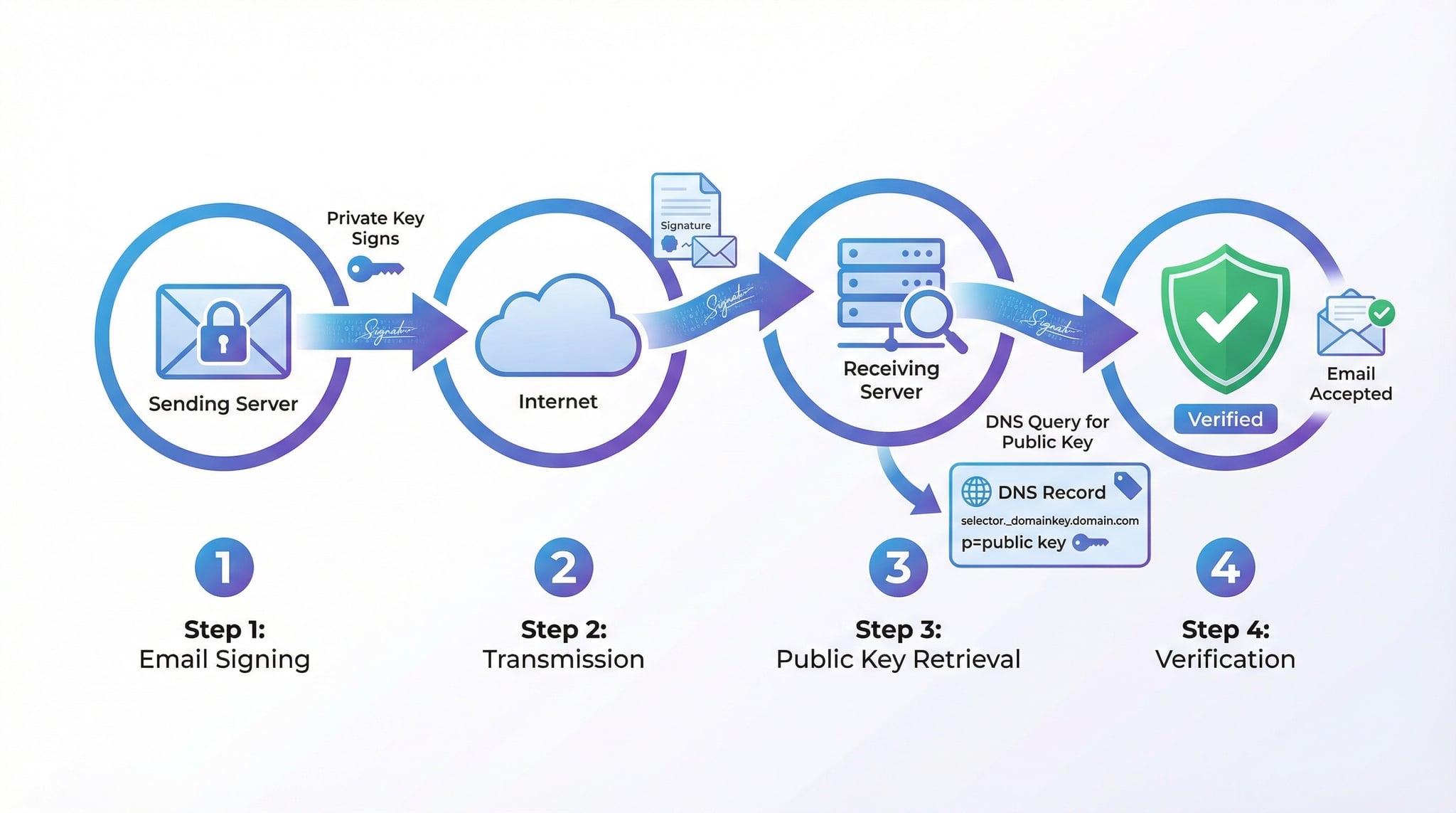
Un enregistrement DKIM (DomainKeys Identified Mail) est un enregistrement DNS de type TXT qui contient une clé cryptographique publique. Lorsqu'un email est envoyé, le serveur d'envoi signe le message avec une clé privée. Le serveur de réception récupère ensuite la clé publique depuis le DNS pour vérifier la signature, confirmant que l'email n'a pas été modifié en transit et provient bien du domaine signataire.
L'enregistrement DKIM est publié à l'adresse selector._domainkey.domain.com, où selector est un identifiant choisi par l'administrateur (par exemple, « google » pour Google Workspace, « selector1 » pour Microsoft 365). Un domaine peut avoir plusieurs sélecteurs, un par service d'envoi d'email, ce qui permet d'utiliser différentes clés pour différents services.
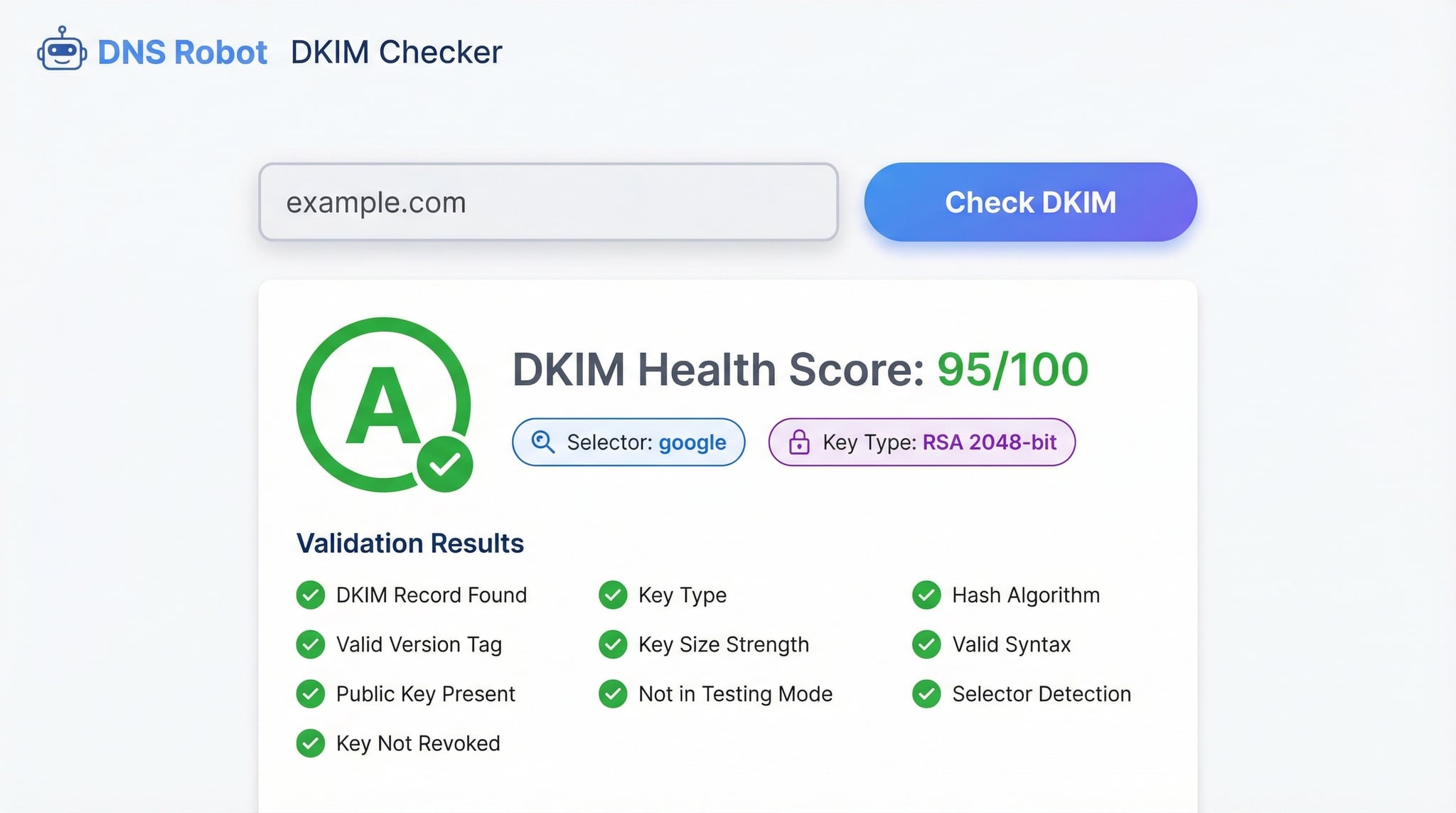
Notre vérificateur DKIM scanne automatiquement plus de 65 sélecteurs courants, analyse le type et la taille des clés, et exécute 10 vérifications de validation. Utilisez-le en complément de notre SPF Checker et DMARC Checker pour une authentification email complète.
Comment vérifier un enregistrement DKIM
Il existe trois méthodes pour vérifier un enregistrement DKIM. La plus simple est d'utiliser notre vérificateur DKIM en ligne : entrez un nom de domaine, cliquez sur « Check DKIM » et l'outil détecte automatiquement les sélecteurs courants parmi plus de 65 patterns connus, récupère les enregistrements DKIM, analyse les clés et exécute 10 vérifications de validation.
En ligne de commande, vous devez connaître le sélecteur. Utilisez dig selector._domainkey.example.com TXT +short sous Mac/Linux ou nslookup -type=txt selector._domainkey.example.com sous Windows. Remplacez « selector » par le sélecteur réel (google, default, selector1, etc.). Cette méthode affiche l'enregistrement brut mais ne valide ni la clé, ni la taille, ni les tags.
La troisième méthode consiste à examiner les en-têtes email. Ouvrez un email reçu, affichez les en-têtes complets et recherchez l'en-tête DKIM-Signature qui contient le sélecteur (s=selector) et le domaine de signature (d=domain.com). Notre Email Header Analyzer facilite l'interprétation de ces en-têtes.
Advertisement
Tags DKIM — Référence complète
L'enregistrement DKIM contient des tags qui définissent le type de clé, la clé publique, les options de vérification et les flags. Comprendre ces tags est essentiel pour diagnostiquer les problèmes DKIM et s'assurer que vos emails sont correctement authentifiés.
Notre vérificateur exécute 10 vérifications de validation couvrant la présence de l'enregistrement, la validité de la clé, la taille, le type et les bonnes pratiques. Voici le détail de nos vérifications et les bonnes pratiques DKIM.
DKIM Record Found — vérifie l'existence d'un enregistrement TXT au sélecteur._domainkey.domain.com
Valid DKIM Syntax — analyse la syntaxe complète de l'enregistrement et détecte les tags invalides
Public Key Present (p=) — vérifie la présence d'une clé publique valide encodée en Base64
Key Type (k=) — identifie le type de clé cryptographique (RSA ou Ed25519)
Key Size Check — vérifie que la taille de la clé RSA est d'au moins 2048 bits (1024 bits signalé comme faible)
Version Tag (v=DKIM1) — confirme la présence du tag de version DKIM
Testing Mode (t=y) — détecte si l'enregistrement est en mode test (les échecs ne sont pas appliqués)
Key Not Revoked — vérifie que la clé n'est pas révoquée (p= vide signifie clé révoquée)
Acceptable Hash Algorithms (h=) — vérifie les algorithmes de hachage acceptés (sha256 recommandé)
Service Type (s=) — vérifie le type de service autorisé (email par défaut, * pour tous)
Tag p= (Clé publique)
La clé publique encodée en Base64 utilisée pour vérifier les signatures DKIM. Si p= est vide, la clé est révoquée. La clé doit correspondre à la clé privée utilisée par votre serveur de messagerie pour signer les emails.
Tag k= (Type de clé)
Définit l'algorithme cryptographique : RSA (par défaut, le plus courant) ou Ed25519 (moderne, plus compact). Les clés Ed25519 offrent une sécurité équivalente à RSA 3072 bits avec seulement 256 bits, mais ne sont pas encore supportées par tous les fournisseurs.
Tag t= (Flags)
Flags optionnels : t=y active le mode test (les échecs DKIM ne sont pas pénalisés), t=s exige que le domaine de signature corresponde exactement au domaine de l'en-tête From. Retirez t=y une fois la configuration DKIM validée.
Bonnes pratiques DKIM
Utilisez des clés RSA d'au moins 2048 bits. Effectuez une rotation des clés tous les 6 à 12 mois. Ne supprimez pas l'ancien sélecteur avant que tous les emails en transit soient délivrés. Publiez un enregistrement avec p= vide pour révoquer les anciennes clés.
SPF vs DKIM vs DMARC — Authentification email
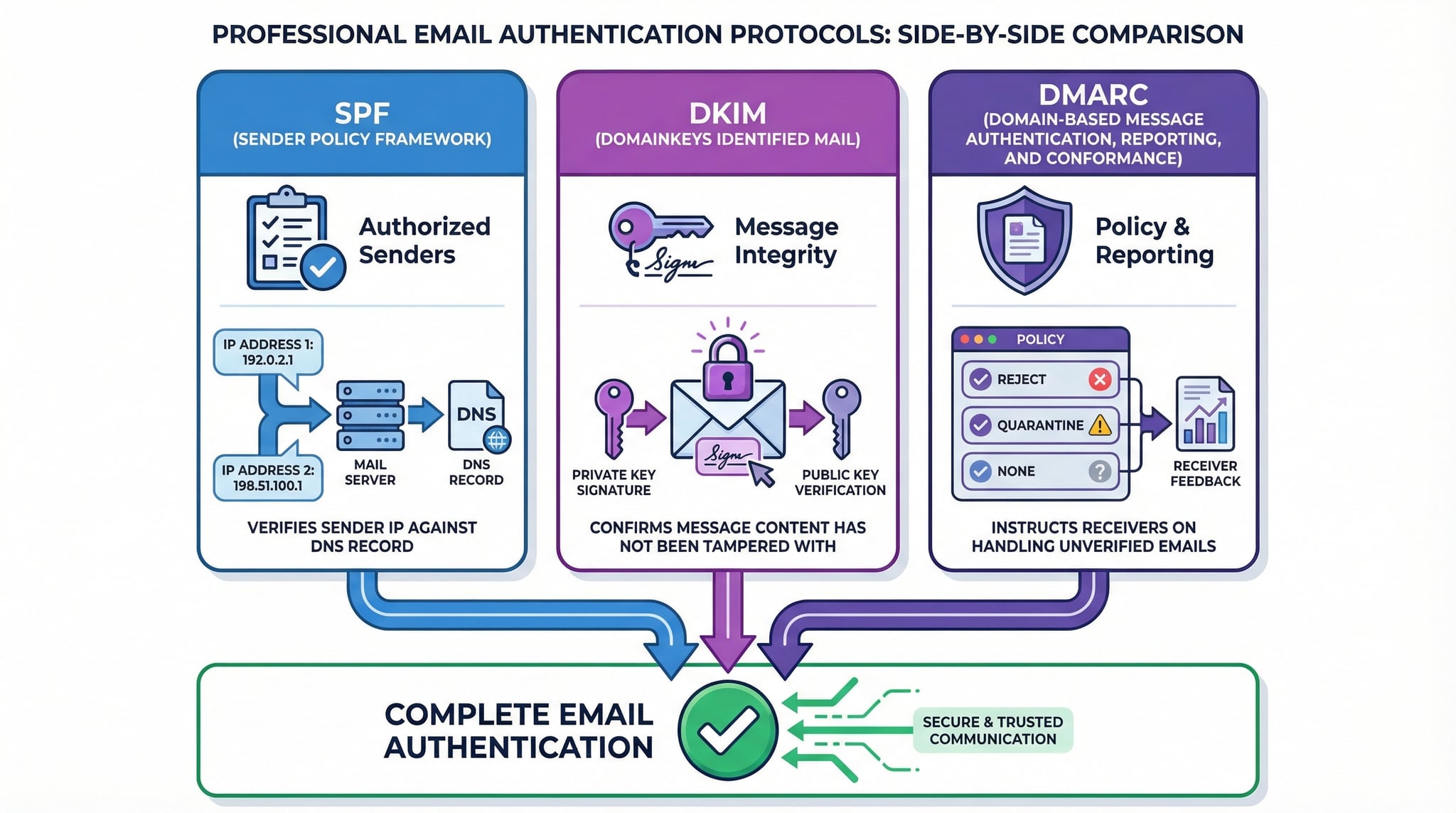
SPF, DKIM et DMARC sont trois protocoles complémentaires qui forment le trio de l'authentification email. Chacun protège un aspect différent de la communication par email, et les trois sont nécessaires pour une protection complète contre l'usurpation d'identité et le phishing.
SPF vérifie que l'adresse IP du serveur d'envoi est autorisée par le domaine de l'enveloppe. Il utilise un enregistrement DNS TXT contenant les mécanismes d'autorisation. SPF protège contre l'usurpation de l'adresse d'enveloppe mais pas de l'en-tête From visible. Validez votre SPF avec notre SPF Checker.
DKIM ajoute une signature cryptographique au message email. La clé privée signe l'email côté serveur, et la clé publique publiée dans le DNS permet au serveur de réception de vérifier l'intégrité du message. DKIM prouve que le contenu n'a pas été altéré en transit.
DMARC unifie SPF et DKIM en vérifiant l'alignement : le domaine visible dans l'en-tête From doit correspondre au domaine authentifié par SPF ou DKIM. DMARC définit la politique à appliquer en cas d'échec (none, quarantine, reject) et active les rapports. Vérifiez votre DMARC avec notre DMARC Checker.
Advertisement
Outils associés
Complétez votre analyse DKIM avec ces outils spécialisés d'authentification email pour sécuriser entièrement votre infrastructure de messagerie.
Analysez votre enregistrement SPF, comptez les lookups DNS, résolvez les chaînes include et vérifiez la conformité RFC 7208 avec 12 vérifications.
Vérifiez votre politique DMARC, les modes d'alignement, les adresses de rapport (rua/ruf) et obtenez un score de santé avec 11 vérifications.
Testez la connectivité SMTP de votre serveur de messagerie, vérifiez le support TLS, les capacités d'authentification et les extensions SMTP.
Vérifiez votre enregistrement BIMI pour afficher le logo de votre marque dans les boîtes de réception. Nécessite DMARC p=quarantine ou p=reject.