What Is Ping?
Ping is the most fundamental network diagnostic tool, used to test whether a host is reachable and to measure the round-trip time (RTT) for packets to travel from your device to a target server and back. The name comes from sonar — like a submarine sending a sound pulse and listening for the echo. When you ping an IP address or domain, your computer sends an ICMP Echo Request packet and waits for an ICMP Echo Reply.
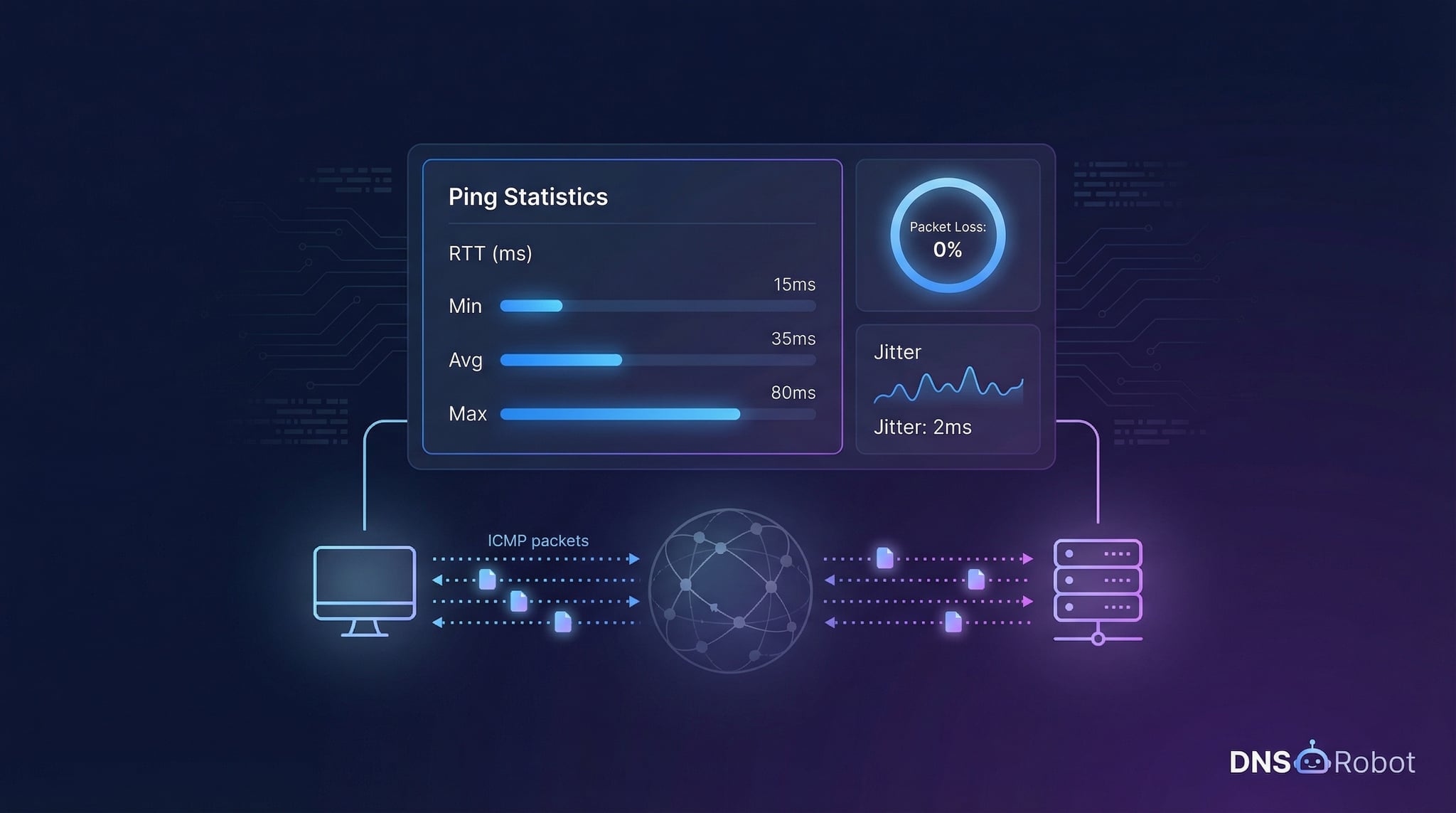
Our free online ping tool lets you ping any domain or IP address directly from your browser. It reports latency (response time in milliseconds), packet loss (the percentage of packets that didn't receive a reply), and jitter (the variation in latency between consecutive packets). Whether you're troubleshooting a slow connection, testing a server's availability, or checking your network latency before a gaming session, ping is always the first tool to reach for.
How Online Ping Works
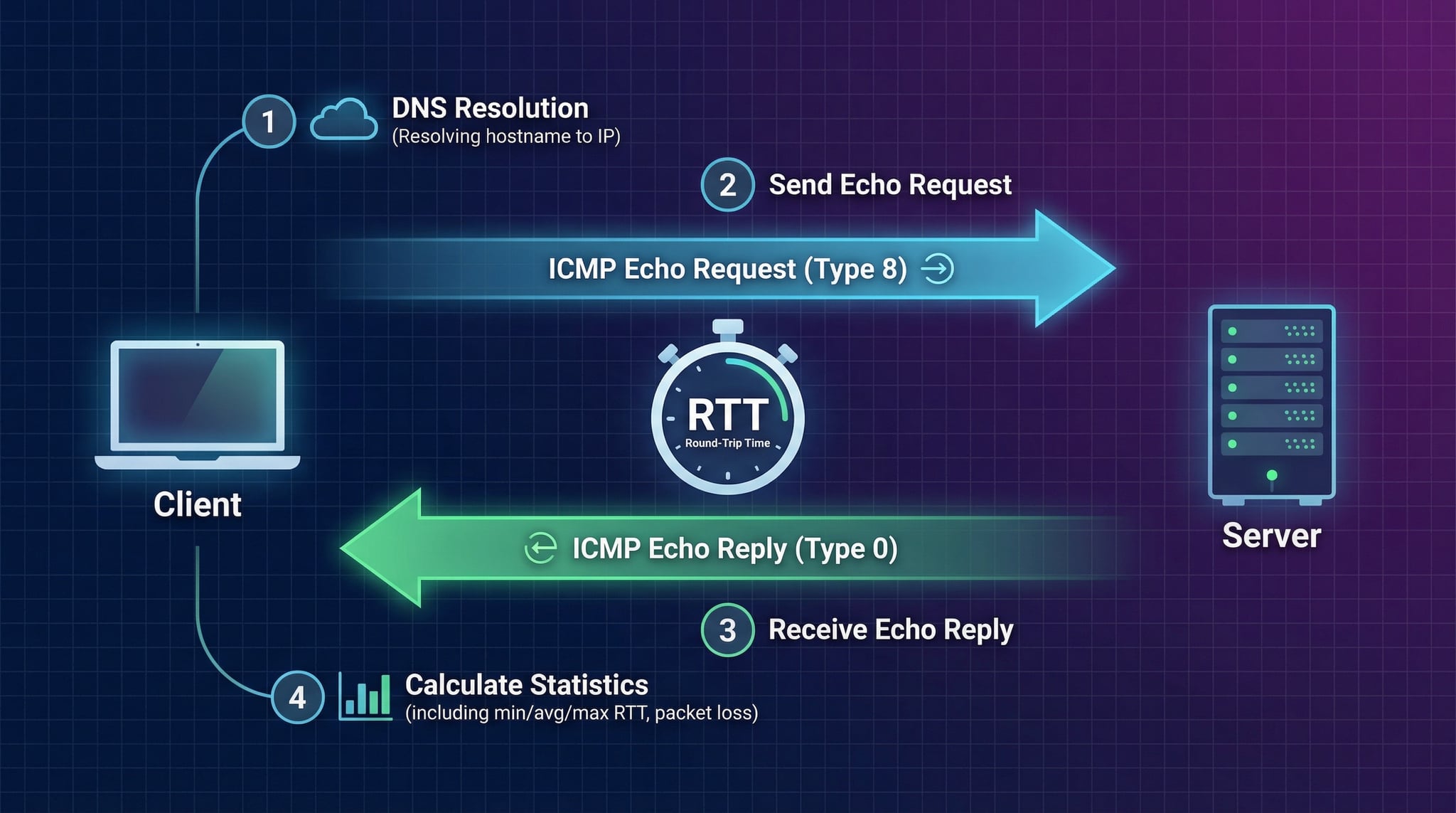
When you use our ping tool online, the test runs from our server infrastructure using the ICMP protocol. Here's the four-step process that happens every time you ping a host:
If you entered a domain name, the system first resolves it to an IP address using DNS lookup.
Our server sends 4 ICMP Echo Request packets (Type 8) to the target IP address with a 5-second timeout per packet.
The target host receives the request and sends back an ICMP Echo Reply (Type 0). The round-trip time is recorded for each packet.
Results are compiled: min/avg/max latency, packet loss percentage, and jitter (variation between consecutive RTTs).
Advertisement
Understanding Ping Results
A ping test produces several key metrics. Understanding these values helps you diagnose network issues and determine whether your connection is performing well.
Round-trip time in milliseconds — how long it takes a packet to reach the destination and return. Reported as min, average, and max. Lower is better.
Percentage of packets that didn't receive a reply. 0% is ideal. Even 1-2% packet loss can cause noticeable degradation in real-time applications.
The variation in latency between consecutive packets. Low jitter means a stable, consistent connection. Critical for VoIP, video calls, and gaming.
The maximum number of network hops a packet can traverse before being discarded. TTL values hint at the operating system and distance to the target.
Ping Latency Benchmarks
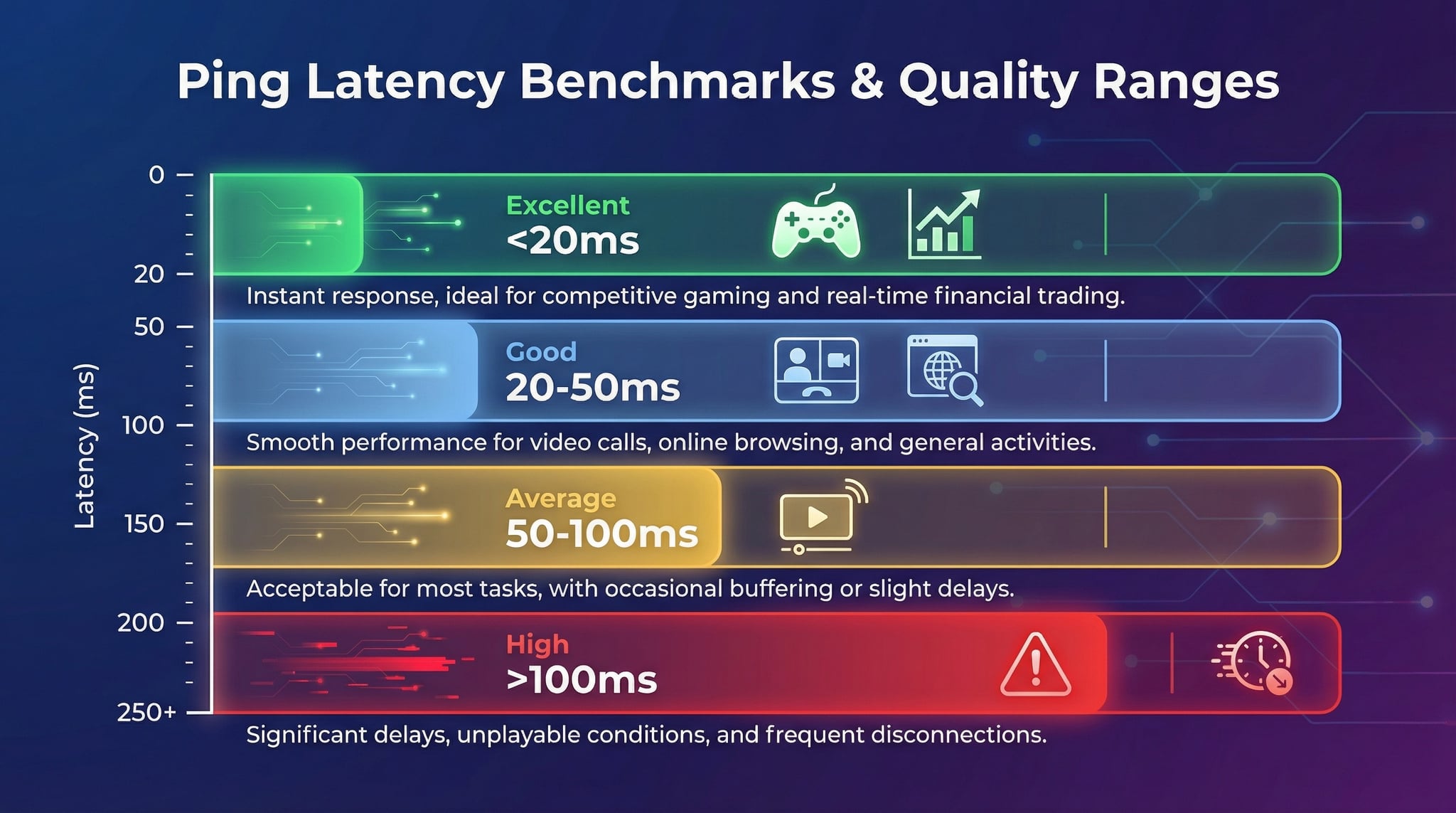
What is a good ping time? The answer depends on your use case. Here are the latency ranges and what they mean for different activities:
Ideal for competitive gaming, real-time trading, and latency-sensitive applications.
Great for casual gaming, video calls, and general web browsing with no perceptible delay.
Acceptable for web browsing and streaming. Slight delays may be noticed in interactive apps.
Noticeable lag in gaming and VoIP. May indicate routing issues, congestion, or geographic distance.
Advertisement
Common Causes of High Ping
If your ping test shows high latency or packet loss, one or more of these factors is likely responsible. Identifying the cause is the first step to fixing it.
Packets travel physical distances through fiber optic cables. Pinging a server on another continent adds 80-200ms due to the speed of light in fiber.
During peak usage hours, shared network links become saturated. Packets queue up at routers, increasing latency and sometimes causing drops.
Wireless connections add latency and jitter compared to wired. Interference from other networks, walls, and distance from the router all increase ping.
Suboptimal routes or routing loops force packets through unnecessary hops. Use traceroute to identify routing problems.
Some ISPs throttle certain traffic types or deprioritize ICMP packets. Test at different times and with different tools to confirm.
An overloaded target server may respond slowly to ICMP requests. High server CPU or memory usage can increase response times.
Ping for Different Use Cases
Different applications have different latency and stability requirements. Here's what to look for when running a network latency test for common use cases:
Gaming
- Latency under 40ms recommended
- 0% packet loss critical
- Jitter under 15ms for smooth gameplay
- Wired connection strongly preferred
VoIP & Video Calls
- Latency under 150ms for clear audio
- Packet loss under 1% essential
- Jitter under 30ms for quality
- Consistent latency more important than low
Server Monitoring
- Focus on 0% packet loss (uptime)
- Track latency trends over time
- Sudden latency spikes = alerts
- Test from multiple locations
Advertisement
Related Network Tools
Ping is just one piece of the network diagnostic toolkit. Combine it with these tools for comprehensive troubleshooting:
Frequently Asked Questions about Ping
What is ping and what does it measure?
Ping is a network diagnostic tool that measures the round-trip time (RTT) for ICMP packets to travel from your location to a target host and back. It reports latency in milliseconds, packet loss percentage, and jitter (variation in latency). Ping is the most fundamental tool for testing network connectivity and measuring network performance.
Why is my ping so high?
High ping is commonly caused by: geographic distance between you and the server, network congestion during peak hours, Wi-Fi interference or weak signal, ISP throttling or routing issues, background downloads consuming bandwidth, or an overloaded router. Try testing on a wired connection and at different times to isolate the cause.
What does packet loss mean?
Packet loss occurs when one or more ping requests fail to receive a reply from the target host. Even 1-2% packet loss can degrade performance noticeably in real-time applications. 0% packet loss is ideal. Persistent packet loss indicates network congestion, hardware failure, or routing problems between you and the target.
What is ICMP?
ICMP (Internet Control Message Protocol) is a network protocol used by ping and traceroute. It operates at the network layer (Layer 3) and is used for diagnostic and error-reporting purposes. Ping uses ICMP Echo Request (Type 8) and Echo Reply (Type 0) messages to test connectivity and measure round-trip time between two hosts.
What is the difference between ping and traceroute?
Ping tests connectivity and measures round-trip time to a single destination host. Traceroute maps the entire network path, showing every router (hop) between you and the destination along with latency at each hop. Use ping for quick connectivity checks and latency measurement; use traceroute to diagnose where along the path problems occur.
What is a good ping time?
Under 20ms is excellent and ideal for competitive gaming and real-time applications. 20-50ms is good for most uses including casual gaming and video calls. 50-100ms is average and fine for web browsing and streaming. Over 100ms is high and may cause noticeable lag in interactive applications. For online gaming, under 40ms is generally recommended.
What is jitter and why does it matter?
Jitter is the variation in latency between consecutive packets. While latency measures the average delay, jitter measures how consistent that delay is. High jitter causes audio distortion in VoIP calls, video stuttering in conference calls, and lag spikes in online games. Under 30ms jitter is acceptable for most real-time applications; under 10ms is ideal.
Can I ping any website?
Most websites and servers respond to ping, but some block ICMP traffic for security reasons. If a ping fails, the host may still be online — it may simply be configured to drop ICMP packets. Websites behind CDNs like Cloudflare may respond to ping but from a CDN edge server rather than the origin server.
How many packets does this tool send?
Our online ping tool sends 4 ICMP echo request packets with a 5-second timeout per packet. This provides enough data for reliable statistics (min/avg/max latency, jitter, and packet loss) while keeping the test fast. Four packets is the standard default used by most ping implementations.
Is this online ping tool free?
Yes, our online ping tool is completely free with no registration required. You can test unlimited hosts, view detailed latency statistics including min/avg/max RTT, jitter, and packet loss, and analyze network connectivity — all without any cost or account creation.