










What Is My ISP?
What is my internet provider? This page shows it the moment it opens: its name and logo, how many people use it in your country, your IPv4 and IPv6 addresses, and whether a VPN or relay hides it. Nothing to type.
- IPv4Checking…
- IPv6Checking…
Who is my ISP, and what does an ISP check show?
Your internet service provider (ISP) is the company your connection runs through: the cable, fibre, DSL, mobile or satellite network that gave your router or phone its public IP address. This page reads that address as your request arrives and answers "who is my ISP?" and "what is my internet service provider?" before you type anything.
Most ISP checkers stop at a registry name such as "Comcast Cable Communications". This one shows the brand you pay (Xfinity), how many people use it in your country, both your IPv4 and IPv6 addresses with the network behind each, and what a VPN, iCloud Private Relay or a mobile network changes.
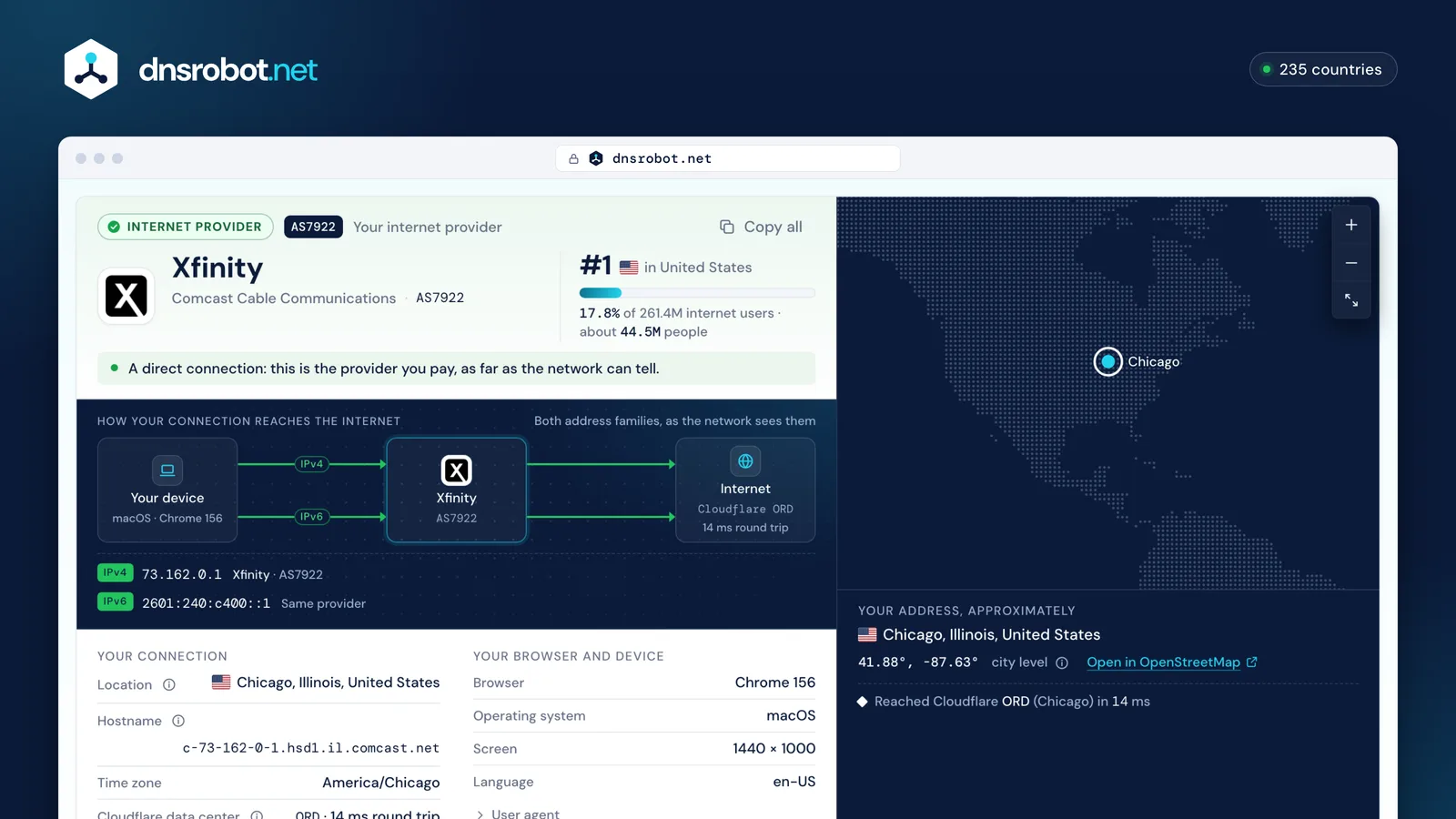
 Your ISP's nameThe brand people know, its logo and the kind of network: home broadband, mobile, satellite, VPN or data center.Its sizeIts rank and estimated users in your country, from APNIC Labs' ad-based measurements.Both addressesYour IPv4 and IPv6, each with its own network. Different networks mean a VPN that covers only one, or a second line.Where it isThe approximate place of the address: your provider's hub, usually in or near your city.
Who are the biggest internet providers in your country?
The largest networks by estimated users, from APNIC Labs, which samples users through some 25 million online ad impressions a day, maps each one to its country and network, and scales the shares to each country's internet population. Mobile and home networks are counted separately where an operator runs them apart.
 Internet users
261.4M
United States
Largest home ISP
Xfinity

17.8% of users · AS7922
Largest mobile ISP
T-Mobile

7.5% of users · AS21928
Top ten together
64.3%
of the country's users
United States: 261.4M internet usersAPNIC Labs · Oct 15, 2026
| # | Provider | Type | Users | Share |
|---|---|---|---|---|
| 1 | XfinityAS7922 · Comcast Cable Communications | Home | 44.5M | |
| 2 | AT&TAS7018 · AT&T Enterprises | Home | 30.1M | |
| 3 | T-MobileAS21928 · T-Mobile USA | Mobile | 18.7M | |
| 4 | VerizonAS6167 · Verizon Business | Mobile | 17.8M | |
| 5 | SpectrumAS20115 · Charter Communications | Home | 12.8M | |
| 6 | VerizonAS701 · Verizon Business | Home | 11.6M | |
| 7 | SpectrumAS22773 · Cox Communications | Home | 8.1M | |
| 8 | SpectrumAS10796 · Charter Communications | Home | 7.7M | |
| 9 | FrontierAS5650 · Frontier Communications of America | Home | 4.9M | |
| 10 | SpectrumAS20001 · Charter Communications | Home | 4.8M |


Estimates: APNIC Labs AS population, Oct 15, 2026, re-used with attribution.
Why does my ISP or location look wrong?
Because the internet only sees the network your traffic leaves through, and that is not always the company on your bill or the town you are in. The tool above names the cause when it can.
A VPN, proxy or relay
A VPN or proxy sends your traffic out through its own server, so the page sees a data center. iCloud Private Relay does the same through Akamai, Cloudflare or Fastly, and Cloudflare WARP through Cloudflare.
A mobile network
Phone carriers connect you to the internet through gateways that can be far from you, so the location is often the gateway's city. Hotspots and 5G home internet look the same.
A reseller or virtual operator
Many brands rent another company's network: an MVNO on a big carrier, or a fibre reseller on the national network. The page shows the network that carries the traffic.
Carrier-grade NAT
Many providers share one public address between many customers (CGNAT, 100.64.0.0/10 inside their network). The address is right, but port forwarding and hosting games stop working.
IPv4 and IPv6 differ
Your device may use both. A VPN that only tunnels IPv4 lets IPv6 out through your provider, and that is a leak: the tool compares both.
Location databases
IP locations are a best guess from registration, routing and provider data. Country is nearly always right; the city is often your provider's nearest hub.
Brand, network, AS number: three names for one connection
Support lines and network tools use different names for the same provider. The AS number is the one that is globally unique.
- Brand
Xfinity
The name on your bill, app and router.
- Network (organization)
Comcast Cable Communications
The company that registered the network, as registries and WHOIS show it.
- AS number (ASN)
AS7922
The number the network announces its addresses under on the internet. Quote it to support.
Is it my ISP or my router?
Test from the inside out: your device, then your router, then the internet. The first step that fails is where the problem is.
- 1
Another device
If a phone on the same Wi-Fi works, the problem is the first device: restart it or forget and rejoin the network.
- 2
Your router
Open your router's admin page (Router Login finds it). If it doesn't load, restart the router; the problem is inside your home.
- 3
Beyond the router
If the router answers but nothing loads, Ping 1.1.1.1. Replies with no websites point to DNS; no replies point to your provider's line.
- 4
Your provider
Check your provider's status page or app for an outage, then call support with your AS number and the time it started.
How do you find internet providers by address?
With your country's official coverage map, not with an IP check: this page sees only the connection you are on. Regulators and national networks publish what each address can get, and some maps name the providers.
Elsewhere, the providers' own address checkers are the most reliable source.



What can your ISP see?
Your provider carries every packet, so it sees where your traffic goes and when, but not what is inside an encrypted connection.
It can see
- Which servers and websites you connect to (their IP addresses and, usually, the site name)
- When you are online and how much data you use
- Your DNS lookups, unless they are encrypted (DNS over HTTPS or TLS)
- Everything on the few sites still without HTTPS
It can't see
- The pages, searches and videos inside an HTTPS site
- Your passwords, messages and form data on HTTPS
- Anything inside a VPN tunnel (the VPN company sees it instead)
Check what leaks with the DNS Leak Test and the WebRTC Leak Test.
How do you find your ISP without this page?
On a phone, the carrier's name is in the status bar or under Settings. At home, the router's label, your bill or your provider's app names it. From a terminal, ask our API:
irm https://dnsrobot.net/api/my-ispPowerShell prints your provider, AS number and location as a list.
Is there an ISP lookup API?
Yes: free, without a key, open to browsers (CORS). Ask for the caller's own provider, or for any IP address.
Fair use: 60 lookups a minute per address. Answers carry network with the brand, kind, users, share and rank where we know them.
$ curl https://dnsrobot.net/api/my-isp
{
  "ip": "203.0.113.10",
  "isp": "Comcast Cable Communications, LLC",
  "asn": "AS7922",
  "city": "Chicago", "country": "US",
  "network": { "brand": "Xfinity", "kind": "isp", "rank": 1, "share": 17.78, … },
  …
}$ curl "https://dnsrobot.net/api/ip-info?ip=8.8.8.8"
$ curl -X POST https://dnsrobot.net/api/ip-info \
-H "Content-Type: application/json" -d '{"ip": "8.8.8.8"}'
$ curl "https://dnsrobot.net/api/asn?ip=2001:4860:4860::8888"ISP questions
What is my ISP?
What ISP do I have, and how do I find out?
Who is my service provider on Wi-Fi and on mobile data?
Why does it show the wrong provider?
Why is my location wrong?
What is my ASN (ISP number)?
Can my ISP see my browsing history?
How do I check that my VPN hides my ISP?
What is CGNAT and how do I know if I'm behind it?
Why do my IPv4 and IPv6 show different providers?
Who is my internet provider by address?
Is this ISP checker free, and do you store my IP?
Missing something?Suggest a feature or a new tool
Related network tools
What Is My IP
Your public IPv4 and IPv6 at once, with the network, location and a VPN check
IP Lookup
Look up IP address geolocation, ISP, and network details instantly
ASN Lookup
Look up Autonomous System Number details and IP ranges
DNS Leak Test
See which DNS servers really resolve your lookups and whether your VPN leaks DNS requests to your internet provider
Router Login
Open your router's admin page, fix typos like 192.168.l.l and find default logins by brand
Ping Test
Test your ping, jitter and packet loss, see your ping to 34 cloud regions, and ping any website or IP from 11 cities