DNS RobotDNS Propagation Checker
HomeDNS LookupWHOIS LookupIP LookupSSL Check
DNS RobotDNS Propagation Checker

Next-generation DNS propagation toolkit

Privacy PolicyTerms of ServiceAbout UsContact

DNS Tools

DNS LookupDomain to IPNS LookupMX LookupCNAME LookupView all

Email Tools

SPF Record CheckerDMARC CheckerDKIM CheckerSMTP Test ToolEmail Header AnalyzerView all

Website Tools

WHOIS LookupDomain AvailabilitySubdomain FinderCMS DetectorLink AnalyzerView all

Network Tools

Ping ToolTraceroutePort CheckerHTTP Headers CheckSSL Certificate CheckView all

IP Tools

IP LookupWhat Is My IPIP Blacklist CheckIP to HostnameASN LookupView all

Utility Tools

QR Code ScannerQR Code GeneratorMorse Code TranslatorText to Binary ConverterSmall Text GeneratorView all
© 2026 DNS Robot. Developed by ❤ Shaik Brothers
All systems operational
Made with
  1. Home
  2. /
  3. Email Tools
  4. /
  5. DMARC Checker

DMARC Checker

Check DMARC records for any domain instantly. Our free DMARC checker validates DMARC policy, checks alignment modes, verifies reporting URIs, analyzes subdomain policy, and gives you a health score with 11 validation checks. The most comprehensive DMARC record check tool online.

Free DMARC ToolDMARC Record Check11 ValidationsPolicy Analysis
DMARC Record Checker

What Is a DMARC Record?

A DMARC record (Domain-based Message Authentication, Reporting and Conformance) is a DNS TXT record published at _dmarc.yourdomain.com that tells receiving mail servers what to do when emails fail SPF and DKIM authentication checks. DMARC is the policy layer of email authentication — it ties SPF and DKIM together with enforcement rules (none, quarantine, or reject) and enables reporting so you can monitor who is sending email on behalf of your domain.

Our free DMARC checker goes beyond basic DMARC lookup. It parses every DMARC tag with human-readable descriptions, evaluates policy strength, checks DKIM and SPF alignment modes, validates aggregate and forensic reporting URIs, analyzes subdomain policy, and runs 11 validation checks to give you a comprehensive DMARC health score. Whether you're troubleshooting email deliverability, auditing email security, or implementing DMARC for the first time, this tool provides instant DMARC record validation.
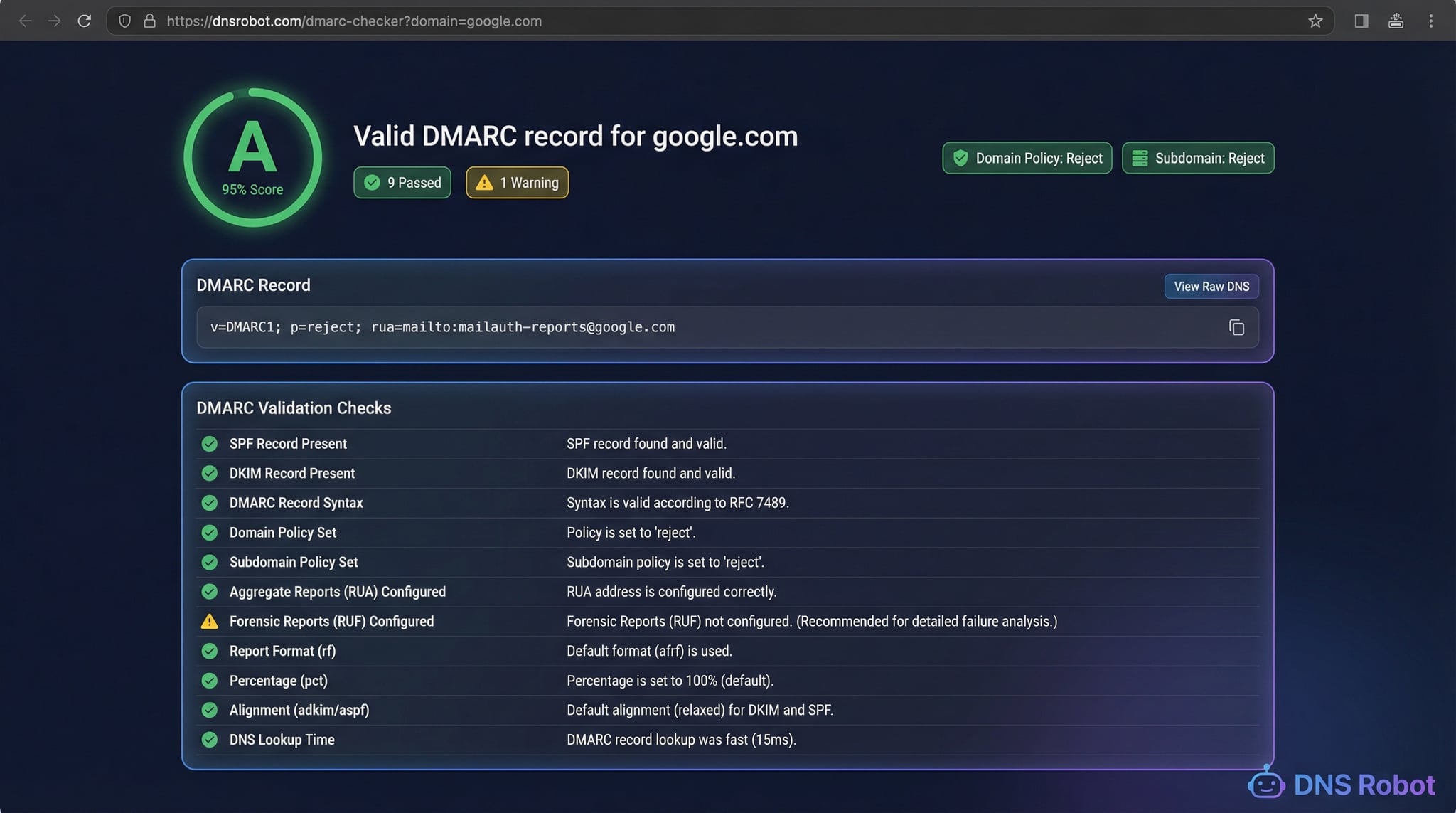
DMARC checker showing validation results with health score, policy analysis, and parsed DMARC tags
DNS Robot's DMARC checker validates DMARC records with 11 checks, policy analysis, alignment verification, and tag parsing.

How to Check DMARC Record (3 Methods)

There are several ways to check DMARC records for any domain. Our online DMARC checker is the fastest and most thorough method, but command-line tools work for quick lookups.
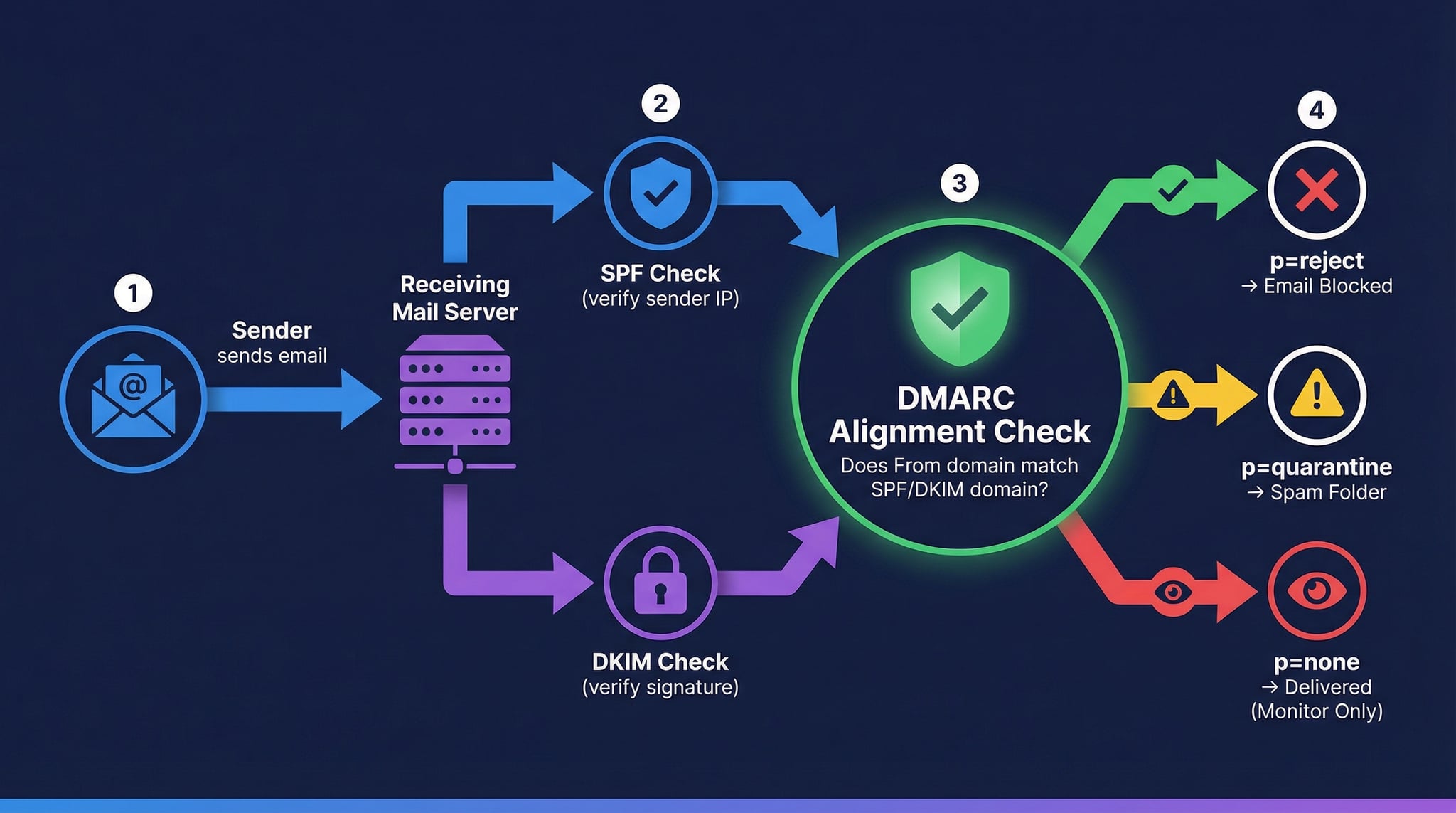
How DMARC works showing email flow through SPF and DKIM authentication with policy enforcement
How DMARC works: the receiving server checks SPF and DKIM, verifies alignment with the From domain, then applies the DMARC policy.
1
Online DMARC Checker (Recommended)
Enter any domain in our DMARC record checker above and click "Check DMARC". You'll instantly see the full DMARC record, parsed tags with descriptions, policy strength analysis, alignment mode settings, reporting URIs, and a health score based on 11 validation checks.
2
Using nslookup (Windows/Mac/Linux)
Open a terminal and run nslookup -type=txt _dmarc.example.com. Look for the TXT record starting with v=DMARC1. This shows the raw DMARC record but doesn't validate policy or check alignment.
3
Using dig (Mac/Linux)
Run dig _dmarc.example.com TXT +short for a quick DMARC lookup. For all DNS record types, use our DNS Lookup tool.

DMARC Record Tags — Complete Reference

A DMARC record consists of tag-value pairs separated by semicolons. Each tag controls a different aspect of email authentication policy. Understanding these tags is essential for a proper DMARC check.

p (Policy)

Required tag. Specifies what to do with failing emails: none (monitor), quarantine (spam), or reject (block).

sp (Subdomain Policy)

Policy for subdomains. If not set, inherits from p. Set separately when subdomains need different policies.

rua (Aggregate Reports)

Email address(es) for aggregate XML reports. Format: rua=mailto:[email protected]. Essential for monitoring.

ruf (Forensic Reports)

Email for forensic failure reports. Contains details about individual failed emails. Optional; not all providers support it.

adkim / aspf (Alignment)

DKIM and SPF alignment mode. r = relaxed (subdomains OK), s = strict (exact match). Default is relaxed.

pct (Percentage)

Percentage of emails to apply policy to (1-100). Use for gradual rollout: start at 10%, increase to 100%. Default is 100%.

Understanding DMARC Policies

N
p=none (Monitor Only)
No enforcement. Emails are delivered normally regardless of authentication. Best as a starting point to collect DMARC reports before enforcing.
Q
p=quarantine
Failing emails are sent to spam/junk folder. Good intermediate step between monitoring and full rejection.
R
p=reject (Strongest)
Failing emails are rejected outright. Maximum protection against spoofing and phishing. The ultimate goal for every domain.

Our 11 DMARC Validation Checks

DMARC record found at _dmarc.domain
Valid version tag (v=DMARC1)
Required policy tag (p=) present
Policy strength evaluation (reject > quarantine > none)
Subdomain policy (sp) analysis
Aggregate reporting URI (rua) configured
Forensic reporting (ruf) check
DKIM alignment mode verification
SPF alignment mode verification
Policy percentage (pct) enforcement check
Valid syntax (no unknown tags)

DMARC vs SPF vs DKIM — The Email Authentication Trio

DMARC is the policy and reporting layer that ties SPF and DKIM together. Without DMARC, even if you have SPF and DKIM configured, receiving servers have no clear instructions on what to do with failing emails. Here's how they compare:
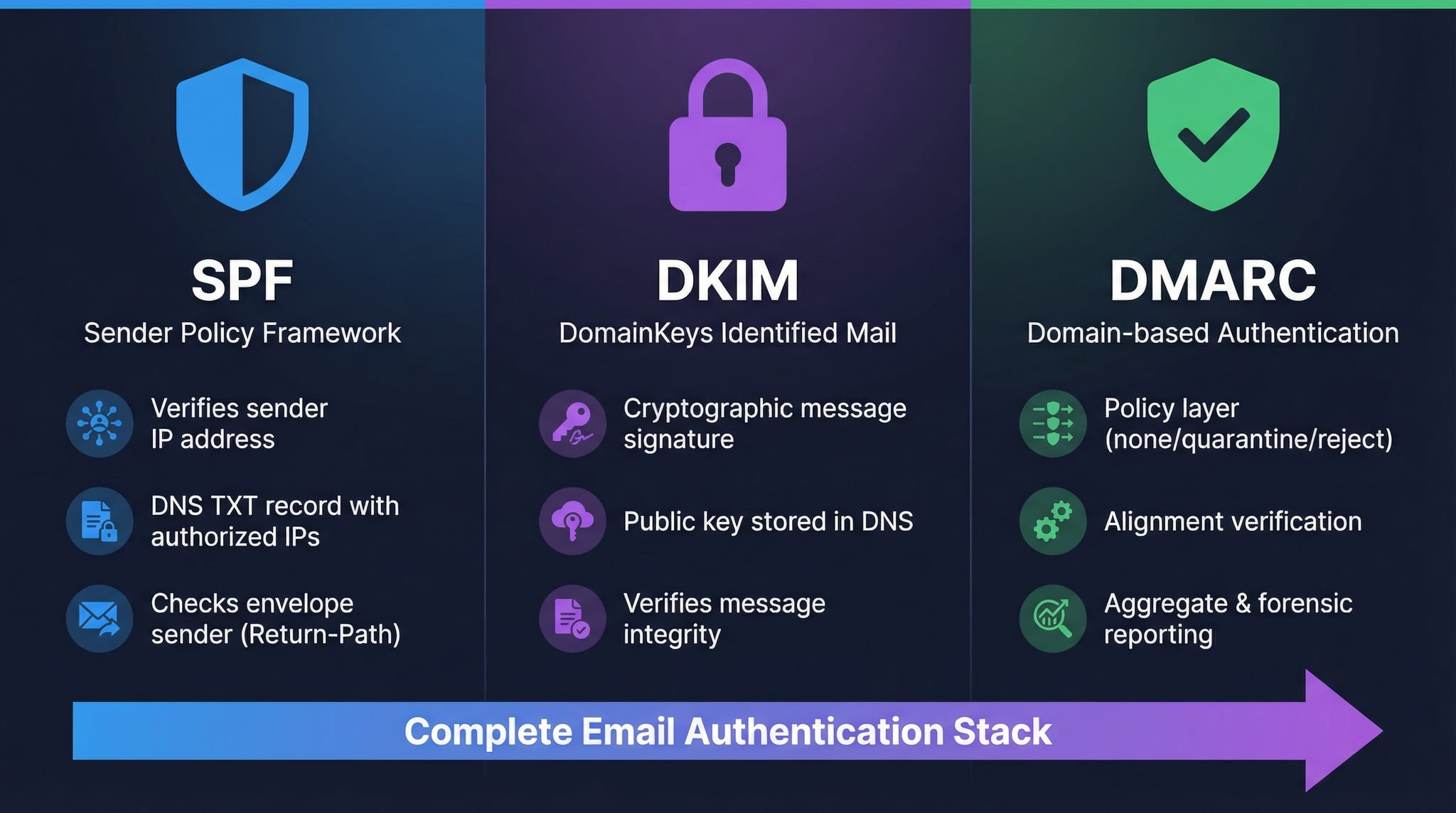
SPF vs DKIM vs DMARC comparison showing how each protocol handles email authentication
SPF, DKIM, and DMARC work together: SPF checks sender IP, DKIM verifies message integrity, DMARC enforces policy and enables reporting.
SPF

What: Verifies the sending server's IP is authorized

How: DNS TXT record listing allowed IPs

Checks: Envelope sender (Return-Path)

Check SPF Record →
DKIM

What: Verifies the message wasn't tampered with

How: Cryptographic signature in email headers

Checks: Message integrity + signing domain

Check DKIM Record →
DMARC

What: Ties SPF + DKIM together with policy

How: DNS TXT record at _dmarc.domain

Checks: From header alignment + enforcement

You are here

DMARC Implementation Roadmap: From Monitoring to Enforcement

Implementing DMARC is a phased process that protects your brand from email spoofing without disrupting legitimate email delivery. Start with p=none to collect data about email authentication results. Analyze aggregate reports (rua) to identify all legitimate email sources and ensure they pass SPF and DKIM. Gradually move to p=quarantine with a low percentage (pct=10) and increase as confidence grows. Finally, implement p=reject with pct=100 for full enforcement.

DMARC Best Practices for Email Security

  • Start with p=none and gradually enforce
  • Always configure rua for aggregate reports
  • Set up both SPF and DKIM before DMARC
  • Use pct tag for gradual policy rollout
  • Monitor aggregate reports regularly
  • Set subdomain policy (sp) explicitly
  • Consider strict alignment for maximum security
  • Target p=reject as the ultimate goal

Related Email & DNS Tools

SPF Checker

Check SPF records, DNS lookup count, and include chain resolution.

DKIM Checker

Verify DKIM signatures and public key DNS records.

MX Lookup

Check MX records and detect email providers for any domain.

DNS Lookup

Check all DNS record types (A, AAAA, CNAME, MX, TXT, and more).

DNS Validator

Run 17 DNS health checks including SPF and DMARC validation.

IP Blacklist Checker

Check if your mail server IP is blacklisted on major RBLs.

Frequently Asked Questions About DMARC Checker

What is a DMARC record?

DMARC (Domain-based Message Authentication, Reporting and Conformance) is an email authentication protocol published as a DNS TXT record at _dmarc.yourdomain.com. It tells receiving servers what to do when emails fail SPF and DKIM checks: monitor (none), quarantine, or reject them.

How to check DMARC record of a domain?

Enter the domain in our DMARC checker above and click "Check DMARC". You'll see the parsed DMARC record, 11 validation checks, policy analysis, and alignment settings. Command-line: dig _dmarc.example.com TXT +short.

What DMARC policy should I use?

Start with p=none to monitor. Analyze DMARC reports to identify legitimate senders. Upgrade to p=quarantine (sends failures to spam), then p=reject for maximum protection. Use the pct tag for gradual rollout.

What is DMARC alignment?

DMARC alignment ensures the From header domain matches the domains authenticated by SPF and DKIM. Relaxed alignment (default) allows subdomains to match; strict alignment requires exact domain match. Set via adkim and aspf tags.

What are DMARC aggregate reports (rua)?

Aggregate reports are daily XML summaries sent to rua addresses containing email authentication statistics — which IPs sent email for your domain, SPF/DKIM pass/fail rates, and what policy was applied. Essential for monitoring before enforcing strict policies.

Do I need SPF and DKIM for DMARC?

DMARC requires at least one of SPF or DKIM to pass with alignment. However, configuring both provides the strongest authentication — if one fails (e.g., SPF during forwarding), the other can still pass.

What is the DMARC pct tag?

The pct tag specifies what percentage of failing emails the policy applies to. Start at pct=10 when moving to quarantine or reject, then gradually increase to 100%. Default is 100% (full enforcement).

What is the difference between rua and ruf?

rua sends aggregate reports (daily stats summary). ruf sends forensic reports (details about individual failed emails). Aggregate reports are widely supported and essential; forensic reports are optional and not all providers support them.

How does DMARC prevent spoofing?

DMARC instructs receivers to check SPF/DKIM and verify From domain alignment. With p=reject, emails failing these checks are blocked outright, preventing attackers from impersonating your domain. Without DMARC, spoofed emails reach inboxes unchallenged.

Is this DMARC checker free?

Yes, completely free with no registration. Check unlimited domains, analyze DMARC policies, verify alignment and reporting, and get a health score with 11 validation checks — all at no cost.