What Is a Domain Health Check?
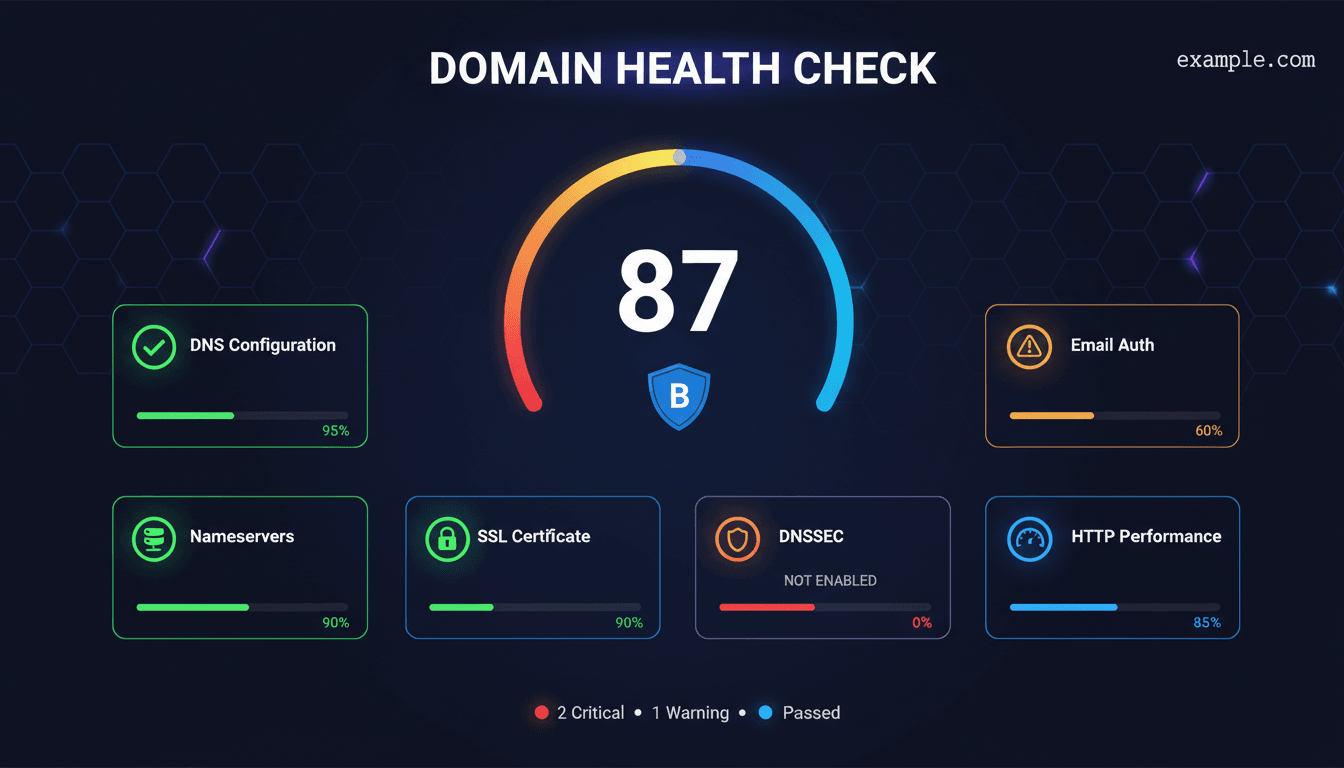
A domain health check is a comprehensive audit that evaluates every critical layer of your domain's infrastructure — from DNS records and nameservers to SSL certificates and email authentication. Instead of testing individual components one at a time, a health check gives you a single health scorethat summarizes your domain's overall status.
Our tool runs multiple checks in parallel: it queries your DNS records (A, AAAA, NS, MX), validates your SSL certificate, verifies SPF and DMARC email authentication, tests nameserver responsiveness, checks DNSSEC status, and measures HTTP response headers. Each check is scored individually and combined into an overall grade from A to F.
Whether you are a webmaster, sysadmin, or domain owner, running a domain health check after DNS changes, hosting migrations, or SSL renewals helps catch misconfigurations before they cause downtime, email delivery failures, or security vulnerabilities.
What Our Domain Health Checker Tests
The domain health checker evaluates your domain across six critical categories. Each category receives its own letter grade, and the combined score determines your overall health rating:
DNS Configuration
Validates A, AAAA, NS, and MX records. Checks for missing records, IPv6 support (AAAA), and proper nameserver delegation. Missing A records or NS records cause critical failures.
SSL/TLS Certificate
Verifies certificate validity, expiration date, issuer chain, and protocol support. Expired or self-signed certificates trigger critical alerts. Checks if HTTPS redirect is configured.
Email Authentication
Tests SPF, DMARC, and DKIM records. Missing SPF or DMARC records severely impact email deliverability and leave your domain vulnerable to spoofing and phishing attacks.
Nameserver Health
Tests nameserver responsiveness, redundancy (at least 2 NS required), and whether they return authoritative answers. Slow or single-point-of-failure nameservers reduce reliability.
DNSSEC Status
Checks if DNSSEC is enabled with valid DS and DNSKEY records. DNSSEC prevents DNS spoofing by digitally signing your DNS records. Most domains don't have it — adding it boosts your score.
HTTP Headers & Performance
Analyzes HTTP response time, status codes, and security headers (HSTS, CSP, X-Frame-Options). Slow response or missing security headers indicate areas for improvement.
Advertisement
How the Domain Health Score Is Calculated
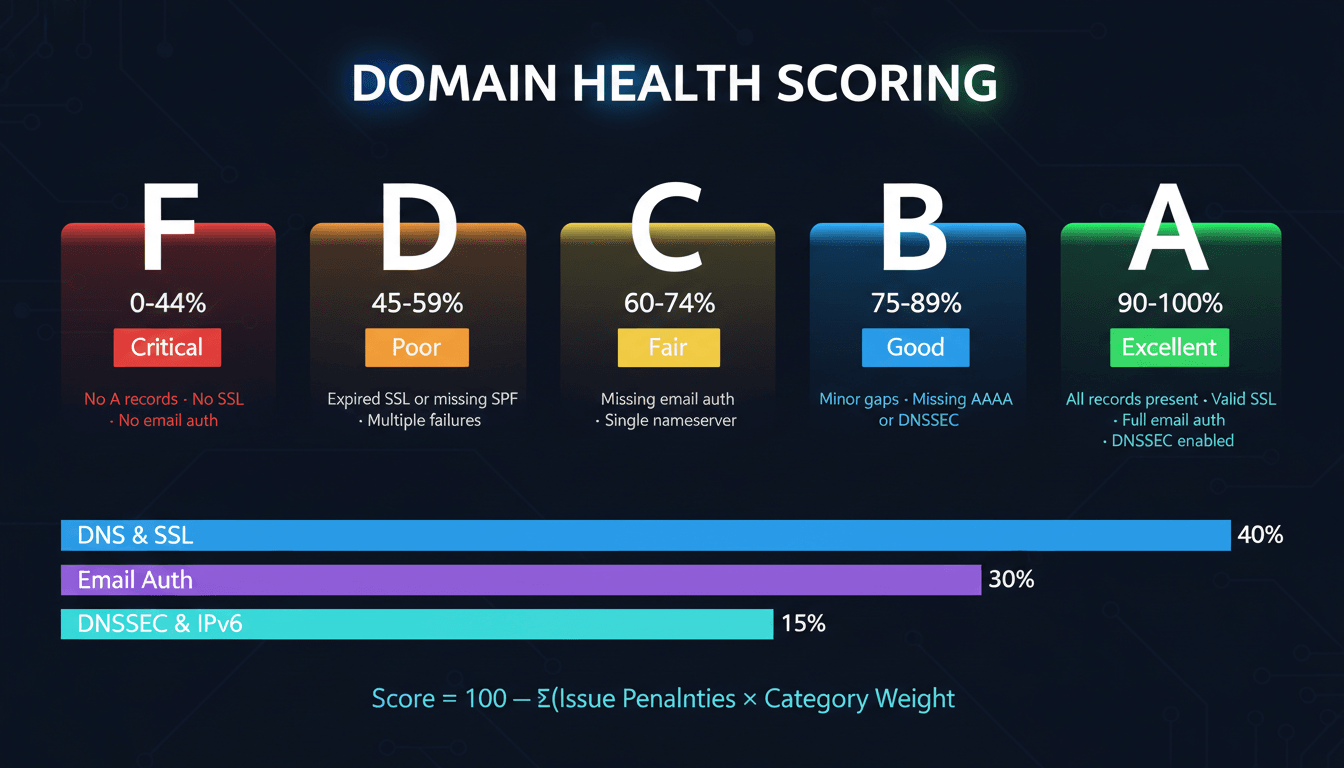
The health score starts at 100 and deducts points for each issue found. Critical issues (missing A records, expired SSL, no SPF) cause large deductions. Warnings (missing AAAA, no DNSSEC, slow response) cause smaller deductions. The final percentage maps to a letter grade:
Each category (DNS, SSL, Email, Nameservers, DNSSEC, HTTP) is weighted based on impact. SSL and DNS issues carry the most weight since they directly affect whether your site is reachable. Email authentication is weighted heavily because missing SPF/DMARC records expose your domain to spoofing. DNSSEC and IPv6 are weighted lower since they are enhancements rather than requirements.
Why Domain Health Matters
A poorly configured domain leads to real-world consequences: your emails land in spam folders, your site shows security warnings, search engines penalize your rankings, and visitors lose trust. Domain health is the foundation everything else depends on.
Email Deliverability
Missing SPF or DMARC records cause emails to be rejected or flagged as spam by Gmail, Outlook, and Yahoo. Since February 2024, Google requires SPF and DMARC for bulk senders.
Website Security
Expired SSL certificates show browser warnings that scare away visitors. Missing DNSSEC leaves your DNS vulnerable to cache poisoning attacks that redirect users to malicious sites.
SEO Rankings
Google uses HTTPS as a ranking signal. Slow DNS resolution increases page load time (a Core Web Vitals factor). Proper MX and email auth prevent your domain from being flagged as spam.
Uptime & Reliability
Having only one nameserver creates a single point of failure. If that NS goes down, your entire domain — website, email, everything — becomes unreachable until it recovers.
Advertisement
How to Improve Your Domain Health Score
If your domain scored below an A, here is the recommended fix order based on impact. Address critical issues first, then work through warnings:
🔴 Critical
Install or renew SSL certificate
An expired or missing SSL certificate blocks visitors with browser warnings. Use Let's Encrypt for free certificates, or check your current cert with our SSL Checker. SSL Checker →
Add missing A or NS records
Without A records, your domain can't resolve to an IP. Without NS records, DNS queries fail entirely. Verify with our DNS Lookup tool. DNS Lookup →
Add SPF and DMARC records
These TXT records authenticate your email and prevent spoofing. Gmail, Outlook, and Yahoo now reject emails from domains without SPF. Use our checkers to validate your records. SPF Checker →
🟡 Important
Add a second nameserver
At least 2 NS records are required for redundancy. If your single NS goes down, your entire domain becomes unreachable. Most registrars provide multiple nameservers. NS Lookup →
Configure HTTPS redirect
Ensure HTTP requests redirect to HTTPS (301 redirect). This prevents mixed content warnings and ensures all traffic is encrypted. HTTP Headers →
Add MX records for email
Even if you don't use email, a null MX record (RFC 7505) signals this explicitly. Missing MX records with active email cause delivery failures. MX Lookup →
🔵 Enhancement
Enable DNSSEC
DNSSEC digitally signs your DNS records to prevent spoofing. Enable it at your registrar — most support it with one click. Verify status after enabling. DNS Lookup →
Add AAAA records for IPv6
IPv6 support is increasingly important. Add AAAA records pointing to your server's IPv6 address for dual-stack connectivity. DNS Lookup →
Email Domain Health Check
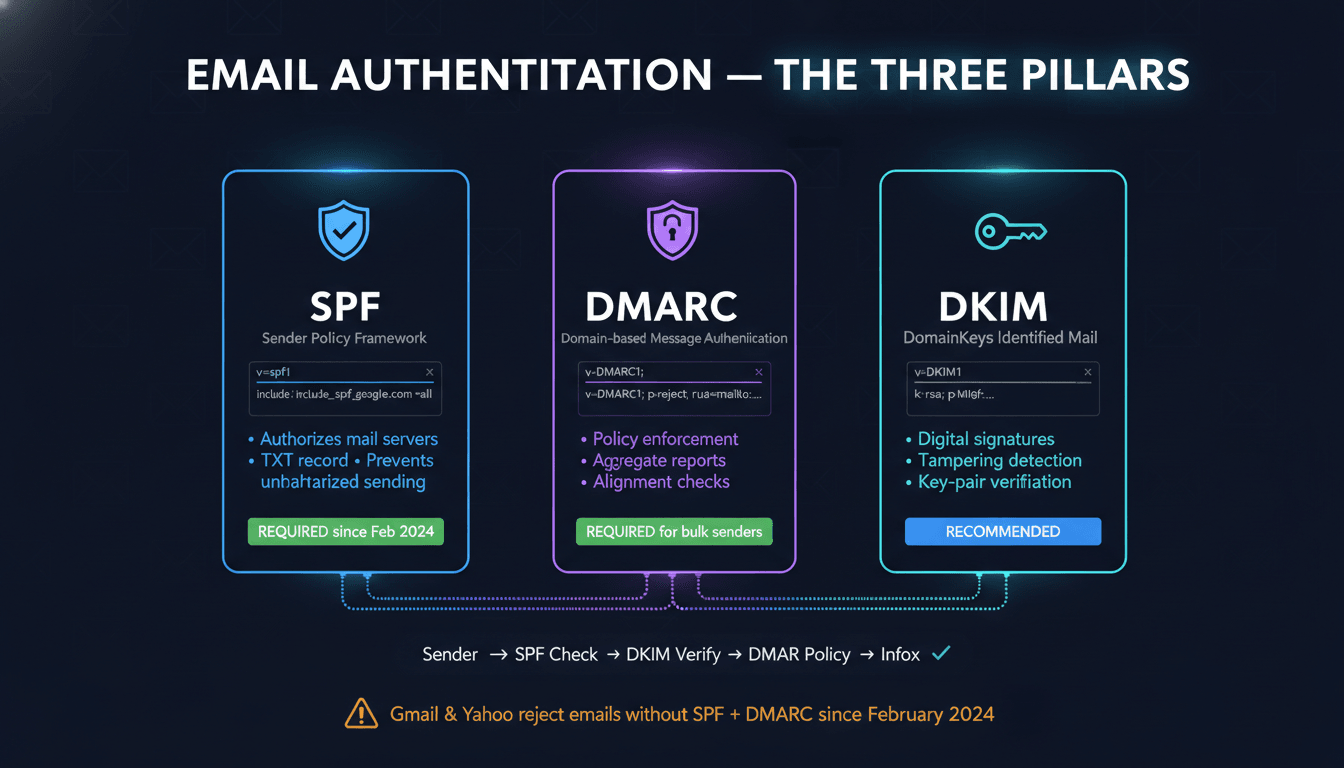
Email authentication is one of the most impactful parts of domain health. Since February 2024, Google and Yahoo require SPF and DMARC for any domain sending more than 5,000 emails per day. Even low-volume senders benefit from properly configured email authentication.
Our health checker tests all three pillars of email authentication. Here is what each record does and why it matters:
SPF Record
Specifies which mail servers are authorized to send email on behalf of your domain. Receiving servers check SPF to reject unauthorized senders. Without SPF, anyone can send email pretending to be from your domain.
Check your SPF Record →DMARC Record
Tells receiving servers what to do with emails that fail SPF or DKIM checks (none, quarantine, or reject). Also enables aggregate reports so you can monitor email authentication failures.
Check your DMARC Record →DKIM Record
Adds a digital signature to outgoing emails that receiving servers can verify using a public key published in your DNS. This proves the email wasn't tampered with in transit.
Check your DKIM Record →For a complete email security audit, use our SMTP Test tool to verify your mail server is accepting connections, and our BIMI Checker to verify your brand logo appears in supported email clients.
Advertisement
Related DNS & Security Tools
Dive deeper into specific areas of your domain health with these free diagnostic tools:
Query all DNS record types (A, AAAA, CNAME, MX, NS, TXT, SOA) for any domain.
Deep-dive into SSL certificate details — validity, chain, expiration, protocol support.
Validate your SPF record syntax, included IP ranges, and lookup limits.
Verify your DMARC policy, alignment mode, and aggregate report settings.
Check nameserver delegation, glue records, and NS response times.
Look up domain registration details, registrar, and expiration date.
Analyze HTTP response and security headers for any URL.
Discover subdomains using Certificate Transparency logs.
Frequently Asked Questions About Domain Health
What is a domain health check?
A domain health check is a comprehensive audit that evaluates your domain's DNS records, SSL certificate, email authentication (SPF, DMARC, DKIM), nameserver health, DNSSEC, and HTTP performance. It provides an overall score and identifies issues affecting availability, security, or email deliverability.
What does the domain health checker test?
It tests DNS configuration (A, AAAA, NS, MX), SSL/TLS certificate validity, email security (SPF, DMARC, DKIM), nameserver responsiveness, DNSSEC status, and HTTP response headers. Each test contributes to an overall health grade from A to F.
How is the health grade calculated?
Starting at 100 points, critical issues (expired SSL, missing A records, no SPF) cause large deductions while warnings (no IPv6, no DNSSEC) cause smaller ones. Grades: A (90-100%), B (75-89%), C (60-74%), D (45-59%), F (below 45%).
Why is my domain health score low?
Common causes: expired SSL certificate, missing SPF or DMARC records, only one nameserver (no redundancy), missing AAAA record, DNSSEC not enabled, or slow nameserver response. The tool highlights each issue with fix recommendations.
How often should I check my domain health?
Check after any DNS changes, SSL renewals, or hosting migrations. Monthly checks are sufficient for routine monitoring. Check more frequently if you manage email delivery, since SPF/DMARC issues immediately affect deliverability.
Does domain health affect SEO?
Yes. SSL validity is a Google ranking signal, DNS resolution speed affects page load time (Core Web Vitals), and email authentication prevents your domain from being flagged as spam. A healthy domain is the foundation for good SEO.
What should I fix first?
Priority order: (1) SSL certificate issues — blocks visitors. (2) Missing A/NS records — makes site unreachable. (3) SPF and DMARC — critical for email. (4) Add second nameserver. (5) Enable DNSSEC and add AAAA records.
Is this domain health checker free?
Yes, completely free with no registration. Run unlimited checks on any domain, view detailed results per category, and get actionable recommendations. Use our individual tools (SSL Checker, DNS Lookup, SPF Checker) for deeper analysis.