











Password Strength Tester
See how long your password would take to crack, attack by attack, which patterns give it away and whether it has appeared in a data breach. This password strength tester is a password checker that never sends your password: only 5 characters of its hash leave your device.
- Common password
- Word
- Name
- Year
- Keyboard
- Repeat
- Random
Tested in your browser. Only the first 5 of the 40 characters of its SHA-1 hash leave it, for the breach check.
How fast would it fall?
Type or paste a password: the verdict updates as you type.
What it checks
- Patterns attackers try first: 49,233 common passwords, words and names, years, keyboard runs, repeats and look-alike swaps.
- Data breaches: about 2.07 billion leaked passwords in Have I Been Pwned, by k-anonymity.
- Eight attacks, from a login page that locks after 100 tries to NTLM hashes on 100 graphics cards.
How strong is my password?
As strong as the number of guesses an attacker needs to reach it, and attackers try likely passwords first: common passwords, words and names, years, keyboard runs and swapped letters, long before random strings. The tester counts those guesses.
It splits what you type into the pieces attackers try, such as Summer + 2026 + !, prices each piece by how many guesses it takes, and adds up the cheapest way to build the whole password. The engine is zxcvbn-ts, the open-source estimator OWASP points to, with English word lists and those of the page's language where one exists.
We corrected the two places where the stock estimator goes wrong at the strong end: it rates a truly random 12-character password at about 10¹² guesses instead of about 10²⁴, and a six-word passphrase billions of times too high. Random stretches are now priced by the characters they use, and passphrases by the scheme that made them.
Capitals, digits and symbols are shown, but a missing type never counts against you: NIST dropped such rules because they produce predictable passwords like Password1! (NIST SP 800-63B-4). The first 64 characters are analysed; anything longer is beyond guessing unless it's a known phrase, and the breach check still sees all of it.
Summer2026!
SummerDictionary wordA season, capitalised the usual way: 50 guesses2026!RandomFive characters with no pattern found: 100,000 guesses
WeakAbout 10 million guesses: WeakExposedIn breach data 45 times: Exposed
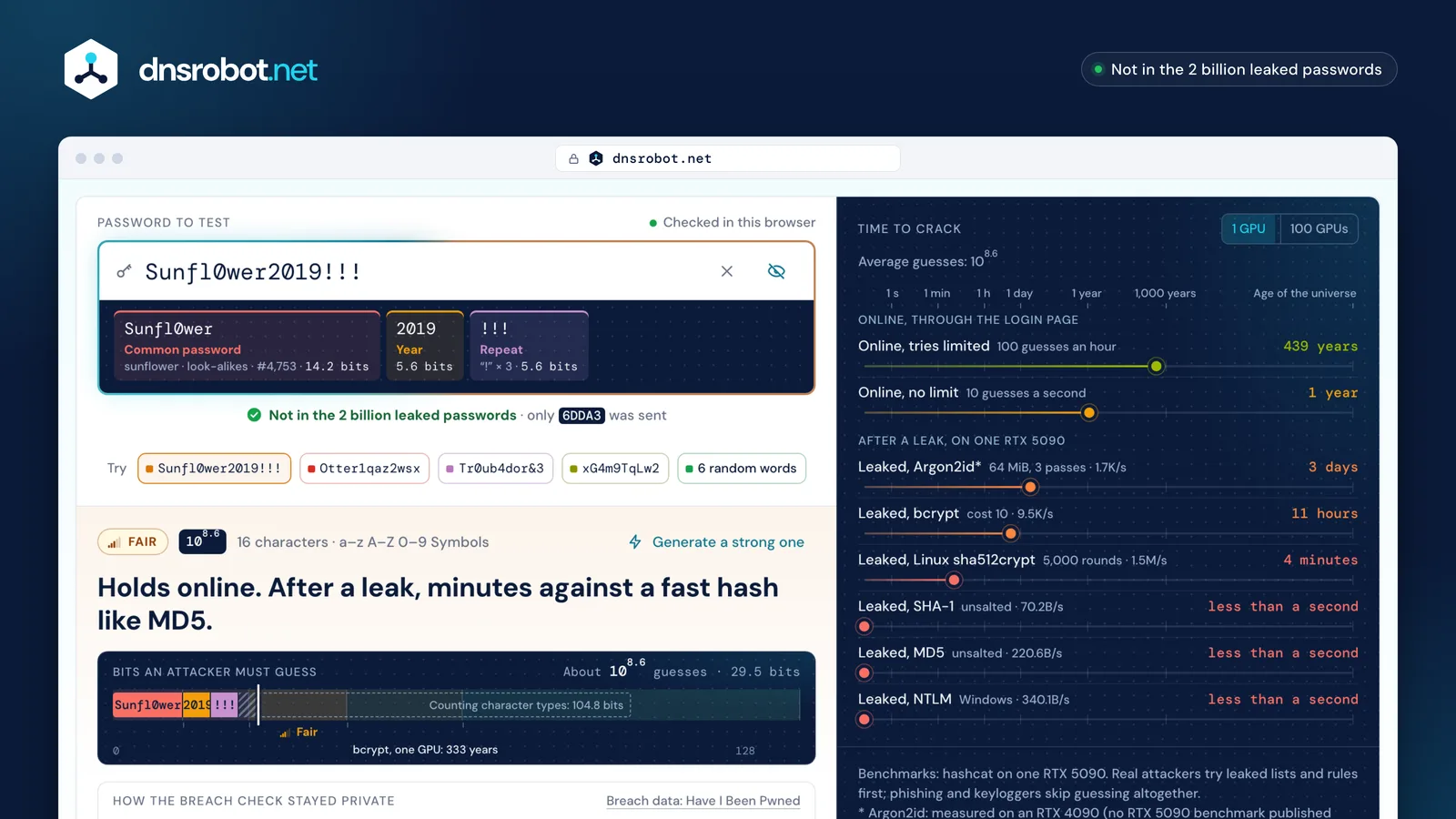
 The ratingVery weak to Very strong, from the guesses an attacker needs, or Exposed when the password is in breach data.Where it's weakThe password split into the patterns attackers try, each with the reason it's cheap to guess.Crack timeHow long each of eight attacks would take, on one graphics card or a hundred.Breach checkWhether Have I Been Pwned has seen it, and the 5 characters of its hash that were sent.
How long would it take to crack my password?
It depends on the attack: the same password can hold out for years against a login page that limits tries and fall in under a second once a site leaks badly stored password hashes. The tester works as a password crack time calculator for eight named attacks, on one graphics card or a hundred.
How long to crack a password comes down to the guesses it needs divided by the attacker's speed. Online, attackers guess through the login page: 100 tries an hour where the site locks out repeated failures (NIST allows at most 100 in a row), 10 a second where it doesn't. Offline, after a database leak, they guess against the stored hashes on graphics cards, and the speed depends on how the site stored them.
One RTX 5090 tries 340.1 billion NTLM hashes a second (Windows), 220.6 billion MD5 and 70.2 billion SHA-1, but about 9,500 bcrypt hashes at cost 10 and 1.48 million Linux sha512crypt (hashcat benchmarks). Argon2id with 64 MiB of memory runs at 1,699 a second on an RTX 4090 (hashcat). That gap is why OWASP asks sites to store passwords with Argon2id or bcrypt.
Each time is an average: for a random password, half of all the possibilities. A password strength test is only as honest as the attack it assumes, so each row names one; real attackers also run lists and rules before brute force, which is what the pattern estimate models. Phishing and keyloggers skip guessing altogether.
| Online, tries limited | Online, no limit | Leaked, Argon2id* | Leaked, bcrypt | Leaked, Linux sha512crypt | Leaked, SHA-1 | Leaked, MD5 | Leaked, NTLM | |
|---|---|---|---|---|---|---|---|---|
| 6-digit PIN105.7 | 208 days | 14 hours | 5 minutes | 52 seconds | less than a second | less than a second | less than a second | less than a second |
| Summer2026!, by its patterns alone107.0 | 11 years | 12 days | 2 hours | 17 minutes | 7 seconds | less than a second | less than a second | less than a second |
| 8 random characters1015.1 | 2B years | 4M years | 26K years | 5K years | 30 years | 6 hours | 2 hours | 1 hour |
| 4 random words1015.3 | 2B years | 6M years | 34K years | 6K years | 39 years | 7 hours | 2 hours | 1 hour |
| 12 random characters1023.2 | 10¹⁷ years | 10¹⁴ years | 10¹² years | 554B years | 4B years | 75K years | 24K years | 16K years |
| 6 random words1023.0 | 10¹⁷ years | 10¹⁴ years | 10¹² years | 368B years | 2B years | 50K years | 16K years | 10K years |
| 16 random characters1031.2 | 10²⁵ years | 10²² years | 10²⁰ years | 10¹⁹ years | 10¹⁷ years | 10¹² years | 10¹² years | 10¹² years |
| Any password in breach data109.3 | 2K years | 7 years | 14 days | 3 days | 23 minutes | less than a second | less than a second | less than a second |
| Online, tries limited | Online, no limit | Leaked, Argon2id* | Leaked, bcrypt | Leaked, Linux sha512crypt | Leaked, SHA-1 | Leaked, MD5 | Leaked, NTLM | |
|---|---|---|---|---|---|---|---|---|
| 6-digit PIN105.7 | 208 days | 14 hours | 3 seconds | less than a second | less than a second | less than a second | less than a second | less than a second |
| Summer2026!, by its patterns alone107.0 | 11 years | 12 days | 59 seconds | 10 seconds | less than a second | less than a second | less than a second | less than a second |
| 8 random characters1015.1 | 2B years | 4M years | 262 years | 47 years | 110 days | 3 minutes | 1 minute | 41 seconds |
| 4 random words1015.3 | 2B years | 6M years | 341 years | 61 years | 143 days | 4 minutes | 1 minute | 54 seconds |
| 12 random characters1023.2 | 10¹⁷ years | 10¹⁴ years | 31B years | 6B years | 36M years | 752 years | 239 years | 155 years |
| 6 random words1023.0 | 10¹⁷ years | 10¹⁴ years | 21B years | 4B years | 24M years | 499 years | 159 years | 103 years |
| 16 random characters1031.2 | 10²⁵ years | 10²² years | 10¹⁸ years | 10¹⁷ years | 10¹⁵ years | 69B years | 22B years | 14B years |
| Any password in breach data109.3 | 2K years | 7 years | 3 hours | 36 minutes | 14 seconds | less than a second | less than a second | less than a second |
Is my password secure? What each rating means
Your password is secure against guessing if it rates Very strong, or Strong at a site that stores passwords with a slow hash, and has never appeared in a breach. Exposed overrides everything else.
Each rating is a range of guesses, set by how long real attacks take to cover it. Very strong needs 10²¹ guesses or more: no single graphics card finds it within a century, even against NTLM.
- 6-digit PIN
- Summer2026!
- 8 random characters
- 4 random words
- 6 random words
- 12 random characters
- 16 random characters
- Locked login
- Open login
- Argon2id
- bcrypt
- sha512crypt
- SHA-1
- MD5
- NTLM
▲: one year on one graphics card
| Rating | Guesses needed | What it withstands |
|---|---|---|
| Exposed | In breach data | Nothing: attackers try breached passwords first. Change it everywhere you use it. |
| Very weak | Under 10⁴ | Online guessing finds it within 17 minutes, even at 10 tries a second. |
| Weak | 10⁴ to 10⁸ | A site that locks out after 100 failures, but not one without a limit; after a leak, 16 hours at most. |
| Fair | 10⁸ to 10¹⁴ | Online guessing for months to millennia; after a leak, hours to 333 years against bcrypt, but under 10 minutes against MD5 or NTLM. |
| Strong | 10¹⁴ to 10²¹ | After a leak: 333 to 3 billion years against bcrypt, but 5 minutes to 93 years against NTLM, on one graphics card. |
| Very strong | 10²¹ or more | No single graphics card finds it within a century, even against NTLM, the fastest hash to crack. |
What makes a strong password?
Length and randomness: at least 15 characters if the password alone protects the account, made by a generator or from random words, used for one account only and never found in a breach. Symbols, capitals and regular changes are no longer required.
That is the rule set of NIST SP 800-63B-4, the US standard revised in July 2025: 15 characters single-factor and 8 with a second factor, at least 64 accepted, any characters including spaces and emoji, no composition rules, no forced changes, and every new password checked against breached and common ones.
CISA, the US cybersecurity agency, asks for at least 16 characters or a passphrase of four to seven unrelated words, and the UK's NCSC suggests three random words. All three put length first.
Swapping letters for look-alike digits doesn't help: attackers know o → 0 and a → @, and try them early (NCSC). The password generator makes passwords that meet every rule.
- At least 15 characters, or 8 with a second factorLength checked against 15
- Accept at least 64 charactersUp to 256 accepted, the first 64 analysed
- Any characters, including spaces and emojiCounted in characters: an emoji is one
- No rules such as "must contain a symbol"A missing type is never marked as a problem
- No forced changes; change after a compromiseExposed says when it's time
- Block common and breached passwordsChecked against Have I Been Pwned
- Allow paste and password managersPaste works and triggers the breach check
Password entropy: why P@ssw0rd and Tr0ub4dor&3 fail
Entropy counts the possible passwords an attacker would have to try, which is meaningful only for a password drawn at random. Counted by character types, P@ssw0rd scores about 52 bits and Tr0ub4dor&3 about 72; both are in breach data, thousands to millions of times.
A password entropy calculator multiplies the length by the bits of each character type present, as if every character had been picked at random. A person never does that: P@ssw0rd is the word "password" with two well-known swaps, and Have I Been Pwned has seen it 6,421,042 times. That is why NIST bases its rules on length: entropy can't be worked out for passwords people choose (NIST SP 800-63B-4, Appendix A).
Tr0ub4dor&3, xkcd's example of a hard-to-remember password, is a dictionary word with swapped letters, a symbol and a digit: about a million guesses once the swaps are undone, Weak on its own and Exposed in fact, at 3,196 sightings.
For a random password the two counts agree, and the password generator shows its exact bits. The tester reports guesses instead: 10ˣ guesses is 3.32 × x bits.
- By character types
- By patterns
- In breach data
P@ssw0rd6,421,042 timesTr0ub4dor&33,196 times12 random charactersNot found
Has my password been leaked? A private Have I Been Pwned check
The tester runs a Have I Been Pwned password check on the exact password, against Pwned Passwords' about 2.07 billion passwords from data breaches, without sending it: only the first 5 of the 40 characters of its SHA-1 hash leave your browser, and they go to our server, not to Have I Been Pwned.
Your browser hashes the password with SHA-1 and sends the first 5 characters, such as 21BD1. About 2,000 hashes in the database start with those 5; the reply lists all of them with their counts, and your browser looks for the other 35 characters in that list. This is k-anonymity, Have I Been Pwned's own design (HIBP): whoever sees the 5 characters can't tell which of the 2,000 you hold.
Our server asks Have I Been Pwned on your behalf, so it never sees your IP address, pads each reply with 100 to 300 dummy rows so the size gives nothing away, and doesn't log the prefix. The check runs when you leave the field, press Enter or paste, never on each keystroke: a prefix per letter typed could give the password away, which is why Have I Been Pwned advises against it (HIBP).
The count is sightings, not breaches: Tr0ub4dor&3 was seen 3,196 times. The 2.07 billion is our own measurement, as Have I Been Pwned publishes no current total: 256 random prefixes held 1,971 hashes each on average (23 October 2026).
Your browser
••••••••SHA-1 of the password
21BD12DC183F740EE76F27B78EB39C8AD972A757Sent: the first 5 characters · Kept: the other 35
Compared in your browser
…2DC183F74…:6,421,042Seen 6,421,042 times
dnsrobot.net
21BD1+ 100 to 300 dummy rows
Not logged
About 2,000 hashes that start with 21BD1Have I Been Pwned
/range/21BD1Sees our server, never you
What to do if your password was in a breach
Stop using it: change it first on your email account, then on every site where you used the same or a similar password, each time to a new random one, and turn on two-step sign-in wherever it's offered.
A breached password is on the lists attackers try first, so its strength no longer counts: running the whole list of 2.07 billion takes one graphics card under a second against NTLM or MD5 hashes and about 2.5 days against bcrypt. That is why NIST requires sites to reject breached passwords and to make you change one that has been compromised (NIST SP 800-63B-4).
Email comes first because it can reset every other account. The password generator gives each account its own password, and a password manager remembers them. A hit doesn't mean your account was broken into: the list holds the password itself, from whoever used it.
Even a strong, unique password doesn't stop phishing or a keylogger, which capture it as you type (NIST SP 800-63B-4). Check where a link really leads before you sign in, and check a suspicious email's real sender with the email header analyzer.
- 1Change it on your email firstEmail can reset every other account.
- 2Then everywhere you reused itEach account gets its own generated password.
- 3Turn on two-step sign-inA stolen password alone no longer gets in.
- 4Keep them in a password managerIt remembers each one and fills it in.
Password strength: questions and answers
Is it safe to type my real password here?
Is this the same as Have I Been Pwned's password check?
What does "seen 3,196 times" mean?
How does the password checker work out the crack time?
Why does another password strength checker give a different answer?
Is this a password entropy calculator?
Why is my long password rated weak?
Do I need symbols, numbers and capital letters?
How long does it take to crack an 8-character password?
Can a strong password still be hacked?
Why does a password that looks strong say Exposed?
Why doesn't the breach check run as I type?
Missing something?Suggest a feature or a new tool
Related tools
Password Generator
Strong random passwords, passphrases and PINs made in your browser, each with its exact bits and crack time
Email Header Analyzer
Parse raw email headers and trace the email journey
Router Login
Open your router's admin page, fix typos like 192.168.l.l and find default logins by brand
WiFi QR Code Generator
A WiFi QR code guests join in one scan with the iPhone Camera or Android's Wi-Fi settings: WPA2 and WPA3, and a printable guest card