











Jitter Test
See how evenly your packets arrive: real UDP at the rates calls and games use, timed idle and while your line is busy.
3,000 UDP packets through Cloudflare's nearest data centre and back · 1 min · nothing is stored
Jitter over timeExample: a made-up minute
Every packet, as it landedExample: a made-up minute
- On time 2,632
- Late 103
- Lost 3
- Out of order 262
- Duplicate 0
How does this jitter test work?
This network jitter test sends small UDP packets through Cloudflare's nearest data centre and back, 50 a second by default, the rate a voice call sends them, and times every one on one clock.
Your jitter is RFC 3550's interarrival jitter: how much the delay changes from one packet to the next, as a running average. It is the number WebRTC reports and call apps use, so it compares with what Teams or Zoom see.
An average can hide a bad moment, so the test also finds the worst 15 seconds of the run, the window Microsoft Teams' network target uses. With the line busy, it measures jitter while downloading and while uploading too.
Whole run 13.5 ms; worst 15 s 35.9 ms from 45 s, while uploading: above Teams' 30 ms.
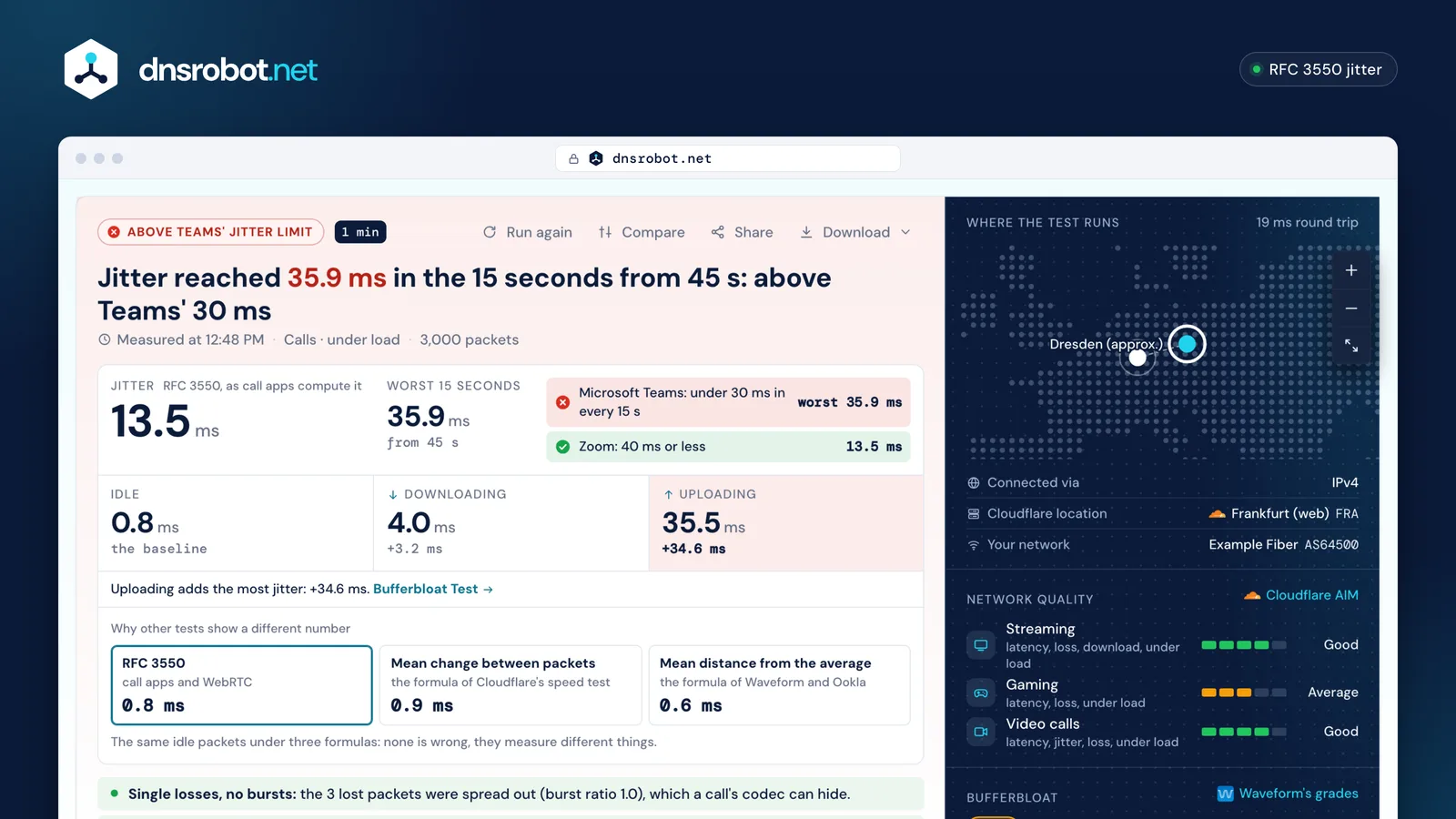
 Your jitterRFC 3550 jitter over the whole run: the number call apps compute from the same packets.The worst 15 secondsAn average can hide a bad moment: this is the worst 15-second window, the one Microsoft Teams' target uses.The limitsMicrosoft Teams' and Zoom's published jitter limits, each checked against the run.Under loadJitter idle, while downloading and while uploading: whether a busy line makes it worse.
What is jitter?
Jitter is how unevenly packets arrive: the change in delay from one packet to the next. A call sends a packet about every 20 ms; jitter is how far from every 20 ms they turn up.
The app at the other end holds incoming packets in a jitter buffer so it can play them out smoothly. A packet that arrives later than the buffer allows is thrown away, and the app fills its gap with sound it makes up itself. Microsoft says Teams absorbs some jitter this way; once jitter is more than the buffer covers, the speaker's voice sounds robotic.
Jitter isn't the same as packets arriving out of order (that's reordering). But when the delay changes by more than the gap between two packets, the later one overtakes, so high jitter often brings reordering too. This test counts them separately.
Transit times in ms. Each change moves J a sixteenth of the way, so one spike lifts it a little and steady packets bring it back down.
What is a good jitter?
For calls, under 30 ms in any 15 seconds meets Microsoft Teams' network target, and 40 ms or less meets Zoom's recommendation. Microsoft's call-quality guide counts audio jitter above 30 ms as poor.
The limits measure different things. Teams' target covers any 15 seconds of the path from your device to Microsoft's network. Zoom gives one figure for meetings and phone calls. ITU-T Y.1541 allows calls 50 ms of one-way delay variation, measured per minute, which can't be compared with a round-trip number.
So is 40 ms jitter bad? It is at Zoom's limit and above Teams'. Check the worst 15 seconds as well as the average: a line that is calm when idle can still pass 30 ms when someone starts an upload, as in the example above.
| Who | Limit | Measured over |
|---|---|---|
| Microsoft Teams (network target) | under 30 ms | any 15 seconds, your device to Microsoft's network |
| Microsoft Teams (call quality) | 30 ms or less | a meeting's audio, on average |
| Zoom | 40 ms or less | meetings and Zoom Phone |
| ITU-T Y.1541 (class 0, VoIP) | 50 ms or less | one way, per minute: not comparable to a round trip |


Jitter vs latency (and packet loss)
Latency is how long a packet takes; jitter is how much that time changes; packet loss is how many never arrive. Microsoft describes each one's sound on a call: a long round trip gives a walkie-talkie effect, jitter a robotic voice, loss missing words.
They meet in the jitter buffer: a packet that arrives too late to be played is discarded, and the listener hears it as if it had been lost. So a call with a low ping can still break up when its jitter is high. The ping test measures latency to many regions; the packet loss test counts lost and late packets.
- Line Aaverage round trip 41 msjitter 1.1 ms
- Line Baverage round trip 26 msjitter 26.6 ms
Why do jitter tests disagree?
Because tools use different formulas, on different samples. On the same packets, a formula that measures change between packets and one that measures spread around the average can give very different numbers.
RFC 3550, used by call apps and WebRTC, keeps a running average of the change in delay from one packet to the next, smoothed so one spike moves it by only a sixteenth.
Cloudflare's speed test takes the plain average of the change between consecutive samples. On the same packets it lands close to RFC 3550: both measure change from one packet to the next.
Waveform and Ookla take the average distance of each sample from the mean. That also counts slow swings, a delay that drifts up and down over seconds, which the other two barely see.
Tools also test to different places, at different rates and for different lengths, so even one formula gives different numbers on different tests. This test shows its RFC 3550 number first and the other two beside it, from the same packets.
A bar every 200 ms; the numbers use all 750 packets.
- RFC 3550call apps and WebRTC1.7 ms
- Mean change between packetsthe formula of Cloudflare's speed test1.7 ms
- Mean distance from the averagethe formula of Waveform and Ookla9.6 ms
What causes jitter?
Zoom's own definition names three causes: network congestion, timing drift and route changes. At home, congestion is usually the one you can fix.
A busy line. While a download or an upload fills your line, packets queue behind it and the round trip grows: Netflix calls this loaded latency. The test measures jitter while downloading and uploading to show it; the bufferbloat test grades the delay it adds.
Wi-Fi. Microsoft notes that wireless devices compete for bandwidth, that 2.4 GHz is often disturbed by other household devices, and its own call targets allow twice the poor-quality rate on 2.4 GHz as on a cable. Run the test on both to see the difference on your line.
The path further out. Congestion between your provider and the service, or a route change during the call. If your cable test is steady at home but calls still break up, the traceroute shows the path.
- A cable, nothing else running1.5 ms
- A noisy Wi-Fi link8.7 ms
- During a big upload35.0 ms
The dashed line is Microsoft Teams' 30 ms.
How to fix network jitter
Find where it comes from first: test on a cable, then on Wi-Fi, then with the line busy. Each result points at a different fix.
If jitter rises only while downloading or uploading, it's the queue in your router: turn on smart queue management (SQM), as the bufferbloat test explains, or pause large uploads during calls.
If it's high on Wi-Fi but low on a cable, move closer to the router and use 5 GHz, which Microsoft calls better suited to calls, or a cable. If it's high even on a cable with nothing else running, share the test's link with your provider: it shows the worst 15 seconds and when they happened.
Find where your jitter comes from
- 1
Test on a cable, with nothing else running
This is your line's own jitter. If it's already high, the cause is your provider or the path beyond it.
- 2
Test again on Wi-Fi
If jitter rises only here, move closer to the router, use 5 GHz or plug in for calls.
- 3
Test with the load on
If jitter rises while downloading or uploading, it's the queue in your router: turn on SQM, or pause big uploads during calls.
- 4
Share the result
Send the share link to your provider: it shows the worst 15 seconds and when they happened.
Jitter test: questions and answers
What is a good jitter?
Is 40 ms jitter bad?
Is 7 ms jitter bad?
How do I fix my internet jitter?
Why is my jitter different on other tests?
What is the difference between jitter and ping?
Does Wi-Fi cause jitter?
How much data does the jitter test use?
Missing something?Suggest a feature or a new tool
Related tools
Packet Loss Test
Real UDP packet loss, jitter and bufferbloat to Cloudflare's nearest data centre, split into upload and download
Bufferbloat Test
Latency idle and while your line downloads and uploads, graded A+ to F on Waveform's scale, over real UDP packets
Ping Test
Test your ping, jitter and packet loss, see your ping to 34 cloud regions, and ping any website or IP from 11 cities
Router Login
Open your router's admin page, fix address typos and find default logins by brand
What Is My ISP
Discover your ISP, ASN, and connection details
Traceroute
Trace the route to any website or IP from 8 cities, hop by hop, each network named