











Certificate Decoder
Paste an SSL certificate or a whole chain to read every field and check each link, with trust in every major browser. Nothing leaves your browser.
Decoded in your browser. Nothing is uploaded.
What's inside an SSL certificate?
An SSL certificate is an X.509 document signed by a certificate authority: it ties a public key to the names it may be used for, between two dates.
Its core fields are fixed by RFC 5280: a version, a serial number the CA chose, the signature algorithm, the issuer's name, the validity period, the subject's name and the subject's public key. Browsers match a site only against the names in the Subject Alternative Name extension (RFC 9525), not the common name.
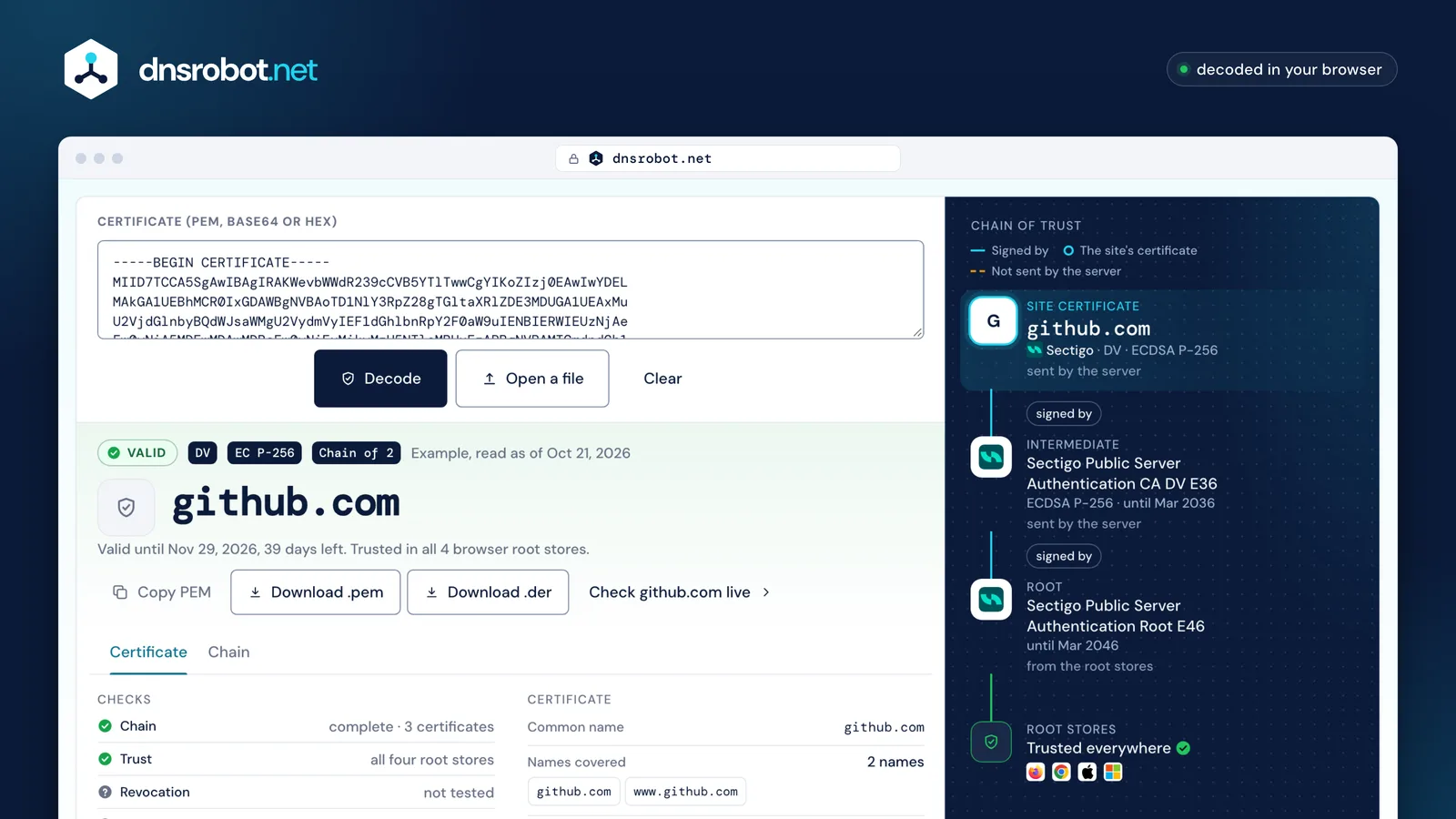
Everything else is an extension: what the key may do, the purposes the certificate allows, whether it may sign other certificates, where to find its issuer and its revocation status, its policies, and the signed proofs that it was logged in Certificate Transparency. Below is github.com's certificate as the decoder reads it, recorded on October 21, 2026.
Chain of trust
- Site certificategithub.comSectigo · DV · ECDSA P-256sent by the server
- IntermediateSectigo Public Server Authentication CA DV E36ECDSA P-256 · until Mar 2036sent by the server
- RootSectigo Public Server Authentication Root E46until Mar 2046from the root stores
- Root storesTrusted everywhere





 Paste or dropA PEM block, a whole chain, bare base64, hex, or a .crt, .cer, .der or .pem file. Nothing is uploaded.The verdictThe expiry date, the days left and which browser root stores trust it, from what you pasted alone.Convert or check livePEM and DER files made in your browser, or the live site in SSL Checker.The chainEach certificate up to its root, with every signature checked the way a browser checks it.The root storesMozilla, Chrome, Apple and Microsoft, from the CCADB lists the browsers publish.
How do I decode a certificate with OpenSSL?
openssl x509 -in cert.pem -text -noout prints every field of a PEM certificate; add -inform der for a binary one.
OpenSSL's x509 command can also print one field at a time: -subject, -issuer, -dates or -enddate, -serial, -ext subjectAltName, and -fingerprint -sha256. To decode the certificate a server sends, fetch it first with openssl s_client, which prints the chain it receives when given -showcerts.
openssl x509 -in cert.pem -text -nooutFor a binary .der or .cer file, add -inform der.
PEM, DER, CRT and CER: what's the difference?
PEM and DER are two encodings of the same certificate: DER is the binary form, and PEM is that DER in base64 between BEGIN and END lines.
PEM is defined in RFC 7468 and travels well in email and configuration files; most servers want it. Windows and Java tools often use DER. The extensions .crt, .cer and .cert don't say which: either encoding can sit behind them, which is why the decoder reads both.
So a PEM decoder only has to undo the base64 to reach the DER bytes; reading those bytes as an X.509 certificate is the real work. Converting changes only the encoding, never the certificate or its signature: openssl x509 -in cert.pem -outform der -out cert.der and back with -inform der. A .p7b file (PKCS#7) holds a list of certificates: openssl pkcs7 -print_certs -in chain.p7b writes them as PEM. A .pfx or .p12 file (PKCS#12) also holds the private key: openssl pkcs12 -in site.pfx -nokeys takes the certificates out without it.
PEM (text)
-----BEGIN CERTIFICATE-----
MIID7TCCA5SgAwIBAgIRAKWevbWWdR239cCVB5YTlTwwCgYIKoZIzj0EAwIwYDEL
MAkGA1UEBhMCR0IxGDAWBgNVBAoTD1NlY3RpZ28gTGltaXRlZDE3MDUGA1UEAxMu
U2VjdGlnbyBQdWJsaWMgU2VydmVyIEF1dGhlbnRpY2F0aW9uIENBIERWIEUzNjAe
…
DER (bytes)
30 82 03 ed 30 82 03 94 a0 03 02 01 02 02 11 00
a5 9e bd b5 96 75 1d b7 f5 c0 95 07 96 13 95 3c
30 0a 06 08 2a 86 48 ce 3d 04 03 02 30 60 31 0b
…
How do I read a certificate chain?
Read it upwards: each certificate names its issuer, and the issuer's certificate holds the public key that checks the signature below it, up to a root the browser already trusts.
A server sends its own certificate first and then the intermediates; the root stays out, because the browser has it. When an intermediate is missing, Chrome fetches it from the address in the certificate and Firefox fills it from its own list, but apps and other clients often fail: a chain that works in one browser can break elsewhere.
The decoder checks each link the way a browser does: the names match, the signature verifies with the issuer's key, the issuer may sign certificates, and the path ends at a root in the Mozilla, Chrome, Apple or Microsoft store. It never fetches a missing certificate: paste the whole chain, or check the live site with SSL Checker.
Chain of trust
- Site certificategithub.comSectigo · DV · ECDSA P-256sent by the server
- IntermediateSectigo Public Server Authentication CA DV E36ECDSA P-256 · until Mar 2036sent by the server
- RootSectigo Public Server Authentication Root E46until Mar 2046from the root stores
- Root storesTrusted everywhere
What do the certificate extensions mean?
Extensions say what the certificate is for and how to check it; the ones a browser reads on a website's certificate are these.
| Extension | What it says |
|---|---|
| Subject Alternative Name | Every name and address the certificate covers. Browsers use only these. |
| Key Usage | What the key may do: sign (digitalSignature), encrypt a key (keyEncipherment), sign certificates (keyCertSign). |
| Extended Key Usage | The purposes: TLS server, TLS client, code signing, email. |
| Basic Constraints | Whether this is a CA certificate that may sign others, and how many levels below it. |
| Authority Information Access | Where to fetch the issuer's certificate and the CA's OCSP responder. |
| CRL Distribution Points | Where the CA publishes its revocation list. |
| Certificate Policies | The validation level: domain (DV), organization (OV) or extended (EV) validation. |
| Signed Certificate Timestamps | Proof that Certificate Transparency logs recorded the certificate, which Chrome and Safari require. |
How long can an SSL certificate be valid?
A publicly trusted certificate issued since 15 March 2026 may last at most 200 days, down from 398; the limit falls to 100 days on 15 March 2027 and to 47 days on 15 March 2029.
The schedule is the CA/Browser Forum's ballot SC-081, in section 6.3.2 of the Baseline Requirements, and Chrome enforces it by the certificate's start date. The decoder compares each certificate with the limit for its own issue date and says when one is over it. Certificates from a private CA, and self-signed ones, are outside these rules.
Does this private key match the certificate?
It does when the public key inside the certificate is the public half of the private key: compare a hash of each.
With OpenSSL, take the public key from each and hash it: the two lines below print the same value for a matching pair, whatever the key type. The CSR Decoder does the same comparison in your browser, for a certificate, a request and a key together.
openssl x509 -in cert.pem -noout -pubkey | openssl sha256
openssl pkey -in key.pem -pubout | openssl sha256
Is it safe to paste a certificate here?
Yes. A certificate is public, and this page reads it in your browser without sending it anywhere.
Every server sends its certificate to every visitor, and public CAs log each one in Certificate Transparency, where anyone can read it. The private key is the secret: it never belongs in a web page. If one is pasted here, the decoder leaves it unread and says so.
Your browser
- Your paste
- Decoded
- Chain checked against the root stores
- Shown
Our server
Nothing is sent
Certificate Decoder FAQ
How do I decode an SSL certificate?
openssl x509 -in cert.pem -text -noout prints the same fields as text.What is the difference between PEM and DER?
How do I convert PEM to DER, or DER to PEM?
openssl x509 -in cert.pem -outform der -out cert.der turns PEM into DER, and openssl x509 -inform der -in cert.der -out cert.pem turns it back. Only the encoding changes; the certificate and its signature stay the same.How can I see when a certificate expires?
openssl x509 -in cert.pem -noout -enddate prints the date. Publicly trusted certificates issued since 15 March 2026 last at most 200 days, so renewal should be automatic.Why does the decoder say my chain is incomplete?
How do I tell a DV, OV or EV certificate apart?
Can I check if a certificate is revoked here?
Is my certificate or private key uploaded?
Missing something?Suggest a feature or a new tool
Related tools
SSL Certificate Check
Verify SSL certificate validity and security details
CSR & Certificate Decoder
Decode a CSR or SSL certificate: subject, SANs, key size, validity, issuer, fingerprint, signature check and CSR-to-certificate match
CSR Generator
Create a certificate signing request and private key in your browser: RSA or ECDSA, with SANs and the matching OpenSSL command
Base64 Decode & Encode
Decode and encode Base64: text (UTF-8, URL-safe), images, PDFs and any file to Base64 or a data URI