











SSL Converter
Convert certificates and keys between PFX, PEM, P7B and DER, ready for nginx, IIS, AWS or Azure. The private key stays in your browser.
Opening the sealed panel…
Your files are read and converted in a sealed panel of this page: the private key and its password never reach our server or the page's other scripts.
The same with OpenSSL
Drop a file and pick where it goes: the commands follow your choice.
Drop a file and these commands follow what you pick.
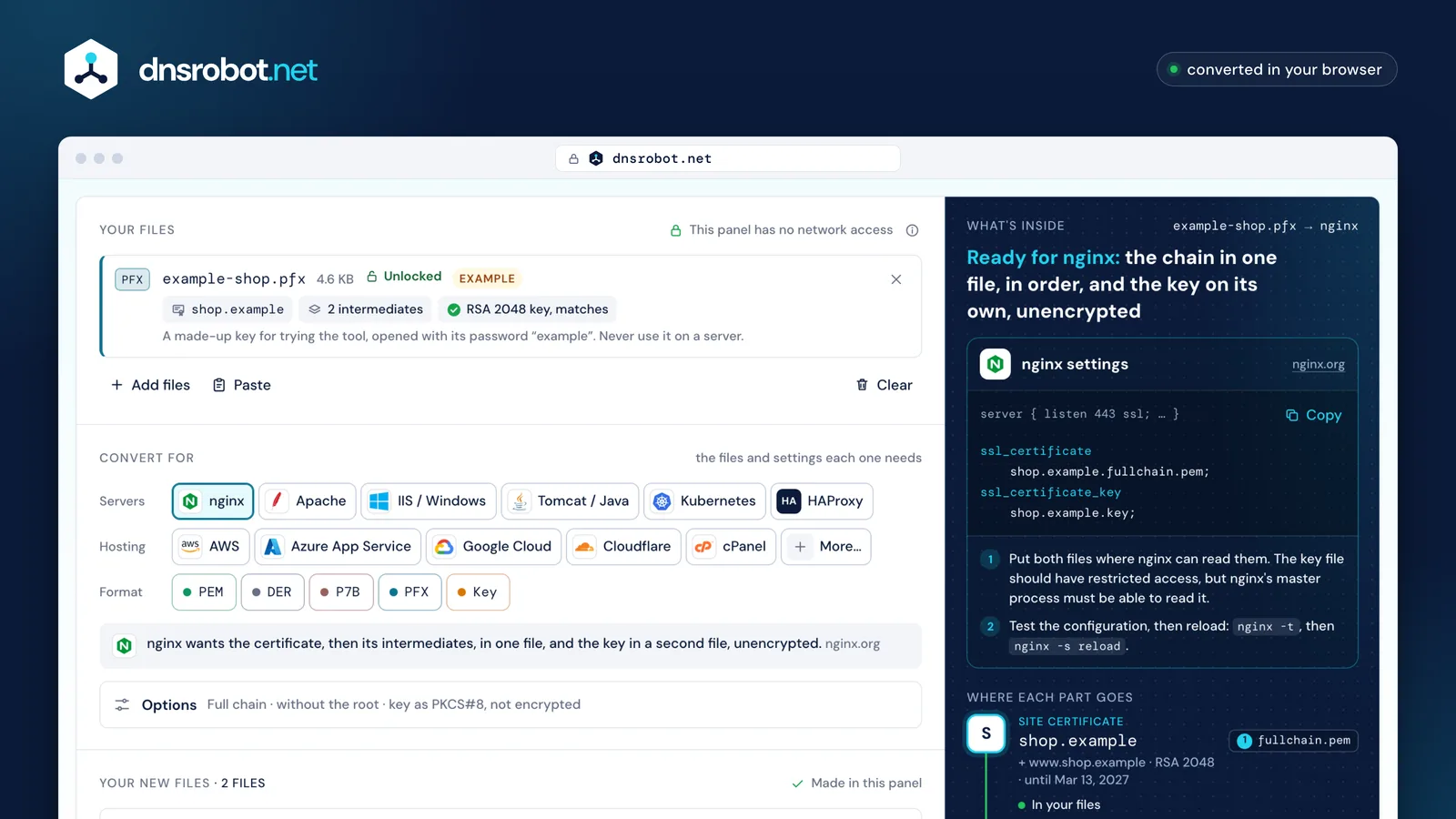
 A panel with no network accessFiles, passwords and the private key stay in this sandboxed panel. It can't send anything anywhere.What the file holdsThe certificate, its intermediates and whether the private key matches, read the moment you drop the file.Pick where it goesnginx, IIS, AWS, Azure and 17 more: each gets the files, the order and the protection it documents.What this server wantsThe files, their order and their protection for your pick, then the files themselves, made in the panel.The settings to pasteThe lines for the server's configuration and the steps to take, with a link to its own documentation.
How do I convert PFX to PEM?
Drop the .pfx (or .p12) above, type its password and pick your server or the PEM format: you get the certificate, its chain and the private key as PEM files, made in your browser. With OpenSSL it takes one command per part.
A PFX is a PKCS#12 file: a list of containers holding bags, each bag a certificate or a key. OpenSSL's layout, the example's too, puts the certificates in one container encrypted with the password, and the key in a plain container, inside a bag encrypted on its own. A MAC made from the same password covers every container, so a wrong password is caught before anything is decrypted.
-clcerts writes the certificate that matches the key and -cacerts the other certificates; -nokeys and -nocerts leave keys or certificates out, and -noenc writes the key without a password (-nodes before OpenSSL 3).
A PFX keeps its certificates in no guaranteed order, and -cacerts writes them in the file's order, so check that the chain runs from your certificate up. The tool puts it in order for you, by checking each signature.
In PowerShell 7.4 or later, import the PFX with the Exportable flag, then call ExportCertificatePem() on each certificate and ExportPkcs8PrivateKeyPem() on the key (.NET 7 and later).
OpenSSL 3 refuses some old files with “unsupported”: those need -legacy. Why, and what else fails.
PFXexample-shop.pfx4,710 bytes · PKCS#12
Encrypted container3DES (PKCS#12), 2,048 rounds
certBagshop.exampleSite certificate · 1,009 bytesfriendlyName “shop.example”localKeyID E8 34 52 BB …certBagExample Issuing CAIntermediate · 961 bytescertBagExample Intermediate CA G2Intermediate · 960 bytes
Plain container
pkcs8ShroudedKeyBagRSA 2048 private keyEncrypted on its own: 3DES (PKCS#12), 2,048 roundsfriendlyName “shop.example”localKeyID E8 34 52 BB …
The same localKeyID on both: the certificate's SHA-1, which pairs it with its key.
MACHMAC-SHA-1, 2,048 rounds, over every container: checks the password first
Becomes
- PEMshop.example.crtThe certificate1,424 bytes
- PEMshop.example.chain.pem2 intermediates, in order2,713 bytes
- Keyshop.example.keyThe private key: PKCS#8, not encrypted1,704 bytes
On this page
- 1
Drop the .pfx or .p12 above, or try the Windows, 3DES example.
- 2
Type its password. The sealed panel opens the file; the column beside it shows the chain and the key.
- 3
Pick your server, or PEM under Format, then download the files.
openssl pkcs12 -in example-shop.pfx -clcerts -nokeys -out shop.example.crtopenssl pkcs12 -in example-shop.pfx -cacerts -nokeys -out shop.example.chain.pemopenssl pkcs12 -in example-shop.pfx -nocerts -noenc -out shop.example.key- Each command asks for the passwords it needs; none goes on the command line.
-noencwrites the key unencrypted (-nodesbefore OpenSSL 3).- OpenSSL adds “Bag Attributes” lines above each block; servers skip them.
-cacertswrites the CA certificates in the PFX's own order: check they run from the certificate up.
$all = [System.Security.Cryptography.X509Certificates.X509Certificate2Collection]::new()$pw = Read-Host 'Password for example-shop.pfx' -AsSecureString$all.Import((Join-Path $PWD 'example-shop.pfx'), [Net.NetworkCredential]::new('', $pw).Password, 'Exportable')$c0 = $all.Find('FindByThumbprint', 'E83452BBAE48610EABFB4336947E2EA959AFD09E', $false)[0]$c1 = $all.Find('FindByThumbprint', '2D6348C6CFDC4B74592D3ED9D001CDB8A72C5F1E', $false)[0]$c2 = $all.Find('FindByThumbprint', '97C9D6908F677CA3B45CB1F52F79BA8D39DE6325', $false)[0]$key = [System.Security.Cryptography.X509Certificates.RSACertificateExtensions]::GetRSAPrivateKey($c0)@($c0) | ForEach-Object { $_.ExportCertificatePem() } | Set-Content 'shop.example.crt'@($c1, $c2) | ForEach-Object { $_.ExportCertificatePem() } | Set-Content 'shop.example.chain.pem'$key.ExportPkcs8PrivateKeyPem() | Set-Content 'shop.example.key'- PowerShell 7.4 or later (.NET 8):
ExportCertificatePem()andExportPkcs8PrivateKeyPem()need .NET 7 or later. Exportablelets .NET export the key it loads from the PFX.
How do I convert PEM (or CRT) to PFX?
Drop the certificate, its intermediates and the private key above together, then pick IIS, Azure or the PFX format. The tool checks that the key matches the certificate, puts the chain in order and writes one .pfx with a 20-character password it generates.
A .crt or .cer file is a certificate in PEM or DER under another name, so crt to pfx and cer to pfx are the same conversion: the tool reads either.
Whether the PFX opens depends on its encryption. Windows imports exactly two kinds: 3DES with a SHA-1 MAC, and AES-256 with SHA-256. Only Windows 11, Windows Server 2019 and later read the AES kind; older versions say the password is incorrect.
OpenSSL 3 and 4 write AES-256 unless told otherwise, which is why Azure gives OpenSSL 3 users the 3DES flags below. The tool writes the compatible 3DES kind with 2,048 rounds unless you pick AES-256.
A PFX is only as strong as its password: 2,048 rounds slow guessing down, they don't stop it. Keep the generated one.
| Opens it | Compatible3DES, SHA-1 MAC | ModernAES-256, SHA-256 MAC | Source |
|---|---|---|---|
| Windows 10, Windows Server 2016 and older | Opens | Fails“The password you entered is incorrect” | Microsoft Learn |
| Windows 11, Windows Server 2019 and later | Opens | Opens | Microsoft Learn |
| Azure App Service | Opens | Use 3DESMicrosoft tells OpenSSL 3 users to write 3DES | Microsoft Learn |
| Java 8 builds before 8u302 | Opens | FailsFixed in JDK 11 and 8u302 | OpenJDK, JDK-8202299 |
| Java 11 and later | Opens | Opens | OpenJDK, JDK-8202299 |
| macOS 14 and older | Opens | FailsImports legacy files only | Apple staff, Developer Forums |
| macOS 15 and later | Opens | Opens | Apple staff, Developer Forums |
| OpenSSL 3 and 4 | Opens | Opens | Tested, OpenSSL 4.1.0 |





openssl pkcs12 -export -in shop.example.crt -inkey shop.example.key -certfile chain.pem -keypbe PBE-SHA1-3DES -certpbe PBE-SHA1-3DES -macalg SHA1 -name shop.example -out shop.example.pfx- Each command asks for the passwords it needs; none goes on the command line.
-keypbe PBE-SHA1-3DES -certpbe PBE-SHA1-3DES -macalg SHA1is the compatible kind, as Azure documents it.
PEM, DER, CRT, CER, P7B and PFX: what's the difference?
DER is a certificate in binary; PEM is the same bytes in base64 between BEGIN and END lines. P7B and PFX are containers: a P7B carries certificates only, a PFX carries certificates and a private key behind a password. CRT and CER are file names, not formats.
CRT and CER can hold either encoding. nginx's own example names a PEM certificate .crt, Windows' Export-Certificate writes one DER certificate to a .cer, and Exchange even accepts a PKCS#12 file named .cer or .crt.
So crt to pem is often a rename: a file that starts with -----BEGIN CERTIFICATE----- is PEM already. A binary one converts with openssl x509 -inform DER -in site.crt -out site.pem, and -outform DER goes back. Or drop it above: the tool reads the contents, never the extension.
PEM to DER and DER to PEM change nothing in the certificate itself: the example's 1,009 bytes become 22 lines of base64 between its BEGIN and END lines.
A .pfx and a .p12 are the same PKCS#12 format, so pfx to p12 is a rename.
| Format | The file starts with | Encoding | Private key | Chain | Usual names |
|---|---|---|---|---|---|
| PEMRFC 7468 | -----BEGIN CERTIFICATE-----shop.example.crt · 1,424 bytes | Text | Yes, in its own block | Yes, a block each | .pem.crt.key |
| DERASN.1 DER | 30 82 03 EDshop.example.der · 1,009 bytes | Binary | No | One certificate | .der.cer |
| P7BPKCS#7 | 30 82 0B 9Dexample-chain.p7b · 2,977 bytes | Binary, or PEM text | No | Yes, as a set | .p7b.p7c |
| PFXPKCS#12 | 30 82 12 62example-shop.pfx · 4,710 bytes | Binary | Yes, encrypted | Yes | .pfx.p12 |
Binary files show their first four bytes, in hex.
One certificate, two encodings
openssl x509 converts one to the otheropenssl x509 -in cert.pem -out cert.der -outform DER
Which files does my server need?
It depends on how the server takes the chain: in one file after the certificate, in a separate chain file, or inside a PFX with the key. Pick the server under Convert for and the tool writes exactly those files, named and in order.
nginx, Apache and Node.js read the certificate followed by its intermediates. AWS wants the chain in a file of its own, without your certificate, and Cloudflare, with its default bundling, wants the certificate alone.
Leave the root out unless it is asked for: Azure App Service and Application Gateway want it inside the PFX, and Node.js's documentation says to omit it.
Most clouds want the key unencrypted: AWS, Google Cloud and Cloudflare refuse a key with a password, and nginx reads one only with ssl_password_file.
Since Java 9 the default keystore is PKCS#12, so Tomcat takes the .p12 itself with certificateKeystoreType set to PKCS12. If something still wants JKS, keytool converts the PFX in one step:
One fileThe certificate, then its intermediates
PEMshop.example.fullchain.pem
- Certificate
- Intermediate
- Intermediate
Keyshop.example.key
1,704 bytes
- nginx
- Apache
- Google Cloud
- Kubernetes
- HAProxykey in the same file
- Node.js
- NetScaler
Separate filesThe certificate, and the chain on its own
PEMshop.example.crt
- Certificate
PEMshop.example.chain.pem
- Intermediate
- Intermediate
Keyshop.example.key
1,704 bytes
- AWS
- Cloudflarethe certificate alone
- cPanel
- Plesk
Inside a PFXCertificate, chain and key behind one password
PFXshop.example.pfx
- Certificate
- Intermediate
- Intermediate
- Key
- IIS
- Azure App Serviceroot included
- Azure Key Vault
- Azure Application Gatewayroot included
- Tomcat
- Exchange
- F5 BIG-IP
- macOS
- iOS
- Android













keytool -importkeystore -srckeystore example-shop.pfx -srcstoretype PKCS12 -destkeystore shop.example.jks -deststoretype JKS- keytool asks for the source and destination passwords.
How do I extract the private key from a PFX?
Drop the PFX above, unlock it and pick Key under Format: the key is written on its own, as unencrypted PKCS#8 unless you choose another form. With OpenSSL it is one command, below.
BEGIN PRIVATE KEY is PKCS#8: it names the algorithm, then holds the key, so one form fits RSA, EC and Ed25519. OpenSSL 3 and later write it by default, and AWS, Google Cloud and Azure Key Vault take it.
Older software wants the traditional forms, BEGIN RSA PRIVATE KEY (PKCS#1) for RSA and BEGIN EC PRIVATE KEY (SEC1) for EC: openssl pkey -traditional writes whichever fits the key. An Ed25519 key has no traditional form.
BEGIN ENCRYPTED PRIVATE KEY is PKCS#8 under a password, AES-256 by OpenSSL's default. nginx reads it only with ssl_password_file, Apache asks for the pass phrase at every start, and AWS refuses it.
To take the certificate out instead (pfx to crt), -clcerts -nokeys writes it alone.
-----BEGIN PRIVATE KEY-----PKCS#8RFC 5208
Any algorithm
Inside
versionprivateKeyAlgorithmprivateKey[0] attributes
Write it with
openssl pkey -in key.pemOpenSSL 3's default; AWS, Google Cloud and Key Vault take it
The example's RSA 2048 key1,216 bytes as DER, 1,704 as PEM
-----BEGIN RSA PRIVATE KEY-----PKCS#1RFC 8017
RSA only
Inside
versionmodulus npublicExponent eprivateExponent dprime1 pprime2 qexponent1exponent2coefficient
Write it with
openssl pkey -in key.pem -traditionalopenssl pkey -traditional on an RSA key
The example's RSA 2048 key1,190 bytes as DER, 1,675 as PEM
-----BEGIN EC PRIVATE KEY-----SEC1RFC 5915
EC only
Inside
version 1privateKey[0] parameters[1] publicKey
Write it with
openssl ec -in key.pemopenssl ec writes it; AWS accepts it
A P-256 key121 bytes as DER, 227 as PEM
-----BEGIN ENCRYPTED PRIVATE KEY-----Encrypted PKCS#8RFC 5208
Any algorithm, under a password
Inside
encryptionAlgorithmencryptedData
Write it with
openssl pkcs8 -topk8 -in key.pemnginx needs ssl_password_file; AWS refuses it
The example's RSA 2048 key1,337 bytes as DER, 1,886 as PEM
openssl pkcs12 -in example-shop.pfx -nocerts -noenc -out shop.example.key- Each command asks for the passwords it needs; none goes on the command line.
-noencwrites the key unencrypted (-nodesbefore OpenSSL 3).
How do I convert P7B to PEM, or to PFX?
A P7B (PKCS#7) carries certificates only, so P7B to PEM writes each one as a PEM block: drop the .p7b above and pick PEM, or run openssl pkcs7 -print_certs. P7B to PFX needs one file more, your private key.
The certificates sit in a set: the standard gives their order no meaning, and a bundle may hold more certificates than the chain needs, or fewer. OpenSSL prints them in the order they were stored, so the tool orders them itself: each certificate's issuer must be another's subject, and the signature must check out.
A P7B never holds the key. The key was made with the CSR, on the machine or in the tool that made it: drop it here beside the P7B and the tool checks that it matches before it writes the PFX. The CSR Decoder checks a key against a CSR.
For one certificate as a .cer (p7b to cer), pick DER: Windows' .cer is a single DER certificate.
P7Bexample-chain.p7b2,977 bytes · 0 signers, no key
In the file: a set, no order
- shop.exampleIssued by Example Issuing CA
SKI 9d:03:3d:84AKI 80:09:ef:ec - Example Issuing CAIssued by Example Intermediate CA G2
SKI 80:09:ef:ecAKI 07:90:5e:d5 - Example Intermediate CA G2Issued by Example Root CA
SKI 07:90:5e:d5AKI ce:4b:b3:ae
In order, by the tool
- shop.example
SKI 9d:03:3d:84 - AKI = SKI, signature checked
AKI 80:09:ef:ec - Example Issuing CA
SKI 80:09:ef:ec - AKI = SKI, signature checked
AKI 07:90:5e:d5 - Example Intermediate CA G2
SKI 07:90:5e:d5 AKI ce:4b:b3:ae- Not in the fileExample Root CA, named as Example Intermediate CA G2's issuer: the root
openssl pkcs7 -in example-chain.p7b -inform DER -print_certs -out shop.example.fullchain.pem-print_certskeeps the bundle's own order and addssubject=andissuer=lines.
Why won't OpenSSL 3 open my old PFX?
It was made with OpenSSL 1.x's defaults, which encrypt the certificates with 40-bit RC2. OpenSSL 3 moved RC2 into its legacy provider, so the file's MAC checks out and decryption then fails with “unsupported”. Add -legacy, or drop the file here: the tool reads RC2 and saves a PFX that opens without it.
The error names the algorithm, Algorithm (RC2-40-CBC : 0), in OpenSSL 4.1.0 and 3.6.2 alike. 3DES isn't affected: only RC2, RC4 and single DES need the legacy provider.
New files fail the other way. OpenSSL 3 and 4 write AES-256 with a SHA-256 MAC, and so does Java since JDK 16. Windows 10 and Server 2016 refuse those with “The password you entered is incorrect”, macOS 14 imports only the legacy kind, and Java before 11 can't load them: write the compatible 3DES kind for those.
On the Mac we tested, /usr/bin/openssl is LibreSSL 3.3.6, and it still writes the old RC2 set by default.
OpenSSL writes
RC2-40 certificates, 3DES key, SHA-1 MAC3.0AES-256 for both, SHA-256 MACOpenSSL reads RC2
Built in3.0Only with -legacyJava writes
RC2, DESede, SHA-1JDK 16 · 11.0.12 · 8u301AES-256, SHA-256Java reads AES files
Fails to loadJDK 11 · 8u302OpensWindows reads AES files
“Password incorrect”Windows 11 · Server 2019OpensmacOS reads AES filesApple engineer, Developer Forums
Legacy files onlymacOS 15Opens
PFXexample-old.pfxThe old example, as the tool reads it
- Certificates
RC2-40 (PKCS#12)2,048 rounds- Key
3DES (PKCS#12)2,048 rounds- MAC
HMAC-SHA-12,048 rounds
openssl pkcs12 -in example-old.pfx -legacy -noenc -out shop.example.tmp.pemopenssl pkcs12 -export -in shop.example.tmp.pem -keypbe PBE-SHA1-3DES -certpbe PBE-SHA1-3DES -macalg SHA1 -name shop.example -out shop.example.pfxrm shop.example.tmp.pem- This PFX uses RC2, RC4 or single DES, so OpenSSL 3 and 4 read it only with
-legacy. -keypbe PBE-SHA1-3DES -certpbe PBE-SHA1-3DES -macalg SHA1is the compatible kind, as Azure documents it.- A file on the way holds the key unencrypted: the last line deletes it.
Is it safe to convert a private key online?
Only if the key never leaves your browser and nothing else on the page can read it. Here every file and password is opened in a sealed frame that can't connect anywhere; the page around it, with its ads and analytics, only receives the certificates and the key's public half.
Check two things on any converter. First, does the file go to a server? Your browser's developer tools show every request in the Network tab while you convert. Here the file goes nowhere.
Second, can the page's other scripts read the key? Converting in the browser still puts the key beside the page's ads and analytics. This page keeps it out of their reach: the frame is sandboxed, so the browser gives it an opaque origin of its own, and documents of different origins can't reach into each other, only exchange messages.
The frame's messages carry certificates, each key's algorithm, size and public half, how a PFX was protected and the names of the files, never a key's bytes or a password: a test runs the frame over every test file and fails if a message carries either. Its policy blocks every request a script could make, and the files are saved from the frame itself.
The one request the page can make is your choice: Fetch the missing intermediate sends the chain's certificates, which are public, never a key. And a PFX you download is only as strong as its password.
Your files and passwordsDropped, chosen or pasted inside the frame
This pageAds, analytics and the “What's inside” column
The sealed framesandbox="allow-scripts allow-downloads"
- Read
- Unlock
- Match and order
- Write the files
Its policydefault-src 'none'script-src 'sha256-…'style-src 'sha256-…'font-src data:connect-src 'none'img-src 'none'media-src 'none'frame-src 'none'worker-src 'none'manifest-src 'none'object-src 'none'form-action 'none'base-uri 'none'
What the page receives
readthe certificates, which are public, and each key's algorithm, size and public halfplanthe target, the format and the files' namessavedwhich file was saved
Never sent: a private key's bytes, a password
Your Downloads folderSaved straight from the frame
The networkNo request can leave the frame
SSL Converter FAQ
How do I convert PFX to PEM?
openssl pkcs12 -in site.pfx -clcerts -nokeys writes the certificate, -cacerts -nokeys the intermediates and -nocerts -noenc the key. Add -legacy for an old file encrypted with RC2.How do I convert PEM to PFX?
How do I convert CRT to PEM?
-----BEGIN CERTIFICATE-----. Drop the file above and the tool reads its contents to tell. A binary (DER) .crt becomes PEM with the PEM format here, or with openssl x509 -inform DER -in site.crt -out site.pem.What is the difference between PFX and PEM?
-----BEGIN and -----END lines, one block per certificate or key, usually in separate files: nginx, Apache and most Linux software read it.Is a .pem file a public key?
How do I convert PFX to PEM with PowerShell?
ExportCertificatePem() on each certificate and ExportPkcs8PrivateKeyPem() on the private key; both need .NET 7 or later. The PowerShell tab under the tool writes these lines for your file and reads the password with Read-Host, so it never appears on the command line.Why does OpenSSL say “unsupported” when I open a PFX?
-legacy. Drop it here instead: the tool reads RC2 files and saves a new PFX in the compatible 3DES form, which opens without -legacy.Is my private key uploaded?
Missing something?Suggest a feature or a new tool
Related tools
Certificate Decoder
Decode an SSL certificate or a whole chain: every field, each link checked, trust in the 4 browser root stores, PEM and DER
SSL Certificate Check
Verify SSL certificate validity and security details
CSR & Certificate Decoder
Decode a CSR or SSL certificate: subject, SANs, key size, validity, issuer, fingerprint, signature check and CSR-to-certificate match
CSR Generator
Create a certificate signing request and private key in your browser: RSA or ECDSA, with SANs and the matching OpenSSL command