DNS RobotDNS Propagation Checker
HomeDNS LookupWHOIS LookupIP LookupSSL Check
DNS RobotDNS Propagation Checker

Next-generation DNS propagation toolkit

Privacy PolicyTerms of ServiceAbout UsContact

DNS Tools

DNS LookupDomain to IPNS LookupMX LookupCNAME LookupView all

Email Tools

SPF Record CheckerDMARC CheckerDKIM CheckerSMTP Test ToolEmail Header AnalyzerView all

Website Tools

WHOIS LookupDomain AvailabilitySubdomain FinderCMS DetectorLink AnalyzerView all

Network Tools

Ping ToolTraceroutePort CheckerHTTP Headers CheckSSL Certificate CheckView all

IP Tools

IP LookupWhat Is My IPIP Blacklist CheckIP to HostnameASN LookupView all

Utility Tools

QR Code ScannerQR Code GeneratorMorse Code TranslatorText to Binary ConverterSmall Text GeneratorView all
© 2026 DNS Robot. Developed by ❤ Shaik Brothers
All systems operational
Made with
Home/Utility Tools/What Is My User Agent

What Is My User Agent?

Instantly detect your user agent string, browser name and version, operating system, device type, rendering engine, and CPU architecture. Our free user agent checker auto-detects your browser on page load. You can also parse and analyze any custom user agent string.

Free Browser ToolUser Agent CheckerAuto-DetectCustom UA Parsing
Detecting your browser...
Parse Custom User Agent
Enter any user agent string to parse and analyze it

What Is a User Agent String?

A user agent string is a text identifier that your browser sends with every HTTP request to web servers. It tells the server what browser you are using, which operating system you are running, your device type, the rendering engine powering your browser, and your CPU architecture. This information is transmitted in the User-Agent HTTP header.

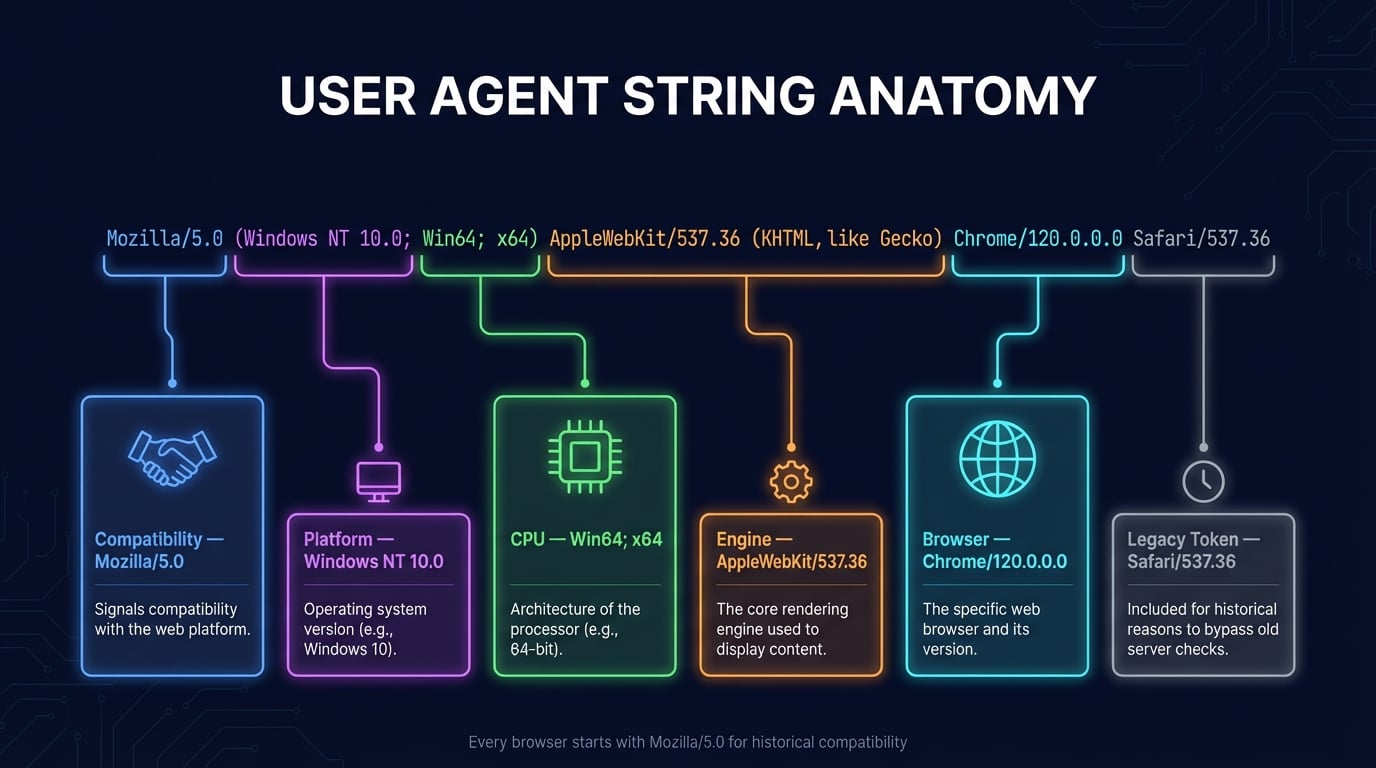
For example, a typical Chrome user agent on Windows looks like: Mozilla/5.0 (Windows NT 10.0; Win64; x64) AppleWebKit/537.36 (KHTML, like Gecko) Chrome/120.0.0.0 Safari/537.36. While this string looks complex, it contains structured information that our user agent checker parses into readable components.

Web developers and server administrators use user agent data for browser compatibility testing, serving optimized content, analytics, and debugging. You can inspect the full HTTP headers your browser sends — including the User-Agent header — with our HTTP Header Checker tool.

How User Agent Detection Works

Our user agent detection tool identifies your browser and system information through a simple four-step process that completes instantly:

1

Read the UA Header

When you visit this page, your browser automatically sends a User-Agent HTTP header with every request. Our server reads this header to get your raw user agent string.

2

Parse the String

The raw user agent string is parsed using pattern matching to extract structured data: browser name/version, OS, device type, rendering engine, and CPU architecture.

3

Identify Components

Each component is matched against a comprehensive database of known browsers, operating systems, devices, engines, and architectures to provide accurate identification.

4

Display Results

All detected information is displayed in organized cards. Your raw UA string is shown with a copy button. Use the custom parser to analyze any other user agent string.

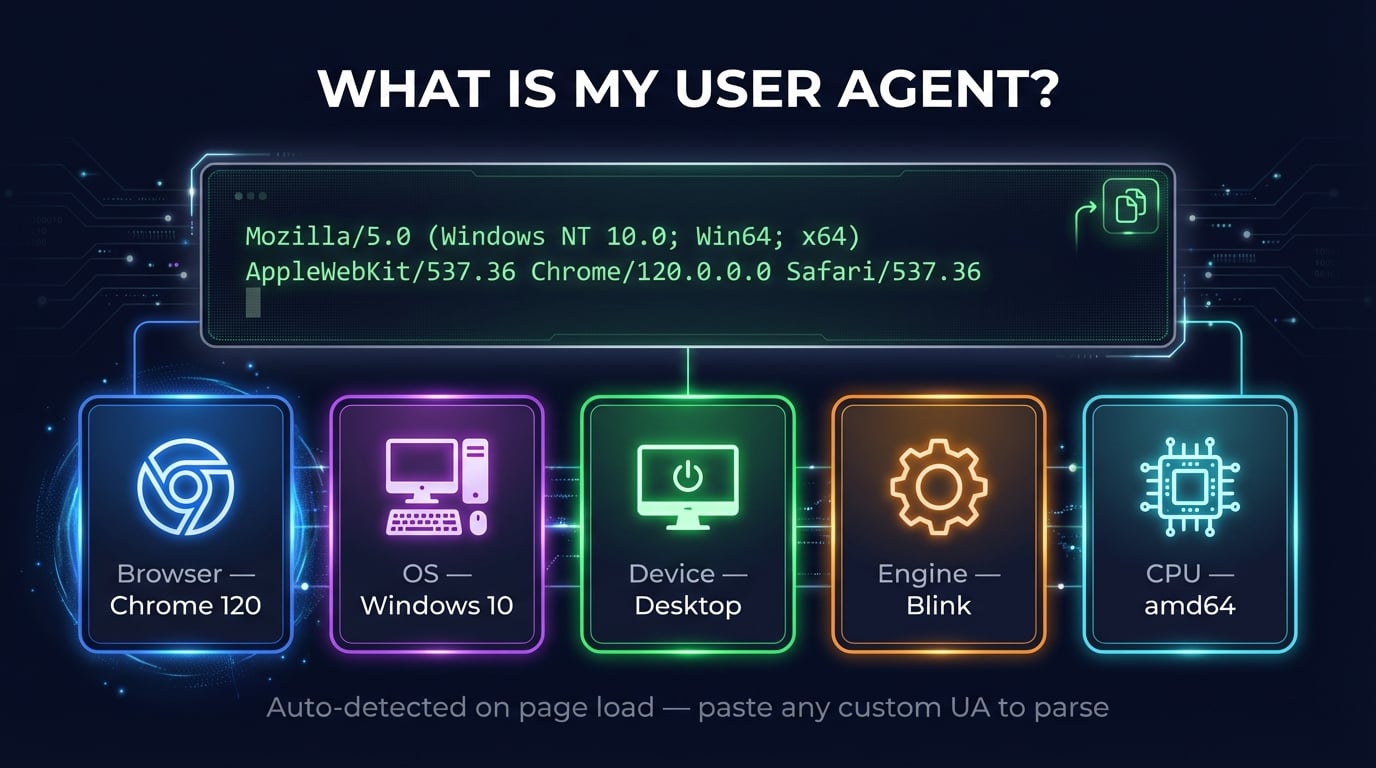
User agent checker showing parsed browser, OS, device, engine, and CPU information in organized cards
The user agent checker auto-detects your browser, OS, device, engine, and CPU architecture from your user agent string

Understanding User Agent String Components

When you check your user agent, our tool extracts and displays six key components from the UA string:

Browser

The web browser name (Chrome, Firefox, Safari, Edge, Opera, Brave) and its full version number. The major version is also extracted for quick reference.

Operating System

Your OS name and version — Windows 10/11, macOS Sonoma/Ventura, Linux, Android 14, iOS 17, Chrome OS. Helps developers optimize for specific platforms.

Device Type

Identifies whether you are on a desktop computer, mobile phone, or tablet. Also detects the device vendor (Apple, Samsung, Google) and model when available.

Rendering Engine

The layout engine that renders web pages: Blink (Chrome, Edge, Opera), WebKit (Safari), or Gecko (Firefox). Determines which CSS/HTML features are supported.

CPU Architecture

Your processor architecture: amd64 (Intel/AMD 64-bit), arm64 (Apple Silicon, ARM), arm (older mobile), ia32 (32-bit). Important for WebAssembly and native performance.

Raw String

The complete, unmodified user agent string as sent by your browser. Can be copied with one click for debugging, testing, or sharing with developers.

Common User Agent String Examples

Here are examples of real user agent strings from popular browsers and devices. You can paste any of these into the custom parser above to see how they are parsed:

Chrome on Windows

Mozilla/5.0 (Windows NT 10.0; Win64; x64) AppleWebKit/537.36 (KHTML, like Gecko) Chrome/120.0.0.0 Safari/537.36

Safari on macOS

Mozilla/5.0 (Macintosh; Intel Mac OS X 14_2) AppleWebKit/605.1.15 (KHTML, like Gecko) Version/17.2 Safari/605.1.15

Firefox on Linux

Mozilla/5.0 (X11; Linux x86_64; rv:121.0) Gecko/20100101 Firefox/121.0

Chrome on Android

Mozilla/5.0 (Linux; Android 14; Pixel 8) AppleWebKit/537.36 (KHTML, like Gecko) Chrome/120.0.6099.144 Mobile Safari/537.36

Safari on iPhone

Mozilla/5.0 (iPhone; CPU iPhone OS 17_2 like Mac OS X) AppleWebKit/605.1.15 (KHTML, like Gecko) Version/17.2 Mobile/15E148 Safari/604.1

Edge on Windows

Mozilla/5.0 (Windows NT 10.0; Win64; x64) AppleWebKit/537.36 (KHTML, like Gecko) Chrome/120.0.0.0 Safari/537.36 Edg/120.0.0.0
User agent string breakdown with color-coded platform, OS, engine, browser, and compatibility tokens
Anatomy of a user agent string: each part identifies a specific component of your browser and system

Why Check Your User Agent?

There are many practical reasons to check your user agent or analyze a user agent string:

Web Development & Testing

Verify how your browser identifies itself when testing responsive designs, browser-specific CSS, or feature detection. Compare UA strings across browsers and devices.

Debugging Website Issues

When a website doesn't work correctly, checking your user agent helps identify if the site is serving wrong content based on browser detection or UA sniffing.

Privacy & Fingerprinting

Check what information your browser reveals to websites. Your user agent is one of the signals used in browser fingerprinting to track you across the web.

Bot & Crawler Detection

Analyze user agent strings from your server logs to identify search engine crawlers (Googlebot, Bingbot), social media bots, or potentially malicious scrapers.

Device Compatibility

Confirm your browser and OS version when troubleshooting compatibility issues, checking system requirements, or verifying that a browser extension changed your UA.

Analytics & Reporting

Understand the user agent strings in your web analytics data. Identify which browsers, OS versions, and device types your visitors use most frequently.

User Agent and Browser Fingerprinting

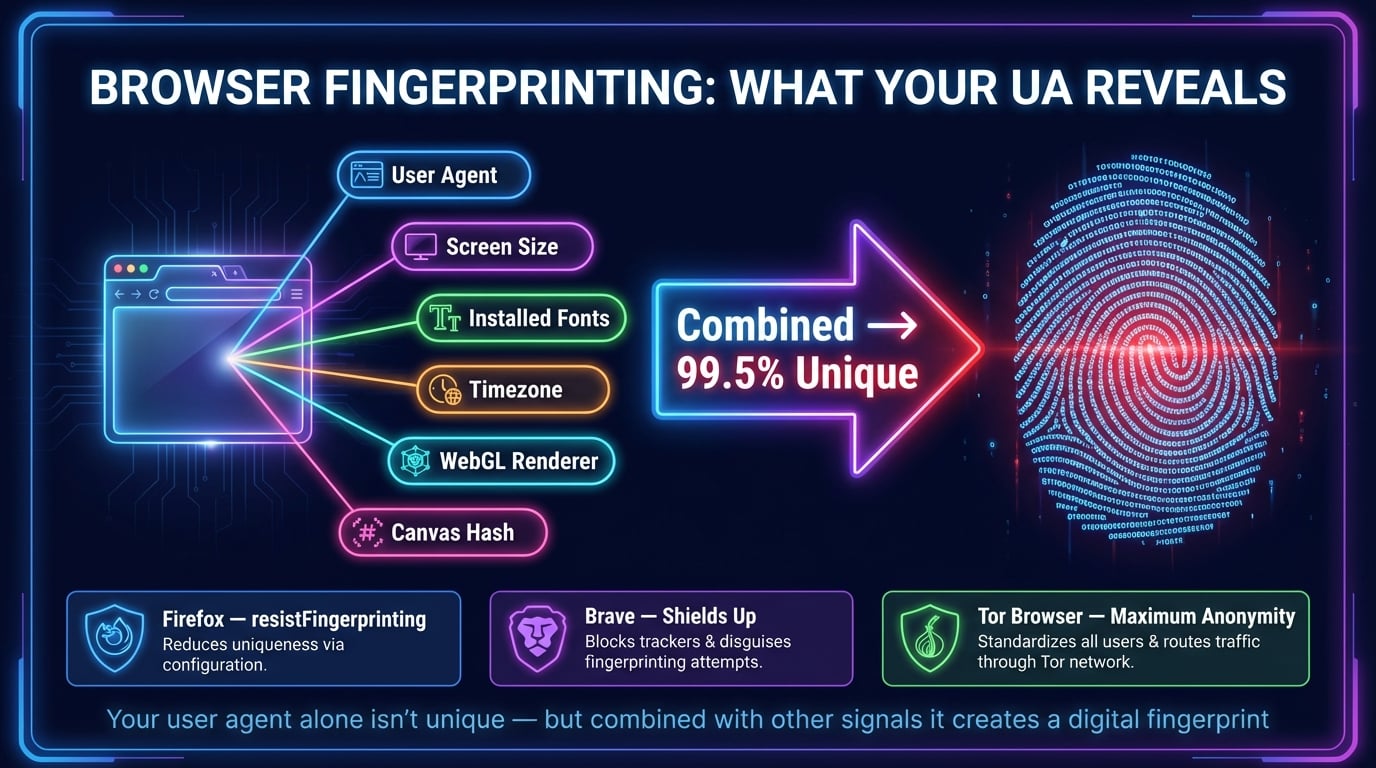
Your user agent string is one of many signals that websites can use to create a browser fingerprint — a nearly unique identifier for your browser. While a user agent alone is not unique enough to identify you, combined with other data points it contributes to a digital fingerprint.

What Your UA Reveals

  • Browser name, version, and major release
  • Operating system and exact version
  • Device type (desktop, mobile, tablet)
  • CPU architecture (amd64, arm64)
  • Rendering engine and version
  • Language and platform preferences

Reducing Your Fingerprint

  • Use Firefox or Brave with anti-fingerprinting enabled
  • Enable resistFingerprinting in Firefox (about:config)
  • Use Tor Browser for maximum anonymity
  • Avoid installing unique browser extensions
  • Use standard screen resolutions and system fonts
  • Consider User-Agent Client Hints reduction

Browsers are gradually reducing the information in user agent strings. Chrome's User-Agent Reduction initiative freezes parts of the UA string to reduce passive fingerprinting. The HTTP Headers tool lets you inspect all headers your browser sends, including privacy-related ones like Sec-CH-UA Client Hints.

User Agent in Web Development

Understanding user agents is essential for web development. Here are three key approaches to working with user agent data:

Feature Detection

The modern best practice. Instead of checking user agent strings, test for specific browser capabilities using JavaScript APIs. For example, check for 'IntersectionObserver' in window rather than parsing the UA for Chrome 58+. Libraries like Modernizr automate this.

Server-Side UA Parsing

Parse user agent strings on the server to serve optimized content. Useful for serving different image formats (WebP vs JPEG), pre-rendering for crawlers, or redirecting mobile users. Libraries like ua-parser-js (used by this tool) make server-side parsing reliable.

Client Hints API

The future of user agent detection. Servers request specific information via Accept-CH header, and browsers respond with structured headers like Sec-CH-UA-Platform and Sec-CH-UA-Mobile. More privacy-friendly than traditional UA strings. Supported in Chromium-based browsers.

Browser fingerprinting showing how user agent, screen resolution, fonts, and timezone create a digital fingerprint
Browser fingerprinting uses user agent and other signals to create a nearly unique identifier — reduce your fingerprint for better privacy

Related Network & Utility Tools

Complement your user agent check with these free tools for network diagnostics and web analysis:

HTTP Headers

Inspect all HTTP response headers including security headers and content negotiation.

What Is My IP

Detect your public IPv4 and IPv6 addresses with geolocation and ISP details.

What Is My ISP

Identify your Internet Service Provider, ASN, and connection details.

SSL Checker

Verify SSL certificate validity, expiration, and security configuration of any website.

DNS Lookup

Check all DNS records (A, AAAA, CNAME, MX, NS, TXT) for any domain name.

IP Lookup

Look up detailed information for any IP address including geolocation and ASN.

Password Generator

Generate strong, random passwords with customizable length and character types.

QR Generator

Create QR codes for URLs, text, WiFi, vCards, and more with customization options.

Frequently Asked Questions About User Agents

What is my user agent?

Your user agent is a text string your browser sends with every HTTP request. It identifies your browser name/version, OS, device type, rendering engine, and CPU. This page auto-detects your user agent string and parses it into readable components.

What's my user agent string used for?

Servers use it to serve optimized content — different layouts for mobile vs desktop, correct file formats (WebP vs JPEG), analytics tracking, and browser compatibility. It's sent automatically in the User-Agent HTTP header with every request.

How do I find my user agent?

Visit this page for instant auto-detection. Alternatively, open DevTools (F12) → Console → type navigator.userAgent. Or check the Network tab in DevTools and look at the User-Agent header in any request.

Can I change my user agent?

Yes — use DevTools to override it temporarily, install a User-Agent Switcher extension, or configure it in browser settings. Developers change UAs to test how sites respond to different browsers and devices.

What is a rendering engine?

It's the software that transforms HTML/CSS/JS into the visual page you see. Main engines: Blink (Chrome, Edge, Opera), WebKit (Safari), Gecko (Firefox). Your user agent string includes the engine name and version.

Why do all user agents start with Mozilla/5.0?

Historical compatibility. Early servers checked for 'Mozilla' to serve advanced content. Other browsers added it to avoid receiving basic pages. This legacy prefix persists today even though it's meaningless.

Can websites track me using my user agent?

Your UA alone isn't unique, but it contributes to browser fingerprinting when combined with screen size, fonts, timezone, and other signals. Use Firefox/Brave with anti-fingerprinting or Tor Browser to reduce tracking.

What are Client Hints?

User-Agent Client Hints (UA-CH) is a newer API providing browser info in a structured, privacy-friendly way. Instead of sending all details in every request, servers request only what they need. Supported in Chrome and Edge.

What's the difference between user agent and user agent string?

A 'user agent' is the software (your browser) acting on your behalf. The 'user agent string' is the text identifier it sends to servers. In practice, both terms are used interchangeably.

Is this user agent checker free and safe?

Yes, 100% free with no registration. We read your browser's User-Agent header (sent to every site you visit) and parse it. We don't store, log, or share your data.