What Is an Email Checker?
An email checker (or email verifier) tells you whether an email address can actually receive mail, without sending anything to it. It catches typos, made-up addresses, closed accounts and throwaway inboxes before they turn into bounces.
This checker runs the same tests the big verification services use: it validates the syntax, confirms the domain has mail servers (MX records), asks the mail server whether the mailbox exists, tests whether the domain accepts every address (catch-all), and flags disposable, role and free-provider addresses. You get a clear verdict, Deliverable, Undeliverable, Risky or Unknown, plus every check behind it.
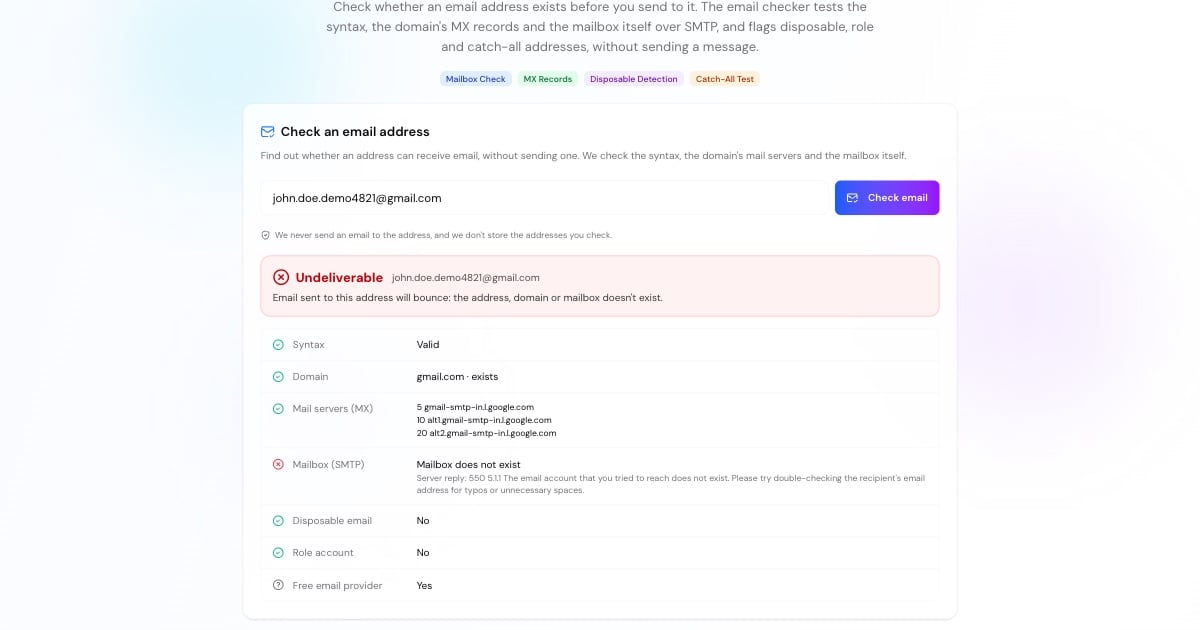
How the Email Checker Verifies an Address
A check takes a few seconds and never sends a message. Step by step:
The address is parsed against the email standards: one @, a 1–64 character name, no stray dots, and a real domain. Internationalised domains are converted to punycode.
We look up the domain's MX records, the servers that receive its email, just like the MX lookup tool. No MX and no server address means the domain can't receive mail.
The domain is compared with a public list of 9,000+ disposable email services, and the name with common shared inboxes such as info@ and support@.
We connect to the top mail server and start a normal SMTP conversation (EHLO, MAIL FROM, RCPT TO), then hang up before any message is sent. The server's answer to RCPT TO says whether it would accept mail for that mailbox.
If the mailbox is accepted, we also ask about a random address at the same domain. If that is accepted too, the server accepts everything, so the first answer doesn't prove the mailbox is real.
Advertisement
What the Results Mean
The mail server confirmed the mailbox exists, and the domain doesn't accept every address.
The syntax is wrong, the domain or its mail servers don't exist, or the server said the mailbox doesn't exist. Remove it from your list.
The address may work but is disposable, a shared role inbox, or on a catch-all domain where any address is accepted.
The server refused to answer, asked us to try later (greylisting) or couldn't be reached. The address may still be fine.
Why Some Addresses Show "Unknown"
Mailbox checks rely on the receiving server's cooperation, and many large providers limit what they reveal to stop spammers from harvesting addresses:
Some providers accept every address during the SMTP conversation and only bounce later, so the check can't separate real and fake mailboxes.
Some business email services block verification from servers they don't recognise, replying with a policy error instead of an answer.
Greylisting makes a server answer "try again later" the first time it sees a sender. Checking again after a few minutes often works.
Catch-all company domains accept mail for any name, so a single mailbox can't be confirmed.
Unknown is not the same as bad. If the address came from a real person, it may well work.
Advertisement
Disposable, Role and Catch-All Addresses
Disposable addresses
Throwaway inboxes from services such as temporary-mail sites. They expire within minutes or days, so they are a red flag on sign-up forms.
Role accounts
Shared addresses such as info@, support@ or sales@. They usually work but reach a team rather than a person, and they complain about marketing more often.
Catch-all domains
Domains whose server accepts mail for any name. Common at companies; the address may be real, but there is no way to confirm it before sending.
Free providers
Gmail, Outlook.com, Yahoo and similar. Perfectly valid, but useful to know for B2B lists, where a company domain is usually expected.
Why Verify Email Addresses Before Sending
Every bounce costs you more than one lost message:
Bounces hurt sender reputation. Mailbox providers watch how often you send to dead addresses; a high hard-bounce rate pushes even good mail into spam. Most email services ask you to keep hard bounces well under a few percent.
Bulk-sender rules are stricter. Since 2024, Gmail and Yahoo require bulk senders to authenticate with SPF, DKIM and DMARC and to keep spam complaints low. Check your setup with the SPF checker and DMARC checker.
Typos lose customers. A sign-up with gmial.com never receives the confirmation email. The checker suggests the likely correct domain.
Fake sign-ups skew your numbers. Disposable and made-up addresses inflate user counts and waste trial resources.
Advertisement
Email Checker vs Email Lookup
An email checker answers one question: can this address receive mail? It doesn't reveal who owns an address. That is a reverse email lookup, which depends on people-search databases and raises privacy issues.
If you want to know where a message you received really came from, the sending servers are recorded in its headers: paste them into the email header analyzer. To test a mail server itself, use the SMTP test.