











MTA-STS Checker
Check a domain's MTA-STS record, policy file and every mail server's certificate on port 25, the way a sending server does. Then generate a policy.
We fetch the domain's policy file from our server and dial each mail server on port 25 from our probe server. No mail is sent.
What we contact
The DNS questions go to the domain's own nameservers, Google Public DNS and Cloudflare's 1.1.1.1. The policy file and its certificate are read from our servers. Each mail server, up to 6 a check, is dialled on port 25 from our probe server, probe.dnsrobot.net: it says EHLO, starts TLS, reads the certificate and quits, with no MAIL FROM and no message. Results are kept for up to 10 minutes, so repeat checks don't dial the servers again. The Generate tab runs in your browser.
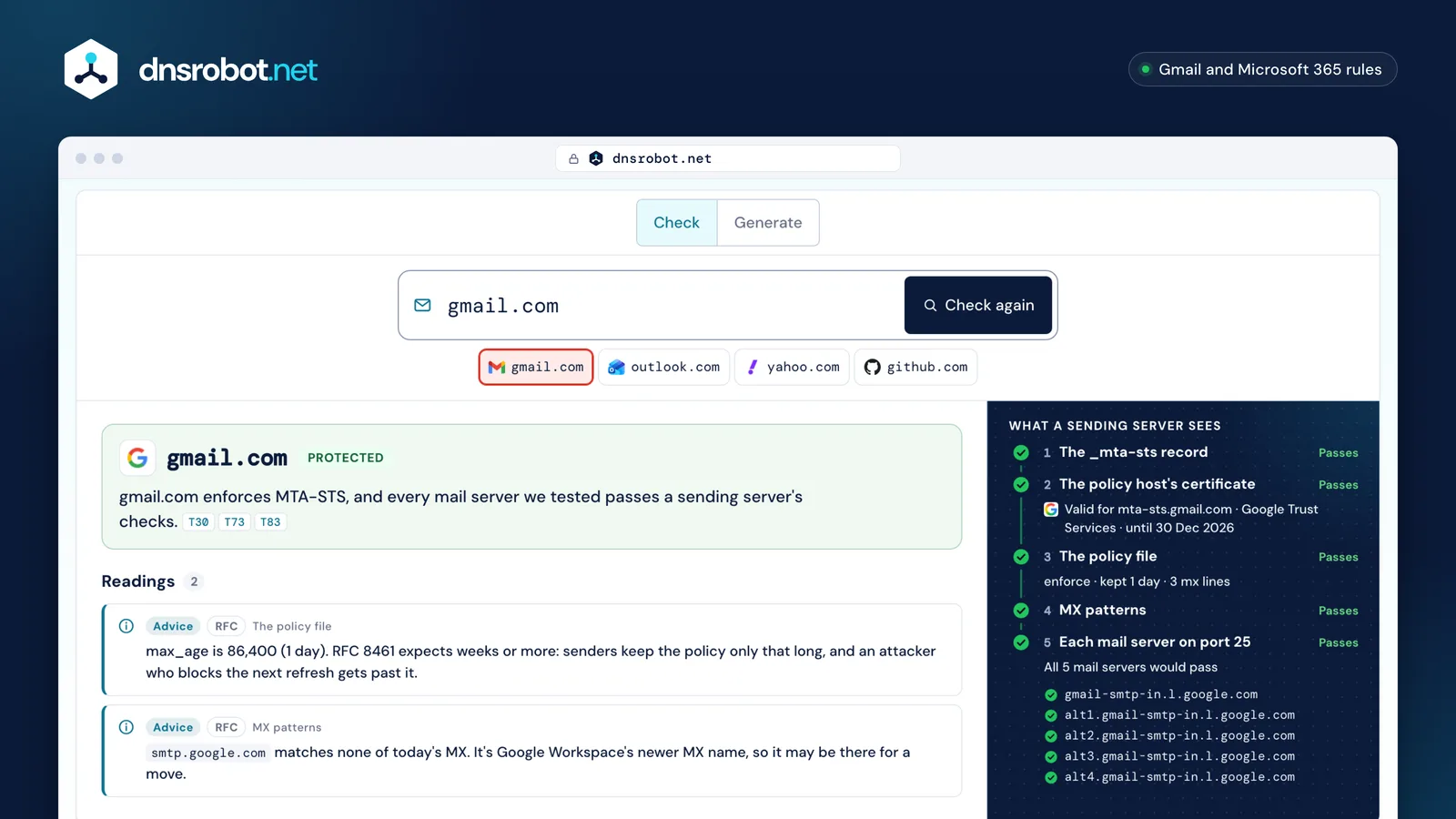
 Type a domainThe domain after the @ in your addresses. An email address works too: its domain is checked.The verdictOne sentence: protected, at risk, testing, opting out, not working at a named step, or no MTA-STS at all.What a sending server seesThe five checks a sender makes, in order: the record, the policy host's certificate, the file, the MX patterns, each mail server.Every mail serverEach MX dialled on port 25 from our probe server: STARTTLS, the TLS version and the certificate against the MX name.GenerateWrite the record, the policy file and TLS-RPT from your live MX, with hosting steps and each server's last result before you enforce.
What is MTA-STS, and what does it protect against?
MTA-STS (RFC 8461) lets a domain tell sending mail servers to deliver to its MX only over TLS, to a server with a valid certificate for its name. Without it, STARTTLS is opportunistic: an attacker in the path can delete the server's STARTTLS offer, and the message travels in plain text although both servers support TLS.
The policy also keeps a sender from handing mail to an impostor. Each MX must match a name in your policy and present a certificate for that name from a public certificate authority, so an attacker who redirects the connection, by spoofing the MX record or rerouting traffic, is refused unless it holds a valid certificate for a name in your policy. In enforce mode the sender doesn't deliver; it treats the failure as temporary and retries later.
The protection starts once a sender has fetched and cached your policy, and it applies only to senders that check MTA-STS. Mail between two domains is held back only when both sides use MTA-STS and a check fails; everyone else's mail flows as before.
Without MTA-STS
- Sending server
- Attacker in the path
- mx1.example.com
EHLO250-STARTTLS
Sent in plain text
With MTA-STS (enforce)
Cached policy: TLS and mx1.example.com required
- Sending server
- Attacker in the path
- mx1.example.com
Not delivered: retried later
- Sending server
- TLS, certificate for mx1.example.com
- mx1.example.com
Delivered encrypted
How does a sending server use an MTA-STS policy?
Before it delivers, a sender looks up _mta-sts.<domain>, fetches the policy file from mta-sts.<domain> over HTTPS and caches it for max_age seconds. Then, for each MX in priority order, it checks the name against the policy's mx lines, insists on STARTTLS and validates the certificate against that MX name.
In enforce mode a server that fails is skipped and the sender tries the next one. When none passes, it must look for a newer policy before failing the message for good, and should retry later. A new id in the TXT record tells senders to fetch the file again; they should refresh about once a day, and keep using the cached policy when a refresh fails.
The first message to a domain may go out before the policy arrives, because a sender may fetch it in the background. And when the file can't be fetched and nothing is cached, the sender carries on as if the domain had no MTA-STS. So a broken policy host costs you protection, not mail, and a sender whose fetch failed should wait five minutes or more before trying the same id again.
- 1_mta-sts TXT
v=STSv1; id=… - 2Policy host
mta-sts.example.com:443 - 3Policy file
/.well-known/mta-sts.txt - 4MX matches an mx line
In MX priority order - 5STARTTLS + certificate
port 25, SNI = the MX name
Fails: try the next MX
No file, no cache: delivered as if no MTA-STS
What goes in the MTA-STS record and the policy file?
The MTA-STS record is a TXT record at _mta-sts.<domain> with two fields: v=STSv1 first, then an id of 1 to 32 letters and digits that changes whenever the policy does. The MTA-STS policy is a text file with four keys: version, mode, max_age and one mx line per allowed mail server.
Both are strict and case-sensitive. Senders discard TXT records that don't begin with v=STSv1;, and when more than one remains they assume there's no policy at all. The record may be split into several strings, which senders join without spaces, or be a CNAME to a provider's record. In the file, a key is followed directly by its colon, lines may end in LF or CRLF, a repeated key counts only the first time, and unknown keys are ignored.
The file must answer 200 at https://mta-sts.<domain>/.well-known/mta-sts.txt, as text/plain, without a redirect and within 64 KB. Google adds two rules for its own console: version on the first line, and a max_age of at least 86400. Microsoft suggests a UTC timestamp as the id, such as 20261101093000Z, and a TTL of 3600 on the record.
The _mta-sts TXT record
Name_mta-sts.example.comTXT
v=STSv1; id=20261101093000Z
v=STSv1Must come first, exactly as writtenid=1 to 32 letters and digits; new with every file
The policy file
https://mta-sts.example.com/.well-known/mta-sts.txt
version: STSv1The only version: STSv1mode: enforceenforce, testing or nonemx: mx1.example.comOne line per patternmx: *.mx.example.netOne line per patternmax_age: 1209600Seconds senders keep it: up to 31557600
200 · text/plain · no redirect · up to 64 KB
Keys and values are case-sensitive
Google: version on line 1, max_age at least 86400

How do MX patterns and wildcards match?
Each MX host must match one mx line: either its exact name, or a pattern that starts with *. where the * stands for exactly one label. So *.example.com matches mail.example.com, but not example.com itself and not a.mail.example.com.
A pattern that matches none of today's MX is allowed: RFC 8461 asks only that every MX match something, and it lets you add a new server's name before you move mail to it. Gmail's own policy lists smtp.google.com, a name none of gmail.com's MX used on 1 November 2026.
Keep wildcards narrow. RFC 8461 warns that *.example.com makes any host under example.com with a CA certificate a valid MX, and Microsoft calls its *.mail.protection.outlook.com an Exchange Online exception: elsewhere, wildcards "must not be used as the MX prefix". Write international names as A-labels (xn--…). An MX that is a CNAME breaks RFC 2181, and Microsoft 365 won't deliver to it under MTA-STS unless the policy also lists the final host.
| Pattern · MX host | mx1.example.com | mail.example.com | a.mail.example.com | example.com | eu.mx.example.net |
|---|---|---|---|---|---|
mx1.example.comExact name | Matches | No match | No match | No match | No match |
*.example.com | Matches | Matches | No matchTwo labels: too deep | No matchThe name itself: no label for the * | No match |
*.mx.example.net | No match | No match | No match | No match | Matches |
MTA-STS enforce vs testing: when do I switch?
Start in testing and switch to enforce once every mail server passes and your TLS-RPT reports are clean: Google recommends two weeks of testing, Cloudflare a few weeks. In testing, senders deliver even when a check fails and only report it; in enforce, they refuse.
Every change to the file needs a new id in the TXT record, and the order matters: publish the new file first, then the new id. A sender that sees a new id fetches the file again; one that saw the id before the file changed could keep the old policy for max_age. Microsoft's way out of an incident is the same move in reverse: back to testing, then a new id.
To remove MTA-STS, publish mode none with a short max_age, change the id, wait until every earlier max_age has passed, then delete the record and the file. Deleting the record alone doesn't clear a policy senders already cached.
File first, then the id
- none New id
- Old copies expire after max_age
- Remove the record and the file
What is TLS-RPT, and what's in a report?
TLS-RPT (RFC 8460) is a TXT record at _smtp._tls.<domain>, such as v=TLSRPTv1; rua=mailto:tls-reports@example.com, that asks senders for a daily report on their TLS sessions with your mail servers. Each report is JSON, usually gzipped, with the successful and failed sessions and a result type for each failure.
The result types name the fault: starttls-not-supported, certificate-host-mismatch, certificate-expired and certificate-not-trusted for a mail server; sts-policy-fetch-error, sts-policy-invalid and sts-webpki-invalid for the policy itself; tlsa-invalid and dnssec-invalid for DANE. Busy networks and timeouts needn't be reported. Reports sent by mail must carry a DKIM signature from the reporting domain. Microsoft 365 sends reports, and Postfix has since version 3.10.
rua can list several mailto: or https: addresses separated by commas, and a reporter may use each or only one; a comma inside an address must be percent-encoded. The address can be at another domain, with no authorization record, unlike DMARC. Google Workspace has no endpoint for https: reports.
{
  1"organization-name": "Example Mail Inc.",
  2"date-range": {
    "start-datetime": "2026-10-31T00:00:00Z",
    "end-datetime": "2026-10-31T23:59:59Z"
  },
  "contact-info": "tlsrpt@mail.example.org",
  "report-id": "2026-10-31T00:00:00Z_example.com",
  "policies": [
    {
      "policy": {
        3"policy-type": "sts",
        4"policy-string": [
          "version: STSv1",
          "mode: testing",
          "mx: mx1.example.com",
          "max_age: 604800"
        ],
        5"policy-domain": "example.com",
        "mx-host": [
          "mx1.example.com"
        ]
      },
      "summary": {
        6"total-successful-session-count": 5326,
        7"total-failure-session-count": 41
      },
      "failure-details": [
        {
          8"result-type": "certificate-host-mismatch",
          9"sending-mta-ip": "198.51.100.25",
          10"receiving-mx-hostname": "mx2.example.com",
          11"receiving-ip": "192.0.2.40",
          12"failed-session-count": 41
        }
      ]
    }
  ]
}
- 1
organization-name - 2
date-range: one UTC day - 3
policy-type: sts - 4
policy-string: the policy file's lines - 5
policy-domain - 6
total-successful-session-count - 7
total-failure-session-count - 8
result-type - 9
sending-mta-ip - 10
receiving-mx-hostname - 11
receiving-ip - 12
failed-session-count
result-type
Mail serverstarttls-not-supportedcertificate-host-mismatchcertificate-expiredcertificate-not-trustedvalidation-failure
MTA-STS policysts-policy-fetch-errorsts-policy-invalidsts-webpki-invalid
DANEtlsa-invaliddnssec-invaliddane-required
Where can I host the MTA-STS policy file?
Anywhere that serves https://mta-sts.<domain>/.well-known/mta-sts.txt with a certificate for that name, a 200 answer, Content-Type text/plain and no redirect. A static host is enough, as long as only you can publish files on it: RFC 8461 warns that a host where others can upload could serve a policy of their own.
Each host has a setting that can break the file. GitHub Pages runs Jekyll, which skips folders that start with a dot, so .well-known needs a .nojekyll file or an include line in _config.yml. Netlify's docs don't say which Content-Type a .txt file gets, so set it in _headers. On nginx and Apache, a site-wide redirect to www or to an app also catches the policy URL; give mta-sts.<domain> its own server block. On Cloudflare, bot protection that covers static resources covers /.well-known/ too.
Exchange Online can't host the file for you: Microsoft recommends Azure Static Web Apps, which issues the certificate itself, over Azure Functions, where you bind your own. Cloudflare Email Routing customers can delegate the whole policy to Cloudflare with a CNAME and a small Worker.
Cloudflare Workers
- Certificate
- Issued for you
- Content-Type
- Set it yourself
Watch: If bot protection covers static resources, it covers /.well-known/ too: a challenge page is not a policy.
Cloudflare Email Routing
- Certificate
- Issued for you
- Content-Type
- Set it yourself
Watch: Delegating gives you Cloudflare's policy, which is already in enforce mode with a one-day max_age.
GitHub Pages
- Certificate
- Issued for you
- Content-Type
- From the .txt extension
Watch: Jekyll skips folders that start with a dot, so .well-known disappears unless you add .nojekyll or include it in _config.yml.
Netlify
- Certificate
- Issued for you
- Content-Type
- Not documented: set it
Watch: Netlify's docs don't say which Content-Type a .txt file gets: set text/plain in _headers. Headers don't apply to proxied or function responses.
nginx
- Certificate
- Bring your own
- Content-Type
- From the .txt extension
Watch: A catch-all return 301 or a try_files fallback to index.html answers the policy URL with a redirect or HTML.
Apache HTTP Server
- Certificate
- Bring your own
- Content-Type
- From the .txt extension
Watch: A site-wide Redirect or RewriteRule (to www, to an app's index.php) catches the policy URL too.
Azure Static Web Apps
- Certificate
- Issued for you
- Content-Type
- From the .txt extension
Watch: Microsoft's sample mx line, *.mail.protection.outlook.com, is for Exchange Online only: list your other providers' MX by name.
Azure Functions
- Certificate
- Bring your own
- Content-Type
- Set it yourself
Watch: Azure issues no certificate here: bind your own for mta-sts.<domain>, and remove the /api route prefix.






Which mail senders enforce MTA-STS?
Gmail and Microsoft 365 do, by their own documentation: Gmail complies with policies in enforce mode, and Exchange Online has validated MTA-STS on all outgoing mail since February 2022. Postfix does with the postfix-mta-sts-resolver add-on, which by default skips policies in testing.
When Microsoft 365 won't deliver, the sender may get a bounce: 5.4.8 when the MX isn't in your policy, 5.7.5 when the mail server's certificate fails. Exchange Online checks a smart host's domain rather than the recipient's, and won't deliver to a domain whose MX is a CNAME unless the policy also lists the final host. postfix-mta-sts-resolver lets an MTA-STS policy override DANE, against RFC 8461, and gives up on a policy host after 4 seconds.
Yahoo, Proton and Fastmail publish policies for their own domains, but we found no page from them, or from Zoho, saying whether they check other domains' policies when sending. Exim has no built-in support. Where your MX also has DANE records, a sender that supports DANE checks those first. And a message with the header TLS-Required: No asks senders to skip MTA-STS and DANE for it.
| Sender | Enforce mode | Testing mode | Source |
|---|---|---|---|
| Gmail and Google Workspace | Checks itComplies with policies in enforce mode when sending to external servers. | Not documented: Google's page covers enforce mode only. | |
| Microsoft 365 (Exchange Online) | Checks itValidates MTA-STS on all outgoing mail, always on; nothing for admins to switch on.When it won't deliver:5.4.8 The MX isn't matched by any mx line in the policy.5.7.5 The mail server's certificate doesn't chain to a trusted root or doesn't name the MX host. | Fetches the policy but doesn't enforce it. | |
| Postfix with postfix-mta-sts-resolver | With an add-onEnforces enforce-mode policies through Postfix's smtp_tls_policy_maps. | Skipped by default; enforced only with strict_testing: true. | |
| Postfix on its own | Not built inNo built-in MTA-STS: it needs a policy plugin. | — | |
| Exim | Not built inNo built-in MTA-STS or TLS-RPT in Exim's own change log. | — | |
| Yahoo Mail | Not documentedPublishes its own policy (testing on 2026-11-01). | — | |
| Proton Mail | Not documentedPublishes its own policy (enforce on 2026-11-01). | — | |
| Fastmail | Not documentedPublishes its own policy (testing on 2026-11-01). | — | |
| Zoho Mail | Not documentedPublishes TLS-RPT but no MTA-STS policy for zoho.com (2026-11-01). | — |







Where an MX also has DANE records, a sender that supports DANE checks them first, and MTA-STS may not override a DANE failure.
A message carrying TLS-Required: No asks senders to ignore MTA-STS and DANE for it.
MTA-STS FAQ
How do I check MTA-STS?
Is MTA-STS worth it?
How do I enable MTA-STS?
Testing or enforce: when do I switch?
What max_age should I use?
My MX isn't in the policy: what happens?
Do I need TLS-RPT too?
MTA-STS or DANE?
Missing something?Suggest a feature or a new tool
Related tools
MX Lookup
Find mail exchange records and mail server details
SMTP Test Tool
Test any mail server: STARTTLS, certificate, AUTH and open relay
DMARC Checker
Check any domain's DMARC policy the way receivers read it, with reports, SPF and DKIM
SPF Record Checker
Validate SPF records and check DNS lookup count per RFC 7208
DKIM Checker
Find a domain's DKIM keys across 140 common selectors, or verify an email's signature
DMARC Record Generator
Build your DMARC record for RFC 9989, starting from the one you publish now, and see what receivers will do with mail that fails.
SPF Record Generator
Build a valid SPF TXT record for your email providers and servers, with a live check of the 10 DNS lookup limit
DKIM Record Generator
Create a DKIM key pair in your browser and get the selector._domainkey TXT record to publish
DNS Lookup
Every DNS record from the domain's own nameservers, beside Google's and Cloudflare's cache