











Packet Loss Test
Test for packet loss with real UDP packets, the way games and calls send them, and see whether you lose them on the way up or on the way down. One run is also a latency test, a jitter test and a bufferbloat test.
3,000 UDP packets through Cloudflare's nearest data centre and back · 1 min · nothing is stored
Every packet, as it landedExample: 1 min on a fibre line
- On time 2,995
- Late 0
- Lost 4
- Out of order 1
- Duplicate 0
How does this packet loss test work?
Your browser sends a steady stream of small UDP packets up to Cloudflare's nearest data centre and straight back down to itself, and counts every one that never returns.
The packets travel over a WebRTC data channel set to never resend a lost message, so a packet that goes missing stays missing: real packet loss, not a delay hidden by a retry. They are relayed by Cloudflare's TURN service, which is anycast: your browser reaches the nearest Cloudflare location, and the relay is homed there. Both ends of the stream are in your browser, on one clock, so every packet's delay is exact to a tenth of a millisecond.
A packet in that loop crosses your connection twice, up and back down, so on its own it can't tell where a packet was lost. That is why a short voice call runs beside it: your browser sends a silent audio stream to Cloudflare's call server (Realtime SFU) and receives it back. Cloudflare reports which packets it never received, which is your upload loss; what goes missing after that is your download loss.
Under load, the line is filled with downloads and then uploads from Cloudflare's speed test servers while the packets keep flowing, so you see how loss, jitter and latency change when the line is busy.
- Loop: the delay and fate of every packet
- Call: which direction lost it
- A lost packet
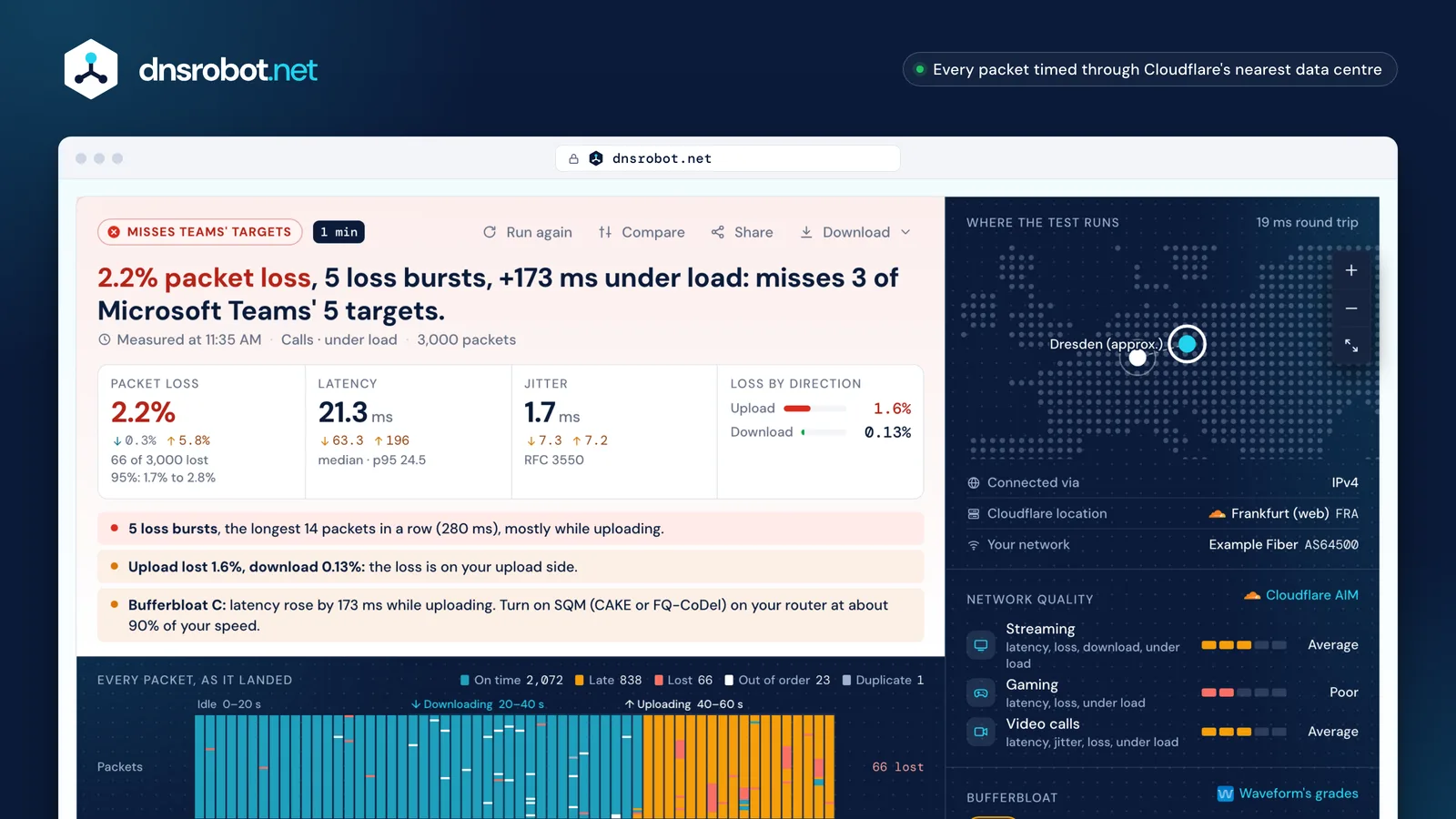
 The verdictThe loss, the bursts and the rise in delay under load, judged against Microsoft Teams' targets or Cloudflare's gaming score.Every packetEach column is one second and each mark one packet: on time, late, lost or out of order, with bursts bracketed.Up or downThe test call splits the loss: what Cloudflare never received from you, and what was lost on the way back to you.Scores and gradeCloudflare's scores for streaming, gaming and video calls, and Waveform's bufferbloat grade from A+ to F.
What is packet loss?
Packet loss is the share of data packets that leave your device but never reach the other end, or reach it too late to be used.
Games, voice and video calls send small packets over UDP many times a second and don't wait for lost ones to be resent: a lost packet is a frozen frame, a word cut out of a call or a character that jumps back. Downloads and web pages use TCP, which resends what was lost, so loss there only shows up as a slower page. That is also why a normal speed test can't see packet loss.
This test counts four things. Lost: a packet that hasn't arrived after 3 seconds, the waiting time the IETF's loss metric says must be reported. Late: one that arrived, but well behind the others. Out of order: one that arrived after a packet sent later (RFC 4737). Duplicate: one that arrived twice, counted once.
- On timearrived with the others
- Latearrived, but well behind the others: too late for a call
- Lostnot back within 3 seconds
- Out of orderarrived after a packet sent later
- Duplicatearrived twice, counted once
How much packet loss is acceptable?
For video calls, under 1%: Microsoft's target for Teams is less than 1% loss in any 15 seconds and less than 10% in any 200 milliseconds, and Zoom recommends 2% or less.
Each verdict on this page follows one published rule exactly. Video calls: Microsoft Teams' targets for the path from your device to the network edge: round trip under 100 ms, loss under 1% in every 15 seconds, burst loss under 10% in every 200 ms, jitter under 30 ms, reordering under 0.05%, and Zoom's recommendation of 150 ms latency, 40 ms jitter and 2% loss.
Gaming and streaming: Cloudflare's network quality scores, the same points speed.cloudflare.com uses: under 1% loss earns full points, 1% to 5% half, 5% to 25% none, and more costs points. For games there is no published loss limit from the game makers; even 1% in a burst is a visible stutter at 64 or 128 updates a second.
- Under 1%: full points, within Teams' target
- 1% to 2%: within Zoom's
- Over 2%: outside both
Is your packet loss random or in bursts?
The pattern matters as much as the percentage: 2% loss spread out is barely noticeable in a call, while 2% lost in a few bursts is a series of dropouts.
The test counts loss episodes, runs of packets lost one after another (RFC 6534), shows the longest, and works out the burst ratio from ITU-T G.107: 1 when losses fall at random, above 1 when they cluster. Bursts usually come from a full queue in a router or modem, which drops several packets of the same stream at once, or from Wi-Fi dropping out for a moment.
A short test can't prove there is no loss. If none of 750 packets was lost, the loss rate is still somewhere under 0.4%, so the page shows a range, not a bare 0%. Run the 3-minute test to catch loss that comes and goes.
Randomsingle losses, scattered
- Loss episodes
- 60
- Longest burst
- 1 · 20 ms
- Burst ratio
- 0.98
In a call: a faint click now and then
Burstyfive runs of 12
- Loss episodes
- 5
- Longest burst
- 12 · 240 ms
- Burst ratio
- 11.76
In a call: five 240 ms dropouts a minute
What is jitter, and how is it measured?
Jitter is how much the delay changes from one packet to the next. Calls and games buffer packets to smooth it out, and that buffer adds delay.
This page measures jitter with the formula in RFC 3550, the one WebRTC call apps report: the change in delay between packets as they arrive, smoothed over the last packets. Other tools use other formulas: Cloudflare's speed test averages the difference between consecutive pings, Waveform and Ookla the deviation from the mean, so their jitter figures aren't directly comparable. Cloudflare's scores on this page use Cloudflare's own formula, as they must.
Transit times in ms. Each change moves J a sixteenth of the way, so one spike lifts it a little and steady packets bring it back down.
What is bufferbloat? Latency under load
Bufferbloat is the extra delay your connection adds when it's busy: your router or modem queues too much data, so every packet waits in line behind a download or an upload.
The under-load test measures latency idle, then while downloading, then while uploading, and grades the rise on Waveform's scale: A+ under 5 ms added, A under 30, B under 60, C under 200, D under 400, F at 400 ms or more, from the average latency and the worse of the two directions.
The fix is smart queue management (SQM) on your router: CAKE or FQ-CoDel, with the speed set a little below what your line delivers, about 90% of the measured speed in OpenWrt's guide. Then run the test again: the grade should rise to A or A+.
 Waveform
- A+<5
- A<30
- B<60
- C<200
- D<400
- F400+
What causes packet loss, and how do you fix it?
Most packet loss comes from Wi-Fi, a busy line (bufferbloat), a faulty cable or port, or your provider's network; the test's pattern tells you which.
Loss only while downloading or uploading points to bufferbloat: turn on SQM. Loss at random while idle on Wi-Fi points to interference or distance: test again on a cable. Loss on a cable too can be a damaged cable, a bad port or old router firmware. If the call test puts the loss on the download side on a cable, with SQM on, the problem is usually beyond your router: send your provider the test's share link and CSV.
Pick the pattern you see
Loss only while downloading or uploading
Likely cause
Bufferbloat: the router or modem queue overflows
Fix
Turn on SQM (CAKE or FQ-CoDel) at about 90% of your speed
Random single losses, on Wi-Fi only
Likely cause
Interference, distance or a weak signal
Fix
Move closer, switch to 5 GHz or use a cable
Loss on a cable too, even idle
Likely cause
A faulty cable or port, old firmware
Fix
Swap the cable and port, update the router
Loss on the download side, cable and SQM on
Likely cause
Your provider's network
Fix
Send the share link and CSV to your provider
Packet loss test vs ping test vs speed test
A speed test measures how much data your line moves, a ping test how long one round trip takes, and a packet loss test how reliably small packets arrive: three different questions.
Use a ping test to see your latency to places around the world, this packet loss test when calls break up or games stutter, and a speed test when downloads are slow.
| Compared | Packet loss test | Ping test | Speed test |
|---|---|---|---|
| Measures | Lost, late and out-of-order packets, jitter, latency under load | Round-trip time to a server or region | Download and upload throughput |
| Protocol | UDP (no resends) | ICMP, TCP or HTTPS | TCP (resends hide loss) |
| Answers | Why calls break up and games stutter | How far away a server feels | Why downloads are slow |
Packet loss test: questions and answers
What is a good packet loss rate for gaming?
Is 1% packet loss bad?
Why does this test show packet loss when my speed test is fine?
Why do I only lose packets while downloading?
Is the packet loss on my side or my provider's?
How can a browser test tell upload loss from download loss?
How long should I run a packet loss test?
Does a VPN affect the packet loss test?
How much data does the test use?
Is anything stored?
Related tools
Ping Test
Test your ping, jitter and packet loss, see your ping to 34 cloud regions, and ping any website or IP from 11 cities
What Is My ISP
Discover your ISP, ASN, and connection details
DNS Speed Test
Time Cloudflare 1.1.1.1, Google 8.8.8.8 and more public DNS servers from your own browser, against your current DNS, and find the fastest for you
Port Checker
Test port connectivity and service availability
Traceroute
Trace the route to any website or IP from 8 cities, hop by hop, each network named
IP Lookup
Look up IP address geolocation, ISP, and network details instantly