DNS RobotDNS Propagation Checker
HomeDNS LookupWHOIS LookupIP LookupSSL Check
DNS RobotDNS Propagation Checker

Next-generation DNS propagation toolkit

Privacy PolicyTerms of ServiceAbout UsContact

DNS Tools

DNS LookupDomain to IPNS LookupMX LookupCNAME LookupView all

Email Tools

SPF Record CheckerDMARC CheckerDKIM CheckerSMTP Test ToolEmail Header AnalyzerView all

Website Tools

WHOIS LookupDomain AvailabilitySubdomain FinderCMS DetectorLink AnalyzerView all

Network Tools

Ping ToolTraceroutePort CheckerHTTP Headers CheckSSL Certificate CheckView all

IP Tools

IP LookupWhat Is My IPIP Blacklist CheckIP to HostnameASN LookupView all

Utility Tools

QR Code ScannerQR Code GeneratorMorse Code TranslatorText to Binary ConverterSmall Text GeneratorView all
© 2026 DNS Robot. Developed by ❤ Shaik Brothers
All systems operational
Made with
  1. Home
  2. /
  3. DNS Tools
  4. /
  5. Reverse DNS Lookup

Reverse DNS Lookup

Free reverse DNS lookup tool to check PTR records for any IP address. Resolve IPv4 and IPv6 addresses to hostnames, verify reverse DNS configuration, and validate PTR records from multiple DNS servers.

Free DNS ToolReverse DNS LookupPTR RecordsIPv4 & IPv6
Reverse DNS Lookup

Enter an IPv4 or IPv6 address to discover its associated hostname via PTR records

Selected Server:🇺🇸Google DNS(Google LLC)- 8.8.8.8Avg Speed: 9.96 ms

What Is Reverse DNS Lookup?

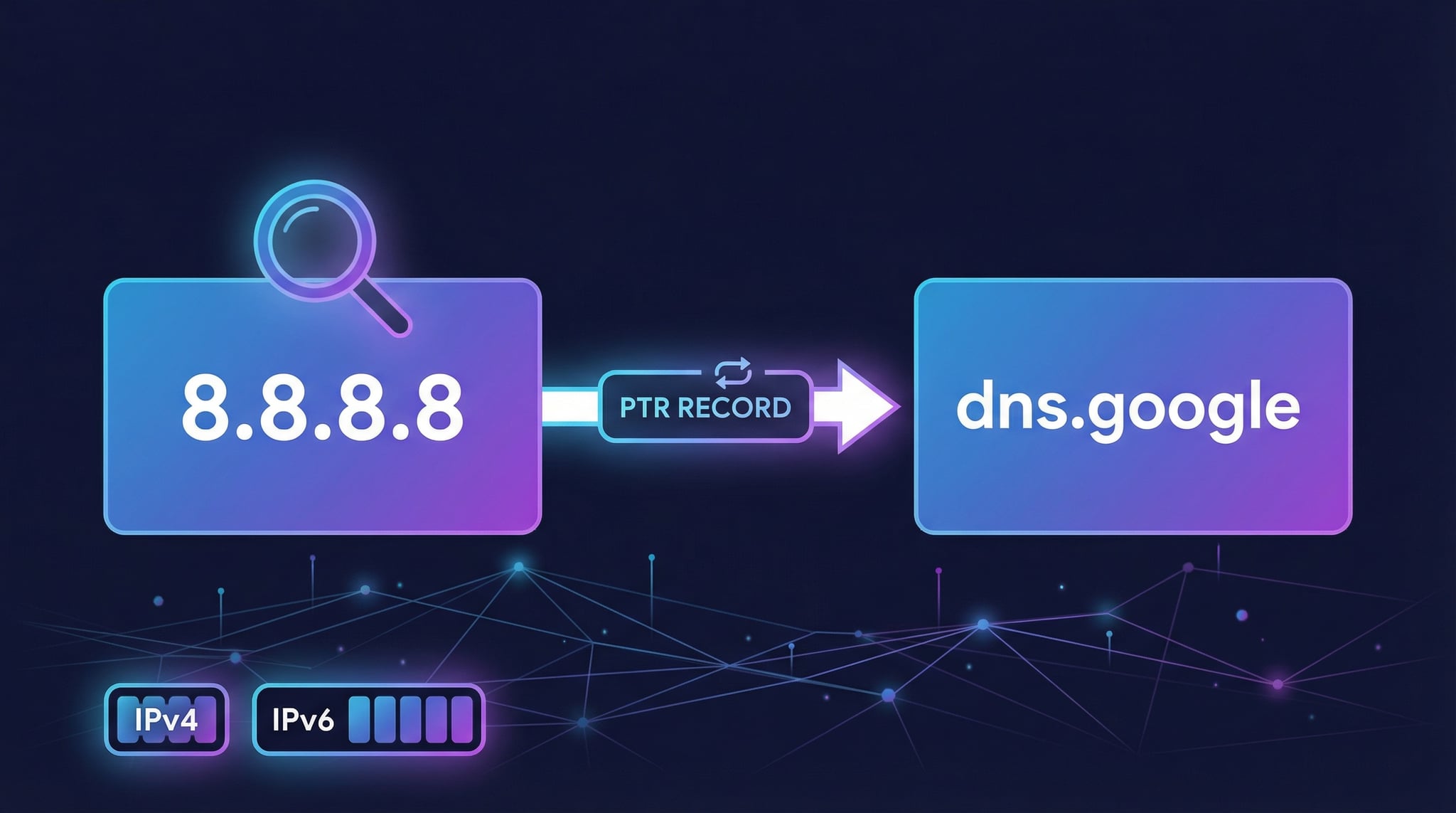
Reverse DNS lookup is the process of resolving an IP address back to its associated hostname by querying PTR (Pointer) records. Unlike a standard DNS lookup that translates domain names to IP addresses, a reverse DNS query does the opposite — it takes an IP address like 8.8.8.8 and returns the hostname dns.google.

Our free reverse DNS lookup tool queries PTR records from multiple DNS servers including Google DNS, Cloudflare, Quad9, and OpenDNS. Enter any IPv4 or IPv6 address to instantly discover its hostname, verify PTR record configuration, and check reverse DNS for email deliverability. No installation required — results in milliseconds.

Reverse DNS lookup results showing PTR record resolution from IP address to hostname with response time
DNS Robot's free reverse DNS lookup tool resolves IP addresses to hostnames via PTR records from multiple DNS servers.

How Reverse DNS Lookup Works (Step by Step)

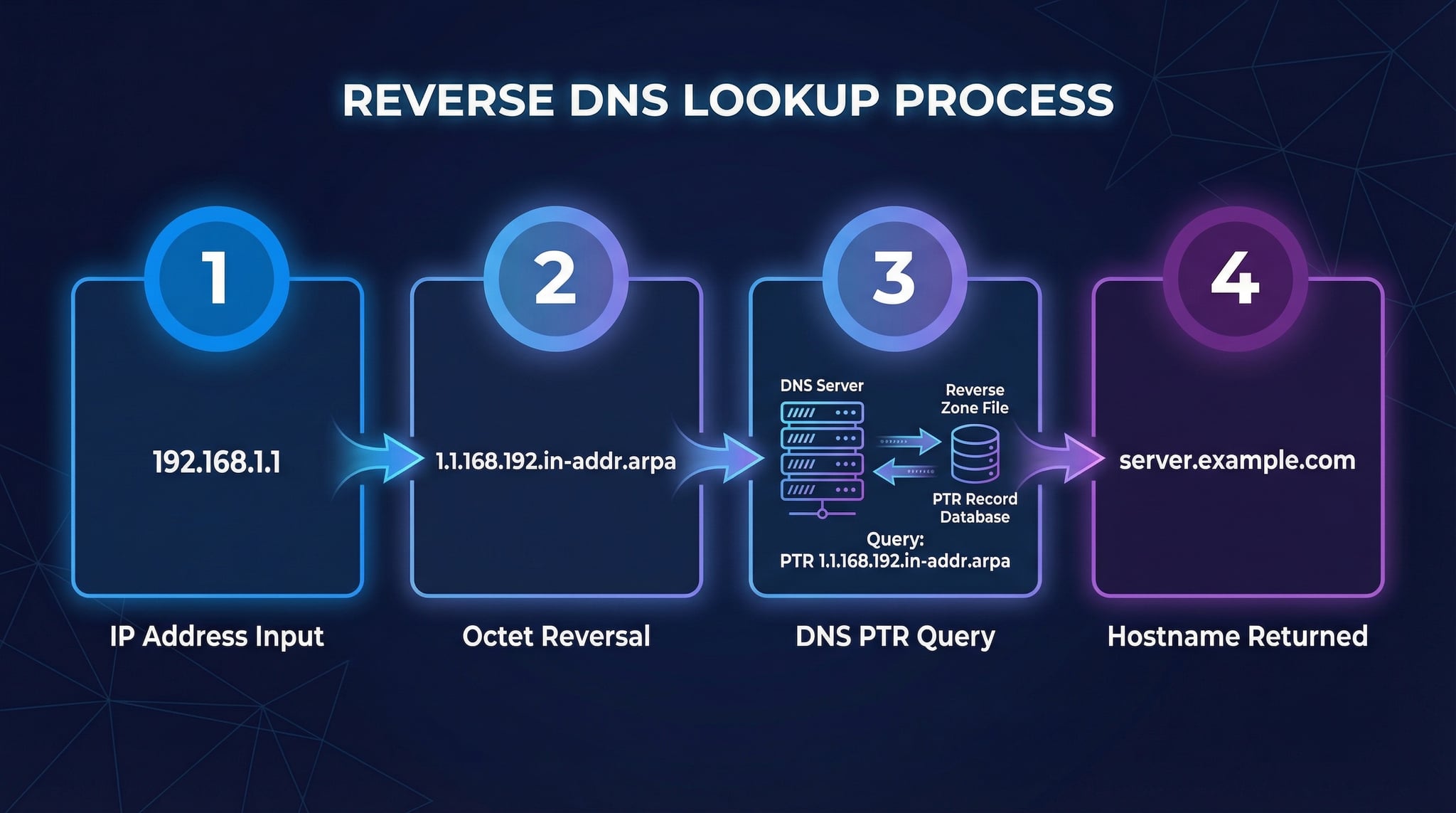
Understanding how a reverse DNS lookup works helps you troubleshoot PTR record issues and configure reverse DNS correctly for email servers. Here is the complete reverse DNS resolution process:

How reverse DNS works showing IP reversal, in-addr.arpa query, PTR record resolution, and hostname
How reverse DNS works: The IP octets are reversed, appended to in-addr.arpa, and the DNS system resolves the PTR record to return the hostname.
1
IP Address Input
You enter an IPv4 address (e.g., 8.8.8.8) or IPv6 address (e.g., 2001:4860:4860::8888) into the reverse DNS lookup tool.
2
IP Octet Reversal & ARPA Query
The IP octets are reversed and appended to .in-addr.arpa for IPv4. So 8.8.8.8 becomes 8.8.8.8.in-addr.arpa. For IPv6, each hex nibble is reversed and appended to .ip6.arpa.
3
PTR Record Resolution
The DNS resolver queries the reverse DNS zone hierarchy to find the authoritative nameserver for the IP range. That nameserver returns the PTR record containing the fully qualified domain name (FQDN) associated with the IP.
4
Hostname Returned
The PTR record resolves to the hostname (e.g., dns.google for 8.8.8.8). For email servers, best practice is to verify the hostname resolves back to the original IP (forward-confirmed reverse DNS).

Understanding PTR Records — The Heart of Reverse DNS

PTR records (Pointer records) are the DNS record type used exclusively for reverse DNS lookups. They map IP addresses to hostnames and are stored in the special in-addr.arpa and ip6.arpa namespaces. Use our PTR record checker above to look up PTR records for any IP address.

PTRIPv4 Reverse DNS

IPv4 PTR records are stored in the in-addr.arpa zone. The IP octets are reversed: 192.168.1.1 becomes 1.1.168.192.in-addr.arpa. This reversal allows the DNS hierarchy to delegate reverse zones efficiently by IP range.

PTRIPv6 Reverse DNS

IPv6 PTR records use ip6.arpa. Each hex digit (nibble) is reversed and dot-separated. A 128-bit IPv6 address produces a 63-character ARPA name. Our tool handles IPv6 reverse DNS lookup automatically.

FCrDNSForward-Confirmed Reverse DNS

FCrDNS verifies that the PTR hostname resolves back to the original IP. Example: 8.8.8.8 → dns.google → 8.8.8.8. This bidirectional check is required by many anti-spam systems. Use our Domain to IP tool to verify the forward lookup.

TTLPTR Record Caching

PTR records have TTL (Time-to-Live) values that control how long DNS resolvers cache the result. Typical PTR TTL values range from 3600s (1 hour) to 86400s (24 hours). Changes to PTR records propagate after the old TTL expires.

Reverse DNS and Email Deliverability

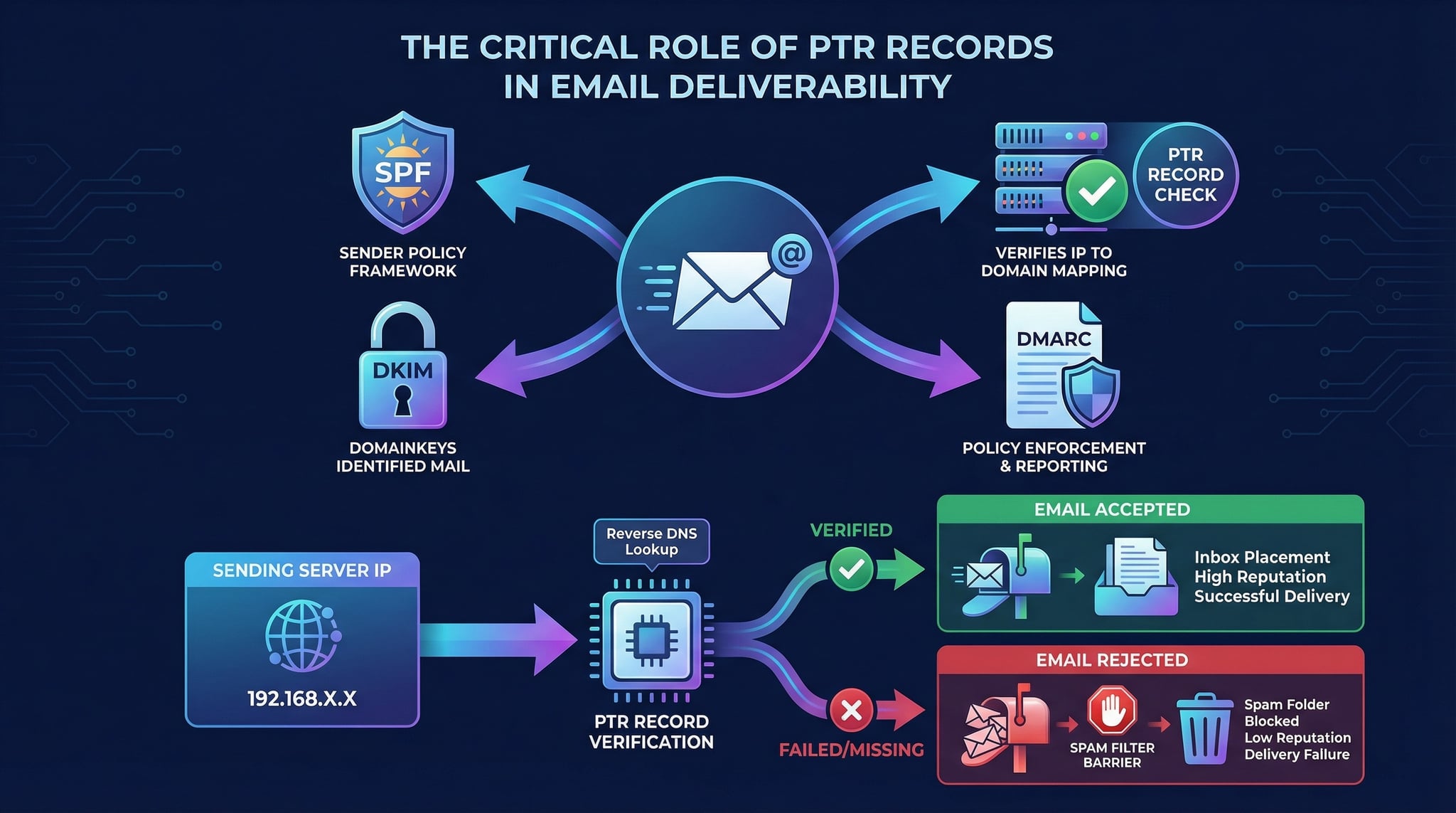
Reverse DNS is one of the most critical factors for email deliverability. Mail servers worldwide check PTR records to verify the identity of sending servers and filter spam. Here is why every email administrator must configure reverse DNS correctly.

PTR record email deliverability showing mail servers checking reverse DNS and validating FCrDNS
How mail servers use reverse DNS: PTR record verification is a key step in email authentication alongside SPF, DKIM, and DMARC.

Why Mail Servers Check Reverse DNS

  • Spam Prevention: IPs without PTR records are often spam sources. Gmail, Outlook, and Yahoo reject or flag emails from IPs with no reverse DNS configured.
  • Sender Identity: PTR records confirm the sending server identity. The PTR hostname should match or be related to the domain in the email's HELO/EHLO greeting.
  • FCrDNS Validation: Anti-spam systems verify the PTR hostname resolves back to the original IP. This forward-confirmed reverse DNS check prevents IP spoofing.
  • RFC 5321 Compliance: The SMTP specification recommends that receiving servers verify PTR records for connecting clients.

PTR Record Best Practices for Email

  • Match HELO Identity: Set the PTR hostname to match your mail server's HELO/EHLO name (e.g., mail.example.com).
  • Use Meaningful Hostnames: Avoid generic ISP hostnames like host-192-168-1-1.isp.com. Use descriptive names under your domain.
  • Verify FCrDNS: After setting a PTR record, use our reverse DNS tool to confirm it resolves, then use Domain to IP to verify the forward lookup.
  • Complete Email Auth: Combine PTR records with SPF, DKIM, and DMARC for full email authentication.

How to Check PTR Records (3 Methods)

There are three ways to perform a reverse DNS lookup and check PTR records for an IP address. Our online tool is the fastest method, but knowing command-line options is valuable for system administrators.

1Online Reverse DNS Lookup (Recommended)

Enter an IP address in our reverse DNS lookup tool above and click "Lookup". Choose from multiple DNS servers (Google, Cloudflare, Quad9, OpenDNS, AdGuard) to query PTR records. Results include hostname, ARPA address, IP version, and response time.

2Reverse DNS Using nslookup (Windows/Mac/Linux)

Basic reverse DNS lookup:
nslookup 8.8.8.8
Query specific DNS server:
nslookup 8.8.8.8 1.1.1.1
PTR record lookup:
nslookup -type=PTR 8.8.8.8.in-addr.arpa
IPv6 reverse lookup:
nslookup 2001:4860:4860::8888

3Reverse DNS Using dig (Mac/Linux)

Reverse DNS lookup:
dig -x 8.8.8.8
Short output:
dig -x 8.8.8.8 +short
Query specific server:
dig @1.1.1.1 -x 8.8.8.8
IPv6 reverse lookup:
dig -x 2001:4860:4860::8888
Query ARPA directly:
dig PTR 8.8.8.8.in-addr.arpa
Trace delegation:
dig -x 8.8.8.8 +trace

When to Use Reverse DNS Lookup

Email Server Verification
Verify PTR records for your mail server IP to ensure emails are not rejected. Use with MX Lookup for complete email DNS validation.
Security Investigations
Identify the origin of suspicious network traffic by resolving attacker IPs to hostnames. Combine with IP Lookup for geolocation data.
Log Analysis & Auditing
Resolve IP addresses in web server access logs, firewall logs, and application logs to readable hostnames for better analysis.
Network Troubleshooting
Diagnose DNS misconfigurations and verify PTR records match expected hostnames. Use with DNS Lookup for complete diagnostics.

Reverse DNS vs Forward DNS

Forward DNS Lookup

Translates a domain name to an IP address. Uses A (IPv4) and AAAA (IPv6) records. Example: google.com → 142.250.80.46. Performed by our DNS Lookup and Domain to IP tools.

Reverse DNS Lookup

Translates an IP address to a hostname. Uses PTR records in the in-addr.arpa (IPv4) or ip6.arpa (IPv6) namespace. Example: 8.8.8.8 → dns.google. Performed by this reverse DNS lookup tool.

Key Differences

Forward DNS is managed by domain owners via their registrar. Reverse DNS is managed by IP owners (ISPs/hosting providers). An IP can have one PTR record but a domain can have multiple A records. Not all IPs have PTR records configured.

Forward-Confirmed Reverse DNS

The gold standard: verify both directions match. Use our reverse DNS tool to find the PTR hostname, then use Domain to IP to confirm the hostname resolves back to the same IP.

Reverse DNS Lookup for Security and Network Administration

Security Use Cases

  • Intrusion Detection: Reverse DNS helps identify the source of malicious traffic. Security tools resolve IPs in alerts to hostnames for faster analysis and attribution.
  • Firewall Log Analysis: Transform raw IP addresses in firewall logs into readable hostnames. Identify patterns like multiple connections from the same organization.
  • Access Control: Some systems use reverse DNS to restrict access. For example, allowing connections only from IPs with PTR records matching *.trusted-org.com.
  • Phishing Investigation: When analyzing phishing emails, reverse DNS on the sending IP can reveal the true origin server and whether it belongs to a legitimate provider.

Common PTR Record Issues

  • No PTR Record: The most common issue. Many ISPs don't configure PTR records for dynamic IPs. Contact your provider to set one up for your server IPs.
  • Generic ISP Hostname: PTR records like host-1-2-3-4.isp.net may trigger spam filters. Request a custom PTR hostname from your provider.
  • FCrDNS Failure: The PTR hostname doesn't resolve back to the original IP. This breaks forward-confirmed reverse DNS and fails anti-spam checks.
  • Stale PTR Records: After migrating servers, old PTR records may still point to outdated hostnames. Use our reverse DNS checker to audit your PTR records regularly.

Related DNS Lookup Tools

DNS Lookup

Check all 12 DNS record types from 23+ global servers.

Domain to IP

Verify forward DNS — find all IPs for a domain.

IP Lookup

Get geolocation, ISP, and ASN details for any IP.

MX Lookup

Check mail exchange records and email server IPs.

NS Lookup

Find authoritative nameservers for any domain.

IP Blacklist Checker

Check if your IP is on email or spam blacklists.

Why Use an Online Reverse DNS Lookup Tool?

While command-line tools like nslookup and dig -x can perform reverse DNS lookups, our online tool offers several advantages. Query PTR records from multiple DNS servers (Google, Cloudflare, Quad9, OpenDNS, AdGuard) with a single click, see real-time response times, and get the complete ARPA address — all without opening a terminal. This makes it ideal for quick PTR record checks, verifying email server configuration, and troubleshooting reverse DNS issues.

Reverse DNS lookup is essential for email administrators, security analysts, network engineers, and anyone managing server infrastructure. Whether you're configuring PTR records for a new mail server, investigating suspicious IP addresses, or auditing your network's reverse DNS configuration, our tool provides instant results. For a complete IP analysis, combine reverse DNS with our IP Lookup (geolocation, ISP, ASN) and IP Blacklist Checker (spam/RBL status).

Frequently Asked Questions About Reverse DNS Lookup

What is reverse DNS lookup?

Reverse DNS lookup resolves an IP address to its associated hostname by querying PTR records. It is the opposite of a forward DNS lookup which translates domain names to IP addresses. For example, a reverse DNS lookup on 8.8.8.8 returns dns.google.

What is a PTR record?

A PTR (Pointer) record maps an IP address to a hostname — the reverse of an A record. PTR records are stored in the in-addr.arpa zone for IPv4 and ip6.arpa for IPv6. They are managed by the IP address owner (ISP or hosting provider).

How to check PTR records for an IP?

Enter the IP address in our reverse DNS tool and click "Lookup". You can also use nslookup 8.8.8.8 on Windows or dig -x 8.8.8.8 on Mac/Linux. Our online tool provides results from multiple DNS servers simultaneously.

Why is reverse DNS important for email?

Mail servers check PTR records to verify sender identity. IPs without valid reverse DNS are often rejected or flagged as spam by Gmail, Outlook, and Yahoo. A properly configured PTR record is essential alongside SPF, DKIM, and DMARC.

What is forward-confirmed reverse DNS?

FCrDNS means the PTR hostname resolves back to the original IP in a forward lookup: 8.8.8.8 → dns.google → 8.8.8.8. This bidirectional verification is considered best practice and is checked by many anti-spam systems. Use Domain to IP to verify the forward direction.

Who manages PTR records?

PTR records are managed by the IP address owner — typically your ISP or hosting provider, not your domain registrar. Contact them to create or update PTR records. Cloud providers (AWS, GCP, Azure, DigitalOcean) usually let you configure reverse DNS from their control panel.

Why is my reverse DNS returning no results?

No results means the IP has no PTR record configured. This is common for dynamic IP addresses, residential connections, and some cloud instances. Contact your hosting provider to set up a PTR record. Check IP Lookup to identify the IP owner.

Can I check IPv6 reverse DNS?

Yes, our tool supports both IPv4 and IPv6 reverse DNS lookup. IPv6 addresses use the ip6.arpa namespace where each hex nibble is reversed. Enter any IPv6 address and the tool handles the conversion automatically.

What is the in-addr.arpa namespace?

in-addr.arpa is the special DNS zone for IPv4 reverse lookups. IP octets are reversed and appended: 192.168.1.1 becomes 1.1.168.192.in-addr.arpa. This reversal allows DNS to delegate reverse zones hierarchically by IP range.

Is this reverse DNS tool free?

Yes, our reverse DNS lookup tool is completely free with no registration required. Check unlimited IP addresses from multiple DNS servers. View PTR records, ARPA addresses, hostnames, and response times without any cost.