











Every other crawler
User-agent: *
Read by every crawler that has no group of its own.
- Allows the whole site.
Google ignores this; Bing reads it.
Theme
Build a robots.txt you can trust: every rule explained as you type it, the file read back by our robots.txt checker against RFC 9309 and Google's own reading, and a live verdict for any crawler and any path before you publish.
One file per host and protocol: www.example.com and example.com each need their own.
Source: RFC 9309, read on October 26, 2026.
Read by every crawler that has no group of its own.
Choose what each known crawler gets. A crawler with a group of its own reads only that group.
They crawl to build a search index. Blocked pages can still be listed from links elsewhere, but with nothing read from them.
They collect pages to train models. A separate token lets you refuse training and still appear in search results.
They fetch pages to answer questions with a link back to you.
They fetch one page because a person asked for it, so some operators say they may ignore robots.txt.
Refusing these refuses a person, not a crawl: when someone asks an AI assistant to open one of your pages, an assistant that obeys the file will not read it for them. Refuse the training crawlers above if training is what you mean.
Link previews, site-owner tools, ad checks, archives, and crawlers whose operators state another job or none.
Your robots.txt/robots.txt
User-agent: *Allow: /ErrorWarningNote23 B of 500 KiB
1 warning
What to do It is the cheapest line in the file and every crawler reads it. Add Sitemap: with the full address of your sitemap.
Pick a crawler and a path: the verdict, the rule that decides it and the group the crawler reads come from the Robots.txt Checker's own matcher.
This crawler may request the URL.
User-agent: *starts on line 1
No group names this crawler, so the * group applies.
Allow: /line 2
/any-page
/
Only the path and query are compared, byte for byte after percent-encoding. The host, the scheme and the fragment are never part of a rule.
Write the rules, save them as a plain text file named robots.txt, encoded as UTF-8, and upload it to the top level of your site, so that it answers at https://example.com/robots.txt. There is nothing to submit: crawlers ask for that address on their own.
Google puts it in three sentences: “The file must be named robots.txt. Your site can have only one robots.txt file. The robots.txt file must be located at the root of the site host to which it applies.” It must be “a UTF-8 encoded text file”, and “Google's crawlers will automatically find and start using your robots.txt file.”
The generator above starts from a preset, explains each rule as you type it, and reads the result back with the parser and matcher of our robots.txt checker before you copy it. The download is named robots.txt: UTF-8 with no byte-order mark, line feeds only, and no date or comment you did not ask for.
https://example.com/robots.txtThere is no submit step: Google's crawlers find the file on their own.
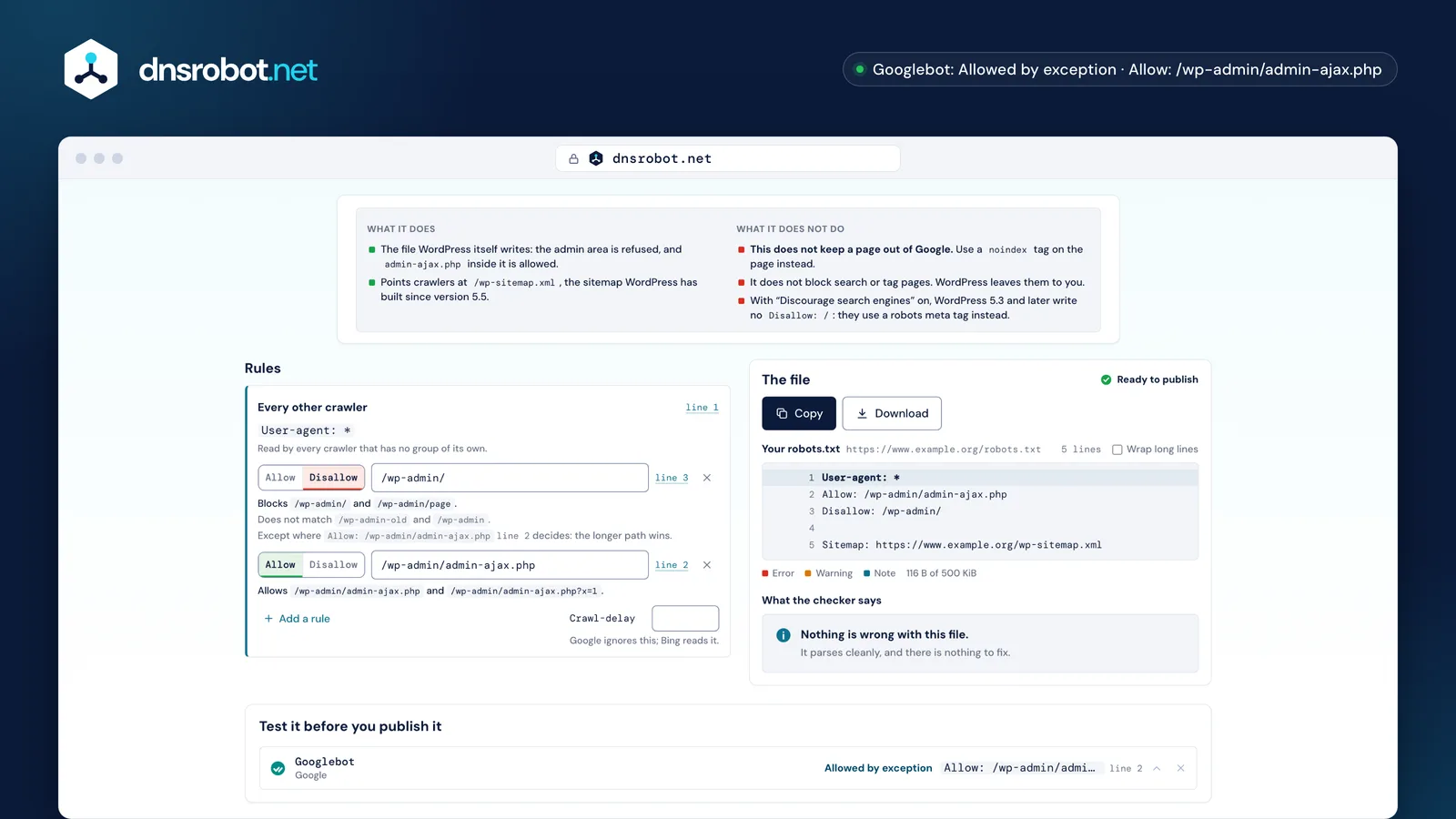
 What the preset doesAnd what it does not: none of these presets keeps a page out of Google, and each one says so.Each rule explainedThe paths a rule blocks and the ones it misses, from the same matcher that decides every verdict, and the longer rule that carves an exception.The file and its findingsThe file with its line numbers, read back by the Robots.txt Checker's own audit before you copy it.The verdictPick a crawler and a path: allowed or blocked, the rule that decided it with its line, and the group the crawler reads.
Groups and Sitemap lines. A group starts with one or more User-agent lines naming crawlers, followed by the Allow and Disallow rules those crawlers obey; a Sitemap line stands on its own, outside every group.
RFC 9309 defines a group as “one or more user-agent lines that are followed by one or more rules”, and a crawler obeys exactly one group: the one naming its own product token, or the * group when none does. Google reads four fields and no others: user-agent, allow, disallow and sitemap.
Field names are case-insensitive, paths are not: in Google's own example, disallow: /file.asp applies to /file.asp “but not” to /FILE.asp. A Sitemap: line must be a full address with the protocol and the host; this generator refuses any other kind and says why.
User-agent: *Starts a group for every crawler with no group of its ownDisallow: /cart/A path these crawlers must not fetchAllow: /cart/helpAn exception: longer than the Disallow, so it wins User-agent: GPTBotStarts a group naming two crawlersUser-agent: ClaudeBotDisallow: /Both are refused the whole site Sitemap: https://www.example.org/sitemap.xmlOutside every group: a full address* and $: how a rule matchesWhen several rules match a URL, the one with the longest path wins, whichever kind it is, and an Allow wins a tie. * stands for any run of characters and $ marks the end of the URL; nothing else in a path is special.
RFC 9309: “The most specific match found MUST be used. The most specific match is the match that has the most octets”, and “if an allow rule and a disallow rule are equivalent, then the allow rule SHOULD be used.” WordPress's own file works this way: Disallow: /wp-admin/ closes the folder, and the longer Allow: /wp-admin/admin-ajax.php opens one file inside it.
A rule without $ is a prefix, so Disallow: /admin also blocks /administrator; add the slash (/admin/) when you mean the folder. Under every rule, the editor above shows the paths it catches and some it does not, from the matcher that decides every verdict, and it flags a rule that another one always beats.
* and $, and what each pattern really catches/admin/admin/ · /administrator · /admin-tools/wp-admin/admin//admin/users/administrator/*.pdf$/files/report.pdf/report.pdf?v=2/*?/search?q=x/search?, ., [ and + are plain characters. There are no regular expressions in robots.txt.
/admin/report.pdfThe Allow wins: it matches more of the path.
Disallow: /files/7 charactersAllow: /files/7 charactersEqual length, so the Allow wins. “The least restrictive rule”, as Google puts it.
All three already serve one, and the presets above write what each platform's own documentation describes: WordPress refuses its admin area but allows admin-ajax.php, Shopify refuses carts, checkouts and filtered or sorted collections, and Next.js serves the file you put in app/robots.txt.
WordPress writes its file in code, in do_robots(): User-agent: *, a Disallow for the admin path and an Allow for admin-ajax.php, plus, on a public site since WordPress 5.5, a Sitemap: line for /wp-sitemap.xml. With “Discourage search engines” on, WordPress 5.3 and later no longer write Disallow: /; they use a robots meta tag instead.
Shopify says its default “works for most stores”. There is no file to upload: changing it means editing the theme's robots.txt.liquid template, which Shopify calls “an unsupported customization”. Next.js serves app/robots.txt as written, or builds the file from app/robots.ts.
 WordPress
User-agent: *Allow: /wp-admin/admin-ajax.phpDisallow: /wp-admin/ Sitemap: https://example.com/wp-sitemap.xmlWritten by WordPress itself. Change it with a plugin or the robots_txt filter.
 Shopify
User-agent: *Allow: /Disallow: /adminDisallow: /cart/Disallow: /checkoutDisallow: /checkouts/Disallow: /accountDisallow: /ordersDisallow: /collections/*+*Disallow: /collections/*sort_by* Sitemap: https://example.com/sitemap.xmlShopify's default. Change it in the theme's robots.txt.liquid template.
 Next.js
User-agent: *Allow: / Sitemap: https://example.com/sitemap.xmlYour own file in app/robots.txt, or app/robots.ts, served at /robots.txt.
A group naming the crawler, with Disallow: / under it, works for every crawler whose operator says it obeys robots.txt, and only for those. It is a request the crawler honours, not a lock: a crawler that ignores the file can still fetch every page.
Most AI companies run more than one crawler, so decide per job. Refusing a training crawler such as GPTBot or ClaudeBot refuses the one that collects pages for models; refusing an answer crawler such as OAI-SearchBot or PerplexityBot also takes you out of the links those assistants show. Google's training token is not Googlebot: “Google-Extended does not impact a site's inclusion in Google Search nor is it used as a ranking signal in Google Search.”
The third kind is different. ChatGPT-User, Claude-User, Perplexity-User and Amzn-User fetch one page because a person asked an assistant to open it, so refusing them refuses that person, and some of their operators say these fetchers may ignore robots.txt anyway. The crawler list above keeps them in a section of their own for that reason.
GPTBotObeysOAI-SearchBotObeysChatGPT-UserMay ignoreClaudeBotObeysClaude-SearchBotObeysClaude-UserObeysPerplexityBotObeysPerplexity-UserMay ignoreGoogle-ExtendedToken onlyNo such crawlerNo such crawlerApplebot-ExtendedToken onlyNo such crawlerNo such crawlermeta-externalagentObeysmeta-webindexerObeysmeta-externalfetcherMay ignoreAmazonbotObeysNo such crawlerAmzn-UserMay ignoreIt asks crawlers not to fetch a page; it does not ask a search engine not to list it. Google “may still index the URL and show it in search results without a snippet” when other pages link to it. To keep a page out, use noindex, and leave the page crawlable so the tag can be read.
Search Console calls it “Indexed, though blocked by robots.txt”. And Google is explicit that “for the noindex rule to be effective, the page or resource must not be blocked by a robots.txt file”: a disallowed page's own noindex is never seen, because the crawler never fetches the page.
That is why every preset above says what it does not do. The staging preset's Disallow: / keeps polite crawlers out, but a staging URL linked from anywhere can still be listed: put staging behind a password, and never ship that line to the live site.
<meta name="robots" content="noindex">Never readTo keep a page out: let the crawler in and use noindex, or require a login.
At the root of the host it applies to, as /robots.txt, one file per host and protocol. https://example.com/robots.txt says nothing about https://www.example.com or https://shop.example.com: each needs a file of its own, and a robots.txt inside a folder is never read.
Google: “You must place the robots.txt file in the top-level directory of a site, on a supported protocol.” Search Console's robots.txt report lists the files of the top 20 hosts of a property separately, with HTTP and HTTPS counted apart.
Type your site at the top of the generator and it gives the exact address the file must answer at, fills in the Sitemap: line for that host, and links to the Robots.txt Checker, which reads the live file once it is up.
https://example.com/robots.txtEvery URL on https://example.comhttps://www.example.com/robots.txtOnly www.example.com: a separate hosthttp://example.com/robots.txtOnly the http:// site: a separate protocolhttps://shop.example.com/robots.txtOnly shop.example.comhttps://example.com/blog/robots.txtNothing: a robots.txt in a folder is never readGoogle reads none of them. Crawl-delay is read by Bing, Clean-param by Yandex, Host is in neither the standard nor Google's list, and Cloudflare's Content-Signal states what your content may be used for rather than what may be crawled.
Google lists its four fields and adds that “other fields such as crawl-delay aren't supported”. Bing's own blog says “the crawl-delay directive accepts only positive, whole numbers as values”, so the editor refuses a fraction rather than write one. Bing's current help page could not be read to confirm a range or a unit, so this page states neither.
None of them breaks a file: RFC 9309 requires that parsing other records “MUST NOT interfere with the parsing of explicitly defined records”. Of the four, the generator writes only Crawl-delay, labelled with who reads it.
User-agentReads itReads itReads itAllowReads itReads itReads itDisallowReads itReads itReads itSitemapReads itReads itReads itCrawl-delayIgnores itReads itNot confirmedClean-paramIgnores itIgnores itReads itHostIgnores itIgnores itNot confirmednoindexIgnores itNot confirmedNot confirmedContent-SignalIgnores itNot confirmedNot confirmedTwice. Before you publish, with Test it before you publish it above: pick a crawler and a path and see the rule that decides it. After you upload it, run the Robots.txt Checker on the live file, because what the server answers matters as much as what the file says.
A file that answers 404 is read as no file at all, so every crawler may take everything; a file that answers 500 or 503 means a crawler that follows the standard must take nothing. RFC 9309 §2.3.1.4: the crawler “MUST assume complete disallow”. Google softens that with a ladder of its own, shown in the figure.
Google's own robots.txt Tester is gone: Search Central announced its retirement on 15 November 2023, and the robots.txt report that replaced it shows the file Google fetched, without testing a URL against a rule. The generator's Test it before you publish it section above and the robots.txt checker do that test.
200Follows the rules in the file.301, 302Follows at least five hops, then stops. Google then reads the file as a 404.403, 404Crawls everything, as if there were no file.429Crawls nothing. Google counts this with the 5xx answers, not the 4xx ones.500, 503Crawls nothing at all, by the standard.No such nameThere is no site to read, so there is no verdict.The costly mistakes are each one short line: a Disallow: / left over from staging, a prefix that reaches further than you meant, a Sitemap: line written as a path, a path without its leading slash, and a noindex line Google stopped reading in 2019.
Each is caught here before you copy the file. The checker's own audit runs as you type and its findings sit under the file; a line a crawler would reject is never written at all, and the editor says on its row why it was left out.
One mistake is a pair, not a line: a URL disallowed here that also carries noindex on the page. The crawler never fetches the page, so it never sees the noindex, and the URL can stay in search results. Pick one: block the crawl, or let it in and tell it not to index.
Disallow: /Left over from staging: the whole live site is closed to every crawler.Disallow: /adminAlso blocks /administrator and /admin-tools. Add the trailing slash.Allow: / under User-agent: *Never read by a crawler that has its own group anywhere in the file.Sitemap: /sitemap.xmlA Sitemap line must be a full address with the host.Disallow: adminA path starts at /. This rule matches nothing.noindex: /private/Dead since 2019. The page stays crawlable and indexable.* group your Allow sits in. The editor above flags a rule that another one always beats, and Test it before you publish it names the deciding rule and the group the crawler read.Missing something?Suggest a feature or a new tool
Fetch any site's robots.txt, test whether a URL is blocked for Googlebot or AI crawlers, and find syntax errors
Crawl your website and get an XML sitemap, an HTML sitemap and a visual site tree
Find and validate a website's XML sitemap: syntax, URL limits, lastmod dates, robots.txt conflicts and broken or redirecting URLs
Check a page's title, meta description, canonical, hreflang, Open Graph and X card tags, with Google and social previews
Response headers exactly as sent, with a Mozilla Observatory security grade
Detect your browser, OS, device type, rendering engine, and CPU architecture from your user agent string