Is It Down for Everyone or Just Me?
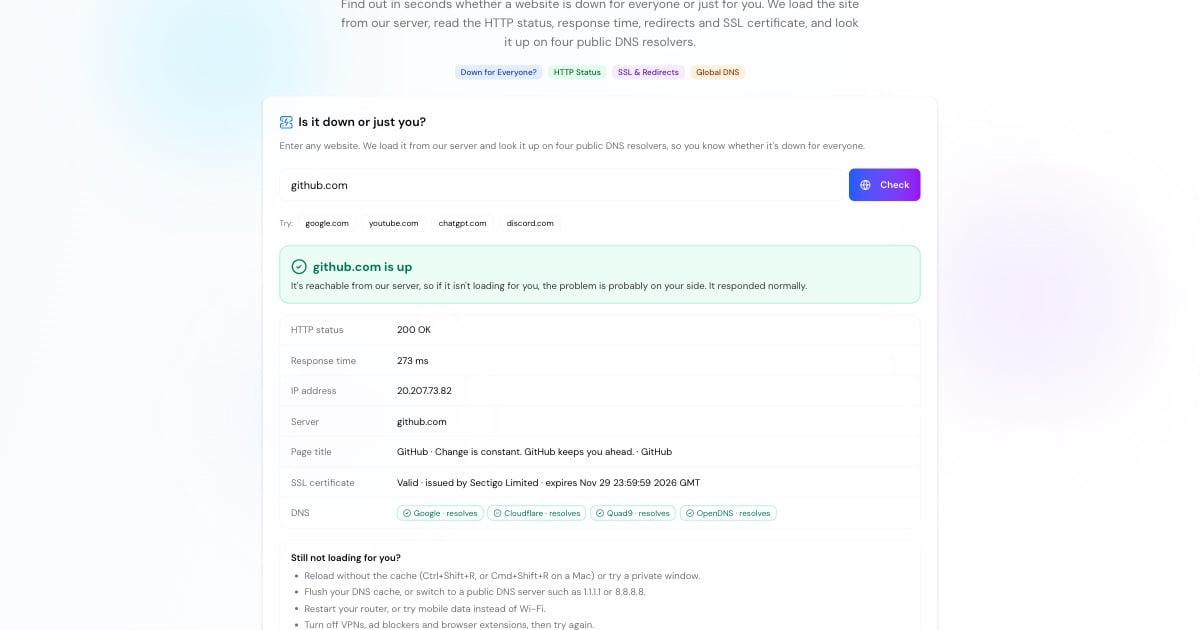
When a website won't load, the first question is whether it's down for everyone or just you. This website down checker answers it: it loads the site from our server, outside your network, and tells you whether it responded, how fast, and with what status.
If the site is up for us but not for you, the problem is between you and the site: your browser, DNS, Wi-Fi, VPN or internet provider. If it's down for us too, the site itself has a problem and all you can do is wait or tell the owner. A third result, up with problems, covers sites that answer with server errors, invalid SSL certificates or very slow responses.
How the Website Down Checker Works
We request the page the way a browser does, follow up to five redirects, and record the HTTP status code and response time.
For HTTPS sites we read the certificate: whether it's valid, who issued it and when it expires. An expired certificate makes browsers block the site even though the server is running. For more detail, use the SSL checker.
We ask Google, Cloudflare, Quad9 and OpenDNS for the site's address. If none can find it, the domain's DNS is broken or the domain has expired.
Up, down, or up with problems, with the reason in plain English and the technical details underneath.
Advertisement
Error Codes You See When a Site Is Down
The HTTP status code tells you where the failure is. The ones you meet most often during an outage:
500 Internal Server Error: the website's own code crashed. See HTTP error 500.
502 Bad Gateway: a proxy or CDN got no valid answer from the server behind it. See 502 Bad Gateway.
503 Service Unavailable: the server is overloaded or in maintenance. See HTTP error 503.
504 Gateway Timeout: the server behind the proxy took too long. See 504 Gateway Timeout.
520–526: Cloudflare-specific errors when Cloudflare can't reach the origin server. See Cloudflare error 520.
No status at all: DNS failure, refused connection or timeout. The site never answered.
Site Is Up but Not Loading for You? Fixes
If the checker says the site is up, the problem is on your side. Work through these, quickest first:
Hard-reload the page (Ctrl+Shift+R, or Cmd+Shift+R on a Mac) or open it in a private window to skip a broken cache.
Flush your DNS cache. An old address can stick after a site moves: how to flush DNS.
Read the exact browser error. ERR_CONNECTION_TIMED_OUT, ERR_CONNECTION_RESET, ERR_CONNECTION_REFUSED and DNS_PROBE_FINISHED_NXDOMAIN each point to a different cause.
Switch DNS servers. If your provider's DNS is failing, a public resolver often fixes it. The DNS speed test shows which one is fastest for you.
Turn off VPNs, ad blockers and extensions, which can block or reroute individual sites.
Restart your router or try mobile data. If other sites fail too, check your connection and your provider with What Is My ISP.
Advertisement
Why Websites Go Down
Traffic spikes
A sudden rush of visitors, such as a launch, a sale or a viral post, overloads the server and it starts returning 503 errors or timing out.
Hosting or cloud outages
When a host, cloud region or CDN has an incident, every site on it can go down at once, often with 502, 504 or 52x errors.
DNS and domain problems
A wrong DNS change, a deleted record or an expired domain makes the site unreachable even though the server is fine.
Expired SSL certificates
The server keeps running, but browsers refuse to open the site until the certificate is renewed.
Deploys and maintenance
A bad release or planned maintenance can take a site offline for minutes or hours.
Attacks
Denial-of-service attacks flood a site with traffic until real visitors can't get through.
Is My Website Down? Checking Your Own Site
If you run the site, checking from outside is the fastest way to confirm an outage your visitors see. Then narrow it down: the DNS lookup shows whether your records are correct, the DNS propagation checker shows whether a recent change has reached resolvers worldwide, the HTTP headers tool shows exactly what your server returns, and ping and traceroute show where the network path breaks.
This checker runs from a single location, so an outage limited to one region may not show up here. For continuous coverage, pair it with an uptime monitoring service that checks from several countries and alerts you.
Advertisement
More Website Tools
Diagnose a website problem in more depth: