











Website Hosting Checker
Find out who is hosting any website: the web host and the cloud it runs on, the CDN in front, the CMS, who handles the domain's email and where it is registered, each with the evidence behind it. Behind Cloudflare, the platform's own headers, the owner of its address block and the names that skip the CDN can still point to the real host.
What a hosting checker shows
A hosting checker (or host checker) finds the company that stores and serves a website. Type a domain and it looks up the site's IP address, the network that announces that address and who the address block is registered to, then what the site itself gives away: its HTTP headers, the CNAME its www points to, the site builder in its markup and its nameservers. Each signal is weighed, so the answer comes with a confidence and the evidence behind it.
A website is rarely one company. The domain is registered at a registrar, its DNS may run elsewhere, a CDN such as Cloudflare often sits in front, and email often goes to Google or Microsoft. As a domain hosting checker it shows each layer on its own, so "who hosts this site?" gets the answer that was meant.
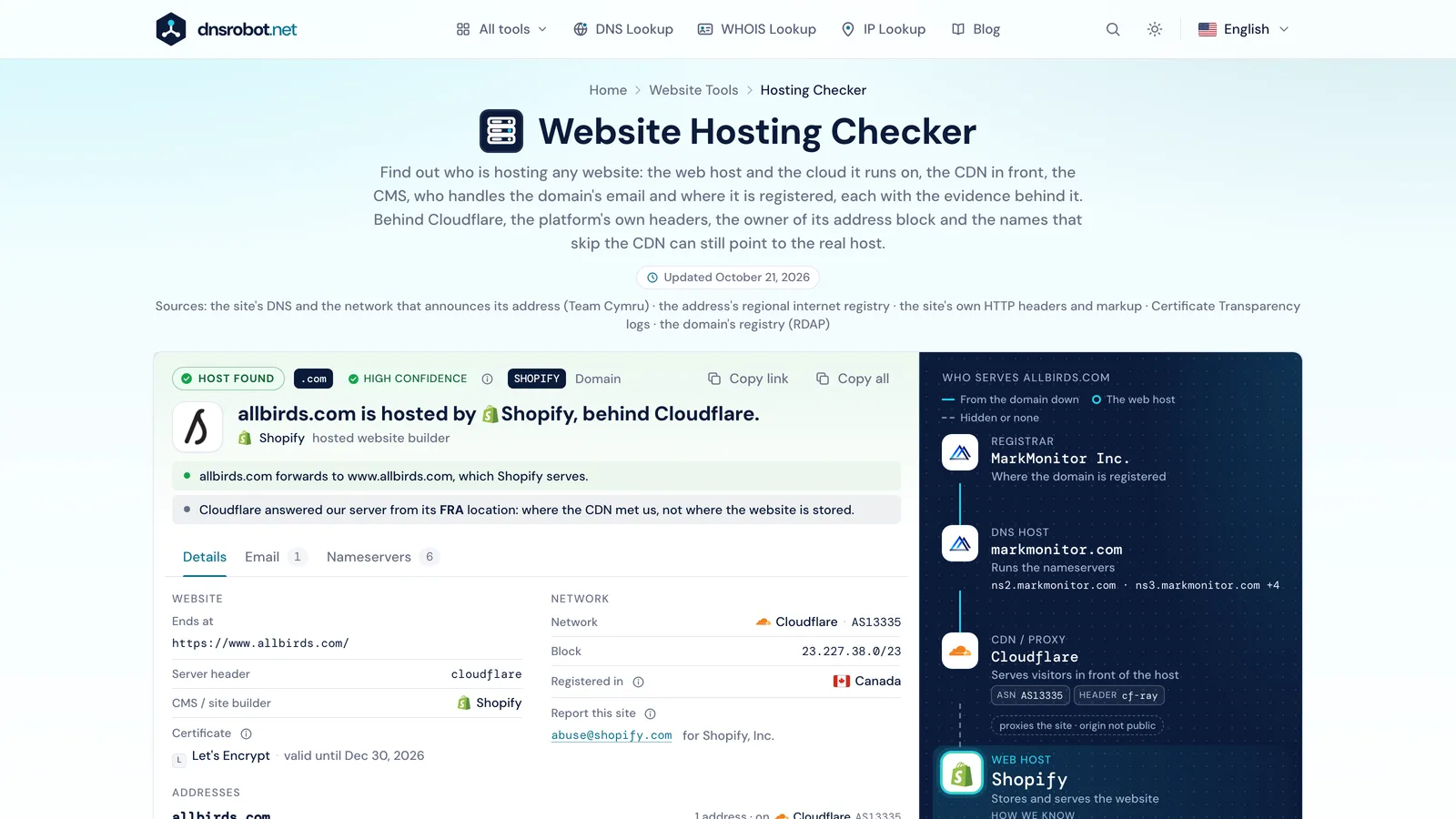
 The answerThe web host in one sentence, with its confidence, and the CDN in front when there is one.Every layerRegistrar, DNS host, CDN, web host, the cloud it runs on, and email: each company apart.The evidenceWhy the checker names that host: the network, a platform's own header, a CNAME, the site builder.The detailsEvery address of the domain and of www, the redirect chain, the CMS, the certificate and the mail setup.
How to find out who is hosting a website
There is no public register of hosting customers, so a hosting lookup reads the clues a site leaves in public, from the strongest to the weakest:
- 1
Find the site's IP address
The domain's A and AAAA records give the address browsers connect to, for the domain and for www, which can differ.
- 2
Find the network behind the address
A public address is usually announced by one network, an autonomous system with a number (ASN) that a regional internet registry assigned. A hosting company's own network names it: AS47583 is Hostinger, AS53831 Squarespace. A platform that holds its own addresses on a CDN's network is named by the block's registrant: Shopify's addresses are on Cloudflare's network, registered to Shopify.
- 3
Read what the site says about itself
Platforms label their responses: Kinsta's cache header, WP Engine's X-Powered-By, Vercel's request id. A www that points to shops.myshopify.com, or a site builder's own markup, names the platform too.
- 4
Weigh it, then check the rest
The nameservers say where the DNS is managed, which is often but not always the host. Signals that agree make a high-confidence answer; several hosts sharing one network make a possible one, with the others listed.
Who serves example-shop.com
- RegistrarNamecheap, Inc.Where the domain is registered
- DNS hostCloudflareRuns the nameserversada.ns.cloudflare.com · rudy.ns.cloudflare.com
- CDN / proxyCloudflareServes visitors in front of the hostASNAS13335headercf-ray: 0000000000000000-FRA
- Web hostShopifyStores and serves the websiteHow we know
- The site answers with the header
powered-by: Shopify - www points to
shops.myshopify.com - The page is built with Shopify, which only runs on Shopify
- The site answers with the header
- EmailGoogle WorkspaceReceives the domain's mailaspmx.l.google.com +1





Web host, registrar, DNS host and CDN: who does what
Four or five companies can stand behind one website, and "hosting" means a different one to each person asking. Here is what each does and how the checker finds it:
| Layer | What it does | How the checker finds it | Example |
|---|---|---|---|
| Registrar | Sells and renews the domain name and sends its nameservers to the registry. | The registry's RDAP record | GoDaddy, Namecheap |
| DNS host | Answers DNS queries for the domain: where the site, mail and subdomains are. | The NS records | Cloudflare, Route 53 |
| CDN / proxy | Sits in front of the host, caches pages near visitors and filters attacks. Visitors connect to it, not to the host. | Its network and its own headers (cf-ray, Via) | Cloudflare, Fastly |
| Web host | Stores the website's files and database and runs its code. | The address's network and block registrant, platform headers, CNAMEs, the site builder | SiteGround, Kinsta, Shopify |
| Runs on | The cloud a platform rents its servers from. | The address's network | Google Cloud, AWS |
| Receives the domain's mail. | The MX records | Google Workspace, Microsoft 365 |
Why does a hosting checker say Cloudflare?
Because Cloudflare is the company visitors connect to. When a site's DNS record is proxied through Cloudflare, the domain resolves to Cloudflare's addresses and Cloudflare fetches the pages from the real host out of sight. Fastly, Amazon CloudFront and Akamai do the same, usually through a CNAME to the CDN's own hostname, which stays visible in DNS. A checker that only reads the IP address then calls Cloudflare the host, which is true for the traffic and wrong for the hosting.
This checker names the CDN as its own layer and keeps looking: a platform's own headers usually pass through the CDN, and the registrant of the address block can name the platform, so Shopify, Kinsta or Vercel are still found behind it. A record Cloudflare proxies hides its CNAME, though.
Clues to a host behind a CDN
Names that skip the CDN
On cPanel hosting, cpanel. and webmail. point straight at the host's server, and mail. or ftp. often do. The result names the network they are on.
The mail setup
MX records at the host's mail servers, or an SPF record that allows the host to send, point to it.
The nameservers
A site on Hostinger's or SiteGround's nameservers is often hosted there, even with a CDN in front.
Ask the owner
Only the site's owner and the CDN know the origin for sure.
We name networks, never a hidden server's address: that address is what lets attackers go around a CDN's protection.
Find who hosts a website with dig, whois and curl
The same lookups from a terminal, on macOS and Linux (Windows: nslookup and PowerShell's Resolve-DnsName for the DNS steps). Put the site's name in place of example.com and its address in place of 203.0.113.10:
| To find | Command |
|---|---|
| The site's address | dig +short example.com A |
| The network behind it | whois -h whois.cymru.com " -v 203.0.113.10" |
| Who holds the address block | whois 203.0.113.10 |
| The headers it sends | curl -sI https://example.com |
| Where www points | dig +short www.example.com CNAME |
| The nameservers | dig +short example.com NS |
| The mail servers | dig +short example.com MX |
Behind a CDN the address and network are the CDN's: read the headers, and the block's registrant, which names a platform that holds its own addresses.
How do I find out who hosts my own website?
Check your domain above: the web host and the registrar each come with a link to their login page. If the host is hidden behind a CDN, these find it:
- 1
Search your inbox
Look for invoices and renewal notices: "hosting", "cPanel", "renewal", or the domain itself.
- 2
Check the registrar
The registrar often sells hosting too, and its dashboard shows the nameservers, which lead to the DNS host.
- 3
Open the CDN's dashboard
In Cloudflare, the domain's DNS records show each proxied record's real target, the origin's address or hostname. IP Lookup turns an address into a company.
How accurate is a hosting checker?
As accurate as the clues a site leaves. Each answer carries one of three ratings:
A reseller or an agency that rents space from a bigger host shows as that host: the network can't tell them apart.
Hosting checker API
A free endpoint with CORS for browsers: POST a domain or GET it in the query. The answer has the fields of our older API plus the layers, addresses, redirects, hints and certificate shown here. 10 checks a minute per network; a repeat within the hour comes from cache.
$ curl -X POST https://dnsrobot.net/api/hosting-check \
    -H "Content-Type: application/json" -d '{"domain": "allbirds.com"}'
{
  "domain": "allbirds.com", "state": "hosted",
  "host": { "slug": "shopify", "name": "Shopify", "confidence": "high", "evidence": [ … ] },
  "cdn": { "slug": "cloudflare", "name": "Cloudflare", … },
  "cms": ["Shopify"], "emailProvider": "Microsoft 365", "registrar": "MarkMonitor Inc.", …
}
Hosting Checker FAQ
How do I find out who is hosting a website?
Why does the hosting checker say Cloudflare?
Can I find the real host of a website behind Cloudflare?
Is the web host the same as the domain registrar?
How can I tell which WordPress host a site uses?
How do I find where a website's server is located?
How can I tell who hosts a website's email?
What is an ASN, and how does it identify the host?
How accurate is the hosting checker?
Is this web hosting checker free, and do you keep what I check?
Missing something?Suggest a feature or a new tool
More website tools
WHOIS Lookup
Look up domain registration, registrar, and owner details via RDAP
DNS Lookup
Every DNS record from the domain's own nameservers, beside Google's and Cloudflare's cache
IP Lookup
Look up IP address geolocation, ISP, and network details instantly
CMS Detector
What CMS, theme, plugins and technologies a website uses, with the proof for each
SSL Certificate Check
Verify SSL certificate validity and security details
Website Down Checker
Is it down for everyone or just you? Check any site from 11 places and your own connection, with a live screenshot