What Is an SPF Record?
An SPF record (Sender Policy Framework, RFC 7208) is a TXT record on your domain that lists the servers allowed to send email for it. When a message arrives, the receiving server looks up the SPF record of the envelope sender's domain (the Return-Path, not the visible From address) and checks whether the sending IP is on the list.
A domain can have only one SPF record. Two records starting with v=spf1 make every SPF check fail with PermError, so when you add a new service you edit the existing record instead of adding another. Since February 2024 Gmail and Yahoo expect every sender to use SPF or DKIM, and bulk senders to use SPF, DKIM and DMARC together.
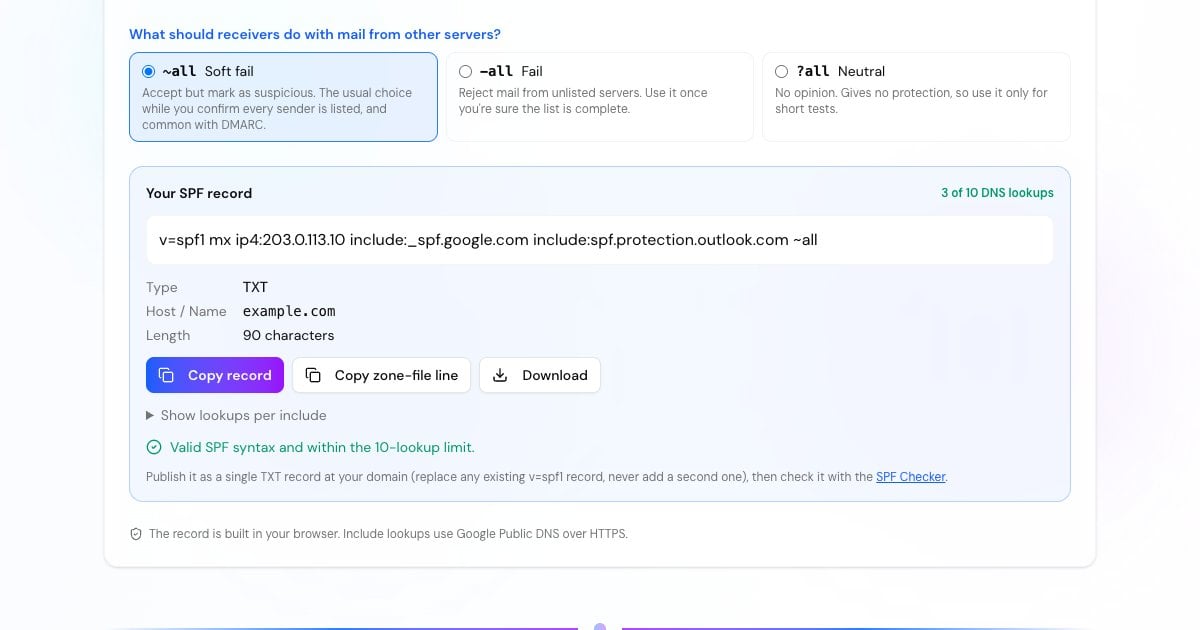
How to Create an SPF Record
Your mailbox provider, newsletter and transactional services, help desk, CRM, and any server or website that sends mail from your domain. Missing one is the most common reason SPF fails.
Pick each provider above, add any other include domains, and enter your own servers as IPv4 or IPv6 addresses. Use mx only if your inbound mail servers also send.
~all (soft fail) is the usual start. Switch to -all (fail) when you're sure the list is complete. Keep an eye on the lookup counter: it must stay at 10 or below.
Add it as a TXT record with host @ (or the subdomain that sends mail), replacing any existing v=spf1 record. Then confirm it with the SPF Checker.
Advertisement
SPF Record Syntax Explained
An SPF record is a list of terms read from left to right. The first one that matches the sending IP decides the result.
The version tag. It must be the first term, and it's how receivers recognise the TXT record as SPF.
Authorizes everything in another domain's SPF record, such as include:_spf.google.com. Every lookup inside that record counts toward your limit too.
Authorize one address or a CIDR range, for example ip4:203.0.113.10 or ip6:2001:db8::/48. They cost no DNS lookups.
Authorize the IPs of the domain's A/AAAA record or of its MX hosts. Handy, but each costs a lookup, and mx can cost up to 10 more queries inside.
What to do with every other server: soft fail, fail, or neutral. Never publish +all, which lets anyone send as your domain.
redirect= hands the whole check to another domain's record. exists: is used with macros by some large senders. ptr is slow, and RFC 7208 says not to publish it.
~all vs -all: Soft Fail or Fail?
-all tells receivers that mail from any unlisted server fails SPF, and many will reject it. ~all marks it as a soft fail: receivers shouldn't reject it on that alone, but may treat it as suspicious. ?all is neutral and offers no protection.
Google's Workspace instructions use ~all and Microsoft's Microsoft 365 example uses -all. Both work. Once you publish DMARC, the DMARC policy (p=quarantine or p=reject) decides what happens to failing mail, so many domains keep ~all to avoid rejecting legitimate forwarded mail and let DMARC do the enforcing. If the domain sends no email at all, publish v=spf1 -all.
Advertisement
SPF Record Examples
Copy the one closest to your setup, or build your own with the generator above. Each is a single TXT record at your domain.
v=spf1 include:_spf.google.com ~allv=spf1 include:spf.protection.outlook.com -allv=spf1 ip4:203.0.113.10 include:_spf.google.com include:mailgun.org ~allv=spf1 include:zohomail.com ~allv=spf1 mx ip4:198.51.100.0/24 ip6:2001:db8::/48 -allv=spf1 -allThe 10 DNS Lookup Limit
RFC 7208 caps an SPF check at 10 DNS lookups. Every include, a, mx, ptr, exists and redirect costs one, and so does every one of those inside the records you include. ip4, ip6 and all are free. A check that needs an 11th lookup stops with PermError, which counts as an SPF failure for DMARC. Receivers should also allow no more than 2 void lookups (names that don't exist or return no records).
Providers don't all cost the same. We counted each include on 5 October 2026, nested lookups included:
_spf.google.com and spf.protection.outlook.com list their IP ranges directly. Amazon SES, Brevo, Mailjet, Zendesk and Fastmail also cost 1.
Each points to one more record of its own.
Hosting mailboxes often chain several includes.
One of these plus a few other services can use up the whole budget.
Advertisement
How to Fix an SPF Record With Too Many Lookups
Remove services you no longer use. Old newsletter tools and trial accounts are the usual culprits.
Replace `a` and `mx` with `ip4`/`ip6` when your own servers have fixed addresses.
Move bulk mail to a subdomain such as news.example.com, with its own SPF record and its own 10 lookups.
Check whether a service needs an include at all. Many senders use their own bounce domain, so SPF passes on theirs and DMARC alignment comes from DKIM.
Be careful with SPF flattening. Replacing includes with copied IP lists works until a provider changes its IPs, then mail starts failing without warning.
Common SPF Mistakes
Two SPF records on the same domain, for example one per provider. Merge them into one.
Using
+all, which authorizes the whole internet.Publishing the record on the wrong name. SPF is checked on the envelope sender's domain, and subdomains don't inherit it.
Adding mechanisms after
all. Receivers never evaluate them, so those senders aren't authorized.Forgetting a sender, such as the web server that sends contact-form mail.
Using the old SPF record type (type 99). RFC 7208 discontinued it: publish TXT only.
Advertisement
SPF, DKIM and DMARC Work Together
SPF alone doesn't stop someone faking the From address your readers see. DKIM signs each message, and DMARC ties both to the visible From domain and tells receivers what to do when they fail. Set up all three:
Verify the published record, its nested includes and its lookup count.
Create a DKIM key pair and the selector._domainkey TXT record.
Build a DMARC policy with reporting addresses.
Read SPF, DKIM and DMARC results from a real message.