What Is a DKIM Record?
DKIM (DomainKeys Identified Mail, RFC 6376) adds a digital signature to every message your server sends. The signature is made with a private key that stays on the server. The matching public key is published in DNS as a TXT record at selector._domainkey.yourdomain.com, and receivers fetch it to check that the message really came from your domain and wasn't changed on the way.
The selector is just a label you choose, such as default or s1. It lets one domain publish several keys at once, one per service or per key generation. A valid DKIM signature from your own domain is also what lets mail pass DMARC when SPF can't line up, for example after forwarding.
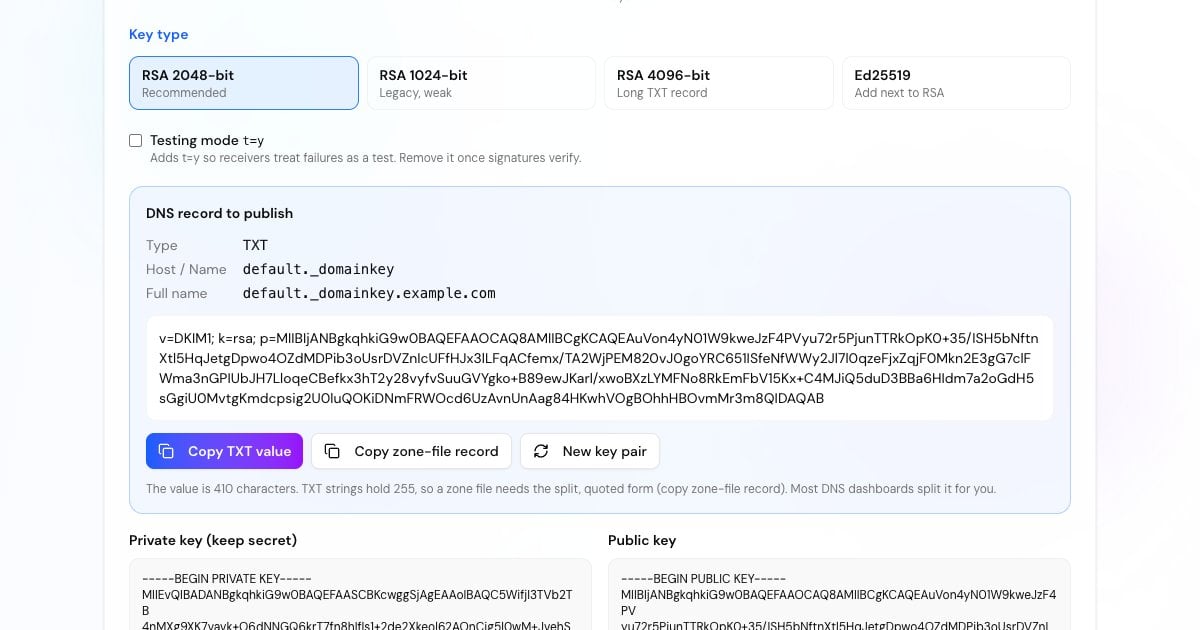
Do You Need to Generate Your Own DKIM Key?
Often you don't. Google Workspace creates the key for you (Admin console, Apps, Google Workspace, Gmail, Authenticate email), and Microsoft 365 uses two CNAME records, selector1._domainkey and selector2._domainkey, that point to keys Microsoft manages. Most newsletter and transactional services also hand you their own records.
You need your own key pair when you run the mail server, for example Postfix with OpenDKIM or rspamd, or Exim, or when an app or relay asks you to upload a private key. That's what this generator is for.
Advertisement
How to Generate DKIM Keys and Publish the Record
The selector can be anything made of letters, digits and hyphens. A date-based one, such as s2026, makes key rotation easy to track.
RSA 2048-bit is the right choice for almost everyone. The key pair is created in your browser the moment the page loads, and again when you change the type.
Download it and install it on your mail server. It isn't stored anywhere, so if you lose it you'll need a new pair.
Add a TXT record with host selector._domainkey and the generated value, send yourself a message and check it with the DKIM Checker.
DKIM Record Syntax
A DKIM key record is a list of tag=value pairs separated by semicolons. Only p= is required, but publish v and k too.
Identifies the record as a DKIM key. If present it must come first.
The key algorithm. rsa is the default if the tag is missing.
The public key in base64. An empty p= means the key has been revoked and signatures made with it fail.
Asks receivers to treat the domain as testing DKIM. Remove it once signatures verify.
Strict mode: the i= identity in a signature must use exactly the d= domain, not a subdomain of it.
Limit the hash algorithms (h=sha256) or the service the key is for (s=email). Most records leave them out.
Advertisement
RSA 2048 vs 1024 vs 4096 vs Ed25519
RSA 2048-bit: the recommended size. RFC 8301 says signers should use at least 2048 bits. The TXT value is about 410 characters.
RSA 1024-bit: still verified, and the minimum receivers accept, but weak by today's standards. Signatures from shorter keys don't count as valid. Use it only if your DNS host can't store a longer value.
RSA 4096-bit: receivers must verify keys up to 4096 bits, but the value is about 750 characters, and some DNS panels and older systems handle it badly. It adds little over 2048.
Ed25519: a modern, much shorter key (the whole record is about 66 characters, RFC 8463). Not every receiver verifies it yet, so sign with an RSA key as well, under a second selector.
Why Is My DKIM Record Split Into Several Strings?
A single TXT string can hold at most 255 characters, and a 2048-bit DKIM value is longer. DNS solves this by storing the value as several quoted strings that receivers join back together.
Most DNS dashboards accept the long value as it is and split it for you. Amazon Route 53 and BIND zone files need you to enter the split form yourself, which is what the zone-file button gives you (in Route 53, paste only the quoted strings, on one line). Don't add spaces or line breaks inside the key, and don't put each half in a separate record.
Advertisement
Set Up the Key on Your Mail Server
Save the private key as default.private (with your own selector), make it readable only by the signing service, and point the signer at it. An OpenDKIM example for example.com with the selector default:
sudo mkdir -p /etc/opendkim/keys/example.com
sudo mv default.private /etc/opendkim/keys/example.com/
sudo chown opendkim:opendkim /etc/opendkim/keys/example.com/default.private
sudo chmod 600 /etc/opendkim/keys/example.com/default.privatedefault._domainkey.example.com example.com:default:/etc/opendkim/keys/example.com/default.private*@example.com default._domainkey.example.comopenssl genrsa -out default.private 2048
openssl rsa -in default.private -pubout -out default.publicopendkim-genkey -b 2048 -d example.com -s defaultHow to Rotate DKIM Keys
Generate a new key pair under a new selector, for example s2027.
Publish the new TXT record and wait for it to resolve everywhere.
Switch the mail server to sign with the new selector.
Keep the old record for a week or so, until mail signed with it has been delivered and checked.
Then delete the old record, or publish it with an empty
p=to revoke it.
Advertisement
More Email Authentication Tools
DKIM is one of three records receivers check. Finish the set:
Look up a published key by selector and check its syntax and size.
Build an SPF record for your providers with a live lookup count.
Create a DMARC policy that uses your SPF and DKIM results.
See whether a real message passed DKIM, SPF and DMARC.