











Website Speed Test
How fast is your website? Test it from up to 3 places at once on a real browser, see what a visitor saw moment by moment, and get fixes for your own stack.
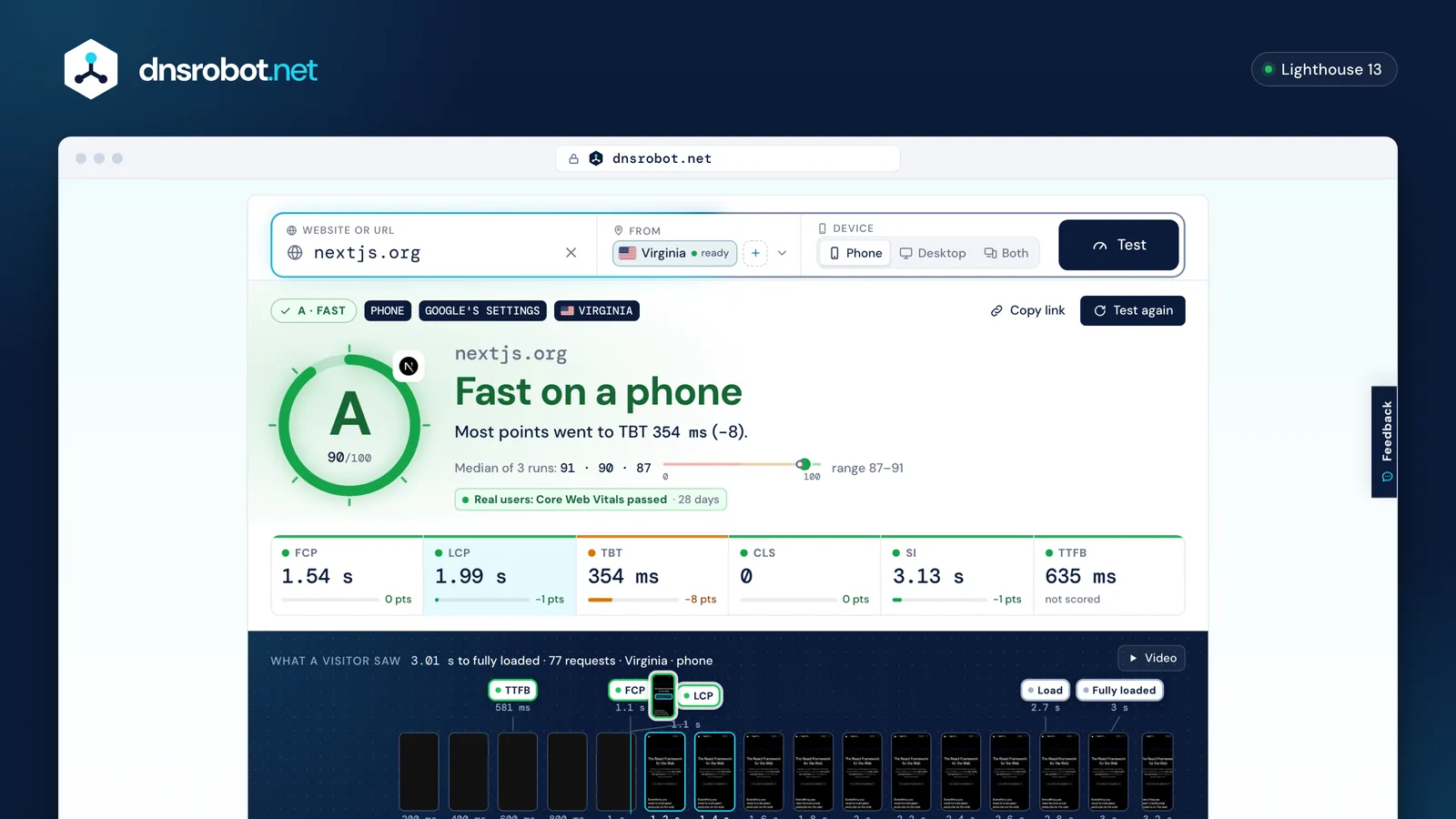
 Any pageA domain or a full URL; up to 3 places, phone, desktop or both.The gradeThe median run's Lighthouse score as a letter, with the runs on a 0–100 track.What a visitor sawThe screen, every request, long tasks and shifts on one time line: click any moment.The conditionsPlace, device, network, CPU, Chrome and Lighthouse versions on every report.
How does a website speed test work?
In a page speed test, a test server in the place you pick opens the page in a fresh Chrome, three times, and records everything: the screen, every request, the main thread. Lighthouse turns each load into a score, and the median of the three runs is the grade.
Parts that need no browser arrive first: server timing from our 11 places, real users' data from the Chrome UX Report, and the site's stack. The grade follows when every place has finished its runs; the fixes come right after.
- 1
 SafetyCloudflare's malware and adult lists, before anything opens the page
 - 2Server timingDNS, connect, TLS and first byte from 11 places, no browser
- 3
 Real users28 days of Chrome UX Report data for the page or its site
 - 4Stackthe CMS, framework, host and CDN from our own engines
- 5
 Runs3 Lighthouse runs per place, each streamed as it finishes
 - 6Gradethe median run's score as a letter, with the points each metric cost
- 7Fixeswritten for this stack, each file and number checked against the test
What do LCP, CLS, TBT, FCP, Speed Index and TTFB mean?
Six numbers on one time line. TTFB is when the server's first byte arrived, FCP when the first text or image appeared, LCP when the largest thing on the first screen was drawn, and Speed Index how quickly the screen filled in.
TBT adds up how long the main thread was too busy to answer a tap, and CLS measures how much the page jumped while it loaded. TTFB carries no weight in the score; the other five do.
| Metric | Phone | Desktop | Weight |
|---|---|---|---|
| FCPFirst Contentful Paint | green up to 1.8 sred above 3 s | green up to 934 msred above 1.6 s | 10% |
| LCPLargest Contentful Paint | green up to 2.5 sred above 4 s | green up to 1.2 sred above 2.4 s | 25% |
| TBTTotal Blocking Time | green up to 200 msred above 600 ms | green up to 150 msred above 350 ms | 30% |
| CLSCumulative Layout Shift | green up to 0.10red above 0.25 | green up to 0.10red above 0.25 | 25% |
| SISpeed Index | green up to 3.4 sred above 5.8 s | green up to 1.3 sred above 2.3 s | 10% |
| TTFBTime to First Byte | green up to 800 msred above 1.8 s | not scored | |
How is the grade calculated?
The grade is the median run's Lighthouse performance score: A from 90 (Google's green), B from 80, C from 65, D from 50 and F below 50. Each metric is scored on its own curve and weighted, and the result card shows the points each one cost.
We run three times because scores move from run to run, and show all three on a 0–100 track. One odd run never decides the letter. A page that never stops loading gets one or two runs instead, and its report says so.
Why do PageSpeed Insights and GTmetrix show a different score?
Same Lighthouse, different servers, places and settings. With the Like Google PageSpeed setting we use the presets PageSpeed Insights runs (a simulated slow phone on 4G, or a desktop on cable) with our CPU slowdown calibrated so our servers score like Google's. Until a test server's slowdown is calibrated, its reports say it is provisional.
PageSpeed Insights runs once from a place you can't choose; we run three times from the place you pick. The Full speed setting loads the page at our server's own speed with no throttling, closer to GTmetrix's view, so its scores run higher.
| The two settings on every report. |  Like Google PageSpeed Like Google PageSpeed | Full speed |
|---|---|---|
| Network (phone) | 150 ms · 1.6 Mbps, simulated | the test server's own |
| Network (desktop) | 40 ms · 10 Mbps, simulated | the test server's own |
| Phone screen |  Moto G Power, 412×823 Moto G Power, 412×823 | Moto G Power, 412×823 |
| CPU | slowed, calibrated per server | not slowed |
| Runs | 3, median | 3, median |
Lab data and field data: which one counts?
The lab test is one fresh visit you can repeat after a fix: the same place, device and network each time, so a change shows the same day. Field data is 28 days of real Chrome users, the 75th percentile, from the Chrome UX Report.
Google's Core Web Vitals verdict comes from field data, and it can't move right after a fix: it averages four weeks. Use the lab to check a fix, and the field data to see it reach your visitors over the next month.
Lab (this test)
- One visit, empty cache
- A place, device and network you choose
- Moves the moment you fix something
- TBT stands in for interactivity
Field (real users)
- Every Chrome visit that shares statistics
- All their phones, networks and caches
- The 75th percentile over 28 days
- INP measures real interactions
How do I make my website faster?
Start with what costs the most points: the fixes are ordered by the saving the measurement proves. A slow server or a far one with no CDN delays everything after it; render-blocking files delay the first paint; heavy JavaScript blocks taps; a late lead image delays LCP.
Ads, analytics and other sites' scripts usually have to stay: delay them until the page is usable, or serve them yourself. Then test again: the report compares before and after and marks each earlier fix as fixed or still open.
| Finding | Fixed in |
|---|---|
| The server is slow to answerslow-server | the sitethe CDNthe server |
| No CDN: far places wait for one serverno-cdn-far-region | the CDN |
| Render-blocking CSS and JavaScriptrender-blocking | the site |
| JavaScript keeps the main thread busymain-thread-busy | the site |
| The largest paint comes latelcp-slow | the sitethe CDN |
| Images bigger than the screen needsimage-delivery | the sitethe CDN |
| Your CDN served an old copycdn-stale-copy | the CDN |
Questions about the website speed test
Is the Website Speed Test free?
Why is my score different every time?
Do you cache results?
Which places can I test from?
What do the Like Google PageSpeed and Full speed settings mean?
Why did my site turn the test away?
Which IP addresses do your test servers use?
How long are reports kept?
Can I compare before and after a fix?
Missing something?Suggest a feature or a new tool
Related tools
Website Down Checker
Is it down for everyone or just you? Check any site from 11 places and your own connection, with a live screenshot
CMS Detector
What CMS, theme, plugins and technologies a website uses, with the proof for each
Hosting Checker
Find out who hosts any website: web host, CDN, CMS, email provider, registrar and SSL issuer
SSL Certificate Check
Verify SSL certificate validity and security details
Ping Test
Test your ping, jitter and packet loss, see your ping to 34 cloud regions, and ping any website or IP from 11 cities
Traceroute
Trace the route to any website or IP from 8 cities, hop by hop, each network named