What Is a CSR?
A certificate signing request (CSR) is the file you send to a certificate authority (CA) to get an SSL/TLS certificate. You create it on your server together with a private key. The CSR contains the matching public key, the identity you want certified (the subject: common name, organization, location) and the domain names in the Subject Alternative Names (SANs), and it is signed with the private key to prove you hold it.
The private key never leaves your server and should never be pasted anywhere. The CSR itself holds only public information, so it is safe to decode. This CSR decoder reads it directly in your browser.
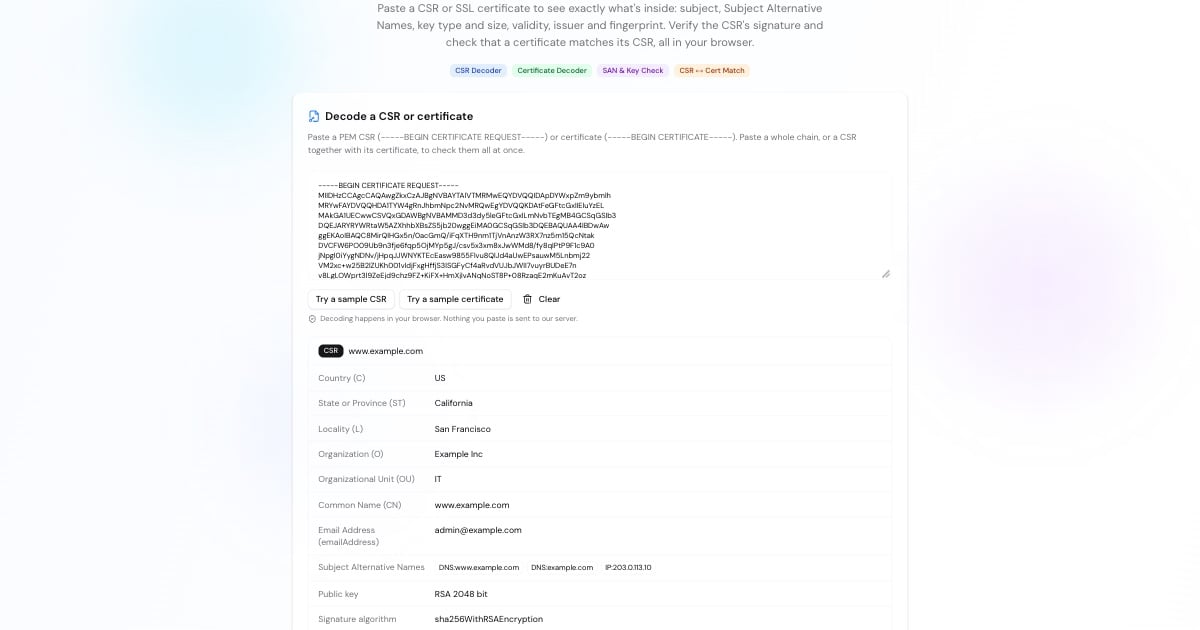
How to Decode a CSR
Copy the whole block, including -----BEGIN CERTIFICATE REQUEST----- and -----END CERTIFICATE REQUEST-----, into the box above.
Make sure every domain you need, usually both example.com and www.example.com, appears in the Subject Alternative Names, and that the organization details are right.
The key should be RSA 2048-bit or larger, or ECDSA P-256 or P-384, and the signature should be valid. An invalid signature means the CSR was altered or damaged.
If everything is correct, paste the CSR into your certificate authority's order form.
Advertisement
What to Check Before You Submit a CSR
A mistake in the CSR means reissuing the certificate. Check these first:
All domain names are in the SANs. Browsers have ignored the common name since Chrome 58 (2017), so names that aren't SANs won't be trusted. Many CAs add the CN automatically, but check.
The key is strong enough. CAs reject RSA keys under 2048 bits. RSA 2048–4096 and ECDSA P-256/P-384 are standard choices.
The signature uses SHA-256 or stronger. SHA-1 signatures are no longer accepted.
Organization details match your records for OV and EV certificates, which the CA verifies. Leave the organizational unit (OU) out: CAs stopped including it in public TLS certificates in 2022.
It's a fresh key. Generating a new private key and CSR for each renewal limits the damage if an old key ever leaks.
How to Decode an SSL Certificate
The same tool works as a certificate decoder. Paste a certificate (-----BEGIN CERTIFICATE-----) or a whole chain and each one is decoded: whether it's valid and how many days remain, the subject and issuer, the SANs, the key, key usage, serial number and SHA-256 fingerprint. CA certificates and self-signed certificates are labelled.
To check the certificate a live website actually serves, including its chain and expiry, use the SSL checker. To see whether a site is reachable at all, try the website down checker.
Advertisement
Does My Certificate Match My CSR?
A certificate only works with the private key its CSR was made from. Installing a certificate with the wrong key is a common cause of server errors after a renewal. Paste the CSR and the certificate together in the box above and the decoder compares their public keys: if they match, the certificate was issued for that CSR's key.
On the server you can compare the certificate, the CSR and the private key with OpenSSL: all three commands below must print the same hash.
openssl x509 -in certificate.pem -noout -pubkey | openssl sha256
openssl req  -in request.csr     -noout -pubkey | openssl sha256
openssl pkey -in private.key     -pubout        | openssl sha256
Create and Inspect CSRs with OpenSSL
The commands most people need, for OpenSSL 1.1.1 or newer:
openssl req -new -newkey rsa:2048 -nodes \
  -keyout example.key -out example.csr \
  -subj "/CN=www.example.com" \
-addext "subjectAltName=DNS:www.example.com,DNS:example.com"openssl req -in example.csr -noout -text -verifyopenssl x509 -in certificate.pem -noout -textAdvertisement
CSR and Certificate Fields Explained
Common Name (CN)
The main domain, such as www.example.com. Kept for compatibility; browsers use the SANs.
Subject Alternative Names (SAN)
Every domain (and sometimes IP address) the certificate covers. Wildcards like *.example.com cover one level of subdomains.
Organization (O), Locality (L), State (ST), Country (C)
Who owns the domain. Verified by the CA for OV and EV certificates; ignored for DV certificates.
Public key
The key the certificate binds to your domain. Its private half stays on your server.
Validity
The dates a certificate is valid between. Since March 2026 public certificates can last at most 200 days, and the limit shrinks again in 2027 and 2029.
Fingerprint
A SHA-256 hash of the whole certificate, used to identify it exactly, for example when pinning or comparing certificates.
More SSL and Security Tools
Check the rest of your HTTPS setup: