










VPN Test
One run checks the address websites see, WebRTC and your other address family, with DNS on request, then says whether your VPN works and what leaks.
AddressThe network every website sees
WaitingDNSWho looks up the names you visit
WaitingRuns on its button: it asks our test nameserver, which every visitor shares. DNS Leak TestWebRTCThe addresses your browser hands a page
WaitingIPv6Your other address family
Waiting
Nothing this test finds is stored. To show what websites see, the page asks ipify.org and our own server for your addresses and their networks; WebRTC runs in your browser. DNS asks our test nameserver only when you press Check DNS too.
How do I test my VPN?
Run the test above with your VPN on. It reads the address every website sees, asks WebRTC what it would hand a page, checks your other address family and, when you ask, your DNS, then puts the four answers into one verdict.
Each check is a different way your traffic can go around a tunnel, and they fail independently. The address says whether a VPN is on at all. DNS says who looks up the names you visit: your provider's DNS server while the VPN is on is a leak, because it shows your provider every name you look up, and that you're hiding your location. WebRTC can hand a page the addresses of every network connection, the one under the VPN included. Your other address family matters when a VPN carries only IPv4: IPv6 then goes out through your provider.
A check that can't run says so, and it never counts as no leak. Run the test once with the VPN off and once with it on: the first run shows your own provider, and the second should show none of it.
The four checkseach fails on its own
| Check | What it asks | A leak means | Go deeper |
|---|---|---|---|
| Address | Which network every website sees | No VPN: websites see your provider | What Is My ISP |
| DNS | Who looks up the names you visit | Your provider sees every name you look up | DNS Leak Test |
| WebRTC | Which addresses your browser hands a page | A page's script gets an address you were hiding | WebRTC Leak Test |
| IPv6 | Whether your other address family uses the tunnel | Sites reached over IPv6 see your provider | IPv6 Test |
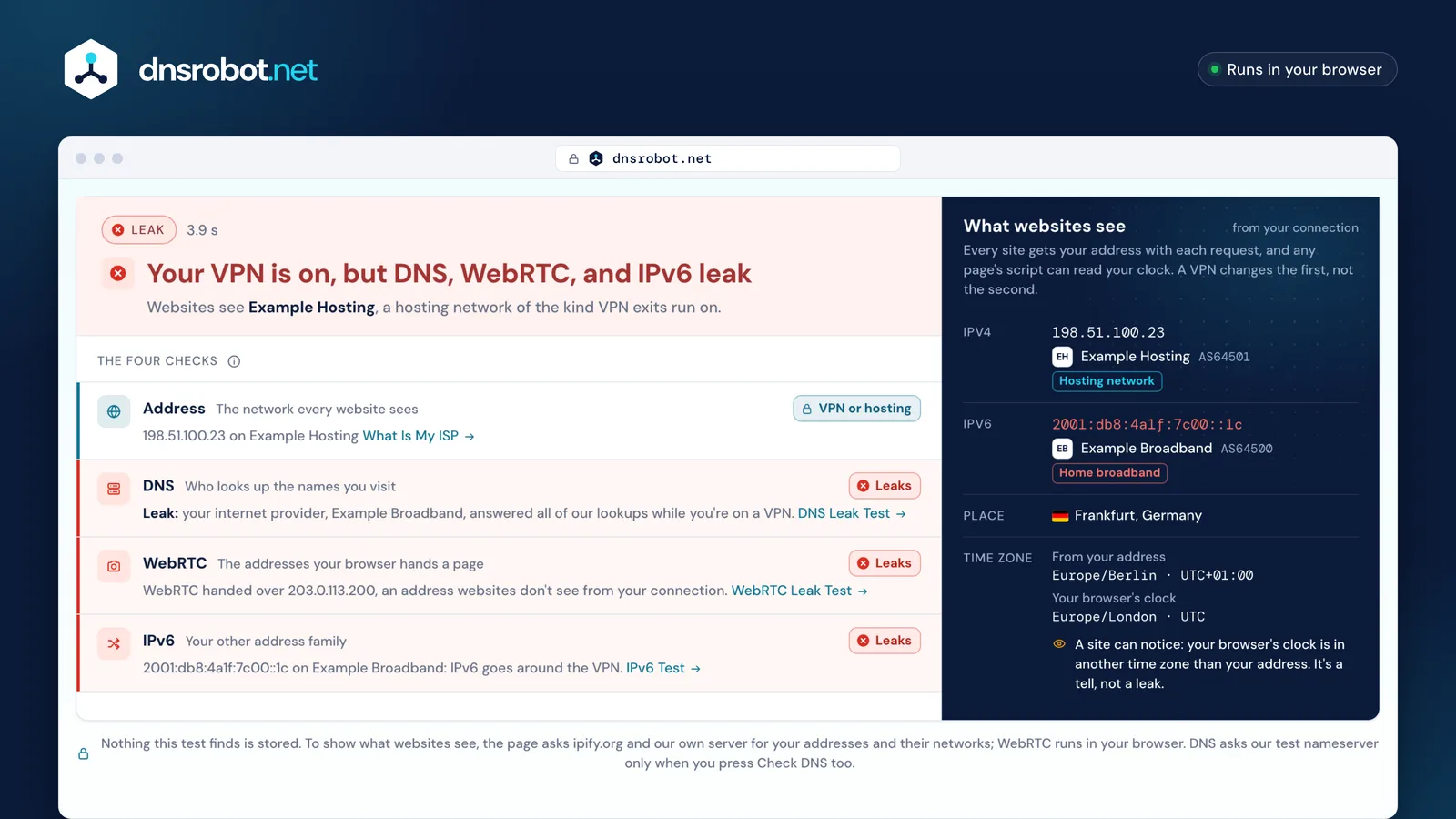
 The verdictOn, off, or on with leaks, each leak named. A check that couldn't run is said, never read as no leak.Each checkThe address websites see, DNS, WebRTC and your other address family, each with what it found.Its stateLeaks, no leak, couldn't check, or not checked yet: DNS runs only when you press its button.What websites seeEach address and its network. A hosting network looks like a VPN; your own provider's name means no tunnel.The time-zone tellYour browser's clock against your address's zone. A site can notice a mismatch, but it isn't a leak.
Is my VPN on or off?
Look at the network websites see. Most VPN exits are in data centres, so with a VPN on the address belongs to a hosting company; without one it belongs to your home or mobile provider.
The test names the network from the address's AS number with the same published rules as What Is My ISP: a list of cloud, hosting and VPN-infrastructure networks, none of them a home provider; Apple's Private Relay partners and Cloudflare; and the Tor Project's own list of exit addresses. It's a reading of the network, never of you: a work network or a cloud desktop can look like a VPN too.
Websites can tell the same way. Detection companies sell lists of such addresses: MaxMind describes flagging "IP addresses associated with hosting services that are likely to be used as anonymizers", VPN services included. Their lists are their own; ours are the published rules above. A clock in another time zone than your address is a second tell.
What the address saysby our published rules
| Websites see | How we know | The test says |
|---|---|---|
| A cloud, hosting or VPN-infrastructure network | On our hosting list: none of them is a home provider | VPN on |
| An iCloud Private Relay partner | The networks behind Apple's published relay addressesAS36183 · AS13335 · AS54113 | Relay |
| Cloudflare | WARP and Private Relay both leave through itAS13335 | Relay |
| A Tor exit | On the Tor Project's own list of exit addresses | Tor |
| A home, mobile or satellite provider | Any other network websites see | No VPN |




How can I test my VPN location?
Read the place under What websites see: it's where address databases put your VPN's exit. Then compare the two time zones under it.
The place comes from the address. Location databases are nearly always right about the country and often wrong about the city. Some VPN locations are also virtual: Proton VPN, for one, offers countries whose servers "are, in reality, located elsewhere". The countries of DNS servers say nothing about where you are, because public DNS answers from many places at once.
The first time zone is Cloudflare's for your address; the second is the one your browser tells any page that asks. When they differ, a site can notice that your clock and your address disagree. That's a tell, not a leak: it gives away no address. Change your device's time zone only if that matters to you.
Two clocksan example
 Europe/BerlinUTC+01:00Cloudflare's time zone for the address
 Asia/KolkataUTC+05:30What JavaScript tells any page
A site can notice they disagreeA tell, not a leak: no address is given away
Why is my VPN not working?
If the test says no VPN is on while your app says connected, this browser's traffic isn't going through the tunnel. Usually the VPN dropped, it doesn't come back on by itself, or the app leaves this browser out.
Start with the system's own setting. Android can start a VPN at boot and keep it on (always-on VPN, Android 7.0 and later), and block every connection that doesn't use it. iPhone, iPad and Mac can connect a VPN on demand. Windows lists VPN connections under Settings › Network & internet › VPN, with Connected under the name of the one that's up.
Then check the app. Many VPN apps can send only some apps through the tunnel, often called split tunnelling; on Android an app's allowed and disallowed lists decide it. If your browser is left out, websites see your provider. On Apple devices a little system traffic always stays outside a VPN app's tunnel, such as what keeps the device on the local network and Wi-Fi sign-in pages. With WireGuard and OpenVPN, the tunnel's DNS and the block on DNS outside it come from lines in the config.
Where to look
Settings › Network & internet › VPN › ⚙ next to your VPN › Always-on VPN, then Block connections without VPNAlways-on VPN starts the VPN at boot (Android 7.0 and later); Block connections without VPN stops everything that doesn't use it. Android's help says a VPN set up through an app won't show the always-on option here.
What each leak means, and how to fix it
A DNS leak shows your provider the sites you look up, a WebRTC leak hands a page an address you were hiding, and an IPv6 leak sends a whole address family past the tunnel. Each has its own fix.
DNS: once connected, use only the DNS servers your VPN gives you. VPN apps keep DNS inside the tunnel with firewall rules, and a custom DNS set in your system can override that, as can your browser's own secure DNS setting. WebRTC: Firefox has preferences that restrict it, Edge has a policy and Safari restricts it already; the WebRTC Leak Test has each browser's steps.
IPv6: turn on your VPN app's IPv6 leak protection, or use a VPN that carries IPv6 too. Switching IPv6 off is an operating-system last resort: Microsoft doesn't recommend disabling it on Windows. The time zone is a tell, not a leak, so there's nothing to fix unless it matters to you.
Each leak and its fixand the test that checks it
| Leak | What it gives away | Fix | Check with |
|---|---|---|---|
| DNS | Every name you look up, to your provider | Use only your VPN's DNS. Remove a custom DNS from your system and the browser's own secure DNS, which can override the VPN's. | DNS Leak Test |
| WebRTC | An address you were hiding, to any page that asks | Firefox: its WebRTC preferences. Edge: its policy. Safari restricts it already. | WebRTC Leak Test |
| IPv6 | Your provider's IPv6 address, to sites reached over IPv6 | Turn on the VPN app's IPv6 leak protection, or use a VPN that carries IPv6. Switching IPv6 off is a last resort. | IPv6 Test |
| Time zone · A tell | Only that your clock and your address disagree | Nothing leaks. Change your device's time zone only if it matters to you. | — |
What does a VPN kill switch do?
A kill switch blocks your connection when the VPN drops, so nothing goes out through your provider until it reconnects. Without one, your traffic and your DNS fall back to your normal connection.
VPN apps describe it the same way. Proton's "protects your IP address and DNS activity by blocking all internet traffic on your device if your VPN connection drops", and its standard kill switch acts only when the connection drops by accident, not when you switch the VPN off yourself. Android has one built in: Block connections without VPN.
A kill switch is separate from DNS leak protection, so you want both. This test can't see a drop that hasn't happened; it shows what leaves your device while you run it.
When the VPN dropswith and without a kill switch
The VPN connection drops
Without a kill switch
Traffic and DNS fall back to your normal connection, and your provider's address shows.
With a kill switch
Everything is blocked until the VPN reconnects. Android's version: Block connections without VPN.
VPN test: questions and answers
Am I using a VPN right now?
What does a VPN leak test check?
Can websites tell I use a VPN?
Does a VPN hide my DNS?
Does a VPN change my time zone?
Is iCloud Private Relay a VPN?
Why does my VPN show the wrong country?
Why is my VPN not working on my phone?
Missing something?Suggest a feature or a new tool
Related tools
DNS Leak Test
See which DNS servers really resolve your lookups and whether your VPN leaks DNS requests to your internet provider
WebRTC Leak Test
Check whether WebRTC in your browser reveals your real IP address behind a VPN or proxy, plus any local IPs it exposes
IPv6 Test
Test if your IPv6 works, which family your browser picks and if a site has IPv6
What Is My ISP
Discover your ISP, ASN, and connection details
What Is My IP
Your public IPv4 and IPv6 at once, with the network, location and a VPN check
IP Lookup
Look up IP address geolocation, ISP, and network details instantly