











Robots.txt Tester
A robots.txt checker that shows its working: the rule that decided your URL with its line number, the group a crawler actually read and why the others were ignored, and what your file's status code means for the whole site.
Enter a domain to read its file, or a full URL such as example.com/admin/ to test that path too.
- FetchGET /robots.txt
- Readgroups, rules, sitemaps
- Groupwhich rules a crawler obeys
- Verdictwhat each crawler may crawl
How to test your robots.txt now that Google's tester is gone
Enter a domain above and select Check robots.txt. We fetch the file once from our server, then test any URL you type against it in your browser, for any crawler you pick — which is what Google's own robots.txt Tester used to do before it was retired.
Google announced the change on 15 November 2023: “As part of this update, we're sunsetting the robots.txt tester.” The legacy tester went in December 2023, and the Search Console robots.txt report that replaced it is a different kind of thing.
That report lists the files Google already fetched for the top 20 hosts on a property you own and verified, with the date it was checked, the size in bytes and a count of issues. It cannot test a URL against a rule, test a crawler that is not Google's, or look at a site you do not own. This page does all three.
- The file Google last fetched
- Its size and the date it was checked
- A count of parsing issues
- Is this URL allowed for this crawler?
- Which rule decided it, and on which line
- A crawler that is not Google's
- A site you do not own
Google announced the change on 15 November 2023 and removed the tester in December 2023.
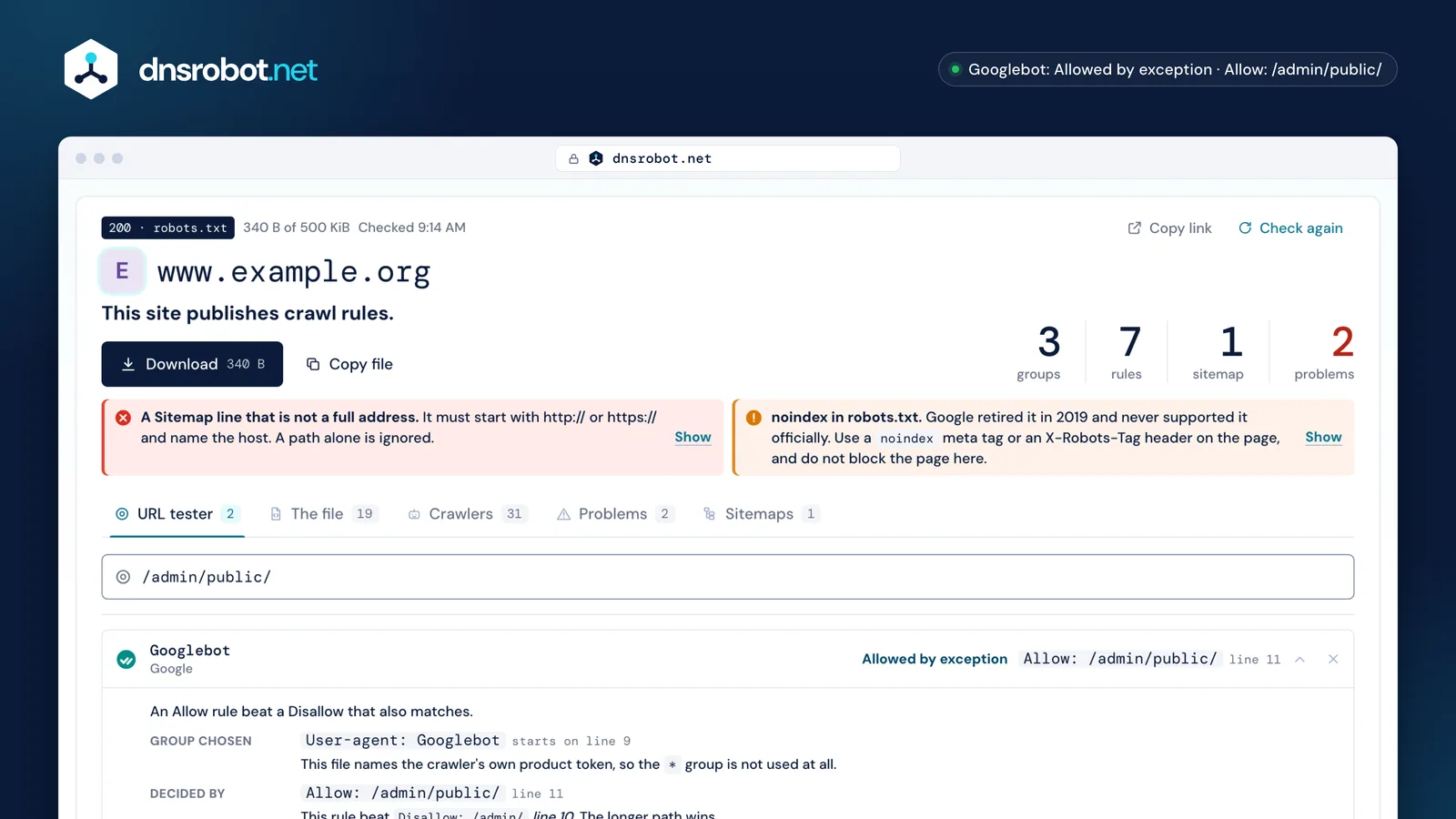
 The consequenceNot the status code on its own: what it means for the whole site. A 404 here lets every crawler take everything; a 503 means a crawler that follows the standard takes nothing.The deciding ruleThe rule that decided this URL for this crawler, with its line number and the rule it beat. The longest match wins, and an Allow wins a tie.The group chosenWhich group the crawler actually read, and why the others were ignored. This is the step the rest of the field leaves out.The findingsEvery problem on its own line of the file, with what to do about it.
How does Google choose which group applies to a crawler?
A crawler obeys exactly one set of rules. It looks for a group whose User-agent line names its own product token; only if there is none does it fall back to the group named *. The * group is a fallback, never an addition.
RFC 9309 puts it plainly: “Crawlers MUST use case-insensitive matching to find the group that matches the product token”, and “[if] no matching group exists, crawlers MUST obey the group with a user-agent line with the * value, if present.” Google says the same in its own words: “Only one group is valid for a particular crawler.”
Two things follow, and together they cause most of the confusion. Several groups naming the same token are merged into one, so two User-agent: Googlebot blocks both count. But a named group and the * group are never merged: an Allow: / under * does nothing for Googlebot once a Googlebot group exists. Googlebot-Image and the other Googlebot-* crawlers fall back to the googlebot group, which is behaviour the crawler adds on top of the matcher — Google's own open-source matcher does not implement it.
- 1
# www.example.org - 2
User-agent: * - 3
Allow: / - 4
Disallow: /cart/ - 5
- 6
User-agent: Googlebot - 7
Disallow: /admin/ - 8
Allow: /admin/report.pdf - 9
- 10
Sitemap: https://www.example.org/sitemap.xml
- 1A group names this crawler's own token?Read that group. The
*group is not used. - 2Several name it?Read them as one group.
- 3A
*group exists?Read the*group. - —No rules apply. Everything may be crawled.

Allow: / under * is never read.
*.Allow vs Disallow: the longest match wins
When more than one rule matches a URL, the one with the longest path wins, whichever kind it is. If an Allow and a Disallow are the same length, the Allow wins.
RFC 9309: “The most specific match found MUST be used. The most specific match is the match that has the most octets”, and “if an allow rule and a disallow rule are equivalent, then the allow rule SHOULD be used.” Google describes the same behaviour as using “the least restrictive rule” when rules conflict.
Octets, not characters: a path with accented letters or a %2F is compared after percent-encoding, which is where naive tools go wrong. Only the path and query are compared, starting at the first character, and they are case-sensitive even though directive names are not — Disallow: /File.pdf does nothing to /file.pdf.
/admin/report.pdfThe Allow wins: it matches more of the path.
Disallow: /files/7 charactersAllow: /files/7 charactersEqual length, so the Allow wins. “The least restrictive rule”, as Google puts it.
The only two wildcards: `*` and `$`
* stands for any run of characters, and $ marks the end of the URL. There is nothing else: no regular expressions, and no special meaning for ?, ., [ or +, which are all plain characters.
A rule without a $ is a prefix, so Disallow: /admin also blocks /administrator and /admin-tools. Add a trailing slash (/admin/) when you mean the folder, and a $ when you mean exactly that URL. Disallow: /*.pdf$ blocks every PDF; Disallow: /*? blocks every URL with a query string.
The URL tester above shows the paths a rule also catches, from the same matcher that produced the verdict, so a rule that reaches further than you meant is visible before you publish it.
* and $, and what each pattern really catches/admin/admin/ · /administrator · /admin-tools/wp-admin/admin//admin/users/administrator/*.pdf$/files/report.pdf/report.pdf?v=2/*?/search?q=x/search?, ., [ and + are plain characters. There are no regular expressions in robots.txt.
What does your robots.txt status code mean?
A 4xx and a 5xx on the same broken file have opposite results. A 4xx is read as if there were no file, so a crawler may take everything. A 5xx means the file is undefined, so a compliant crawler must take nothing.
RFC 9309 §2.3.1.3: if the status says the file “is unavailable to the crawler, then the crawler MAY access any resources on the server”. §2.3.1.4: if it “is unreachable due to server or network errors… the crawler MUST assume complete disallow.” Google treats “all 4xx errors, except 429, as if a valid robots.txt file didn't exist”, which puts 429 on the 5xx side.
Google then softens the 5xx case with a ladder of its own: it stops crawling for the first 12 hours, uses its last good copy for the next 30 days, and after that, if the rest of the site is up, behaves as if there were no robots.txt at all. Google follows at least five redirect hops, then stops and “treats it as a 404 for the robots.txt file”, which means crawl freely. And a name that does not resolve is not a site blocking anyone — there is no file, and no verdict.
200Follows the rules in the file.301, 302Follows at least five hops, then stops. Google then reads the file as a 404.403, 404Crawls everything, as if there were no file.429Crawls nothing. Google counts this with the 5xx answers, not the 4xx ones.500, 503Crawls nothing at all, by the standard.No such nameThere is no site to read, so there is no verdict.- 1First 12 hoursStops crawling the site and keeps retrying the file
- 2Up to 30 daysUses its last good copy of robots.txt
- 3After 30 daysIf the site is up, behaves as if there were no robots.txt
Does robots.txt keep a page out of Google?
No. It asks a crawler not to fetch the page; it does not ask a search engine not to list it. Google can't read a disallowed page, but it “may still index the URL and show it in search results without a snippet” when other pages link to it.
That is the Search Console status “Indexed, though blocked by robots.txt”: “Google won't request and crawl the page, but we can still index it, using the information from the page that links to your blocked page.” Google's own fix, in its words, is to “remove the robots.txt block and use a noindex directive”.
Which makes the commonest mistake in robots.txt a pair, not a line: a URL that is both disallowed here and carries noindex. Google is explicit that “if the page is blocked by a robots.txt file… the crawler will never see the noindex rule, and the page can still appear in search results”. Pick one: block the crawl, or let it in and tell it not to index.
- Crawler
- Reads robots.txt
- The URL is disallowed
- Does not fetch the page
<meta name="robots" content="noindex">Never readTo keep a page out: let the crawler in and use noindex, or require a login.
How do I block ChatGPT, Claude and the other AI crawlers?
With an ordinary group each. The AI companies publish product tokens exactly like search engines do, and most of them run several: one for training, one for answering a question with a link back, and one that fetches a page because a person asked for it.
Those three are worth keeping apart. Blocking a training crawler keeps your pages out of a model; blocking an answer crawler also takes you out of the citations those products show. The Crawlers view above names each one's purpose, its token and what its operator's own documentation says it obeys, so you can refuse training without disappearing from AI answers.
Some operators say outright that the crawler fetching a page on one person's behalf may ignore robots.txt, because it is acting for a user rather than crawling. The table marks those. And Cloudflare's Content-Signal lines, which more sites now publish, are a statement of what your content may be used for rather than a crawl rule: this page keeps them and explains them instead of calling them an error.
GPTBotObeysOAI-SearchBotObeysChatGPT-UserMay ignore
ClaudeBotObeysClaude-SearchBotObeysClaude-UserObeys
PerplexityBotObeysPerplexity-UserMay ignoreGoogle-ExtendedToken onlyNo such crawlerNo such crawler
Applebot-ExtendedToken onlyNo such crawlerNo such crawler
meta-externalagentObeysmeta-webindexerObeysmeta-externalfetcherMay ignore
AmazonbotObeysNo such crawlerAmzn-UserMay ignore- TrainingCollects pages to train a model.
- AI answersFetches pages to answer a question, usually with a link back to you.
- One person's requestFetches one page because someone asked for it. Some operators say this one may ignore robots.txt.
Crawl-delay, Clean-param, Host and Content-Signal: who reads what?
Google reads four fields and no others: user-agent, allow, disallow and sitemap. Everything else in a robots.txt is read by someone else, or by nobody — and an unknown line is never an error.
Google lists its four fields and adds that “other fields such as crawl-delay aren't supported”. Bing does support Crawl-delay, from Bing's own blog: “the crawl-delay directive accepts only positive, whole numbers as values”. Clean-param is Yandex's and nobody else's. Host is in neither the standard nor Google's list.
None of them breaks a file. RFC 9309 requires that parsing other records “MUST NOT interfere with the parsing of explicitly defined records”, so a crawler that does not know a line skips it. The two directives that really are dead are noindex and nofollow inside robots.txt: Google retired the code that handled them in 2019, and they do nothing in Google today.


User-agentReads itReads itReads itAllowReads itReads itReads itDisallowReads itReads itReads itSitemapReads itReads itReads itCrawl-delayIgnores itReads itNot confirmedClean-paramIgnores itIgnores itReads itHostIgnores itIgnores itNot confirmednoindexIgnores itNot confirmedNot confirmedContent-SignalIgnores itNot confirmedNot confirmed- Google supports four fields and says so: user-agent, allow, disallow and sitemap.
- Bing's own blog confirms Crawl-delay. We do not publish a range or a unit for it: Bing's current help page could not be read to check them.
- Retired by Google in 2019, and never part of the standard.
- Cloudflare's Content Signals Policy: a statement about how content may be used, not a crawl rule.
The 500 KiB limit, and what falls past it
Google reads the first 500 kibibytes of a robots.txt and ignores everything after it, without an error anywhere. RFC 9309 sets 500 KiB as the floor for a crawler's parsing limit; Google states it as the ceiling.
Google: “Google enforces a robots.txt file size limit of 500 kibibytes (KiB). Content which is after the maximum file size is ignored.” Nothing warns you. A 600 KiB file is not invalid — its last 100 KiB simply does not exist for Googlebot, and a Disallow down there protects nothing.
Sites reach it more often than you would think: one rule per campaign parameter, per faceted filter, per old staging folder. The check above measures the file against the line and tells you how much is past it. Replace long lists with patterns (Disallow: /*?filter=), and put the rules that matter at the top.
Disallow: /cart/ · Line 12ObeyedDisallow: /private/ · Line 9,412Never readThe file still answers 200 and still parses. Nothing anywhere tells you the rest was dropped.
Common robots.txt mistakes, and how to find them
Most broken robots.txt files break in one of six ways, and none of them shows until something tests it: the file still answers 200, still parses, and still looks right.
The one everybody knows is Disallow: / left behind when a site goes live from staging. The other five: a rule that reaches further than you meant, such as Disallow: /admin, which also catches /administrator; an Allow: / under * that a named group quietly ignores; a Sitemap: line written as a path instead of a full address; a path with no leading slash, which matches nothing; and a noindex line, which Google stopped reading in 2019.
Run the check above, then read the Problems view: every finding sits on its own line of the file, with what to do about it. If you are editing the file rather than auditing it, the robots.txt generator writes a file this same checker has already read.
Sources
- RFC 9309, the Robots Exclusion Protocol: groups, precedence, percent-encoded matching, status codes and the 500 KiB floor
- Google Search Central: how Google interprets robots.txt, create and submit a robots.txt file and block indexing with noindex
- Google Search Console help: the robots.txt report and the Page Indexing report
- Bing: Crawl-delay and the Bing crawler and Yandex: Clean-param
- Google's open-source robots.txt parser, the matcher Googlebot itself uses
- Each crawler's token, purpose and robots.txt behaviour comes from its own operator's documentation, linked beside it in the Crawlers view
Disallow: /Left over from staging: the whole live site is closed to every crawler.Disallow: /adminAlso blocks /administrator and /admin-tools. Add the trailing slash.Allow: / under User-agent: *Never read by a crawler that has its own group anywhere in the file.Sitemap: /sitemap.xmlA Sitemap line must be a full address with the host.Disallow: adminA path starts at /. This rule matches nothing.noindex: /private/Dead since 2019. The page stays crawlable and indexable.Robots.txt tester: common questions
What happened to Google's robots.txt tester?
Why is my Allow: / under User-agent: * being ignored?
* group is skipped entirely — it is a fallback, not an addition. Groups are merged only when several of them name the same token. The URL tester above shows which group was chosen for each crawler and why the others were not.Does robots.txt stop a page being indexed?
noindex meta tag or X-Robots-Tag header, or put the page behind a login.Why is my noindex not working?
noindex included, so the page can keep appearing in search results from links elsewhere. Google states this directly: the page “must not be blocked by a robots.txt file” for noindex to take effect. Remove the Disallow line and keep the noindex.What does a 404 on robots.txt mean? And a 500?
If an Allow and a Disallow both match, which one wins?
Which wildcards work in robots.txt?
* stands for any run of characters and $ marks the end of the URL. Everything else is literal: ?, ., [, ] and + match themselves, and there are no regular expressions. A rule with no $ is a prefix, so Disallow: /admin also catches /administrator. Paths are case-sensitive, while directive names such as Disallow are not.Does Google support Crawl-delay?
How big can a robots.txt file be?
How do I block AI crawlers like GPTBot and ClaudeBot?
Disallow: /, exactly as you would for a search engine. Most AI companies run several crawlers with different jobs: one for training, one for answering questions with a link back to you, and one that fetches a single page on a person's behalf. The Crawlers view above names each token, its purpose and what its operator says it obeys, so you can refuse training without losing AI citations.Is a robots.txt checker the same as a validator?
Is robots.txt a security risk?
Disallow: /admin-backup/ is a signpost to exactly what you wanted hidden. Nothing in it prevents access; a crawler obeys it only because its operator chose to. Protect private paths with authentication or a firewall rule, and this checker will point out the paths in your file that read like an invitation.Missing something?Suggest a feature or a new tool
More crawling and indexing tools
Hreflang Checker
Check a page's hreflang tags and every alternate they name: return links, codes, redirects, noindex and canonicals, plus a tag generator
Sitemap Checker
Find and validate a website's XML sitemap: syntax, URL limits, lastmod dates, robots.txt conflicts and broken or redirecting URLs
Sitemap Generator
Crawl your website and get an XML sitemap, an HTML sitemap and a visual site tree
HTTP Header Checker
Response headers exactly as sent, with a Mozilla Observatory security grade
Redirect Checker
Follow every redirect hop by hop: 301/302 chains, timing and bulk checks
What Is My User Agent
Detect your browser, OS, device type, rendering engine, and CPU architecture from your user agent string