











Meta Tag Checker
A meta checker that measures instead of counting: a page's title and meta description in pixels, where Google's results cut them, then whether the page can be indexed and how its link looks when shared.
We read the page from our server the way Google reads its head, and measure the title and description in pixels.
How long should a meta description be?
As long as it takes to describe the page: Google sets no maximum and cuts the snippet to fit the screen's width, not at a character count. Third parties measure that room at about 920 pixels on desktop and 680 on a phone, which a typical English sentence fills, by our measurement, at around 150 and 110 characters.
In Google's words: “There's no limit on how long a meta description can be, but the snippet is truncated in Google Search results as needed, typically to fit the device width” (Google). Width is the unit, so the letters decide. Measured in Arial at 14 px, iiiiii is 19 px wide and WWWWWW 79 px; Japanese characters are full-width, so the same room holds about half as many; Korean, written with spaces, about two-thirds.
That's why the familiar “155 to 160 characters” is a rule of thumb, not a limit, and why a meta description checker that counts characters can be wrong both ways. A 129-character description in sentence case fits a desktop result with room to spare; the same words in capitals run 155 px past the edge. Advice like “50–60 characters, i.e. 580 pixels” treats the two units as interchangeable, and they aren't.
Length costs nothing in ranking: Google said in 2009 that it doesn't use the description for ranking, and its documentation names no penalty for a long or missing one. Google also writes its own snippet from the page much of the time; two third-party studies saw it replace the description in about two results out of three. Write for the reader: unique to the page, a real summary, never a list of keywords, with the important words first.
The one place Google does count characters is the robots rule max-snippet: its number is a count of characters, with 0 meaning no snippet and -1 letting Google choose (Google).
Free returns on all hiking boots. Waterproof leather, grippy soles and a two-year guarantee. Order by 3 pm for next-day delivery.
FREE RETURNS ON ALL HIKING BOOTS. WATERPROOF LEATHER, GRIPPY SOLES AND A TWO-YEAR GUARANTEE. ORDER BY 3 PM FOR NEXT-DAY DELIVERY.
Rooms observed by third parties; Google publishes none.
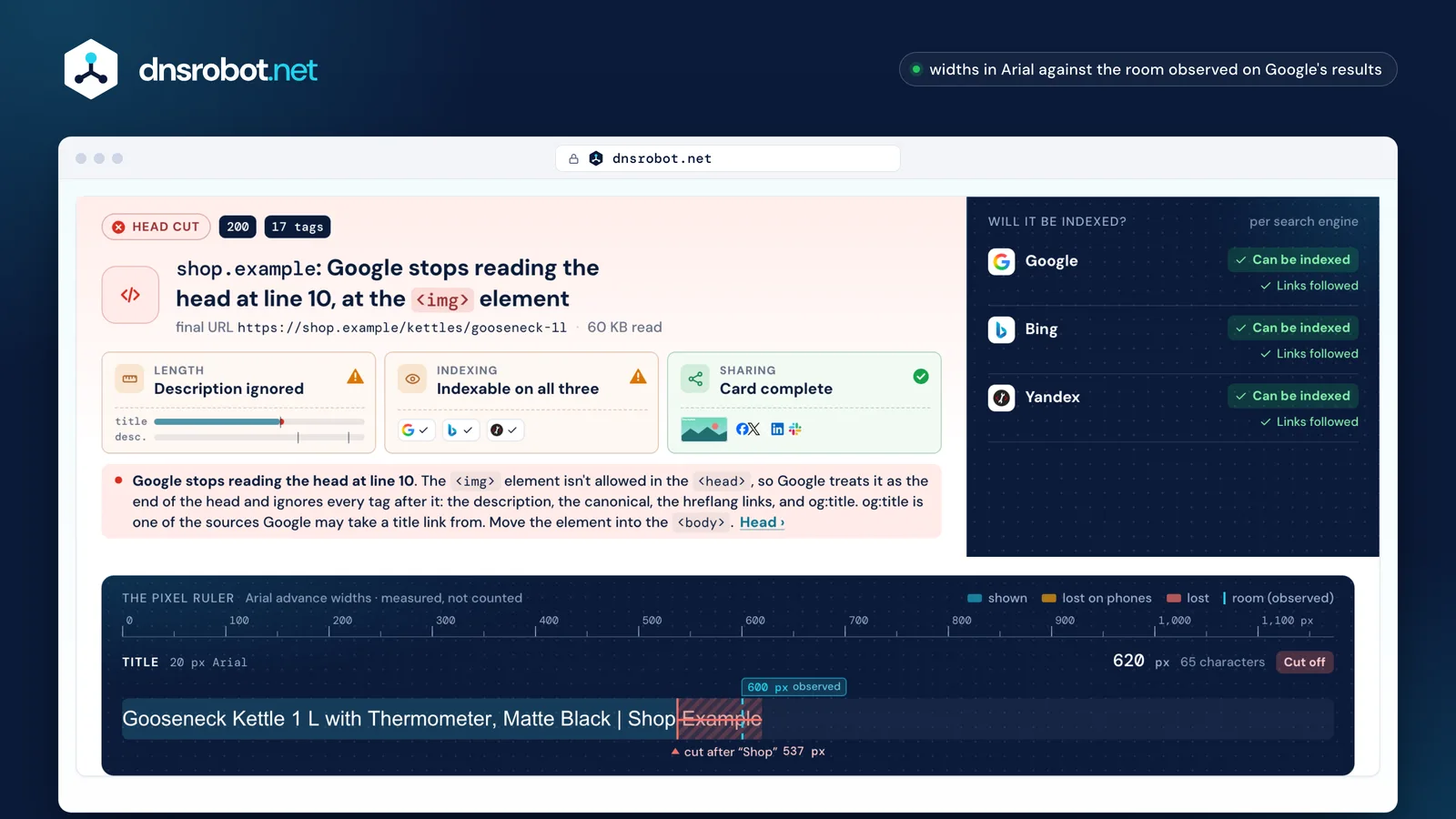
 Measured, not countedThe title and description at the size a results page draws them, with the ruler showing where each is cut on desktop and on a phone.Indexing, per search engineThe robots meta tags and the X-Robots-Tag header, read the way Google, Bing and Yandex each read them.What Google never readsAn element that ends the head early, its line, and every tag it hides.How it looks sharedThe cards Facebook and X build from the tags, with the image's real size read from the file.
How long should a title tag be?
Long enough to name the page, and short enough to fit about 600 pixels, the room third parties measure for a desktop title link: roughly 50 to 60 characters of typical English. Google itself sets no limit and cuts the title link “to fit the device width”.
Google's title link guide says “there's no limit on how long a <title> element can be”, but asks you to avoid “unnecessarily long or verbose” text. A study of 80,959 titles on 2,370 sites found Google rewrote titles over 70 characters nearly every time, and those of 51 to 55 characters about 40% of the time.
The <title> is one input, not the output. Google builds the title link automatically from the title element, the page's main visible title and headings such as <h1>, og:title, other prominent text, anchor text, the text of links pointing to the page, and WebSite structured data. It replaces a title that is missing, boilerplate, stuffed with keywords, or in a different language or script from the page.
So give every page its own descriptive title, put the site name once at the start or the end, set off by a separator such as a pipe, and avoid vague titles like “Home”. The checker above reads the page's first <h1> too, since Google may take the title link from either.
- 1The title element
- 2The main title shown on the page
- 3Headings such as h1
- 4The og:title tag
- 5Other large, prominent text
- 6Other text on the page
- 7Anchor text on the page
- 8Text of links pointing to the page
- 9WebSite structured data
Noindex checker: how do I check if a page is noindex?
Look in two places: the robots meta tag in the HTML and the X-Robots-Tag HTTP header. The header never shows in View Source, so a noindex checker that reads only the HTML can call a page indexable when it isn't; this one reads both, for Google, Bing and Yandex.
A noindex tag and the header carry the same rules, and Google adds them up: with noindex in the header and all in the tag, the page is noindex, because “the more restrictive rule applies” (Google). none means noindex, nofollow; Google's own noindex page calls nofollow a hint. With no tag at all, the default is index, follow. The HTTP Header Checker shows every header a page sends.
Yandex settles a conflict the other way: “Allow directives take priority when combined with prohibiting ones”, so all beside noindex, follow stays indexed there (Yandex). That's why the verdict above is given per engine, not once for all of them.
The trap is robots.txt. A URL blocked there is never fetched, so its noindex is never read, and it can still appear in results when other pages link to it (Google). To keep a page out, let it be crawled and give it a noindex; noindex written in robots.txt isn't supported at all. And a new noindex works only once Google recrawls the page, which can take months.
X-Robots-Tag: noindex| Search engine | How it settles a conflict | This page |
|---|---|---|
| The most restrictive rule wins | Kept out | |
| Bing | The most restrictive rule winsNo rule published; read as Google | Kept out |
| Yandex | The allowing rule wins | Can be indexed |


Blocked in robots.txt: the page is never fetched, so its noindex is never read.
Why does Google ignore some of my meta tags?
Often because an element that doesn't belong in the <head>, such as an <img> or an <iframe>, sits above them. Google treats it as the end of the head and ignores every element after it (Google).
Only eight elements are valid in the head: title, meta, link, script, style, base, noscript and template. A tracking pixel pasted in with a tag snippet, a stray <div> or an embedded <iframe> ends it early, and the canonical, the hreflang links and the description below it are lost without an error anywhere. A meta tag analyzer that only collects every tag in the file still reports them all as present.
Not everything is lost. Google respects robots meta tags in the body as well, so a noindex after the cut still applies. A canonical doesn't: Google accepts it only in the head (Google). The checker above names the element and its line, and lists the tags Google no longer reads.
Tags that JavaScript adds or changes are the other blind spot. Google recommends avoiding it where possible and setting the canonical in the HTML source (Google), so this checker reads the HTML the server sends.
<meta charset="utf-8"><title>Waterproof Hiking Boots for Men and Women – …</title><link rel="stylesheet" href="/theme.css"><img src="https://px.example/p.gif" alt="">Google stops here<meta name="description" content="Free returns on all hi…">Ignored by Google<link rel="canonical" href="https://store.example/boots">Ignored by Google<link rel="alternate" hreflang="de" href="https://store.example/de/stiefel">Ignored by Google<meta name="robots" content="max-snippet:160">Still applies: robots tags count in the body tooWhat does a canonical tag do?
It tells search engines which of several URLs with the same content you want shown, and it is a hint, not a rule: “Google may choose a different page as canonical than you do” (Google).
Google weighs it with other signals: a redirect is the strongest, rel=canonical a strong one, a sitemap a weak one, and none of them is required (Google). Put a self-referencing canonical on the page you want shown, write it as an absolute URL, keep it in the <head>, and don't add hreflang, lang, media or type to it, or Google ignores it for choosing the canonical. The Redirect Checker follows every hop of a redirect.
Two conflicts to avoid. A canonical on a noindex page sends signals that contradict each other, and Google advises against using noindex to choose a canonical at all. And a canonical pointing to another site that nobody here set deserves a look: Google lists an injected cross-domain canonical as a sign of a hacked site.
Language versions are matched with hreflang instead: each version lists itself and all the others with full URLs, and two pages that don't point at each other are ignored. Codes are an ISO 639-1 language with an optional ISO 3166-1 region: en-GB, never en-UK, and es-419 isn't supported (Google). Point each language version's canonical at a URL in that same language.
Same content, several URLs
http://store.example/bootshttps://store.example/boots?utm_source=mailhttps://www.store.example/bootshttps://store.example/boots/https://store.example/bootsA hint: Google may pick anotherSignals, strongest first
rel=canonicalSitemapAn hreflang pair
/en/boots/de/stiefelBoth link back: used
/en/boots/fr/bottesOnly one way: ignored
Which meta tags does Google actually use?
A short list: description, robots and googlebot, notranslate, nopagereadaloud, google-site-verification, the Content-Type and charset declarations, refresh, viewport and rating. Google simply ignores the meta tags it doesn't support (Google).
The meta keywords tag is the best-known one it ignores: Google's documentation says it “is not used by Google Search, and it has no effect on indexing and ranking at all”, and Google announced in 2009 that it had stopped using it. Google doesn't use the lang attribute to detect a page's language either, and rel=next and rel=prev no longer do anything. Of the Open Graph tags, Google documents only og:title, as one source for title links.
Some tags matter even where Google doesn't count them. Screen readers and browsers use lang. Without a viewport tag, a phone lays the page out about 980 CSS pixels wide and shrinks it, so styles for narrow screens never apply (MDN); Google says the tag's presence tells it a page is mobile friendly. And <meta charset> must sit within the first 1,024 bytes of the file, the only part browsers search for it (HTML).
Two more are worth a look. refresh works as a redirect, but Google recommends a server-side 301 instead. And noarchive, retired at Google, still decides at Bing whether content may appear in its chat answers (Bing).
Google uses it
<meta name="description">Sometimes becomes the snippetrobots · googlebotIndexing and snippet rules<title>One source of the title linkog:titleAnother source of the title linkviewportRead as a sign of a mobile-friendly pagecharsetFound only in the first 1,024 bytesrefreshWorks, but a 301 is betterGoogle ignores it
keywordsNo effect on indexing or rankingrel=next · rel=prevNo longer usedNot for Google, still matters
<html lang>Not used to detect the language; screen readers use itog:imageUsed by Facebook and X


noarchiveRetired at Google, used by BingSources
- Google Search Central: snippets, title links, robots meta tag and X-Robots-Tag, noindex, meta tags Google supports, valid page metadata, canonical URLs and localized versions
- The HTML Living Standard (title, description, character encoding) and MDN on the viewport meta tag
- The Open Graph protocol and Meta for Developers on sharing images
- X's card documentation as last published, read from the Internet Archive: markup and summary_large_image
- Yandex on robots meta directives and the Bing Webmaster Blog
- Observed, not published by Google: the pixel rooms and rewrite rates from third-party studies such as Zyppy's title study; the widths on this page are our own measurements in Arial
Meta tag checker: questions and answers
What is the meta description character limit?
How long should a title tag be?
How do I check if a page is noindex?
What does noindex, nofollow mean?
Should I block a page in robots.txt or use noindex?
What is the difference between the meta robots tag and X-Robots-Tag?
Why does Google show a different meta title and description than mine?
How do I check Open Graph tags for Facebook?
Is the Twitter Card Validator still available?
Does Google still use the meta keywords tag?
Do I need a viewport meta tag?
Does this meta tag checker run JavaScript?
Missing something?Suggest a feature or a new tool
More website and SEO tools
Hreflang Checker
Check a page's hreflang tags and every alternate they name: return links, codes, redirects, noindex and canonicals, plus a tag generator
Link Analyzer
Analyze all links on a webpage with dofollow/nofollow detection and HTTP status checking
Redirect Checker
Follow every redirect hop by hop: 301/302 chains, timing and bulk checks
HTTP Header Checker
Response headers exactly as sent, with a Mozilla Observatory security grade
What are Open Graph tags and Twitter cards?
They are the meta tags that decide the title, text and image a link shows when it's shared. Open Graph has four required properties,
og:title,og:type,og:imageandog:url(OGP); X reads its owntwitter:tags and falls back to these og tags for the rest.Facebook asks for an image of at least 1200 × 630 px, close to 1.91:1 and no more than 8 MB; 600 × 315 px is the minimum for a link post, and nothing under 200 × 200 px is accepted (Facebook). Add
og:image:widthandog:image:height: without them the crawler has to download the image first, so the first person to share the link sees no image. As an Open Graph checker, this page reads the image's real size from the file itself.X's last published card documentation, archived in December 2023, asked for a 2:1 image of at least 300 × 157 px for
summary_large_image, a square of at least 144 × 144 px forsummary, under 5 MB and never SVG (X, archived). Withouttwitter:tags, X usesog:title,og:descriptionandog:image, but may show only the small summary card untiltwitter:cardasks for the large one.Both networks cache what they read: Facebook keeps an image until its URL changes. Its Sharing Debugger re-scrapes a page and needs a Facebook login. X no longer offers a public Card Validator that works: on 26 October 2026 its address led only to a login and then an error. The practical check left is to paste the link into a new post without publishing it.
summary_large_imagesummaryNo twitter: tags? X falls back to og:title, og:description and og:image.