











Sitemap Checker
Paste a domain or a sitemap URL and get the whole picture: every file in the index, every rule the protocol sets, the URLs search engines will refuse and why, and whether the dates in it mean anything.
A domain is enough: we read robots.txt and look in the usual places. A file works too, as in example.com/sitemap.xml.
- robots.txtRead first, and what it means
- Sitemaprobots.txt, then the usual paths
- Files readThe index and ten of its files
- CheckedEvery rule, against robots.txt
How to check an XML sitemap
Enter your domain above and select Check sitemap: we read robots.txt, find the file it names, read it and up to ten of its files and fetch a spread of its URLs, then show what a search engine would make of all of it.
You can give a bare domain or the file's own address. From a domain we take the Sitemap: lines in robots.txt first, then try the usual paths; from an address we read exactly what you gave. Either way the whole file is read, not the first hundred URLs, and up to ten files of a sitemap index with it.
Four things decide whether a sitemap is doing its job: the file parses, it stays inside the protocol's limits, nothing in it contradicts robots.txt or the pages' own noindex, and its dates mean something. The views above cover them: Files and Problems for the format and the limits, robots.txt and Sample pages for the contradictions, and URLs for the dates.
200sitemap_index.xml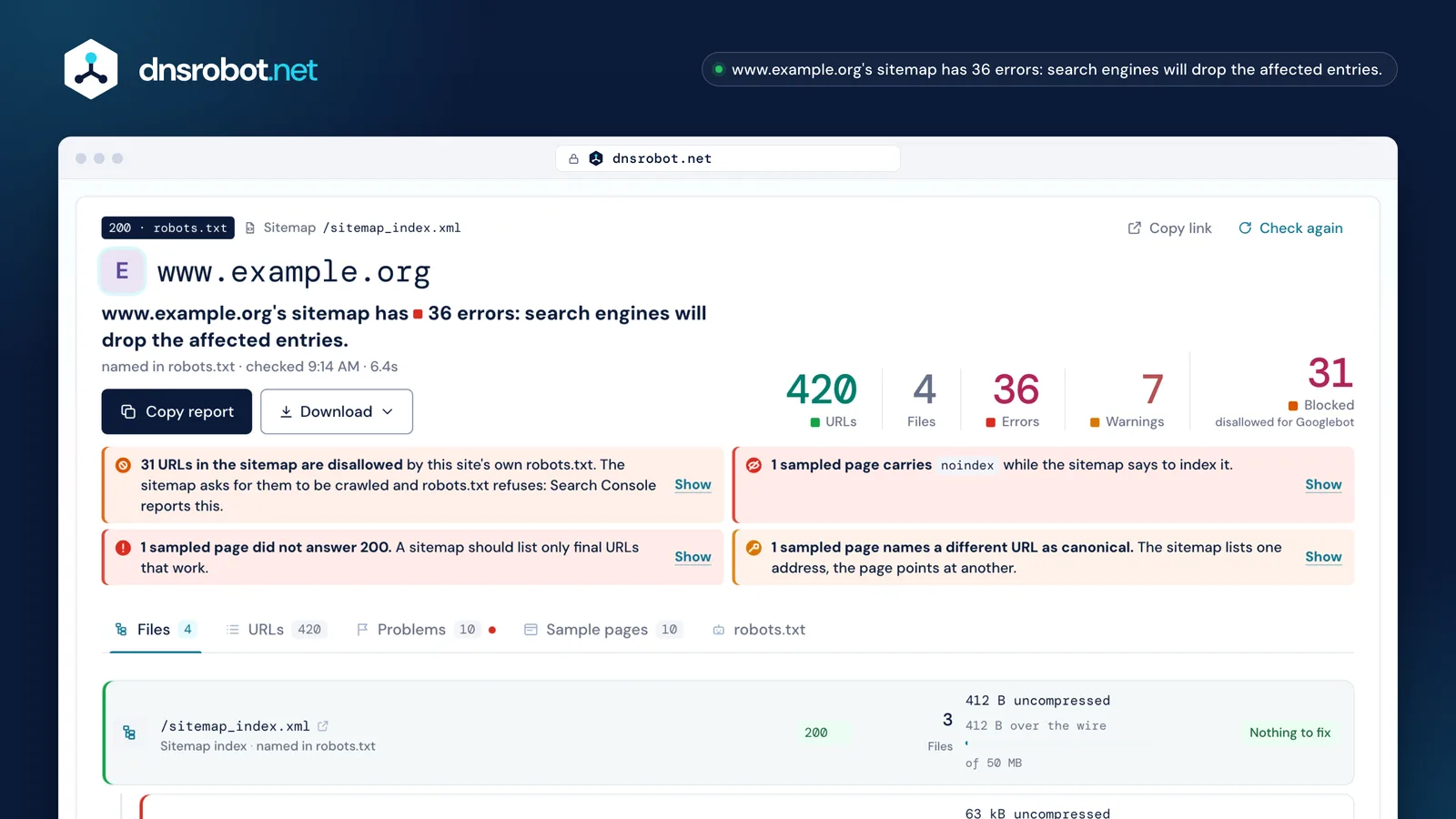
 The verdictWhat is wrong with this sitemap in one sentence, with the five numbers that carry it: URLs, files, errors, warnings and the URLs robots.txt refuses.robots.txt and its consequenceNot only the status code: what that status means for the whole site. A 4xx means everything may be crawled; a 5xx means nothing may be.Every file of the indexEach file with the URLs it holds, its decompressed size against the 50 MB limit, the transfer size beside it, and its own findings.The contradictionsURLs the sitemap asks search engines to crawl while robots.txt refuses them, and sampled pages that carry noindex or name another URL as canonical.
What makes a sitemap invalid
A sitemap is invalid when a parser cannot read it: a bare &, a wrong root element, a missing namespace, a relative URL or blank space printed before the XML declaration. Everything else is a warning, not a refusal.
The commonest of all is an unescaped ampersand. XML reads & as the start of a character reference, so a single bare one ends the file for a parser and everything after it is unread. Write it &, and escape <, >, " and ' the same way (sitemaps.org). A <loc> must be a full URL that starts with the protocol and stays under 2,048 characters.
The namespace must be exactly http://www.sitemaps.org/schemas/sitemap/0.9, on http:// even for an https site: it is a name for parsers, not an address anyone fetches. The file must be UTF-8, and nothing, not even a blank line, may come before <?xml; a UTF-8 byte-order mark is the one thing allowed there.
- 1
1 - 2
<?xml version="1.0" encoding="UTF-8"?> - 3
<urlset xmlns="http://sitemaps.org/schemas/sitemap/0.9">2 - 4
<url> - 5
<loc>https://www.example.org/shop/?size=l&colour=blue</loc>3 - 6
</url> - 7
<url> - 8
<loc>/guides/raised-beds/</loc>4 - 9
<lastmod>2026-09-14T08:30:00</lastmod>5 - 10
</url> - 11
</urlset>
- 1A blank line before the declaration
- 2The namespace must be this exact string, on http://
- 3A bare & ends the file for a parser
- 4A path is not a URL: it must start with the protocol
- 5A time needs a time zone, or leave the time out
Sitemap errors in Search Console, and what each one means
Google Search Console gives a sitemap one of three statuses — Success, Has errors or Couldn't fetch — for verified properties only, and it does not tell you which line is wrong. This page checks any public sitemap and names the line.
Couldn't fetch means Google's request did not come back with a readable file: a 4xx or 5xx, a redirect chain, a timeout, a firewall that refuses Google, or a robots.txt rule that disallows the sitemap's own path. Has errors means the file was read and something in it broke a rule — the figure beside this lists the messages you are most likely to see and the line behind each one.
Two of them are about size rather than format: a sitemap that lists more than 50,000 URLs, and a sitemap index that lists more than 50,000 sitemaps (Google). Split an oversized sitemap into files listed in an index; an index that is too big becomes several indexes, each submitted on its own. A sitemap that lists URLs robots.txt blocks is reported too, and that one is a contradiction in your own files rather than a format mistake.
The three statuses
The messages you are most likely to see
- Couldn't fetchA 4xx or 5xx, a redirect chain, a firewall, or robots.txt disallowing the sitemap's own path.
- Too many URLsMore than 50,000 URLs in one sitemap: an error, not a warning. Split it under an index.
- Parsing errorOften a bare & inside a URL. Write it &.
- Invalid dateA lastmod that is not a W3C Datetime, or a time with no time zone.
- Invalid URLA space, a quote or another character a URL cannot hold, or a broken scheme such as htp://.
- Sitemap contains urls which are blocked by robots.txtThe two files contradict each other. Decide which one is right.
Verified properties onlySearch Console reports a sitemap only for a property you own. This page checks any public sitemap, and names the line.
Does lastmod have to be honest?
Yes. Google uses <lastmod> “if it's consistently and verifiably accurate”, so a date that is the same on every URL, or that moves every time the file is written, is worse than no date at all — it teaches Google to ignore the tag.
Every other sitemap checker reads the format of a date: whether it is a W3C Datetime, whether the time carries a zone. Format is the easy half. The question that decides whether the tag does anything is whether the value means what it claims, and the two giveaways are a single stamp repeated across every entry and a date that is always today. Bing schedules crawls with lastmod too and may disregard dates that are always current.
So this checker reports what the dates are, not only how they are written: how many entries carry one, the oldest and the newest, and whether they are one value repeated. Leaving <lastmod> out is valid and costs nothing; inventing one costs the tag's credibility for the whole site. Mark the last significant change — the main content, the structured data, the links — not a new copyright year (Google).
No lastmod at allValid. Nothing to schedule from, and nothing to disbelieve.
50,000 URLs and 50 MB: when to split
One sitemap may hold at most 50,000 URLs and 50 MB uncompressed. Past whichever you cross first, split the URLs across several files and list those files in a sitemap index, then submit the index.
The size limit counts the decompressed file, even when you serve it as .xml.gz, which is why this checker shows the uncompressed size with the transfer size beside it: a 30 KB sitemap served gzipped can read as 1.6 KB on the wire, and that number tells you nothing about the limit. Naver Search Advisor refuses files over 10 MB, so a Korean site has a lower ceiling than the protocol's.
An index may list up to 50,000 sitemaps, only files on its own site, and never another index: a nested index is not read. Language alternates written with xhtml:link do not count toward the 50,000. This checker reads the index and up to ten of its files in one run, each with its own count, size and findings.
6.2 MBOver the wire812 kBgzip makes the file smaller to send; the limit still counts the size after decompression.sitemap_index.xmlAn index may not name another indexrobots.txt and your sitemap: the contradictions that cost you pages
Your sitemap asks search engines to crawl a list of URLs; robots.txt tells them what they may not crawl. When the two disagree, robots.txt wins and the sitemap entry is wasted — and Search Console reports it.
The status of robots.txt itself is the first thing to read, and almost nobody reports what it means. A 4xx is “unavailable”: there are no rules, so everything may be crawled. A 5xx or no answer at all is “unreachable”, and a crawler that follows RFC 9309 must then crawl nothing on the site; Google reads a 429 the same way. The same broken file produces opposite outcomes, and a tool that prints “no URLs are blocked” over an unreadable robots.txt is wrong whenever the file answered 5xx or 429, or did not answer.
Then come the contradictions inside a working file: URLs the sitemap lists that robots.txt disallows, and — easy to miss — the sitemap's own path disallowed, which publishes a file no crawler may read. The other direction is cheap and worth doing: a Sitemap: line in robots.txt needs no account anywhere and every crawler reads it.
The status, and its consequence
The contradiction
/search/?q=pepperDisallow: /search/The entry does nothing, and Search Console reports it
And the sitemap's own path, disallowed: a file published that no crawler may read.
Which URLs do not belong in a sitemap
Only canonical URLs you want in search results, one per page: final addresses that answer 200, are indexable and are not blocked by robots.txt. Redirects, noindex pages, URLs canonical to somewhere else, errors and parameter variants all belong somewhere else.
A sitemap that lists a redirecting URL sends a crawler one hop further than it had to go, and Google asks for the URL the redirect ends at instead. A noindex page in a sitemap is a straight contradiction: the file says “index this”, the page says “do not”. The page wins, and the entry does nothing.
None of this is fatal — every URL in a sitemap is a suggestion, and Google still decides what to index — but each wrong entry is one a search engine learns to discount. That is why this checker fetches a spread of the URLs rather than only parsing the file: parsing cannot tell you that a listed page now answers 404.
/shop/raised-beds/ValidIndexed as listed/shop/raised-bed/Redirectwasted/shop/?sort=priceCanonical elsewherewasted/tags/autumn/noindexwasted/shop/old-kit/404wasted/search/?q=pepperBlockedwastedImage, video and hreflang entries
A <url> entry can carry more than an address: the page's images, its versions in other languages, and video or news metadata, each in its own namespace inside that entry.
Images use Google's image namespace, up to 1,000 per page; only <image:image> and <image:loc> still count, and caption, title, license and geo_location were retired in 2022. This checker counts the image entries it finds and shows them per URL.
Language versions use xhtml:link with an hreflang code: an ISO 639-1 language with an optional ISO 3166-1 region, never a region alone. Every version of a page must list every other version, itself included, or Google ignores the set. Alternates do not count toward the 50,000-URL limit, so listing twelve language versions in each entry does not multiply the count by twelve.
https://www.example.org/guides/raised-beds/2026-09-143up to 1,000 per pageen · de · frevery version lists every version, itself includedAlternates do not count toward the 50,000
How often do search engines read your sitemap?
Google reads a sitemap on its own schedule, which it does not publish: submitting one is a hint, not an order. Bing reads one as soon as it finds it and then usually at least once a day. Neither re-reads a file more often because you ask them to.
The old anonymous pings are gone: Bing switched off bing.com/ping on 13 May 2022 and Google announced in June 2023 that its ping would stop working; it now answers 404. A tool that still offers to “ping Google” does nothing at all.
What does bring a changed page's next crawl forward is an accurate lastmod, which is the whole reason the tag's honesty matters, and IndexNow for individual changed URLs — one submission reaches Bing, Yandex, Naver, Seznam and others, though not Google. Resubmitting an unchanged sitemap by hand achieves nothing.
An accurate lastmod brings a changed page's next crawl forward
Do you need a sitemap at all?
A small site whose pages all link to each other may not need one: Google puts the figure at about 500 pages or fewer. Large sites, new sites with few links from elsewhere, and sites with many images or videos benefit most.
Google's own starter guide calls a sitemap optional, and submitting one is a hint rather than an instruction: it does not make a page rank and it does not guarantee indexing. What it does is make sure a crawler knows a URL exists, which matters most for pages your own links do not reach.
If you have one, it is worth being right. A sitemap full of redirects, noindex pages and URLs robots.txt blocks is not neutral — it is a list a search engine learns to trust less. Checking it costs a minute; building a fresh one from your own site takes a crawl.
Sources
- sitemaps.org protocol and its FAQ: the format, the required and optional tags, the 50,000 / 50 MB limits, the index and the location rule
- Google Search Central: build a sitemap, large sitemaps, the Sitemaps report and its errors, localized versions and lastmod and the retired ping
- Bing: the lastmod tag (2023), sitemaps in AI-powered search (2025) and the removed ping (2022)
- RFC 9309, the robots.txt standard: what a 4xx and a 5xx mean for a crawler
- Naver Search Advisor: feeds and IndexNow
- large sites
- new sites with few links from elsewhere
- many images or videos
- pages no internal link reaches
Sitemap checker FAQ
How do I check whether my XML sitemap is valid?
What are the most common sitemap errors?
Why does Search Console say “Couldn't fetch”?
Is it a problem if a URL in my sitemap is disallowed in robots.txt?
Does lastmod have to be accurate?
How many URLs can one sitemap have?
Does Google use priority and changefreq?
Is this sitemap checker free, and is there a URL limit?
How is this different from Google Search Console?
What is a sitemap index, and can it name another index?
Does my sitemap have to be listed in robots.txt?
Will a sitemap get my pages indexed?
Missing something?Suggest a feature or a new tool
More crawling and SEO tools
Hreflang Checker
Check a page's hreflang tags and every alternate they name: return links, codes, redirects, noindex and canonicals, plus a tag generator
Robots.txt Checker
Fetch any site's robots.txt, test whether a URL is blocked for Googlebot or AI crawlers, and find syntax errors
Sitemap Generator
Crawl your website and get an XML sitemap, an HTML sitemap and a visual site tree
Link Analyzer
Analyze all links on a webpage with dofollow/nofollow detection and HTTP status checking
Redirect Checker
Follow every redirect hop by hop: 301/302 chains, timing and bulk checks
HTTP Header Checker
Response headers exactly as sent, with a Mozilla Observatory security grade
Website Down Checker
Is it down for everyone or just you? Check any site from 11 places and your own connection, with a live screenshot