
What Is an Instagram Username Checker?
An Instagram username checker is an online tool that instantly verifies whether a specific Instagram handle is available for registration. With over 2 billion monthly active users competing for unique names, finding an available Instagram usernamecan be challenging — our tool queries Instagram's web profile API directly to give you a definitive answer in under 1 second.
Unlike other tools that show "Unknown" for Instagram, our Instagram username availability checker uses Instagram's own API with proper session authentication (CSRF tokens and Sec-Fetch headers) — the same API that Instagram's website uses internally. This means you get accurate, real-time results: the username is either Available (no profile exists) or Taken (a profile exists with that name).
Beyond Instagram, the tool simultaneously checks 30 other platforms including GitHub, Twitter/X, YouTube, Reddit, Twitch, Steam, LinkedIn, Snapchat, Mastodon, and more — helping you secure a consistent brand presence across the entire internet. For checking your domain and online infrastructure, use our DNS Lookup tool or WHOIS Lookup for domain availability.
Instagram Username Rules & Requirements
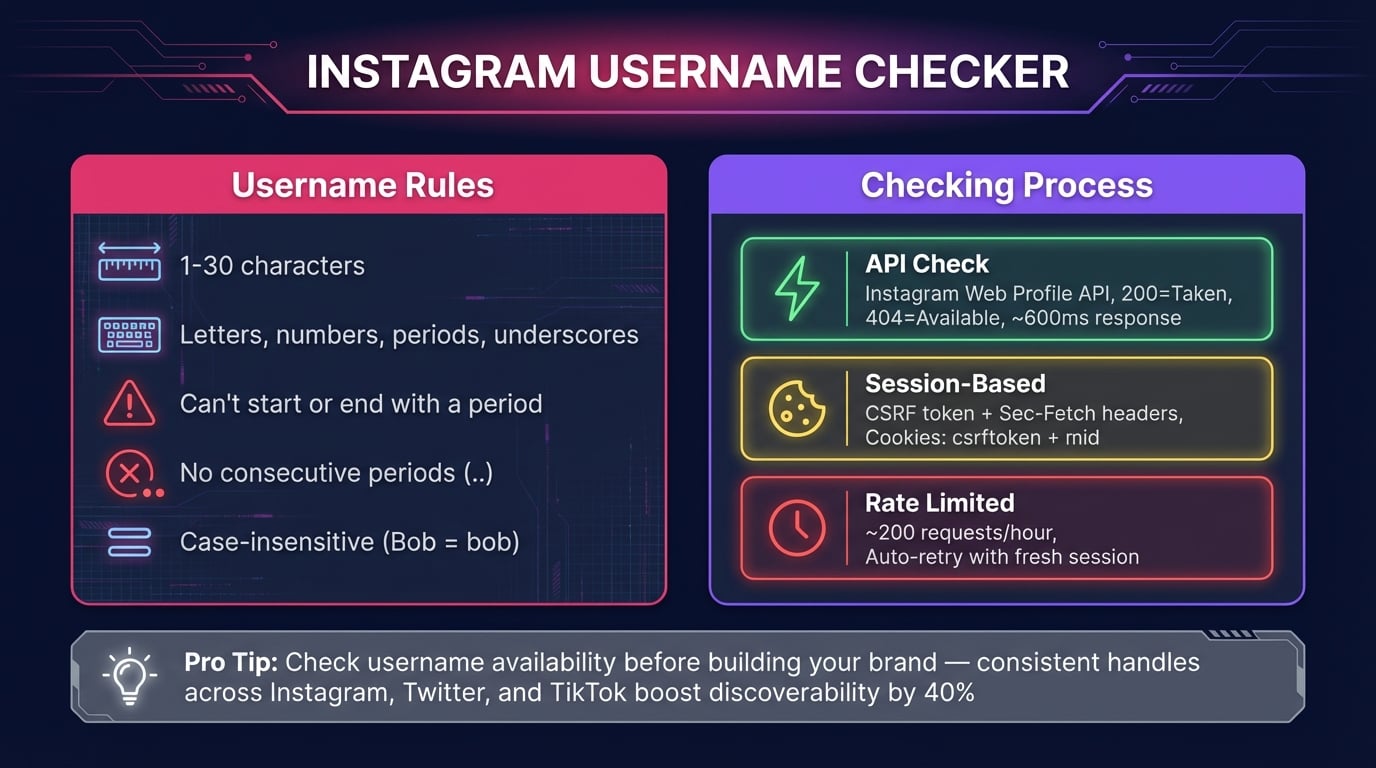
Before checking Instagram username availability, understand the rules Instagram enforces for usernames:
1-30 Characters
Instagram usernames can be between 1 and 30 characters long. Shorter usernames (3-15 characters) are easier to remember and type on mobile.
Letters, Numbers, Periods, Underscores
Only letters (a-z), numbers (0-9), periods (.), and underscores (_) are allowed. No spaces, hyphens, or special characters like @, #, or !.
No Consecutive Periods
You cannot use two or more periods in a row (..). A single period between words is fine (e.g., your.brand), but 'your..brand' is not allowed.
Case-Insensitive
Instagram treats usernames as case-insensitive — 'YourBrand', 'yourbrand', and 'YOURBRAND' are all the same username. You can't register a variation of an already-taken name.
Advertisement
How to Check Instagram Username Availability
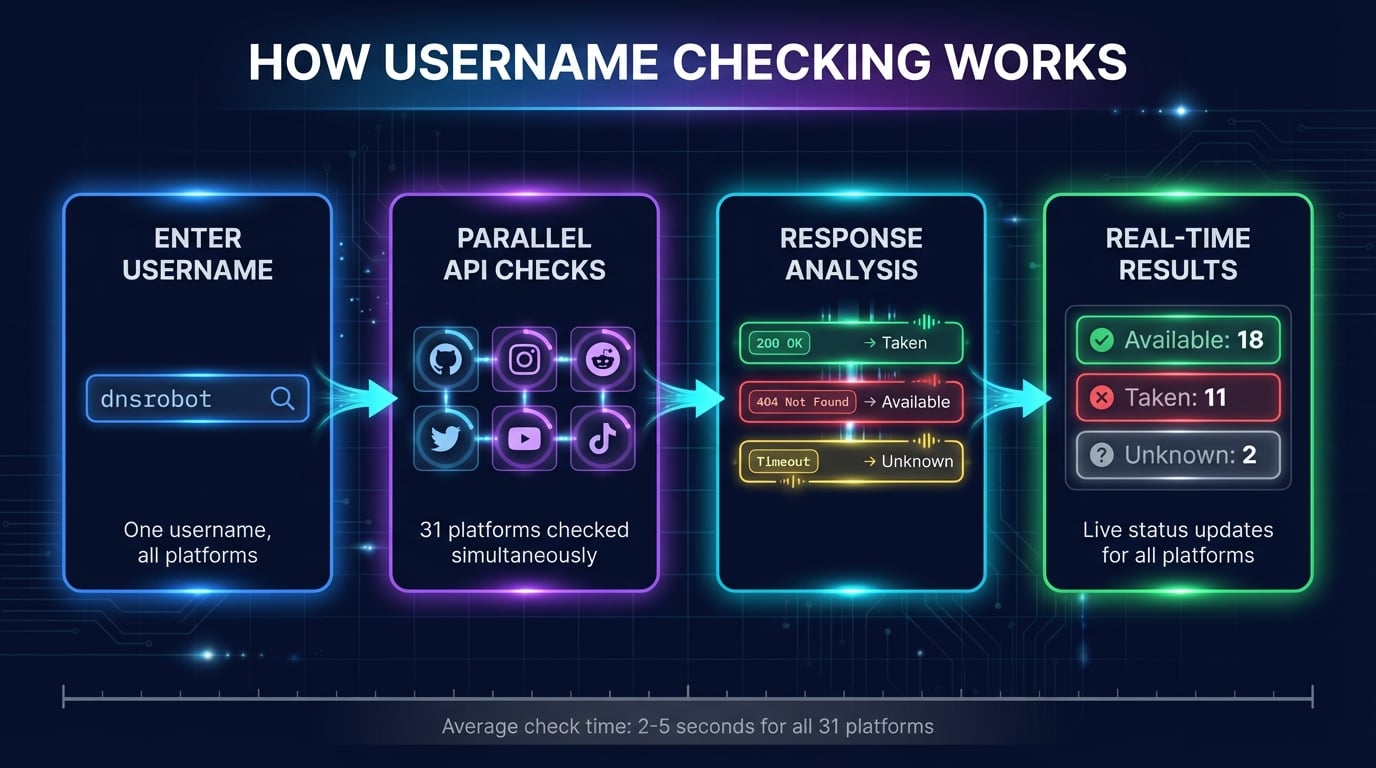
Our Instagram username availability checker verifies your desired handle across Instagram and 30 other platforms in seconds:
Enter Your Username
Type your desired Instagram username into the search box. The tool accepts letters, numbers, underscores, periods, and hyphens — covering all platforms' character requirements.
Click Check Availability
Hit the check button to start. Instagram results appear in under 1 second via API. All 31 platforms stream results in real-time — no waiting for all checks to finish.
Review Results
Each platform shows a clear status: green checkmark (available), red X (taken), or gray question mark (unknown). Instagram uses our API integration for the most accurate results.
Secure Your Handle
For available platforms, register your username immediately. Instagram usernames can be claimed at any time — act fast once you confirm availability across all platforms.
Discord Username Checker
Our Discord username checker verifies availability against Discord's new unique-username system — the one they rolled out in 2023 when Discord migrated away from discriminators (the old username#1234 format). Under the new system, every handle is globally unique, so the namespace became dramatically more competitive: common words, first names, and brand terms disappeared within weeks of rollout.
Because Discord's API blocks requests from datacenter IP ranges (HTTP 403 with code 40333), most online Discord username checkers show "Unknown" or fail silently. Our tool runs the Discord check from your browser, not our server — your own residential IP hits Discord's public unique-username/username-attempt-unauthed endpoint and gets a real-time taken or available response. Result in under 500 ms, no account needed.
Discord username rules
- 2–32 characters total
- Lowercase letters, numbers, underscores, periods only
- No uppercase, no spaces, no special characters
- Case-insensitive —
yourbrandblocksYourBrand
If your Discord username is taken
- Add a period:
your.brand - Add an underscore:
your_brand - Add a suffix:
yourbrand.hq,real.yourbrand - Keep it short — Discord shows the first 32 chars in all UI
The Discord username availability checker runs automatically alongside 29 other platforms — Instagram, GitHub, Twitter/X, YouTube, Reddit, Twitch — so you can lock the same handle everywhere in one pass. Type a name above to check Discord now.
Advertisement
31 Platforms We Check
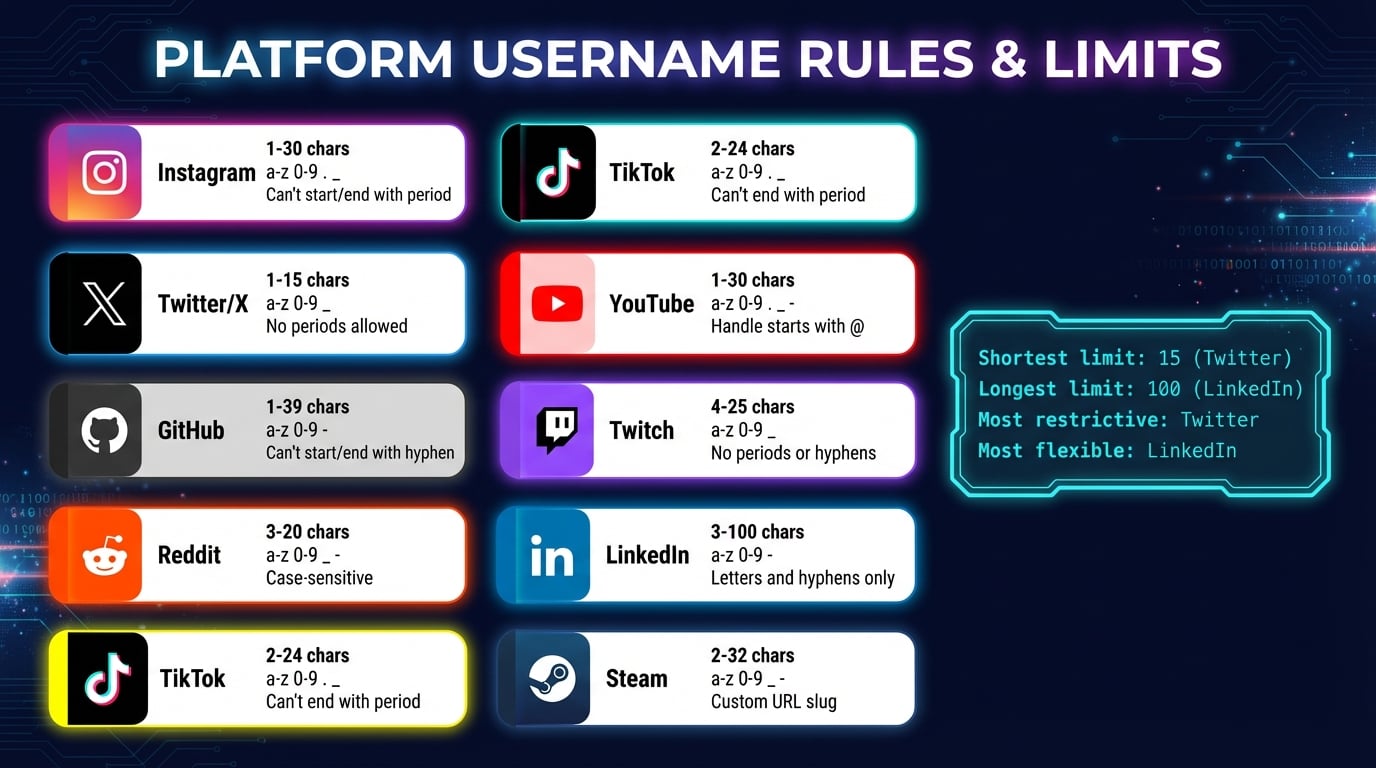
Beyond Instagram, our social media username checker covers 31 platforms across 7 categories. Each platform has unique username rules:
1-30 characters. Letters, numbers, periods, and underscores. No consecutive periods. Case-insensitive. Checked via Instagram's web profile API.
Twitter / X
Max 15 characters. Letters, numbers, and underscores only. No spaces or special characters. Checked via availability API.
GitHub
Max 39 characters. Letters, numbers, and hyphens. Cannot start or end with a hyphen. No consecutive hyphens.
YouTube
Handle max 30 characters. Letters, numbers, underscores, hyphens, and periods. Must be unique across YouTube.
3-20 characters. Letters, numbers, underscores, and hyphens. Cannot be changed after creation.
Twitch
4-25 characters. Letters, numbers, and underscores only. Checked via Twitch GraphQL API.
Custom URL slug. 3-100 characters. Letters, numbers, and hyphens. Must include at least one letter.
Steam
2-32 characters. Letters, numbers, underscores, and hyphens. Custom URL is separate from display name.
Snapchat
3-15 characters. Must start with a letter. Letters, numbers, periods, hyphens, and underscores allowed.
Mastodon
1-30 characters. Letters, numbers, and underscores. Handle is specific to your chosen server (e.g., mastodon.social).
Why Use the Same Username on Instagram & Other Platforms
Securing the same username on Instagram and every other platform provides significant advantages for brands, businesses, and content creators:
Brand Recognition
A consistent handle makes your brand instantly recognizable. When someone sees @yourbrand on Instagram, Twitter, YouTube, and TikTok — they immediately know it's the same person.
SEO & Discoverability
Search engines associate your username across platforms, strengthening your online presence. A consistent handle appears in search results, making you easier to find from any platform.
Trust & Credibility
Matching usernames across Instagram and other platforms signals legitimacy. Users are more likely to trust and follow accounts that are clearly the same brand everywhere.
Cross-Platform Promotion
'Follow me @yourbrand everywhere' only works with consistent naming. When you share Instagram content on Twitter or YouTube, followers can easily find you on every platform.
Impersonation Prevention
Claiming your username on all platforms — even ones you don't actively use — prevents others from impersonating your brand or creating confusion with similar Instagram handles.
Professional Appearance
Consistent usernames signal that you take your online presence seriously. Brands, employers, and collaborators check social profiles — mismatched handles look unprofessional.
Advertisement
What If My Instagram Username Is Taken?
If the Instagram usernameyou want is already taken, don't panic. Here are proven strategies to find an available alternative that still works for your brand:
Add a Prefix
Try 'the', 'real', 'its', or 'im' before your name: @theyourbrand, @realyourbrand, @itsyourbrand. These are common on Instagram and immediately recognizable.
Add a Suffix
Append 'official', 'hq', 'co', or 'app' after your name: @yourbrandofficial, @yourbrandhq. 'official' is the most trusted suffix on Instagram.
Use Underscores or Periods
Instagram allows both underscores and periods: @your_brand, @your.brand. These create visual separation while keeping the core name intact.
Add Your Niche or Location
Incorporate context: @yourbrand.nyc, @yourbrand_photo, @yourbrand.fitness. This also helps with discoverability in your specific niche.
After finding an alternative, run it through this tool again to ensure it's available on Instagram and all other platforms. Use our Domain Checker to verify if the matching domain name is available too.
How Our Instagram Username Check Works
Most username checkers fail on Instagram because Instagram's website is a Single Page Application (SPA) that returns HTTP 200 for both existing and non-existing profiles. Our tool solves this with a three-step API approach:
1. Session Token
We fetch Instagram's homepage to obtain a fresh CSRF token and session cookies (csrftoken + mid). These are cached for 30 minutes and refreshed automatically.
2. API Request
We query Instagram's web profile API with proper headers: X-IG-App-ID, X-CSRFToken, Sec-Fetch headers, and session cookies — mimicking how Instagram's own website fetches profile data.
3. Status Check
Instagram returns HTTP 200 with JSON profile data (taken) or HTTP 404 (available). If rate-limited (401/429), the session is refreshed automatically. Results appear in under 1 second.
For the other 30 platforms, we use tailored detection methods: HTTP status codes, response body analysis, redirect URL detection, and dedicated platform APIs (Twitter, Twitch, Kick, Lichess). For deeper network analysis, try our HTTP Headers tool or Port Checker.
Advertisement
Tips for Choosing the Perfect Instagram Username
Finding an Instagram username that works across all platforms requires strategy. Follow these tips to choose a handle that is memorable, available, and future-proof:
Keep It Short
Aim for 3-15 characters. Short usernames are easier to remember, type on mobile, mention in captions, and fit in bio links. Twitter's 15-character limit is a good cross-platform benchmark.
Avoid Special Characters
Stick to letters, numbers, and underscores. Instagram allows periods too, but not all platforms do. For maximum consistency across platforms, underscores are the safest separator.
Make It Memorable
Use your actual brand name or a recognizable variation. Avoid random numbers or l33tspeak (h4ck3r). Your Instagram handle should be easy to say out loud and spell from hearing.
Check All Platforms First
Before committing to an Instagram username, verify it's available everywhere. It's easier to change before you have followers. Use this tool to check Instagram + 30 other platforms in one click.
Consider SEO Value
Include a relevant keyword if it fits naturally. A photographer named Alex might use @alexphoto rather than @alex123. Keywords in Instagram usernames help with profile discoverability.
Secure Variations
Register common misspellings and variations on Instagram and other platforms to prevent impersonation. If your handle is @yourbrand, also claim @your_brand and @yourbrandofficial.
Username Lookup: Find Where a Name Is Taken (LoL, Discord, Steam & More)
A username lookupworks in reverse: instead of checking whether a name is free, it shows you where a handle already exists. Enter any username and the grid reveals every platform where it's registered — useful for tracking your own brand across apps, verifying whether an impersonator holds your name, or researching whether the person messaging you really owns the accounts they claim.
Gamers use it as a name checker for League of Legends, Steam, Xbox, Twitch, Kick, and Chess.com— all included in the 31-platform scan. LoL names follow Riot's 3–16 character rules, and since Riot IDs now span Valorant and TFT too, locking a consistent gamer tag across Discord, Steam, and Twitch before your next ranked season saves the "name taken" frustration later. One search covers the social media name check and the gaming name check in a single pass.
Related Tools
Complement your Instagram username check with these free tools for brand building and online presence:
Check if your Instagram brand name is available as a domain with AI-powered name suggestions.
Look up domain registration details, registrar info, and owner information via RDAP.
Analyze all links on any webpage with broken link detection and status codes.
Generate strong, random passwords to secure your new Instagram and social media accounts.
Verify SSL certificate validity and security configuration for your website.
Detect your browser, OS, and device type from your user agent string.
Check all DNS records (A, AAAA, CNAME, MX, NS, TXT) for any domain.
Create QR codes linking to your Instagram profile for easy sharing.
Frequently Asked Questions
How do I check if an Instagram username is available?
Enter your desired username in our tool and click Check. It queries Instagram's web profile API directly — returning 'Available' or 'Taken' in under 1 second. It also checks 30 other platforms simultaneously.
What are Instagram username rules?
Instagram usernames can be 1-30 characters: letters (a-z), numbers (0-9), periods (.), and underscores (_). No consecutive periods (..) allowed. Case-insensitive — 'YourBrand' and 'yourbrand' are the same.
Is this Instagram username checker accurate?
Yes, we query Instagram's official web profile API with proper session authentication. 'Available' means no profile exists. However, Instagram may still block registration for reserved, banned, or restricted names.
What if my Instagram username is taken?
Try adding a prefix (the, real, its), suffix (official, hq, co), underscores (your_brand), or your niche/location (yourbrand.nyc). Then check the new name across all platforms again to maintain consistency.
Which platforms does this tool check?
We check 31 platforms: Instagram, Twitter/X, Snapchat, Reddit, Mastodon, Telegram, Linktree, About.me, YouTube, Twitch, Vimeo, Kick, GitHub, GitLab, Dev.to, Replit, Docker Hub, Steam, Xbox, Chess.com, Lichess, LinkedIn, Dribbble, Gravatar, DeviantArt, SoundCloud, Last.fm, Patreon, Tumblr, Flickr, and Substack.
Why use the same username on Instagram and other platforms?
Consistent usernames build brand recognition, improve SEO, establish trust, enable cross-platform promotion ('follow me @yourbrand everywhere'), and prevent impersonation.
How fast is the Instagram check?
Instagram results appear in under 1 second via API. All 31 platforms complete in 3-8 seconds with parallel batch processing. Results stream in real-time — you see each platform as it responds.
Can I check Instagram usernames for free?
Yes, 100% free with no registration. Check unlimited usernames across Instagram and 30 other platforms. Export results as Copy, JSON, or CSV. We don't store or log your searches.
Why do other tools show 'Unknown' for Instagram?
Instagram's website is a Single Page Application that returns HTTP 200 for both existing and non-existing profiles. Most tools rely on status codes and fail. Our tool uses Instagram's web profile API with proper session tokens, which returns accurate 200/404 responses.
What does 'unknown' status mean?
An 'unknown' status means a platform returned an unexpected response — usually from rate limiting or temporary server issues. Try again after a few minutes or check that platform manually.
How to check if a Twitch username is available?
Enter your desired Twitch username and click Check. We query Twitch's API directly, returning availability in under 1 second. Twitch usernames must be 4-25 characters. We also check Instagram, YouTube, and 28 other platforms simultaneously.
Can I check TikTok username availability?
Yes, our tool checks TikTok via its public profile endpoint. TikTok usernames can be 2-24 characters using letters, numbers, underscores, and periods. With 1B+ users, try adding underscores or a suffix like 'official' if your first choice is taken.
How to check Discord username availability?
We check Discord alongside 30 other platforms. Discord switched to unique display names (no more #1234 discriminators), making usernames more competitive. Discord names must be 2-32 characters, lowercase only.