






CMYK to Pantone Converter
Enter cyan, magenta, yellow and black and get the closest Pantone (PMS) spot inks to the colour those inks print on coated or uncoated paper, ranked by Delta E 2000. Or get any Pantone's CMYK build.
PANTONE 2925 C
ΔE 20000.69The eye can't tell them apart.
- HEX
- RGB
- CMYK
- L*a*b*
- 2925 C is slightly lighter than your colour, and leans cyan.
- 2925 U (uncoated) is ΔE 4.0 from 2925 C: the same ink looks different on more porous paper.
Nearest inks8 of 20 · Solid Coated
ΔE 2000 to your colourRanked by CIEDE2000 (CIE 2001)
PANTONE® and other Pantone trademarks are the property of Pantone LLC. DNS Robot is not affiliated with Pantone. Screen colours are approximations: check a printed Pantone guide before you print.Codes: Formula Guide, September 2026 · colours: Pantone's screen values
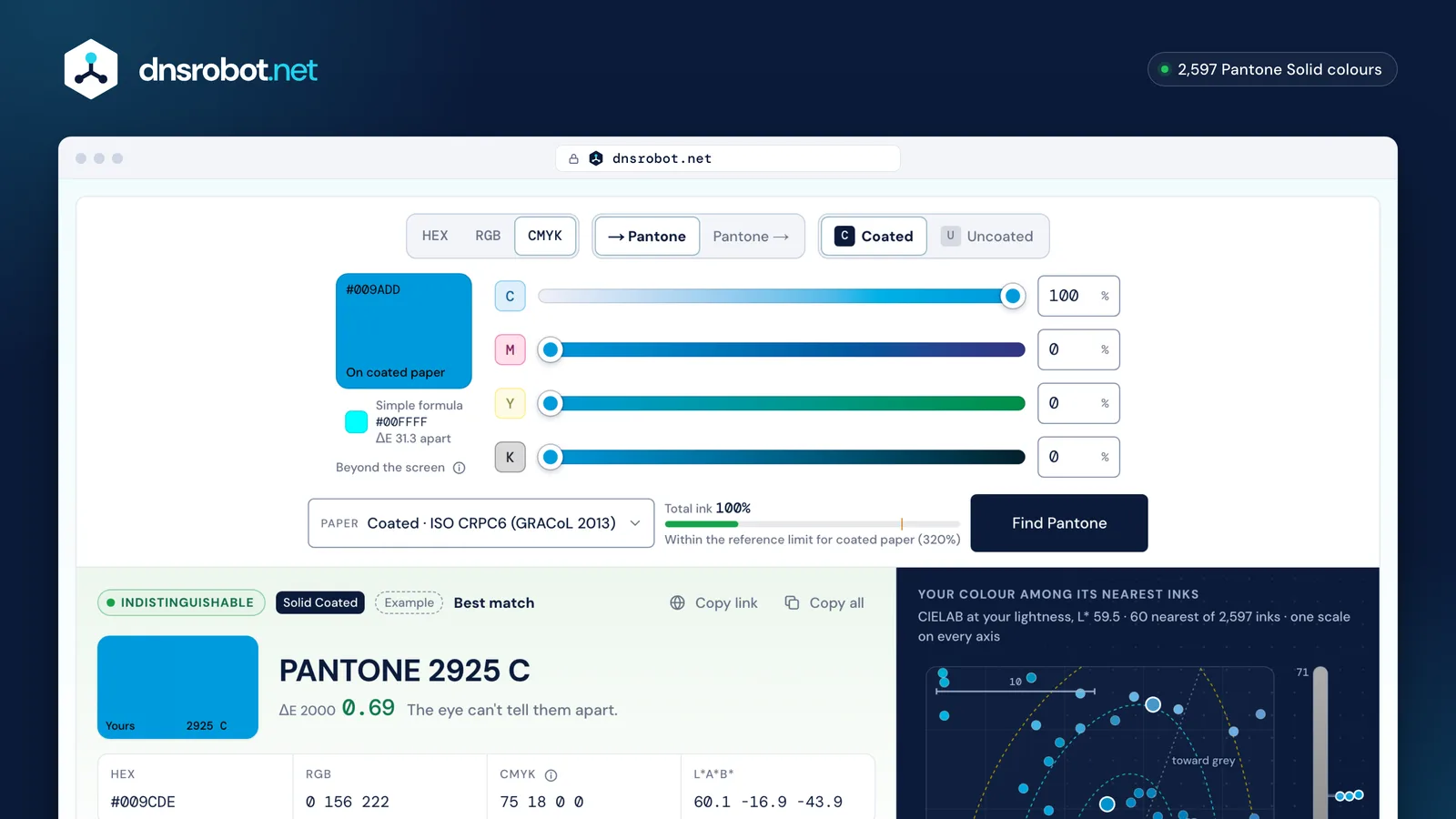
 Your four inksCyan, magenta, yellow and black in percent; paste 0 100 89 0 or cmyk(…) as well.On which paperThe colour the build prints on coated or uncoated paper, from ISO's reference print data.The closest inkThe nearest Pantone spot ink with the difference in ΔE 2000 and what it means.The neighbourhoodWhere the printed colour sits among the Pantone inks around it.
How do you convert CMYK to Pantone?
Work out what colour the four inks print, then find the Pantone ink nearest to it. The converter reads your CMYK through ISO's reference data for the paper you choose, then measures the CIEDE2000 difference to 2,597 Pantone inks: Pantone's own build for 185 C, 0 100 89 0, prints ΔE 2.0 away from the ink.
- 1. Enter the build Cyan, magenta, yellow and black in percent, as your layout or printer gives them.
- 2. Print it, on paper ISO 15339's reference data say what each build looks like on a calibrated press: coated (CRPC6, the GRACoL 2013 condition) or uncoated (CRPC3).
- 3. Compare with every ink The printed colour is measured against the Pantone inks for the same paper with CIEDE2000.
- 4. Rank and judge Nearest first. Under 2 is a close match; above 5 the spot ink is only the nearest one.
- 1CMYKC0%M100%Y89%K0%0 100 89 0
- 2Printed on coated paper#D81F2F
- 3Nearest ink1795 C1.0185 C2.1711 C2.1ΔE 2000 · against all 2,597 inks
PANTONE 1795 C · ΔE 1.0 · Very close
Why can the same CMYK numbers print different colours?
Because CMYK is a recipe, not a colour. The same four percentages give different colours on different papers and presses. 100% cyan prints as #009ADD on coated paper and #00A0DE on uncoated paper, while the simple formula most converters use shows #00FFFF, a screen colour no CMYK press can print.
Checked on Pantone's own CMYK builds, the simple formula lands a median ΔE of 9.4 from the ink, and ISO's coated print data 2.8. That is why this converter reads CMYK through a print condition first. Europe's FOGRA conditions sit about 1.3 ΔE from CRPC6, close enough for choosing an ink.
CMYK 100 0 0 0
Coated paper · CRPC6
#009ADD
Uncoated paper · CRPC3
#00A0DE
ΔE 5.5 from the coated print
Simple formula (screen)
#00FFFF
ΔE 31.0 from the coated print
Pantone to CMYK: what CMYK values does Pantone give its colours?
Pantone publishes a CMYK build for almost every colour (2,587) in its Color Bridge guides, labelled CP for coated and UP for uncoated. Type a code into the converter's Pantone → field to see the build and how close it prints: PANTONE 185 C's is 0 100 89 0.
Pantone updated its CMYK builds in 2019 with the G7 method for the CRPC6 and CRPC3 press references, so older charts differ: 185 C changed from 0 93 79 0 to 0 100 89 0. A build gets close only where CMYK can reach the ink.
| Pantone | CMYK build | Build printed | ΔE to the ink |
|---|---|---|---|
| 185 C | 0 100 89 0 | 2.0Close | |
| 286 C | 100 80 0 12 | 5.9Nearest only | |
| Reflex Blue C | 100 87 0 20 | 10.9Nearest only | |
| Process Blue C | 100 15 0 6 | 1.0Very close | |
| 354 C | 85 0 98 0 | 7.4Nearest only | |
| 7406 C | 0 13 100 1 | 1.1Very close | |
| Warm Red C | 0 83 81 0 | 4.9Noticeable | |
| Orange 021 C | 0 74 100 0 | 5.3Nearest only | |
| Purple C | 36 89 0 0 | 9.2Nearest only | |
| Black C | 65 66 68 82 | 0.8Indistinguishable | |
| Cool Gray 9 C | 50 40 34 17 | 3.6Noticeable | |
| 300 C | 100 56 0 3 | 3.0Close |
Which Pantone colours can't be printed in CMYK?
Bright blues, purples, oranges, greens and fluorescents. Their CMYK builds stay visibly away from the ink even on a calibrated press: Reflex Blue C, Violet C, Medium Purple C, Purple C, Dark Blue C, and 354 C. For these, print the spot ink.
Spot inks are premixed from Pantone's base inks, so they reach colours four process inks can't. Measured over the colours with a Pantone build, 20% print more than ΔE 5 from their ink on coated paper.
Spot ink against its best CMYK build
- Reflex Blue C10.9
- Violet C10.1
- Medium Purple C9.8
- Purple C9.2
- Dark Blue C8.1
- 354 C7.4
- 286 C5.9
- Orange 021 C5.3
- Bright Red C5.1
Spot ink | CMYK build, printed
Spot colour or CMYK: which should you print?
Print a spot colour when a brand colour must match on every run, when it lies outside CMYK, or for large flat areas and one- or two-colour jobs. Print CMYK for photos and full-colour work, where every colour comes from the same four inks.
| Job | Why | |
|---|---|---|
| Logo or brand colour that must match every time | Spot | One premixed ink, the same on every run. |
| Bright blue, purple, orange, green, fluorescent | Spot | Outside what CMYK reaches. |
| Large solid area | Spot | Solid ink, no halftone dots to mottle. |
| Photos, gradients, many colours | CMYK | Every colour from four inks. |
| Short digital print run | CMYK | Digital presses usually simulate spot colours with process inks. |
What is total ink coverage, and why does it matter?
Total ink coverage is the sum of the four percentages: 65 66 68 82 is 281%. Presses limit it, typically to 300–320% on coated paper and 280–300% on uncoated, because too much ink can't dry in time and sets off onto the next sheet.
The converter shows the total as you build a colour and marks it amber above the chosen paper's reference limit: 320% coated (GRACoL 2013), 280% uncoated. Rich blacks are where builds most often run high: ask your printer for their limit.
Total: 281%
Typical limit: 300–320% coated, 280–300% uncoatedAbove it, ink can't dry in time and sets off onto the next sheet
How do you turn a CMYK colour into a Pantone spot colour in Illustrator or InDesign?
Open the swatch's options, set Color Type to Spot Color and name it exactly after the Pantone ink, such as PANTONE 185 C. The printer's workflow reads the name and prints that ink on its own plate.
- Find the nearest inkEnter the CMYK above and pick the Pantone that matches by eye and by ΔE.
- Make the swatchSwatches panel menu → New Swatch (InDesign: New Color Swatch), or double-click an existing swatch.
- Set it to spotColor Type: Spot Color (InDesign: Spot). Swatch Name: PANTONE 185 C.
- Check the separationsWindow → Separations Preview in Illustrator (CMYK documents, with Overprint Preview on), or Window → Output → Separations Preview in InDesign: the ink appears as its own plate.
Adobe removed Pantone's colour books from Illustrator, Photoshop and InDesign between August 2022 and October 2023; picking from Pantone's library needs Pantone Connect. A named spot swatch doesn't.
CMYK to Pantone: questions and answers
How do I convert CMYK to Pantone?
Can CMYK be converted to Pantone exactly?
What is the CMYK for Pantone 185 C?
Is CMYK to PMS the same as CMYK to Pantone?
Why do other CMYK to Pantone converters give different results?
Which CMYK profile does the converter use?
Can every Pantone colour be printed in CMYK?
What is the difference between Pantone C and CP?
Should I use coated or uncoated Pantone colours?
What total ink coverage is too high?
Is DNS Robot affiliated with Pantone?
Missing something?Suggest a feature or a new tool
Related tools
HEX to Pantone
Convert any HEX colour code to the closest Pantone PMS colours with Delta E accuracy, plus Pantone to HEX lookup
RGB to Pantone
Convert RGB values to the closest Pantone PMS colours with Delta E accuracy, plus Pantone to RGB lookup
QR Code Generator
Make QR codes for links, Wi-Fi, contacts, WhatsApp and UPI or Pix payments, with your logo and colours, read back before you download SVG, PNG or PDF
QR Code Scanner
Scan QR codes from webcam or uploaded images instantly
Base64 Decode & Encode
Decode and encode Base64: text (UTF-8, URL-safe), images, PDFs and any file to Base64 or a data URI
Epoch Converter
Convert Unix timestamps to dates and dates to epoch time in any time zone, with batch conversion