










Is It Down for Everyone or Just Me?
Is this website down, or just for you? Check website status from 11 places and your own connection, and see a live screenshot of what it shows.








Is it down for everyone or just me?
If our 11 places reach a site and your browser doesn't, it's just you. If nobody reaches it, it's down for everyone.
Every check asks the same question from two sides at once. Our 11 places open the site the way a browser does, and your own browser tries it over your connection. Comparing the two is the honest way to answer “is it just me?”: a down checker that asks from one server can't.
A site can also be down only in some places (a regional network fault or a country block), or answer people but turn away automated checks: we show those apart, never as “down”.
Every place and your browser reach it.
We reach it; your browser can't. The fix is on your side.
Nobody reaches it, you included. Only the owner can fix it.
Some places fail. It depends where you are.
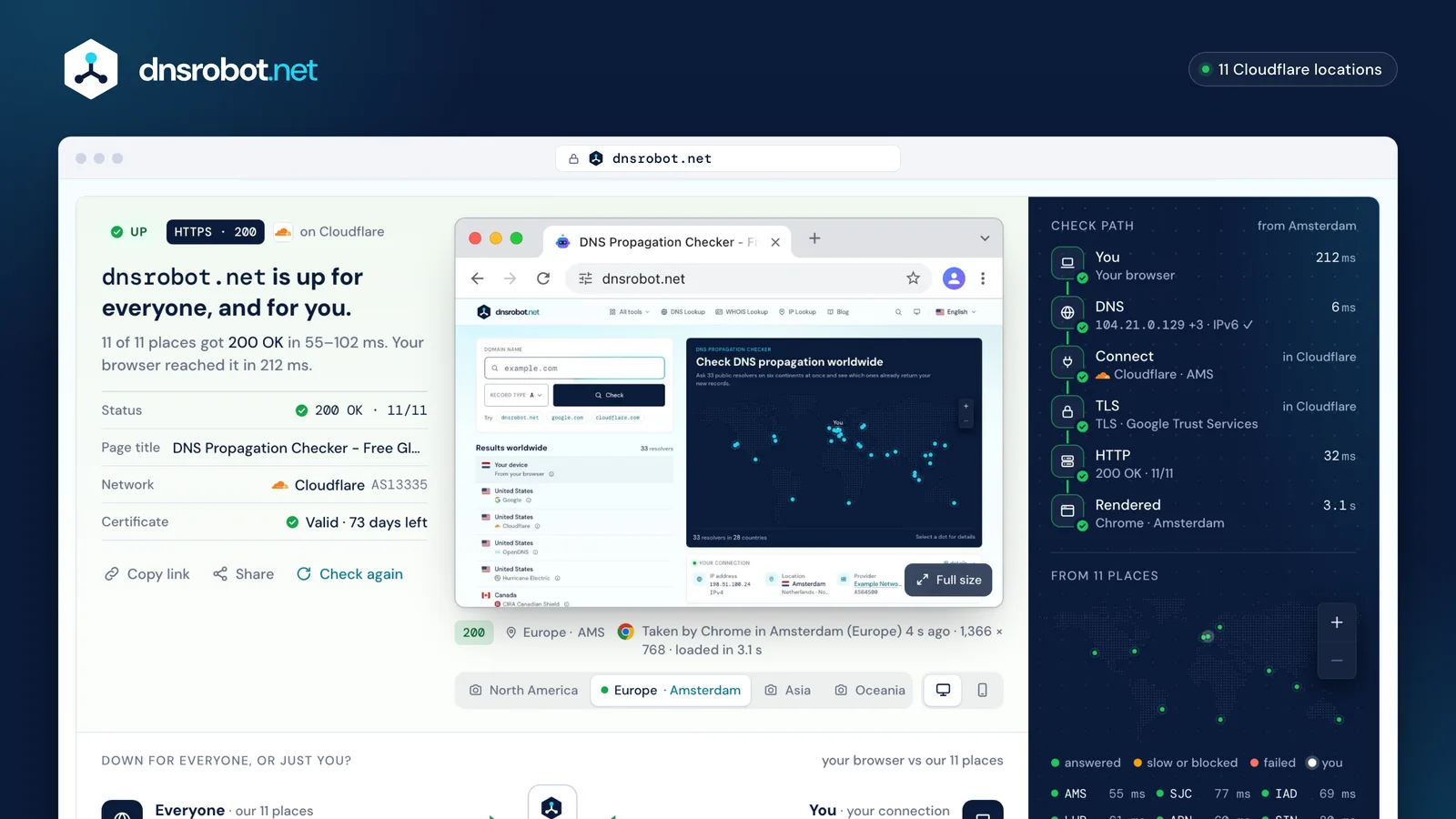
 One verdictEveryone (our 11 places) and you (your own browser) in one sentence, with the status code most places got.The live screenshotWhat a real Chrome browser saw a few seconds ago, with where and when it was taken. Take another from any region, or as a phone.Where it breaksThe check path from you to the rendered page: DNS, connect, TLS and the server's answer, each with its time.From 11 placesEvery place on the map, green when it got the page, amber when it was slow or blocked, red when it failed.
How to check if a website is down
Each place runs the steps a browser runs, and times each one. Then a real browser loads the page and takes the screenshot.
DNS turns the name into an address. Connect opens a TCP connection to it. TLS checks the certificate the way browsers do, so expired, misnamed and untrusted certificates each get their own answer. Then we send the request, wait for the first byte and follow up to 5 redirects, checking each one.
Last, Chrome (Cloudflare's Browser Run) loads the page in the region nearest you and takes the screenshot. The verdict never waits for it: it comes from the 11 places and your own browser, usually within a few seconds.
- DNS11 ms
Name → address, from Google and Cloudflare.
NXDOMAINSERVFAIL - Connect7 ms
TCP to the address, from each place.
refusedtimed out - TLS9 ms
The certificate, checked like a browser does.
expiredwrong name - First byte128 ms
The request, and the server's wait.
5xx52xslow - Download14 ms
The page and up to 5 redirects.
resetloop - Render2.3 s
Chrome loads it and takes the screenshot.
blankbot wall
What do 500, 502, 503, 504 and Cloudflare 52x errors mean?
A status code means the server answered; a browser error means nothing did. Where the chain breaks tells you who can fix it.
The small path on each row is you → the proxy or CDN in front of the site → the site's own server, with the break marked. The check path beside every result shows the same thing at full size.
Two Cloudflare details most pages get wrong: a Cloudflare-branded 502 or 504 page means the site's own server sent the error, while a blank, unbranded one came from Cloudflare; and 1xxx codes (1016, 1020, 1033) live in the page itself, while the status line carries 403, 409, 429 or 530.
| 500 Internal Server ErrorThe site's own code failed on this page. | Site | |
|---|---|---|
| 502 Bad GatewayA proxy or CDN got a broken answer from the server behind it. | Site | |
| 503 Service UnavailableOverloaded, or down for maintenance on purpose. Retry-After may say when it's back. | Site | |
| 504 Gateway TimeoutA proxy waited for the server behind it and gave up. | Site | |
| 429 Too Many RequestsYou (or your network) sent too many requests: wait, then retry. | You |
| ERR_ | Site or you | |
|---|---|---|
| DNS_ | Site or you | |
| ERR_ | Site or you | |
| ERR_ | Site or you | |
| ERR_ | You | |
| ERR_ | Site or you |
| 520 Unknown errorThe server sent Cloudflare an empty or unexpected answer. | Site | |
|---|---|---|
| 521 Web server is downThe server refused Cloudflare's connection. | Site | |
| 522 Connection timed outNo answer to Cloudflare's connection within 19 seconds. | Site | |
| 523 Origin is unreachableCloudflare has no route to the server's address. | Site | |
| 524 A timeout occurredConnected, but no page within 125 seconds. | Site | |
| 525 SSL handshake failedThe TLS handshake between Cloudflare and the server failed. | Site | |
| 526 Invalid SSL certificateCloudflare couldn't validate the server's certificate. | Site | |
| 530 Origin errorCloudflare couldn't find the server: the page's 1xxx code says why. | Site |
Website not loading for you? Fixes that work
If our 11 places reach the site and you can't, the problem sits between you and the internet: your browser, your DNS, your network or your provider.
Work through the steps in order and check again after each one. The DNS steps fix most cases: your computer or router remembers an old address for as long as its TTL allows, and a “not found” answer for as long as the domain's negative-cache time.
If the site loads on mobile data but not on your Wi-Fi, your network or your provider is blocking it. On a work computer, a security proxy can break certificates for some sites; ask your IT team.
Ctrl+F5 · ⌘+Shift+R1.1.1.1 or 8.8.8.8




ipconfig /flushdnsIn Command Prompt. Clears the DNS cache, including remembered “not found” answers.
Why websites go down
Most website outages are one of six things, and each one leaves a different trace in the check.
When a big provider fails, thousands of unrelated sites go down at the same minute, and status pages lag behind. That's when an independent check is most useful: it tells you which layer broke, not only that something did.
Too many visitors, a bad release, a crashed app.
503 · 500 · 502The owner forgot to renew; the registrar puts it on hold or parks it.
NXDOMAIN or parked · expiry dateBrowsers refuse the site until a new one is installed.
TLS: expiredA wrong record, broken DNSSEC, a botched nameserver move.
SERVFAIL · wrong addressA provider thousands of sites share has a bad day.
52x · many sites at onceA firewall, a country block or a bot wall turns some people away.
partly down · 403Big outages, from each provider's own report
- Cloudflare
A firewall rule with a runaway regular expression used up CPU worldwide; visitors saw 502 errors.
27 min - Fastly
A valid customer setting hit a latent bug: 85% of Fastly's network returned errors.
95% back in 49 min - Akamai
A configuration update triggered a bug in a DNS component of its edge network.
up to an hour - Meta
A maintenance command took down Meta's backbone; its DNS servers withdrew their routes, so Facebook, Instagram and WhatsApp vanished.
length not published - CrowdStrike
A faulty security-sensor update crashed Windows PCs: Microsoft estimated about 8.5 million devices.
bad file live 78 min - Google Cloud
A policy with blank fields crashed API management worldwide; customers got 503s.
7 h 27 min - AWS us-east-1
A race in DynamoDB's DNS automation left an empty record and cascaded into EC2, Lambda and more.
14 h 32 min - Cloudflare
A bot-management file that doubled in size crashed Cloudflare's proxy; many sites returned errors. Not an attack.
5 h 46 min







Lengths from each provider's report: start to full recovery, except where noted.
Website screenshots: why a site looks different from another country
Sites change their language, prices, cookie banners and even what they show by country. So every screenshot says where it was taken.
Our screenshots come from Cloudflare's Browser Run, which runs Chrome in big locations near the Worker that calls it. We call it from four regions: North America, Europe, East and South-East Asia, and Oceania. We use the one nearest you, and you can take another from any region, or as a phone.
There's no browser pool in South America, Africa, India or the Middle East, so checks from there use the nearest region, and we name it. The city is read inside the page at capture time: we never label a screenshot with a place it wasn't taken in. A site that Cloudflare's security filters list as malware or phishing gets no screenshot at all; the link safety checker shows which services block a link and why.
 1North AmericaORD
 2Europe · DeutschAMS
 3Asia · 日本語NRT
- 4OceaniaAKL
Is my website down? Uptime in minutes
“99.9% uptime” sounds perfect, but it still allows almost 44 minutes of downtime every month.
Hosting and cloud contracts promise uptime as a percentage (an SLA). The figure turns each promise into the downtime it allows in an average month (365.25 ÷ 12 days) and in a year.
To catch outages on your own site as they happen, you need a website uptime checker: a check every minute from more than one place. A one-off check like this one answers “is it down right now?”, and the SSL Checker and WHOIS Lookup tell you when your certificate and your domain run out.
Website Down Checker FAQ
How do I check if a website is down right now?
Is it down for everyone or just me?
Why is a website not loading for me when it works for others?
Why does the screenshot show a blank page or “Access denied”?
Where is the website checked from?
What do 502, 503 and 522 errors mean?
Why does the checker say the certificate expired?
Is the domain expired, or is the site just down?
How is this different from Downdetector?
Does checking a site tell the site who I am?
How often can I check a website, and can I share the result?
Missing something?Suggest a feature or a new tool
Related tools
Link Safety Checker
Is this link safe? Who blocks it, where it really redirects, how old its domain is and what the page asks for
SSL Certificate Check
Verify SSL certificate validity and security details
Ping Test
Test your ping, jitter and packet loss, see your ping to 34 cloud regions, and ping any website or IP from 11 cities
DNS Lookup
Every DNS record from the domain's own nameservers, beside Google's and Cloudflare's cache
WHOIS Lookup
Look up domain registration, registrar, and owner details via RDAP
Port Checker
Test port connectivity and service availability