











Email Deliverability Test
Send one real email to a one-time address and see how it arrived: the sending server, SPF, DKIM, DMARC, content and SpamAssassin, scored out of 10.
Send the email you want to test to this address, from the account and the service you really send it with. We never email you back.
Checking whether an address exists? Email Checker
Or paste a message
The source of an email you received (Show original in Gmail, View source in Outlook.com or Yahoo Mail), an .eml file, or just an email's text or HTML. Checked, then dropped: nothing is kept.
How to test your email deliverability
Send one real email to the address above, the way you always send it. The report builds as each part is checked.
1. Copy the test address. It takes one message for 2 hours. Nothing to sign up for, and we never email you back.
2. Send from the setup you really use: your mail app, your own server, or your email platform's real campaign to a segment that holds the address. A test reads the path the message took, so a message sent some other way tests something else.
3. Read the report. Our mail server records how your server connected (its address, its HELO name and the TLS it chose), then every check runs on the message itself: SPF, DKIM, DMARC, the format, the content, the unsubscribe headers and SpamAssassin. Most reports finish within a minute of the message arriving.
Fixed something? Re-check DNS reads SPF, DMARC, the DKIM keys and the reverse DNS again for the same message, without sending a new one (three times per report, a minute apart).
- Your mail appyou press Send14:02:10
- Your sending serveryour email serviceSendGrid · 198.51.100.24Reverse DNS (PTR)HELO nameBlocklists
- Our mail serverreceives it over TLSmailprobe.dnsrobot.net · TLSv1.3the SMTP sessionTLS versionEHLO and pipeliningLine endingsthe messageSPFDKIMDMARCARCFormatContentUnsubscribe
- Your reportparts appear as they're checked14:02:24SpamAssassinGmail · Yahoo · Outlook.com rulesScore



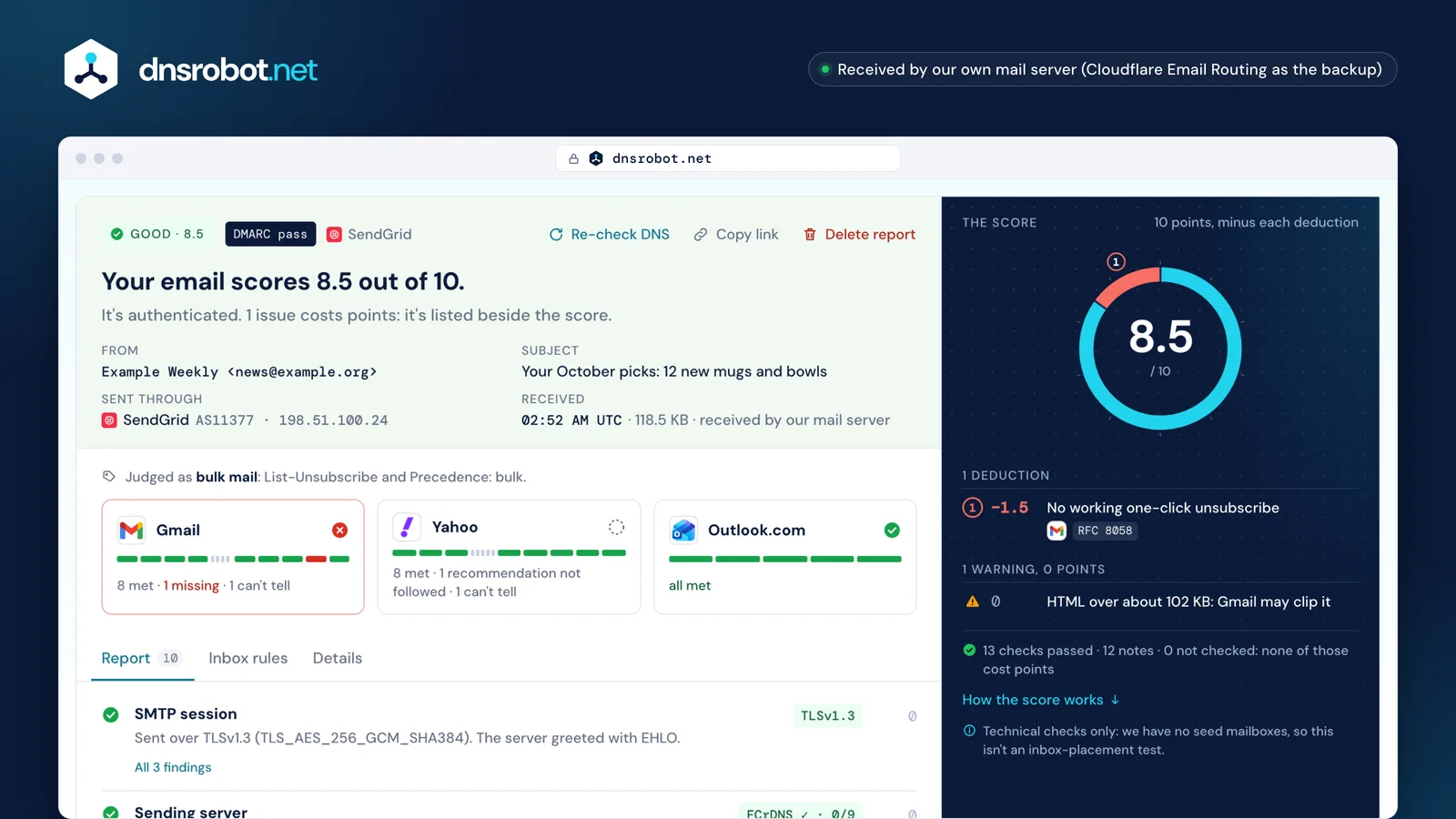
 The scoreTen points minus deductions. The ring is made of them, and each one names its rule and where that rule comes from.Inbox rulesGmail's, Yahoo's and Outlook.com's sender requirements, met, missing or can't tell from one message.Each checkThe report lists the sending server, SPF, DKIM, DMARC, format, content, unsubscribe and SpamAssassin, each with what it found and what to fix.The deductionsEach one with its points and the rule behind it; warnings that cost nothing are listed apart.
Email spam checker: what your score is made of
Ten points, minus deductions that each name their rule. A check we couldn't run never costs a point.
The table below is the scoring code itself, so the page can't say one thing while the score does another. The heavy deductions are the ones receivers act on: DMARC failing, nothing authenticating, a major blocklist, no reverse DNS.
Some rules count only for bulk mail. Gmail, Yahoo and Outlook.com ask bulk senders for both SPF and DKIM, DMARC and one-click unsubscribe; a one-to-one message gets those as recommendations, at 0 points.
Rows marked 0 points are warnings whose source we haven't confirmed yet: they show, and they cost nothing until a provider's own page backs them.
What is a good spam score?
Here, 10 means no deduction was found and 8 or more is in good shape. SpamAssassin's own scale runs the other way: its default spam threshold is 5.0, and its documentation calls that quite aggressive. A clean newsletter often scores about 1, which costs nothing here; above 2.0 half of SpamAssassin's points count, at most 3.
10 − 1.5 − 0.7 = 7.8
- 1Bulk mail without working one-click unsubscribe (RFC 8058: both headers, signed by DKIM)
- 2SpamAssassin 3.4
| What we found | Points off | Part |
|---|---|---|
| Neither SPF passes nor any DKIM signature verifies | −3 | SPF |
| DMARC fails: no aligned SPF or DKIM pass, and the From domain publishes a policy | −2.5 | DMARC |
| The From header has no single domain DMARC can apply to | −2 | DMARC |
| The From domain publishes no DMARC recordbulk mail only | −1 | DMARC |
| SPF fail: the record says this server may not send | −1 | SPF |
| SPF softfail or neutral | −0.5 | SPF |
| No SPF record for the MAIL FROM (or HELO) domain | −1 | SPF |
| SPF permerror: a broken record or more than 10 DNS lookups | −1 | SPF |
| The message isn't DKIM-signedbulk mail only | −1 | DKIM |
| DKIM-signed, but every signature fails (treated as unsigned)bulk mail only | −1 | DKIM |
| A signature uses an RSA key under 1,024 bits | −1 | DKIM |
| DKIM passes, but no passing signature matches the From domain | −0.5 | DKIM |
| The sending address is on a major blocklist | −3 | Sending server |
| The sending address is on a smaller blocklist | −1 | Sending server |
| The sending address has no reverse DNS (PTR) | −2.5 | Sending server |
| The PTR name doesn't resolve back to the sending address | −1.5 | Sending server |
| HELO is not a fully qualified name | −0.5 | Sending server |
| The server sent without TLS | −1.5 | SMTP session |
| Bare LF or CR line endings in the message | 0a warning, not counted in the score (−0.5 once a source is cited) | SMTP session |
| From is missing, repeated, unreadable, or lists several mailboxes without Sender | −2 | Format |
| Date is missing or unreadable | −1 | Format |
| Message-ID is missing or malformed | −1 | Format |
| Date is more than a day from the time it arrived | 0a warning, not counted in the score (−0.5 once a source is cited) | Format |
| A field that may appear once appears twice | −0.5 | Format |
| Lines longer than 998 characters | −0.25 | Format |
| Images with almost no text | 0a warning, not counted in the score (−1 once a source is cited) | Content |
| HTML with no plain-text version | −0.5 | Content |
| HTML over about 102 KB: Gmail may clip it | 0a warning, not counted in the score (−0.5 once a source is cited) | Content |
| Links through URL shorteners | 0a warning, not counted in the score (−1 once a source is cited) | Content |
| Links to a bare IP address | 0a warning, not counted in the score (−1 once a source is cited) | Content |
| Links to a domain that imitates another | 0a warning, not counted in the score (−2 once a source is cited) | Content |
| javascript:, data: or file: links | 0a warning, not counted in the score (−2 once a source is cited) | Content |
| Link text shows one domain and the link goes to another | 0a warning, not counted in the score (−0.5 once a source is cited) | Content |
| An attachment type Gmail blocks | 0a warning, not counted in the score (−2 once a source is cited) | Content |
| Links to a host Cloudflare's security resolver blocks (malware or phishing) | 0a warning, not counted in the score (−2 once a source is cited) | Content |
| Scripts, iframes, forms or embedded objects in the HTML | −1 | Content |
| 1Bulk mail without working one-click unsubscribe (RFC 8058: both headers, signed by DKIM) | −1.5 | Unsubscribe |
| 2SpamAssassin's points above 2.0 | half the points over 2.0, at most 3 | SpamAssassin |
| SpamAssassin's score reaches its spam threshold | −2 | SpamAssassin |
| Not checked, or can't tell from one message | 0 | – |
Why emails land in spam
A receiving server decides in steps. One test message shows the first four; the last one only the receiver sees.
Who is connecting. The address your server sends from: is it on a blocklist, does it have a reverse DNS name that points back to it, did it use TLS? Gmail answers a missing reverse DNS with 4.7.23 or 5.7.25.
Who it claims to be. The HELO name and the envelope sender, checked with SPF. A failing SPF is a reason to defer or refuse, not just to file in spam.
Whether it's really from the From domain. DKIM signs the message, and DMARC checks that SPF or DKIM passes for the domain people see in From. Since 2024 Gmail, Yahoo and Outlook.com refuse or defer bulk mail that misses this.
What it says. Links, HTML, attachments and a content filter's score. This is where spam folders come from more often than refusals.
What your recipients do with it. Complaint rate, opens, replies and your sending history. No single message can show that: Google's Postmaster Tools shows Gmail's view, and Gmail asks for a spam rate below 0.3%.
- Who is connectingBlocklistsReverse DNSTLSRefused with: 4.7.23 · 5.7.254.7.29In this test
- Who it claims to beHELOSPFRefused with: 4.7.27 · 5.7.27In this test
- Really from the From domainDKIMDMARCFormatRefused with: 4.7.30 · 4.7.32 · 4.7.40550 5.7.515In this test
- What it saysLinksHTMLSpamAssassinIn this test
- What recipients doComplaintsEngagementHistoryGmail asks for a spam rate below 0.3% in Postmaster Tools.Not in one message


Gmail, Yahoo and Outlook.com sender rules, and the codes they refuse with
When a provider defers or refuses a message, the reply code names the rule. Each one maps to a row of the report.
Gmail's codes start with 4 when the message is deferred (your server tries again) and 5 when it's refused. They reuse numbers that mean other things in the official list: read them with Gmail's own table, not a generic one.
Yahoo's FAQ says a bulk sender is one "sending a significant volume of mail. We will not specify a volume threshold." Gmail and Outlook.com draw the line at about 5,000 messages a day.
| Code | Provider | What it means | Report row |
|---|---|---|---|
| 4.7.23 · 5.7.25 | Gmail | The sending address has no reverse DNS (PTR), or its name doesn't resolve back to it | Sending server |
| 4.7.27 · 5.7.27 | Gmail | SPF didn't pass (bulk senders) | SPF |
| 4.7.29 · 5.7.29 | Gmail | The message wasn't sent over TLS | SMTP session |
| 4.7.30 · 5.7.30 | Gmail | DKIM didn't pass | DKIM |
| 4.7.40 · 5.7.40 | Gmail | No DMARC record or policy for the sending domain (4.7.31 in Gmail's sender FAQ) | DMARC |
| 4.7.32 · 5.7.32 | Gmail | The From domain isn't aligned with the SPF or DKIM domain | DMARC |
| 550 5.7.515 | Outlook.com | A high-volume sending domain doesn't meet Outlook.com's SPF, DKIM and DMARC requirement | DMARC |
Who counts as a bulk sender
About 5,000 messages or more to personal Gmail accounts within 24 hours, counted per primary domain. Once is enough: you stay a bulk sender.

"A significant volume of mail." Yahoo doesn't give a number.
Domains sending more than 5,000 messages a day to Outlook.com, Hotmail and Live addresses.
One-click unsubscribe: the two headers bulk senders need
Gmail and Yahoo ask bulk mail for one-click unsubscribe (RFC 8058) and a visible unsubscribe link in the message.
One-click needs two headers. List-Unsubscribe holds exactly one HTTPS address (a mailto: may sit beside it), and List-Unsubscribe-Post says List-Unsubscribe=One-Click. A DKIM signature that passes must cover both, or a forwarder could change where the click goes.
The click is a POST, not a link someone opens: spam filters fetch every URL they find in the headers, and a plain link would unsubscribe the reader by itself. The same is why this test never fetches your message's links.
Yahoo accepts a mailto: link in List-Unsubscribe; Gmail wants the HTTPS one-click. Transactional mail, like receipts and password resets, doesn't need either.
The report also looks for an unsubscribe link in the body, in the words of twelve languages. Finding none is "can't tell", never a failure: the word may be one we don't know.
List-Unsubscribe: <https://example.com/unsubscribe/opaquepart>, <mailto:unsub@example.com>Exactly one HTTPS address; a mailto: may sit beside itList-Unsubscribe-Post: List-Unsubscribe=One-ClickExactly this valueDKIM-Signature: v=1; a=rsa-sha256; d=example.com; s=s1; h=from:to:subject:date:list-unsubscribe:list-unsubscribe-post; …DKIM must sign both headers
| What each one accepts | Gmail | Yahoo |
|---|---|---|
| HTTPS, Post header, both signed | accepted | accepted |
| mailto: only | not one-click | accepted |
| HTTPS without the Post header | not one-click | not one-click |
Check it in your own inbox
No placement test needed to see what one provider decided: send the same email to your own Gmail, Outlook.com or Yahoo address and paste what arrived.
Open the copy in your inbox and use Show original (Gmail) or View source (Outlook.com, Yahoo Mail), then paste it under the test address above, or save it as an .eml file and choose that. The card reads the results that provider wrote on that copy: SPF, DKIM and DMARC as it checked them, and Microsoft's spam and bulk levels where they are.
That is one provider's verdict on one copy. An inbox placement test sends to many seed mailboxes and reports where each copy landed that day; it is a different measurement, and we don't run one.
The same paste also runs the checks that read the message itself: format, content and links, the unsubscribe headers and SpamAssassin. A pasted email's text or HTML alone gets the content checks and SpamAssassin.
Received: from mta1.news.example.org (mta1.news.example.org. [192.0.2.25]) by mx.google.com with ESMTPS …
Authentication-Results: mx.google.com; dkim=pass header.i=@news.example.org header.s=s1; spf=pass smtp.mailfrom=bounce@news.example.org; dmarc=pass (p=NONE) header.from=news.example.org- spf=passSPF passed for the envelope sender's domain at the address that connected
- dkim=passDKIM: a signature by news.example.org verified
- dmarc=passDMARC passed: SPF and DKIM both match the From domain
Authentication-Results: spf=pass (sender IP is 192.0.2.25) smtp.mailfrom=news.example.org; dkim=pass (signature was verified) header.d=news.example.org;dmarc=pass action=none header.from=news.example.org;compauth=pass reason=100
X-Forefront-Antispam-Report: CIP:192.0.2.25;CTRY:;LANG:en;SCL:1;SRV:;IPV:NLI;SFV:NSPM;H:mta1.news.example.org;PTR:mta1.news.example.org;CAT:NONE;SFS:;DIR:INB;
X-Microsoft-Antispam: BCL:4;
Received: from mta1.news.example.org (192.0.2.25) by DB5PEPF00014B8F.mail.protection.outlook.com …- compauth=passMicrosoft's own check of the From domain: reason 100, SPF or DKIM passed with aligned domains
- BCL:4Bulk complaint level 4, a mixed number of complaints: below Microsoft's thresholds (7 by default, 5 at its strictest)
- SCL:1Spam confidence level 1: from 0 to 4 it doesn't decide the verdict, it's one input to filtering
Email tester or email checker: which one do you need?
An email deliverability checker reads your sending. An email checker reads an address. Here is which tool answers which question.
| Tool | You give it | It answers |
|---|---|---|
| Email deliverability test | One real email you send | How it arrived: server, SPF, DKIM, DMARC, content, SpamAssassin and the providers' rules, scored out of 10 |
| Email Checker | An email address | Whether its mailbox exists, by asking its mail server and stopping before anything is sent |
| Email Header Analyzer | The header of an email you received | Its path, and what the receiving provider decided about SPF, DKIM and DMARC |
| SMTP Test | A mail server | Its greeting, TLS, certificate and whether it relays for strangers |
| SPF, DKIM and DMARC checkers | A domain | The records it publishes and what is wrong with them |
| Inbox placement test | One send to many seed mailboxes | Which folder it landed in at each provider, that day. We don't run seed mailboxes, so we don't offer one |
What we keep, and for how long
The address is random and opens nothing else. The full body of your message is deleted the moment the analysis ends.
The report keeps the headers, the links, a 140-character preview and what each check found; the full body and attachments are deleted. It stays 7 days, opened only by its link, and Delete report removes it at once.
To score it, the raw message goes once to SpamAssassin on our own mail server and is scored in memory. Nothing you send is used for anything else, and we never email you or the sender.
- 0Your test address is made: random, one message
- ≤ 2 hYour email arrives at our mail server
- ~1 minChecked; the full body is deleted
- 7 daysThe report (headers and findings) is deleted
Frequently asked questions
How do I send a test email?
Is this email deliverability test free?
What is a good spam score?
Does a 10/10 mean my email will reach the inbox?
Why hasn't my test email arrived?
Why do my emails go to spam in Gmail but not in Outlook?
Can I test a newsletter from my email marketing platform?
Is my email stored, and who can see the report?
What's the difference between an email deliverability test and an email checker?
Can I check an email for spam without sending it?
How often should I test my email deliverability?
Missing something?Suggest a feature or a new tool
Related tools
Email Checker
Verify an email address with its mail server, nothing sent, or send us a test email for a spam and deliverability report
SPF Record Checker
Validate SPF records and check DNS lookup count per RFC 7208
DKIM Checker
Find a domain's DKIM keys across 140 common selectors, or verify an email's signature
DMARC Checker
Check any domain's DMARC policy the way receivers read it, with reports, SPF and DKIM
IP Blacklist Check
Check if an IP address is listed on spam or malware blacklists
Email Header Analyzer
Parse raw email headers and trace the email journey